
AI Auto-Tracking Sports Filming System
4.4Editor score
180 Degree Full Field View
Works With iPhone Tripod
No Subscription Required
This guide compares the top court cameras with auto tracking for tennis players, coaches, and fans to help you capture every game hands-free with precision.
Finding the right court camera with auto tracking for tennis can transform how you record matches. These devices use intelligent software to follow the action so you do not need a cameraman on the sidelines.
We evaluated ten leading systems based on tracking accuracy, video quality, ease of setup, and compatibility with sports workflows. Each model offers unique strengths for recording singles or doubles play from various angles.
Our picks highlight the best options for different needs and budgets. Each review shows key features and real-world performance notes. Please note that pricing and availability can change so check the latest details before buying.
4.4Editor score

3.9Editor score

4.7Editor score
The following table offers a side-by-side look at each system core capabilities including tracking technology, resolution options, and connectivity features to help you decide quickly.


The XbotGo Falcon stands out as a top choice for sports enthusiasts wanting a complete recording solution. It combines advanced AI tracking with 4K video capture and live streaming capabilities in one device. This system is designed to eliminate the need for a dedicated camera operator so you can focus on the game.
We may earn a commission when you buy through this link, at no additional cost to you.
Powered by a robust 8-core processor and 6 TOPS AI performance the Falcon intelligently recognizes and keeps the main action centered. Its dual-lens system offers a dedicated recording lens for high-quality footage and an AI-assisted lens for smarter tracking. This setup supports game reviews coaching analysis and player development needs effectively.
While it offers premium features the system requires a stable Wi-Fi connection for live streaming which might be a limitation in some outdoor areas. The price is also higher than basic models but the included features and flexible setup justify the investment for serious users.
For teams and players seeking a reliable all-in-one camera with powerful AI tracking the Falcon is a strong recommendation. It simplifies the recording process and delivers professional-quality results for tennis and other sports.
The Falcon uses advanced algorithms to track players and key moments automatically ensuring the action stays centered without manual input.
Built-in Wi-Fi allows you to share games instantly with family and fans from the sidelines courts or fields easily.
We may earn a commission when you buy through this link, at no additional cost to you.
The XbotGo Chameleon is built for capturing dynamic team sports scenes with precision. It uses xbotVision AI 2.0 to track over 20 sports including tennis basketball and soccer. This camera offers a versatile solution for coaches and players who need reliable hands-free recording.
We may earn a commission when you buy through this link, at no additional cost to you.
Its 360-degree panoramic tracking and 120-degree ultra-wide-angle AI lens ensure no moment is missed. The AI-assisted auto-editing feature helps create stunning montages effortlessly. Additionally the Apple Watch integration provides convenient angle adjustments and real-time previews on the go.
While the tracking is accurate users may find the initial setup involves some learning curve to optimize angles and modes. Battery life depends on usage and heavy streaming can drain it faster. These minor issues do not overshadow its strong performance.
For those looking for a portable and versatile system that supports a wide range of sports the Chameleon is a great fit. It delivers high-quality video and smart editing tools without hidden subscription costs.
The xbotVision AI 2.0 algorithm ensures unmatched accuracy for both team and individual sports making it highly adaptable.
Bluetooth remote and Apple Watch integration make it easy to adjust angles and preview shots in real time.
We may earn a commission when you buy through this link, at no additional cost to you.
This system offers a smart budget-friendly approach by using your iPhone as the camera. The AI tracks the court and follows the ball automatically keeping play centered digitally. It is an excellent choice for those who want professional results without buying a dedicated camera.
We may earn a commission when you buy through this link, at no additional cost to you.
The 180-degree ultra-wide lens provides full context of the court so mechanical panning errors are avoided. You can start a live stream in the app and share a watch link quickly. The included 20 hours of cloud storage helps you save highlights without extra costs.
However the video quality depends on your iPhone model which may limit resolution for some users. The tracking is optimized for specific sports so checking compatibility before purchase is wise. These factors are acceptable given the low cost and simplicity.
For casual players and families wanting an easy way to record matches this system is highly recommended. It simplifies the process and delivers solid results for tennis and other supported sports.
By leveraging your existing smartphone this system reduces hardware costs while maintaining strong AI tracking capabilities.
Create highlight clips and share them instantly with family and friends through simple app controls.
We may earn a commission when you buy through this link, at no additional cost to you.
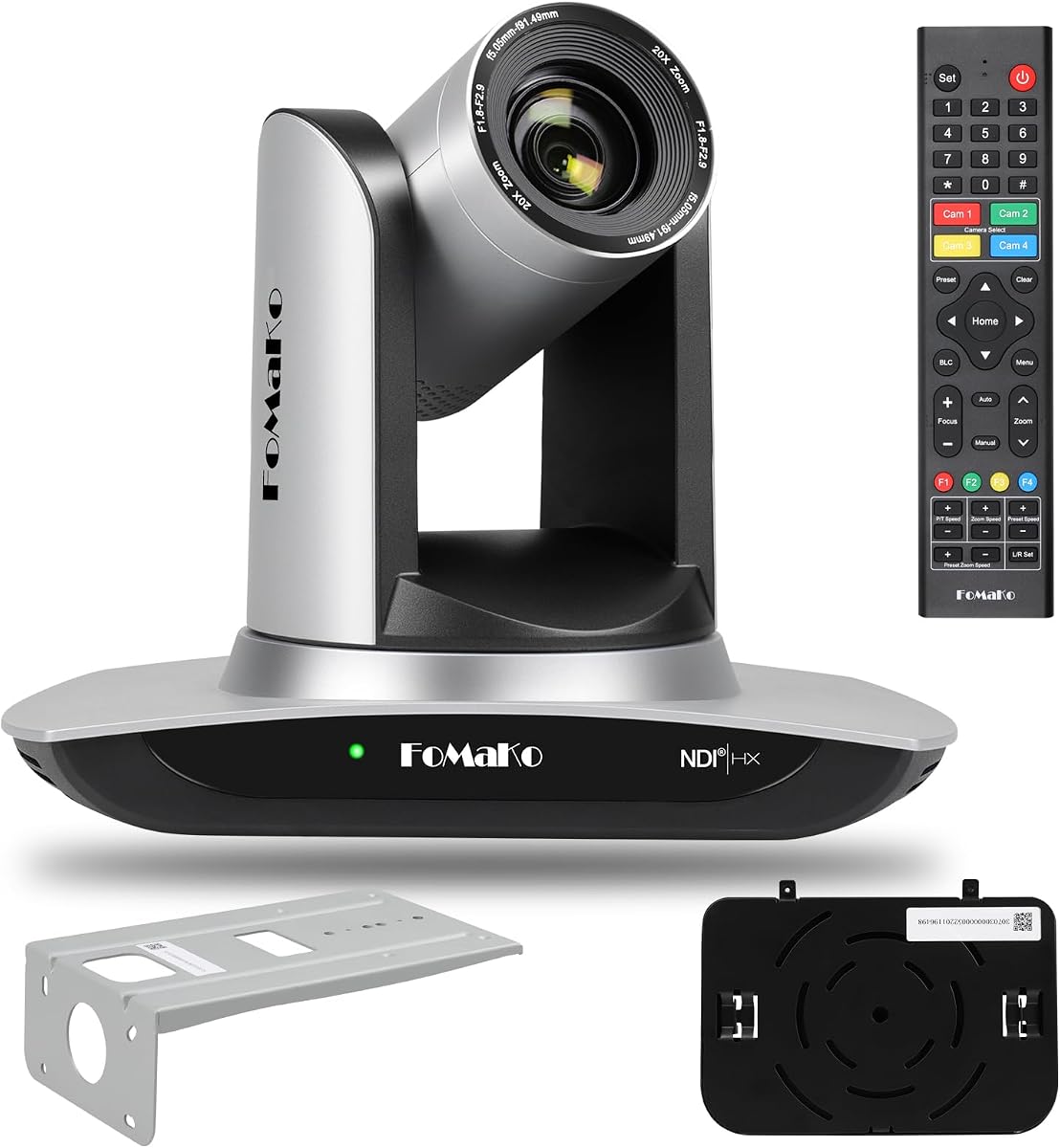
The FoMaKo 4K HDMI PTZ camera brings professional broadcast capabilities to sports recording. It features Gen 3 AI tracking with customizable modes and settings. The NDI HX3 certification ensures stable video quality even on lower bandwidth networks.
We may earn a commission when you buy through this link, at no additional cost to you.
Its 20x optical zoom allows you to capture close-up shots of players or the ball without losing clarity. The camera supports multiple outputs including HDMI LAN and USB making it compatible with various streaming software like vMix and OBS. Lifetime technical support adds value to the purchase.
Setup may be more involved than consumer models especially if you need to configure network protocols like NDI. A PoE switch is required for some installations which adds to the initial cost. These complexities are offset by its robust performance.
For users seeking broadcast-quality video and reliable tracking this camera is a strong contender. It delivers high-definition results and flexible connectivity for advanced setups.
NDI HX3 support ensures low latency and stable video streaming suitable for professional production environments.
Gen 3 AI allows adjustments to tracking modes sensitivity and target size for precise control.
We may earn a commission when you buy through this link, at no additional cost to you.
This bundle combines the XbotGo Falcon AI sports camera with the NT4 steel tripod for a ready-to-use solution. The tripod provides dependable support ensuring consistent recording on the sidelines. It simplifies the setup process for teams needing reliable coverage.
We may earn a commission when you buy through this link, at no additional cost to you.
The steel construction of the NT4 tripod ensures stability during matches even in windy conditions. The lightweight design makes it easy to move between fields and courts quickly. This package is tailored for soccer basketball football and volleyball among other sports.
While the bundle offers convenience it comes at a higher price than the camera alone. The tripod may also be heavier than lightweight alternatives. These trade-offs are acceptable for those prioritizing stability and ease of use.
For coaches and teams wanting a complete setup without assembling parts separately this bundle is highly recommended. It ensures consistent video quality and reliable performance throughout the season.
This bundle saves time by providing all necessary components in one purchase for immediate use.
The steel tripod construction ensures the camera stays steady during active matches and events.
We may earn a commission when you buy through this link, at no additional cost to you.
This bundle delivers 4K video at 60FPS which is ideal for capturing fast tennis movements smoothly. It supports NDI HX3 for stable streaming and includes multiple output options. The system is built for professional environments like studios and live events.
We may earn a commission when you buy through this link, at no additional cost to you.
With 3-channel 4K 60FPS video output you can switch between angles or send feeds to different platforms. The 20x optical zoom and Gen 3 AI tracking ensure precise focus on players. Lifetime technical support and free setup guidance add significant value.
The higher price and complexity might be challenging for casual users but professionals will appreciate the capabilities. Network requirements and cable management need attention. These aspects are manageable with proper planning.
For broadcast-quality production and live streaming this bundle is a top choice. It offers high frame rates and robust connectivity for demanding applications.
60FPS output ensures smooth playback of fast action without motion blur which is critical for sports analysis.
Simultaneous outputs allow flexible routing for live production workflows and streaming.
We may earn a commission when you buy through this link, at no additional cost to you.
The Tenveo 4K NDI PTZ camera features advanced AI tracking for humanoid and face detection. This makes it suitable for following players on a court accurately. It supports NDI for low-latency workflows and multiple output channels for versatile use.
We may earn a commission when you buy through this link, at no additional cost to you.
Its 20x optical zoom captures details clearly while the 4K 30fps video ensures high resolution. The IP search tool simplifies network setup allowing quick access to the camera interface. Comprehensive support and warranty terms offer peace of mind.
An external microphone is required for audio which adds to setup costs. Power over Ethernet needs a compatible switch which may not be available everywhere. These requirements are standard for professional gear.
For users needing precise subject tracking and flexible connectivity this camera is a strong option. It delivers professional results for sports and live events alike.
Dual body and face tracking ensures subjects remain centered even when blocked or moving quickly.
IP search tool and NDI support streamline deployment for modern production networks.
We may earn a commission when you buy through this link, at no additional cost to you.
The PTZOptics Move SE 30x is a premium PTZ camera with a powerful 30x optical zoom lens. It captures 1080p video at 60FPS for smooth motion tracking. This camera is built for professionals who need reliable and precise coverage.
We may earn a commission when you buy through this link, at no additional cost to you.
Its auto-tracking feature keeps the action centered without manual input. Multiple control options including web UI and remote apps offer flexibility. Simultaneous outputs via HDMI SDI NDI and USB make it versatile for live production.
While it offers Full HD instead of 4K the image quality remains high for most applications. The price is higher than consumer models but the build quality and features justify it. Setup is straightforward with simple network discovery.
For high-end sports recording and production this camera is an excellent choice. It delivers consistent performance and reliable zoom capabilities.
30x optical zoom allows you to capture distant action with clarity without losing image quality.
Multiple control methods ensure you can operate the camera via app remote or web interface easily.
We may earn a commission when you buy through this link, at no additional cost to you.
This budget-friendly NDI camera offers solid performance with HX3 support and 20x optical zoom. It provides multiple output options including HDMI SDI and USB for flexible integration. The included tally light aids in production workflows.
We may earn a commission when you buy through this link, at no additional cost to you.
Its AI tracking is designed for one person which may limit use for team sports like tennis. However it works well for presentations and focused events. Free CMS software and remote training make setup easier.
The limitation to single subject tracking means it may not suit fast-paced multi-player games. Still the price and features offer good value for specific needs. The SDI option allows long cable runs without signal loss.
For users needing NDI integration on a budget this camera is a practical choice. It delivers reliable output and helpful support features.
NDI HX3 certification ensures low latency streaming compatible with major production software.
Free training and remote assistance help users get started quickly without technical barriers.
We may earn a commission when you buy through this link, at no additional cost to you.
The FoMaKo NDI PTZ camera offers Gen 3 AI tracking with customizable modes for precision. It supports NDI 6 and HX3 for stable video flow. The 20x optical zoom and multiple mounting options add versatility for various setups.
We may earn a commission when you buy through this link, at no additional cost to you.
Its output interfaces include HDMI LAN and USB making it compatible with common streaming tools. H.265 encoding ensures clear motion video even under low bandwidth. Lifetime technical support and free setup guidance are valuable additions.
External audio capture is needed which may add to the total setup cost. Network configuration is required for NDI features but guides are available. These are standard for professional systems.
For reliable tracking and professional streaming capabilities this camera is a solid option. It delivers consistent performance and flexible connectivity for production.
Advanced AI features allow precise tracking adjustments for different environments and needs.
H.265 encoding ensures high-quality video streaming even with limited network bandwidth.
We may earn a commission when you buy through this link, at no additional cost to you.
Selecting the right camera involves understanding key factors like tracking technology video quality and setup requirements. This guide explains the main features to consider.
Auto tracking uses AI algorithms to follow action without manual input. Look for systems that support multiple subjects or players for tennis which often involves two players moving across the court. Advanced models offer face or humanoid tracking while others follow the ball. Check if the system can switch targets or lock on a specific player for detailed analysis.
Choose a system with robust tracking algorithms tested for sports to ensure the camera stays focused on the play.
Higher resolution like 4K provides clearer details for reviewing techniques and errors. A frame rate of 60FPS ensures smooth playback of fast movements like serves and volleys. For tennis where ball speed is high both factors matter for accurate analysis.
Opt for 4K with 60FPS if budget allows to capture every motion clearly and reduce motion blur.
Zoom allows you to capture close-ups without moving the camera physically. Optical zoom maintains quality while digital zoom may reduce clarity. A wide-angle lens is useful for capturing the full court view. For tennis a mix of wide and zoom capabilities helps show overall play and details.
Look for cameras with at least 20x optical zoom to balance wide coverage and detailed shots.
Multiple outputs like HDMI USB and NDI provide flexibility for streaming and recording. NDI support enables low latency streaming over networks which is great for live events. Check if the camera supports PoE for easier cabling in outdoor setups. Compatibility with your existing software is essential.
Ensure the camera offers the right interfaces for your streaming platform and network setup.
Simple setup saves time and reduces frustration during matches. Look for cameras with web interfaces mobile apps and remote controls. Features like presets allow quick switching between views. Consider if the system works with standard tripods for flexible mounting.
Choose a system with intuitive controls and clear instructions for quick deployment.
Power sources matter for outdoor play. Cameras with PoE or long battery life ensure uninterrupted recording. Check if the device supports external power options. For tennis matches lasting hours reliable power is crucial to avoid missing key moments.
Prioritize cameras with solid battery performance or easy external power connections.
Software tools for editing and sharing highlights add value. Some systems include cloud storage for easy access. Features like auto-editing save time on post-production. Check if there are subscription fees or if features are included upfront.
Select a system with useful software tools and reasonable storage options.
Prices vary based on features and brand. Higher-end models offer more customization and better performance. Consider your needs and how often you record to balance cost and value. Bundles with tripods may offer savings compared to buying separately.
Weigh the features against your specific use to find the best value option.
Place the camera on a stable tripod at the baseline or center court for optimal coverage. Ensure it is secure to prevent movement during play. Adjust the angle to capture the entire court including the net and sidelines.
Use the app or remote to start tracking before the match begins. Test the tracking by moving across the court to confirm it follows smoothly. Adjust sensitivity settings if the camera moves too quickly or slowly.
After use wipe the lens with a soft cloth to remove dust or moisture. Store the camera and accessories in a dry place. Regularly update firmware for improved performance and new features.
Yes many models feature AI tracking designed for sports that can follow players across the court. Look for systems that support multi-person tracking to capture both players during doubles.
No the main benefit of these cameras is hands-free operation. They use AI to track action automatically so you can focus on coaching or playing without managing the camera.
HDMI sends video directly to monitors while NDI streams video over a network allowing flexible routing. NDI is useful for live streaming setups requiring low latency and network integration.
Most cameras support live streaming built Wi-Fi or network connections. Check compatibility with platforms like YouTube or Facebook and ensure your internet speed is sufficient for the desired resolution.
Some models include cloud storage or software features with no subscription. Others may offer optional upgrades. Verify the included features before purchasing to avoid unexpected costs.
Storage needs depend on resolution and recording time. 4K video requires more space so consider models with large memory card slots or cloud options. Review estimated file sizes before choosing storage.
Many are designed for indoor or covered outdoor use. If planning to use in rain or extreme heat check for weather resistance ratings or use protective enclosures to ensure durability.
Some systems allow you to use an iPhone or Android phone as the camera. This can reduce cost but quality depends on the phone. Verify if your device is supported by the app.
Choosing the right court camera with auto tracking for tennis can elevate how you record and review matches. The XbotGo Falcon offers an all-in-one solution while the AI Auto-Tracking system provides great value for iPhone users. For premium quality the PTZOptics Move SE stands out with excellent zoom.
Consider your specific needs such as video quality ease of setup and budget when making your choice. Features like NDI support and live streaming add flexibility for coaches and players. Investing in a reliable system ensures you capture every serve and volley effectively.
Prices and availability may vary so check the latest details before purchasing. With the right camera you can turn every practice or match into a valuable recording for growth and enjoyment.