This guide compares the best coax to Ethernet adapter kits for home networking, evaluating speed, compatibility, and ease of setup for wired internet solutions.
As an Amazon Associate we earn from qualifying purchases. We may earn a commission when you buy through links on this page, at no additional cost to you. Read our affiliate disclosure.As an Amazon Associate we earn from qualifying purchases.Purchases through our links may earn us a commission, at no extra cost to you. Read our affiliate disclosure.
Finding the right coax to Ethernet adapter can transform your home network by leveraging existing wiring for faster speeds. These devices bridge the gap between coaxial cable infrastructure and modern ethernet-enabled gadgets without requiring new cabling.
We evaluated ten top-rated adapter kits based on throughput performance, ease of installation, and compatibility with major internet service providers. Our analysis focuses on real-world reliability for gaming, streaming, and remote work scenarios across different home layouts.
Each selection highlights unique strengths like dual port options, power over ethernet support, or budget-friendly pricing. Remember that prices fluctuate frequently, so verify current deals before purchasing to ensure you get the best value for your specific networking needs.
Top 3 Picks for Best Coax to Ethernet Adapter
Best Budget
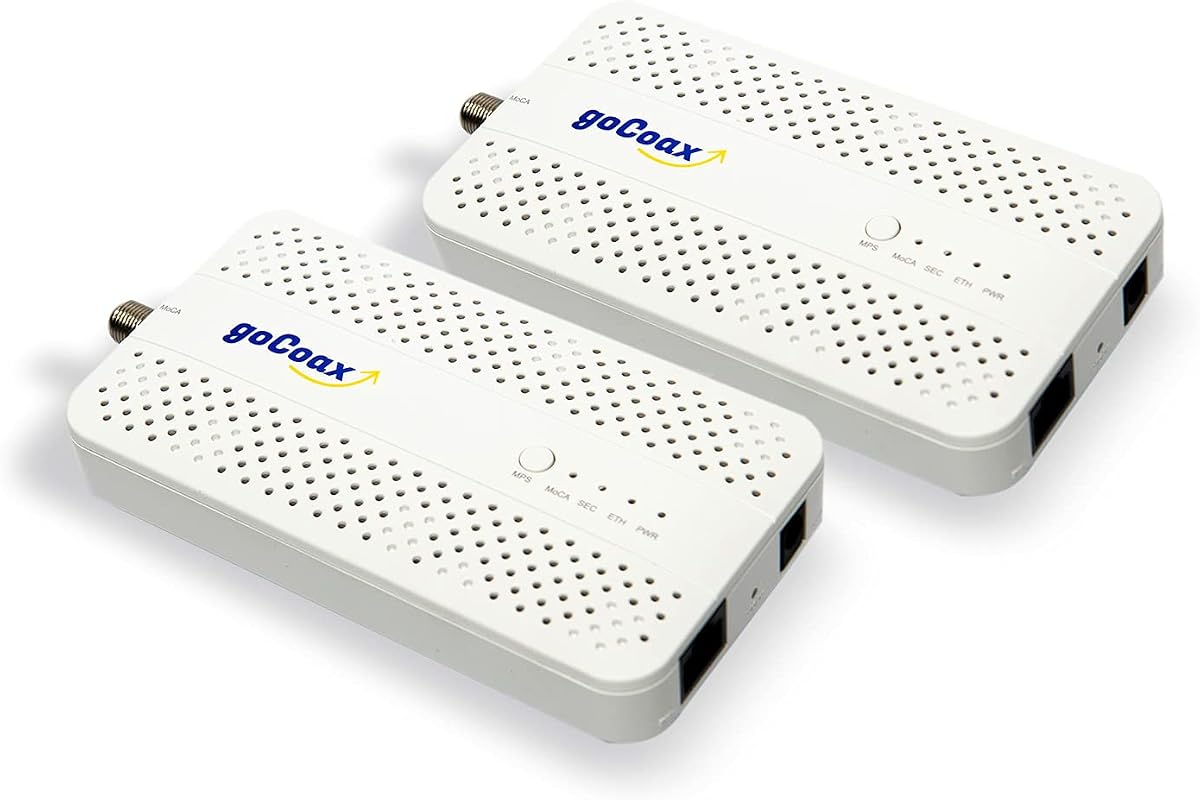
goCoax MoCA 2.5 Adapter (2-Pack) with 2.5GbE Ethernet Port | MA2500D Ethernet Over Coax for Gaming & 4K Streaming | 2.5Gbps, Plug and Play | for Cable Internet Homes – Not for Satellite TV (White)
Top 10 Best Coax to Ethernet Adapter in 2026 Compared
This side-by-side comparison highlights the key specifications and performance capabilities of each adapter kit to help you choose the most suitable option for your home network infrastructure and internet service requirements.
goCoax MoCA 2.5 Adapter (2-Pack) with 2.5GbE Ethernet Port | MA2500D Ethernet Over Coax for Gaming & 4K Streaming | 2.5Gbps, Plug and Play | for Cable Internet Homes – Not for Satellite TV (White)
Hitron HTEM5 MoCA 2.5 Network Adapter (2-Pack) – Extends Network via Coax | NOT a Modem/Router/WiFi | Requires Cable TV Wiring (NOT Satellite) | Works with Cable & Most Fiber (NOT AT&T) | 2.5 Gbps
MoCA 2.5 Adapter Kit with 2.5G Ethernet Port and PoE+ 30W for Ethernet Over Coax – Ideal for Wi-Fi 6E/7 Access Points, IP Cameras, and More – Model KB-M3-03
This TRENDnet adapter stands out as the top choice for users seeking reliable multi-gigabit speeds over existing coax wiring. With a rating of 4.8 stars it delivers consistent performance for demanding applications like 4K streaming and online gaming.
Pros
Excellent 2.5Gbps throughput
Simple plug and play setup
High reliability for streaming
Government compliant standards
Works with most routers
Cons
Not for satellite TV
Requires coax wiring
We may earn a commission when you buy through this link, at no additional cost to you.
The standout feature is its 2.5Gbps port which provides enough bandwidth for modern high speed internet plans. Its compact design fits easily in entertainment centers while supporting up to 16 nodes on one network for whole home coverage.
While it requires existing coax wiring and does not work with satellite TV the setup is straightforward. Backwards compatibility ensures it integrates smoothly with older MoCA systems without needing a full network replacement.
Ideal for homeowners with cable internet who need a stable wired connection without drilling walls. This kit offers the best balance of speed compatibility and ease of use for most standard home networks.
Multi Gigabit Performance
The 2.5Gbps port supports faster internet plans than standard gigabit adapters ensuring your network keeps up with high speed providers.
Simple Network Expansion
With plug and play functionality you can extend your network to any room with a coax outlet in minutes without complex configuration.
The goCoax MoCA 2.5 Adapter offers exceptional value for budget conscious users who do not want to sacrifice speed or reliability. Its 4.6 rating reflects solid performance for everyday home networking needs.
Pros
Affordable price for 2.5Gbps
Low latency for gaming
Works with major ISPs
Complete installation kit
Zero configuration needed
Cons
Not for satellite systems
Requires coax splitter
We may earn a commission when you buy through this link, at no additional cost to you.
Featuring under 3ms latency it is an excellent choice for competitive gaming and real time video conferencing. The dedicated 2.5GbE port ensures that your devices receive maximum bandwidth without wireless interference.
Users should note that this kit requires existing coax wiring and is not compatible with satellite TV systems. However for most cable and fiber users it provides a seamless upgrade path from Wi-Fi.
This adapter is perfect for those seeking a cost effective wired solution that works with major providers like Comcast and Spectrum. The included cables make installation immediate and hassle free for any user.
Gaming and Streaming
With minimal latency this adapter handles high bandwidth activities like 4K streaming and gaming without buffering or lag spikes.
Easy Setup
Plug and play design means you can connect the adapters and start enjoying high speeds within minutes of unboxing.
Kiwee adapter distinguishes itself with dual 2.5GbE ports on each unit allowing multiple devices to connect at full speed simultaneously. This makes it ideal for households with numerous high bandwidth devices.
Pros
Two 2.5GbE ports per adapter
High speed reliable connection
Future proof for upgrades
Universal device compatibility
Complete installation kit
Cons
Higher price point
Not for satellite TV
We may earn a commission when you buy through this link, at no additional cost to you.
The MoCA 2.5 technology ensures ultra fast interference free networking over coaxial cables. Users can achieve up to 2.5 Gbps speeds which is significantly faster than older standards and supports 4K streaming effortlessly.
While the price is higher than basic models the dual port feature justifies the investment for power users. It is built with premium components to ensure years of reliable high speed networking without degradation.
This adapter is best suited for tech enthusiasts or large families who need to connect multiple devices without running new ethernet cables. Its universal compatibility ensures it works with any router or ISP setup.
Dual Port Advantage
Connecting two devices at once at full speed eliminates the need for extra switches and keeps your network organized and efficient.
Future Proofing
Built with high-grade components this adapter supports next-gen networks ensuring your investment lasts as internet speeds increase.
The ScreenBeam ECB7250K02 kit provides an excellent way to replace slow Wi-Fi with wired speeds using your home coax cables. It delivers up to 2.5 Gbps ensuring your devices get reliable connections.
Pros
Faster than Wi-Fi speeds
Great for remote work
Includes coax splitters
Backwards compatible
High bandwidth performance
Cons
May conflict with DOCSIS 3.1
Not for satellite TV
We may earn a commission when you buy through this link, at no additional cost to you.
Ideal for 4K streaming and remote work it bypasses wireless congestion entirely. The kit includes everything needed including splitters to connect multiple rooms easily without additional purchases.
However some users with DOCSIS 3.1 modems might experience frequency overlap issues. It is recommended to check compatibility with your ISP before installation to avoid random disconnects.
This adapter is best for households looking to eliminate Wi-Fi dead zones with minimal effort. Its compatibility with most routers makes it a versatile choice for many home internet setups.
Complete Kit
Includes splitters and cables to ensure you can set up connections immediately without buying extra components.
Remote Work Ready
With high bandwidth this adapter supports video conferencing and large file transfers without lag or interruption.
The Hitron HTEM5 is a straightforward adapter designed to extend your network using existing coax wiring without replacing your modem or router. It achieves up to 2.5 Gbps speeds perfect for streaming and gaming.
Pros
High speed Ethernet extension
Great for cable internet
Free technical support
Plug and play setup
Includes all necessary items
Cons
Not for AT&T Fiber
Requires interconnected coax
We may earn a commission when you buy through this link, at no additional cost to you.
One of its key strengths is the free technical support which helps verify your home wiring compatibility. This is crucial since satellite systems often have disconnected coax lines that will not work.
While it does not support AT&T Fiber it works with most other major ISPs. The kit includes everything you need to get started including cables and a quick start guide for easy installation.
This adapter is perfect for users who want a reliable connection in rooms far from the router. Its compatibility with cable internet makes it a safe choice for most residential connections.
Support Included
Free technical support helps verify compatibility and resolve connectivity issues without extra costs.
Complete Kit
Includes adapters and cables so you can set up your network right out of the box.
This converter is designed specifically for upgrading analog surveillance systems to IP based ones using existing coaxial wiring. It supports POE standards to power cameras without extra electrical outlets.
Pros
Supports POE standards
Works with coaxial cables
Industrial heat sink
Easy plug and play
Great for CCTV
Cons
Point to point only
Indoor use only
We may earn a commission when you buy through this link, at no additional cost to you.
Its industrial design includes a built-in heat sink for reliable transmission. It works with various cable types like RG59 and RG6 making it flexible for different CCTV installations.
Note that it is a point to point connection only meaning it does not support multiple nodes on one network like standard adapters. This limits use to dedicated camera or single device setups.
Best suited for security systems where wiring is already in place this tool avoids the cost of new ethernet cables. It simplifies installation significantly for surveillance upgrades.
Surveillance Upgrade
Enables transition from analog to IP cameras without replacing existing coaxial cabling.
Power Over Ethernet
Supports POE standards to power devices through the same cable carrying data.
This kit transforms unused dark coax wiring into a powerful ethernet connection ideal for buildings with fiber or satellite internet that do not utilize existing cable TV lines. It delivers speeds up to 1.2Gbps.
Pros
Works with dark coax
Gigabit network speeds
Secure wired connection
Up to 800 meters
Easy installation
Cons
Not for shared cable TV
Limited ISP support
We may earn a commission when you buy through this link, at no additional cost to you.
The technology used is G.hn which is optimized for unused wiring rather than active cable TV signals. This ensures faster speeds and lower latency for streaming without interference from TV channels.
It is critical to note this will not work with active cable TV or internet lines. It is strictly for dark coax runs so verifying your wiring type is essential before purchasing.
Best for office or apartment buildings with abandoned wiring this adapter provides a clean network solution without new construction. It turns wasted infrastructure into a useful gaming or streaming network.
Dark Coax Focus
Optimized for unused wiring allowing you to leverage existing infrastructure without interfering with active TV signals.
Gigabit Speeds
Delivers up to 1.2Gbps speeds ensuring enough bandwidth for high definition streaming and gaming.
This adapter kit offers a unique advantage by supporting PoE+ up to 30W allowing you to power devices like access points and cameras over the same ethernet cable. It delivers true multi-gigabit speeds.
Pros
Supports PoE+ devices
High speed data transfer
Great for access points
Low latency performance
Multiple device support
Cons
Higher cost than basic
Not for satellite
We may earn a commission when you buy through this link, at no additional cost to you.
The integration of PoE+ simplifies installation for wireless access points or IP cameras in hard to reach places. You can power these devices without needing separate electrical outlets near the coax outlet.
It supports 2.5Gbps speeds ensuring that power hungry devices get stable connections. The kit includes two adapters making it ready for immediate use in home or office setups.
Ideal for users expanding their Wi-Fi coverage or setting up cameras this adapter combines speed and power efficiently. It is a strong choice for modern smart home or office network needs.
Power Over Ethernet
Supports up to 30W to power devices like access points or cameras without extra electrical wiring.
High Speed Network
Supports 2.5Gbps speeds ensuring your network remains fast even with power hungry devices.
The TRENDnet TMO-312C is a reliable single unit adapter for extending your network to another room without extra cost. It offers solid 1Gbps speeds which are sufficient for most standard internet plans.
Pros
Affordable single unit
Solid 1Gbps speeds
Manufacturer protection
Compact design
Works with major ISPs
Cons
Not as fast as 2.5Gbps
Not for satellite
We may earn a commission when you buy through this link, at no additional cost to you.
It supports up to 16 nodes on one network allowing you to connect multiple devices if needed. Its compact design ensures it blends into home entertainment centers without taking up much space.
Users benefit from a three year manufacturer protection plan and responsive technical support. This provides peace of mind for those looking for a straightforward and supported networking solution.
Best for single room upgrades this adapter is a cost effective way to get wired speeds without new cabling. Its compatibility with major ISPs makes it a safe choice for most homes.
Warranty Protection
Backed by a three year manufacturer protection plan for reliable customer service and quality assurance.
Network Support
Supports up to 16 nodes on one network to allow easy expansion across multiple devices.
This adapter is designed as an add-on to expand an existing MoCA 2.0 network to another room without buying a full new kit. It provides 1Gbps speeds surpassing traditional Wi-Fi performance.
Pros
Great add-on option
Cost effective expansion
Includes coax and ethernet
High performance
Easy setup
Cons
Requires starter kit
Not for satellite
We may earn a commission when you buy through this link, at no additional cost to you.
It is ideal for users who already have a MoCA starter kit and need one more connection point. The package includes all necessary items to connect a single device via coax to ethernet.
Keep in mind it is an add-on only so it requires at least one existing MoCA router or adapter. Ensure compatibility with your current setup before purchasing to avoid connectivity issues.
Best for extending coverage affordably this adapter offers high performance without the cost of a new starter kit. It is a simple solution for adding another wired connection point to your home.
Network Expansion
Adds more connection points to your existing MoCA network easily without replacing your current hardware.
Performance
Offers up to 1Gbps speeds ensuring reliable fast connections for gaming and streaming.
We may earn a commission when you buy through this link, at no additional cost to you.
Buying Guide – How to Choose the Best Coax to Ethernet Adapter
Selecting the right adapter depends on your internet provider wiring and performance needs. Here are the key factors to consider.
MoCA Version Compatibility
Ensure the adapter supports MoCA 2.5 for fastest speeds. Older 2.0 versions are slower but may work with existing setups.
Choose adapters that match your router capabilities to avoid bottlenecks.
Wiring Type
Verify your home has coaxial wiring connected to a main splitter. Satellite systems often have disconnected lines.
Check outlets before buying to ensure they are interconnected and active.
Number of Ports
Some adapters offer dual ports to connect multiple devices without extra switches. Single port models are simpler but may limit options.
Consider your needs for multiple connections in one room.
Speed Requirements
For gigabit internet plans choose adapters with 2.5Gbps ports. Standard gigabit ports may not fully utilize high speed plans.
Faster ports ensure your network handles peak usage without drops.
Power over Ethernet
Some adapters include PoE+ support to power devices like cameras. This removes the need for extra outlets.
Check if this feature fits your specific device requirements.
Provider Restrictions
Confirm the adapter works with your ISP such as Comcast or Verizon. Some providers limit MoCA features.
Read warnings about satellite or AT&T Fiber incompatibility carefully.
Kit Contents
Look for kits that include coax and ethernet cables to save extra purchases. Some sell adapters only without cables.
Complete kits simplify installation and reduce total costs.
Warranty and Support
Check the manufacturer warranty and availability of technical support. Some brands offer multi-year protection.
Support can help resolve wiring or compatibility issues quickly.
How to Use and Care for Your Coax to Ethernet Adapter
Start by connecting one adapter to your router via an ethernet cable and the other to your device. Plug the coax cables into both adapters and then into the wall outlets.
Ensure the coax outlets are interconnected and not isolated. You may need to check your home wiring with a provider if unsure.
Keep adapters in a cool well ventilated area to prevent overheating. Avoid placing them near heat sources or direct sunlight to maintain performance.
Frequently Asked Questions
Will a coax to Ethernet adapter work with satellite TV?
No most coax adapters do not work with satellite TV because providers like DirecTV disconnect home wiring. These adapters require interconnected coax cables to function.
Do I need a new router for these adapters?
Not always. Most work with existing routers but some require MoCA compatibility. Check your current router specs before purchasing.
Are these adapters easy to install?
Yes most adapters are plug and play with no configuration needed. Simply connect cables and power adapters to start using them.
Can I use these adapters with fiber internet?
Yes they work with most fiber providers like Verizon Fios. However AT&T Fiber may cause signal interference and not be compatible.
How do I know if my coax wiring is interconnected?
Contact your internet provider to check. If you had satellite service your wiring may be isolated and won't work with adapters.
What speed can I expect from these adapters?
MoCA 2.5 adapters can reach up to 2.5 Gbps. Actual speeds depend on your internet plan and wiring quality.
Can I connect multiple devices to one adapter?
Some adapters have dual ports for multiple devices. Others require a separate ethernet switch to connect more than one device.
Do I need a coax splitter?
Sometimes yes if your wiring has branches. Adapters often include splitters. Ensure your splitter is compatible with MoCA frequencies.
Final Thoughts on Choosing the Best Coax to Ethernet Adapter
The top picks in this guide offer reliable high speed connections for homes with coax wiring. Options like TRENDnet and goCoax provide excellent value for most users.
Prioritize adapters that match your internet speed and wiring type. Check provider compatibility to avoid issues after purchase.
Always review current prices and stock availability as deals change frequently. Verify your coax infrastructure before committing to ensure a smooth setup.
This guide compares the top aluminum foil tape options for HVAC sealing, insulation, and repairs, evaluating adhesion, thickness, and temperature resistance.