
CMTECK USB Computer Microphone G009
4.5Editor score
Noise cancelling chip
Mute button with LED
Adjustable gooseneck
Finding a reliable microphone for your desk does not have to break the bank. Whether you are streaming games, hosting meetings, or recording podcasts, clear audio is essential. We have gathered the best options that deliver professional sound without the premium price tag.
Our team analyzed ten highly rated models based on user feedback and technical specifications. We looked at build quality, connectivity options, and sound performance to ensure you get value for money. Each product was selected for its ability to perform well in common home office scenarios.
Every pick below highlights key features and potential drawbacks to help you decide. We focus on what matters most for budget buyers like ease of use and consistent performance. Please note that availability and pricing may change over time on retailer sites.
4.5Editor score

4.4Editor score

4.4Editor score
As an Amazon Associate we earn from qualifying purchases.
This side by side comparison highlights the core differences between our top ten picks. We evaluate each model on key specs like connectivity pickup pattern and unique features to help you choose quickly.
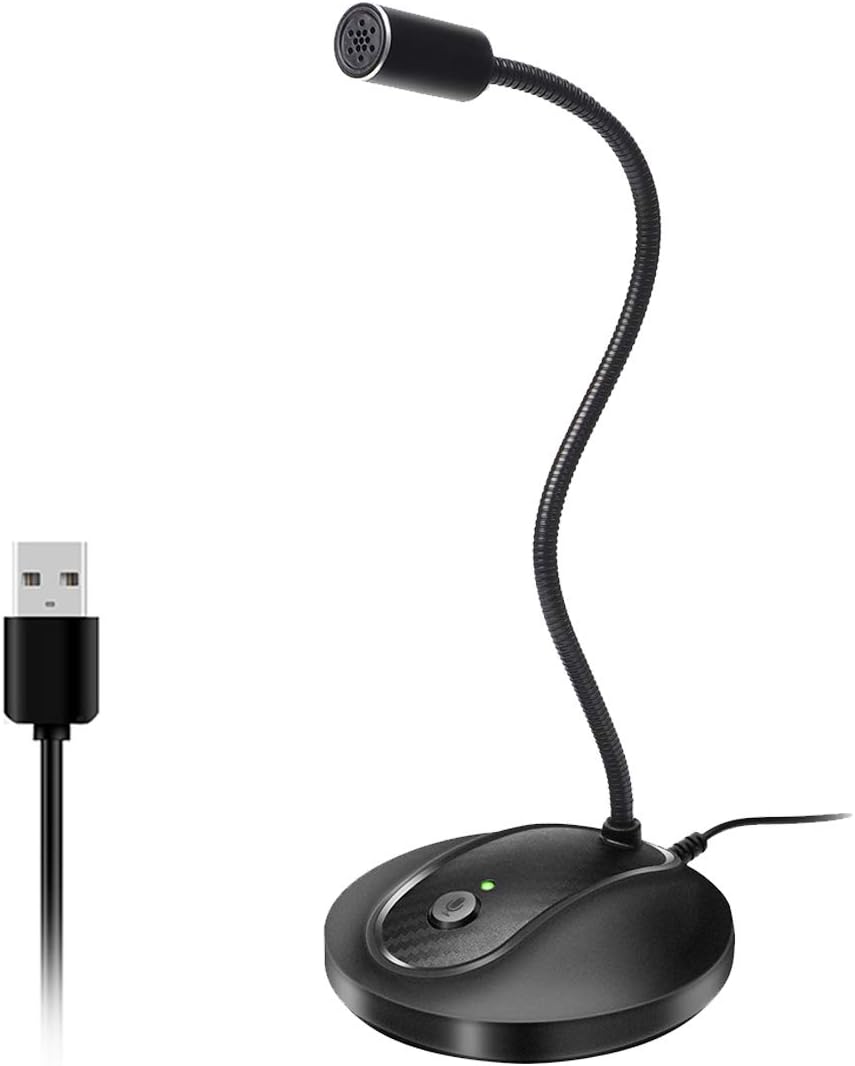



This CMTECK model stands out as the top pick for budget conscious buyers seeking a reliable desk microphone. It holds a strong rating from users who appreciate its straightforward design and clear audio output. The omnidirectional pattern ensures your voice is captured clearly from any angle during meetings or gaming.
We may earn a commission when you buy through this link, at no additional cost to you.
The active noise-cancelling chip helps reduce background sounds like fan noise or keyboard clicks effectively. This feature is crucial for home setups where isolation is hard to achieve. The mute button with its LED indicator provides visual feedback so you never accidentally broadcast silence.
While the plastic base is sturdy for its weight it does lack premium metal finishes found in higher end models. The gooseneck is flexible but can lose some tension over time with heavy adjustment. These trade-offs are acceptable given the low entry cost and performance delivered.
Anyone needing a quick plug-and-play mic for Zoom calls or casual streaming should consider this option. It works seamlessly with Windows and Mac without drivers making it ideal for non-technical users. We recommend it as the best value choice for essential desk recording needs.
The CCS2.0 smart chip filters out ambient noise to focus on your voice clearly. This ensures your listeners hear you without distractions from your environment.
The adjustable gooseneck allows you to position the mic exactly where you need it. This flexibility helps achieve optimal sound quality for different desk setups.
We may earn a commission when you buy through this link, at no additional cost to you.
This microphone offers a solid build quality that feels durable despite its affordable price. Users report high satisfaction with its ability to pick up speech clearly in various environments. The 360-degree gooseneck design allows for flexible positioning to suit your specific desk layout.
We may earn a commission when you buy through this link, at no additional cost to you.
The intelligent noise-canceling technology works well to minimize echo and background chatter during calls. It is particularly useful for shared spaces where silence is difficult to maintain. The mute button ensures quick access to privacy controls during important conversations or streams.
Some users note that the base is heavier than expected which might limit portability slightly. The mute button can feel a bit stiff at first requiring a firm press. These minor issues do not detract significantly from the overall performance and value provided.
We suggest this model for those who need a sturdy mic for daily use without spending much. It is compatible with a wide range of operating systems making it versatile for any workstation. It is a safe choice for reliable audio performance in home offices.
This mic works well with Windows and macOS systems without requiring driver installations. This plug and play convenience saves time for users who need quick setup.
The noise-canceling technology focuses on your voice while reducing unwanted ambient sounds. This helps maintain professional audio quality even in noisy environments.
We may earn a commission when you buy through this link, at no additional cost to you.
This option delivers excellent sound quality for the price making it a favorite for streamers and podcasters. The windproof caps help reduce plosive sounds like pops and breath noise effectively. Its 360-degree pickup pattern ensures no matter where you sit the mic captures your voice well.
We may earn a commission when you buy through this link, at no additional cost to you.
The touch-sensitive mute button provides a modern feel and instant control over your audio status. The LED indicator clearly shows when you are muted so you avoid awkward moments. The shockproof base with silicone pads keeps the mic stable even on active gaming sessions.
However the base is quite lightweight so it may slide if bumped on smooth surfaces. There is also no dedicated volume knob on the device itself requiring software adjustments. These are minor compromises for a device that performs so well in critical areas.
It is an ideal choice for content creators on a tight budget who need reliable audio. The included accessories and ease of use make it ready to work right out of the box. We recommend it for anyone starting their streaming journey today.
The included fluffy caps reduce wind noise and plosives for cleaner voice recording. This ensures your speech sounds natural without harsh popping sounds.
Silicone non-slip pads on the base prevent the mic from shifting during use. This stability is key for consistent audio levels during long sessions.
We may earn a commission when you buy through this link, at no additional cost to you.
This Amazon Basics microphone brings professional features to a budget-friendly price point for home users. The large 14mm diaphragm captures rich detail and nuanced tones in your voice. Users love the cardioid pickup pattern which isolates your voice from surrounding room noise effectively.
We may earn a commission when you buy through this link, at no additional cost to you.
The built-in shock absorber reduces vibrations from desk bumps ensuring stable recordings. The mute button is conveniently placed for one-tap control during live interactions. The stand allows 360-degree rotation which helps you find the perfect angle for speaking.
Some users find the base is fixed which limits using it with external boom arms. While you can mount it on a tripod the stand itself is not removable easily. These design choices prioritize stability over modularity but still offer great versatility.
We recommend this model for podcasters and streamers who need better sound isolation. The audio quality rivals more expensive options making it a smart investment for serious creators. It delivers clear and warm sound that enhances any home studio setup.
The cardioid pattern focuses on sound from the front while rejecting noise from sides. This ensures your voice is captured clearly without background distractions.
The standard thread allows connection to tripods or stands if needed later. This future-proofing lets you upgrade your setup without replacing the mic.
We may earn a commission when you buy through this link, at no additional cost to you.
This ZealSound mic offers a feature set that rivals mid-range products in the market. Its zero-latency monitoring feature allows you to hear your voice in real time through headphones. The dedicated knobs for volume and echo give you precise control over your audio output.
We may earn a commission when you buy through this link, at no additional cost to you.
The intelligent noise reduction mode filters out keyboard clicks and fan hum effectively. Users appreciate the included adapters for iPhone and iPad making it versatile for mobile recording. The cardioid pickup pattern ensures high-quality vocals suitable for podcasts and streaming.
The unit takes up more desk space than simpler gooseneck models. It is also slightly more complex to set up for first-time users compared to basic mics. These factors are acceptable trade-offs for the level of control and quality provided.
We highly recommend this for serious content creators who need advanced controls. The ability to adjust echo and gain without software makes it a powerful tool. It is a top choice for those who want studio quality on a budget.
Dedicated knobs for gain volume and echo allow precise audio tuning. This lets you tailor the sound to your specific voice and environment.
Included USB-C and Lightning adapters work with modern phones and tablets. This flexibility ensures you can record high-quality audio anywhere.
We may earn a commission when you buy through this link, at no additional cost to you.
This TONOR microphone is designed specifically for conference calls and group meetings. Its 11.5-foot pickup radius ensures everyone in the room is heard clearly. Users report that it captures subtle sounds well making it effective for remote collaboration.
We may earn a commission when you buy through this link, at no additional cost to you.
The shielded cable helps eliminate signal interference for a stable connection. The blue indicator light gives a quick visual check of the mic status. It is compatible with most common conferencing apps like Zoom and Teams without extra setup.
It is not ideal for solo recordings as the omnidirectional pattern picks up too much room noise. The lack of active noise filtering means background chatter is captured along with voices. This limits its use for podcasting or streaming where isolation is needed.
We suggest this model for small office meetings where multiple people speak. It simplifies setup for shared spaces and ensures everyone contributes to the conversation. It is a practical solution for professional virtual meetings.
The wide omnidirectional range captures voices from all directions evenly. This ensures no one is left out during group video calls.
The shielded cable reduces noise and signal interference for stable audio. This ensures clear communication even in electrically noisy environments.
We may earn a commission when you buy through this link, at no additional cost to you.
This model stands out with its ambient lighting feature that adds a sleek look to desks. The intelligent noise reduction filters out fan noise and keyboard clicks effectively. Users enjoy the sturdy metal gooseneck which holds position well during use.
We may earn a commission when you buy through this link, at no additional cost to you.
The lightweight design makes it easy to move around or pack for travel. It connects instantly to any PC or Mac making it ready for immediate streaming or gaming. The one-tap mute button provides quick control during busy sessions.
Some users find the breathing lights can be distracting in dark rooms or on camera. The base is also quite small and may slide on smooth surfaces if nudged. These aesthetic choices are personal but do not impact the core audio quality.
We recommend this for gamers who value visual flair alongside good sound. The combination of performance and style makes it a standout in its price range. It is an excellent choice for home entertainment setups.
Breathing lights add a modern touch to your gaming or work setup. You can turn them on or off based on your preference.
The lightweight build allows for easy transport between different rooms. This convenience makes it ideal for flexible workspace arrangements.
We may earn a commission when you buy through this link, at no additional cost to you.
This microphone offers a unique volume control knob directly on the base for quick adjustment. The CCS3.0 smart chip helps reduce background noise automatically for clearer recordings. Users find it easy to use right out of the box without software installations.
We may earn a commission when you buy through this link, at no additional cost to you.
The flexible 360-degree stand allows you to position the mic exactly where needed. It is compatible with Windows and macOS systems ensuring broad utility for users. The omnidirectional pattern captures sound well from any angle in the room.
The base is quite small which might reduce stability if you bump it accidentally. The materials feel mostly plastic rather than metal which affects the premium feel. These factors are minor compared to the functional benefits it offers.
We suggest this model for users who need physical volume control without software. It is a practical tool for meetings and streaming where quick adjustments are necessary. It delivers clear audio at a very competitive price point.
The built-in knob lets you adjust mic volume instantly without software. This adds convenience for dynamic recording sessions.
Rotating the stand allows you to find the best angle for voice pickup. This ensures optimal sound capture regardless of your desk setup.
We may earn a commission when you buy through this link, at no additional cost to you.
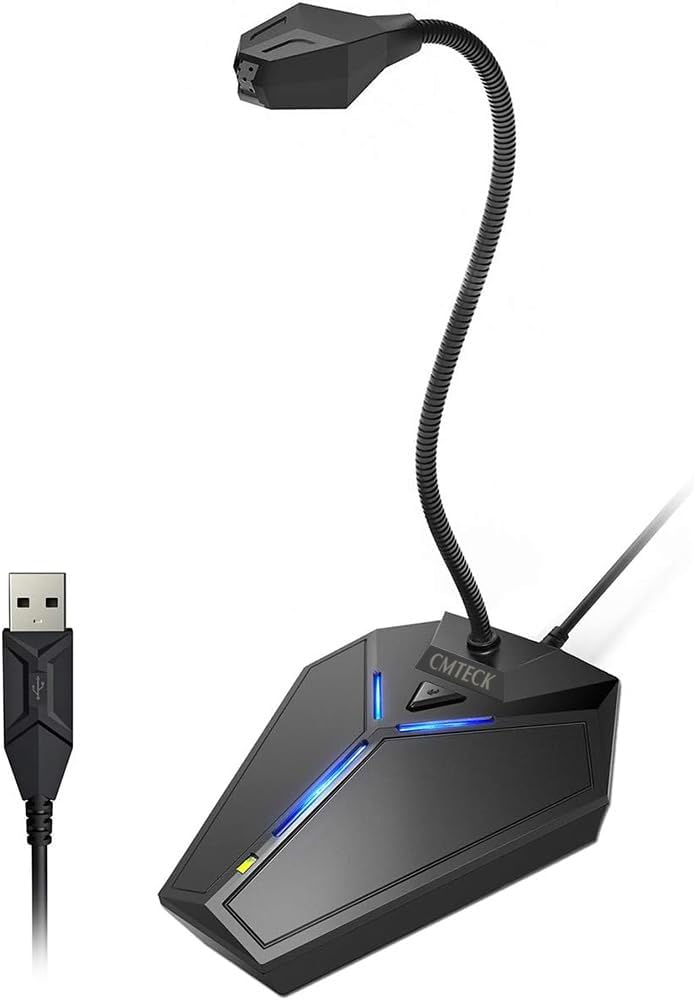
This CMTECK model is praised for its clear vocal capture and reliable performance. The smart chip effectively suppresses background noise to keep your voice front and center. Users like the adjustable gooseneck which allows you to aim the mic precisely.
We may earn a commission when you buy through this link, at no additional cost to you.
The unique blue LED light adds a nice visual touch to your workspace. The mute button provides clear status feedback so you know exactly when you are muted. The ABS base is shockproof and provides a stable platform on most desks.
The blue LED cannot be turned off which might be annoying in dark environments. Some users report that the gooseneck can be stiff to bend initially. These issues are minor but worth noting for specific use cases.
We recommend this for gamers and streamers who need a clear mic quickly. The sound quality is surprisingly good for the price making it a solid budget pick. It is a reliable tool for daily voice communication tasks.
The smart chip ensures your voice comes through crisp and clear during calls. This makes it ideal for professional meetings and streaming.
The LED indicators provide instant feedback on mute and connection status. This helps avoid accidental audio transmission during calls.
We may earn a commission when you buy through this link, at no additional cost to you.
This microphone offers a professional design with a long warranty backing. The patented audio filter helps focus on your voice for better clarity during calls. Users appreciate its lightweight yet stable construction which keeps it firmly on the desk.
We may earn a commission when you buy through this link, at no additional cost to you.
It is one of the few options that supports Linux systems without issues. The mute button is easy to reach for quick control during conversations. The aerodynamic design looks sleek and fits well on modern desks.
It lacks advanced noise filtering features found in other models on this list. The mute function is simple which means it does not offer extra controls like gain. These limitations make it better suited for basic communication tasks.
We suggest this for Linux users or those who need a simple reliable mic. The five-year warranty adds confidence to the purchase. It is a practical choice for straightforward desktop recording needs.
This mic works reliably with Linux in addition to Windows and macOS. This broad support makes it versatile for diverse tech environments.
The sturdy construction and long warranty ensure long-term reliability. This investment protects your purchase for years of regular use.
We may earn a commission when you buy through this link, at no additional cost to you.
Choosing the right budget microphone requires balancing several key factors. Here is what to look for to ensure you get the best quality for your money.
The pickup pattern determines how the microphone captures sound from your environment. Cardioid patterns focus on the front and are ideal for solo recording. Omnidirectional patterns capture sound from all directions which suits group meetings or conference calls.
For most home studio and streaming needs cardioid is the safer choice.
Active noise cancellation helps reduce background sounds like fans or keyboards. This is critical for clean audio in shared spaces where isolation is difficult. Look for mics with smart chips or built-in filters for better clarity.
Prioritize models with active noise reduction if you record in noisy rooms.
Most budget mics use USB for simple plug-and-play setup. Check if your device supports USB-C or if you need adapters for mobile recording. Ensure compatibility with your operating system like Windows or Mac before buying.
USB is standard but adapters add flexibility for mobile users.
Durable materials like metal or shockproof ABS extend the life of your mic. A stable base prevents accidental falls during use. While budget models use plastic look for reinforced joints and non-slip pads for better stability.
A sturdy base ensures consistent placement for reliable audio quality.
Buttons for mute and volume give you quick access during live sessions. LED indicators are essential to know your status at a glance. Avoid models that require complex software for basic functions.
Physical controls streamline your workflow during live events.
A longer cable offers more placement flexibility on your desk. Standard lengths are around 6 feet which works for most setups. If you need more reach check the product specifications before purchasing.
Longer cables prevent tangles and allow better mic positioning.
A good warranty protects your investment against defects. Look for brands that offer responsive customer service for troubleshooting. Some models come with multi-year warranties which adds peace of mind.
Always check the warranty terms before finalizing your purchase.
Ensure the mic works with your current hardware and software. Most budget mics are compatible with major operating systems and apps. Verify if it works with platforms like OBS or Zoom without extra drivers.
Universal compatibility reduces setup headaches and technical issues.
Connect the microphone to an available USB port on your computer. Select it as the default input device in your system sound settings.
Place the mic within 6 to 12 inches of your mouth for optimal audio capture. Avoid positioning it near noisy fans or speakers to reduce background noise.
Keep the microphone clean by wiping it with a soft dry cloth regularly. Store it in a dry place away from humidity to maintain performance over time.
Yes many budget models perform well for streaming. Look for ones with noise cancellation and cardioid patterns. These features help focus on your voice while reducing background distractions.
Most USB microphones are compatible with both Mac and Windows. Check product specs to confirm support for your OS version. Plug and play models work without installing drivers.
Absolutely many budget mics offer studio quality sound. Choose models with cardioid patterns for better isolation. Adding a foam windscreen can improve audio quality further.
No USB microphones plug directly into your computer. They have built-in audio converters so you do not need an external interface. This simplifies your setup and saves money.
Echo often comes from room reflections. Place acoustic panels or soft furniture around your desk. Also ensure the mic is not too close to your speakers.
Position the mic slightly below mouth level pointing up. Keep it about 6 inches away from your mouth. This avoids plosives and ensures consistent voice levels.
We have highlighted ten excellent options that deliver clear sound without breaking the bank. From the CMTECK budget choice to the ZealSound feature-rich model there is a fit for everyone. Your specific needs should guide your final selection among these picks.
Prioritize noise cancellation and connectivity features to match your workflow. A sturdy base and physical controls add convenience for daily use. Investing time in choosing the right mic will improve your audio experience significantly.
Remember to check current availability on retailer sites as stock changes. Prices may vary so compare before buying to get the best deal. We hope this guide helps you find the perfect microphone for your desk.