
LG 24U411A-B
4.5Editor score
IPS full HD panel
120Hz refresh rate
Slim bezel design
Finding a monitor that remains visible in direct sunlight is challenging. Most standard displays wash out under bright conditions. You need high brightness and anti-glare coatings to work outdoors effectively without eye strain.
We compared ten monitors based on peak brightness and color accuracy. Our analysis focused on models designed for outdoor work and high-glare indoor environments. We reviewed technical specs and user feedback to ensure reliability.
Each pick highlights specific strengths for different use cases. Some excel in portability while others offer larger screens. Prices and availability change frequently so check current listings before purchasing to confirm details and offers.
4.5Editor score
4.5Editor score

4.2Editor score
As an Amazon Associate we earn from qualifying purchases.
This side by side comparison evaluates ten monitors for brightness and clarity in challenging lighting conditions. We look at resolution and contrast and features to help you choose the right display for your environment.




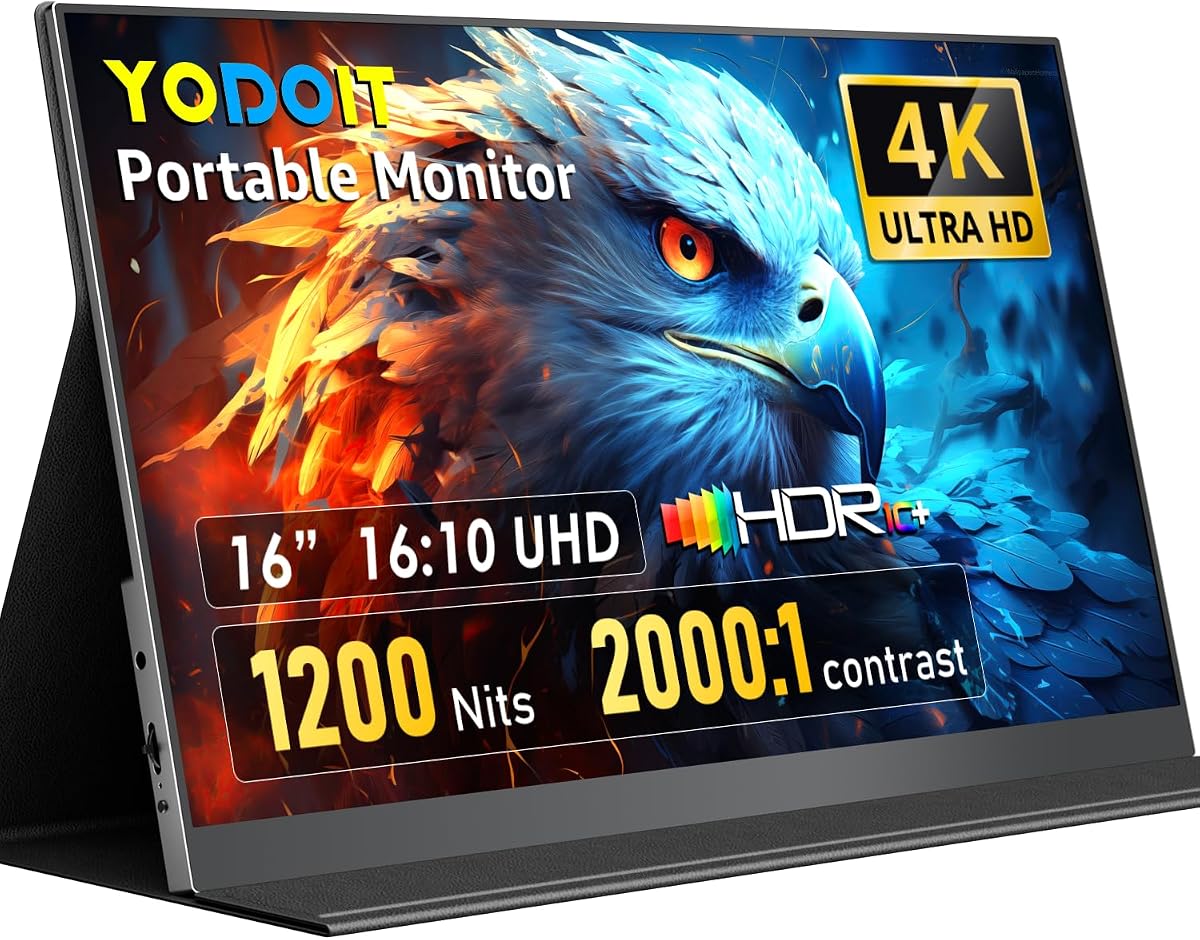
This portable monitor stands out for its exceptional brightness and clarity in direct sunlight. With a peak brightness of 1200 nits it overcomes the limitations of standard portable displays. The matte anti-glare coating ensures visibility without harsh reflections making it ideal for outdoor tasks.
We may earn a commission when you buy through this link, at no additional cost to you.
The 16 inch 4K resolution provides sharp detail perfect for photo editing and design work. Color accuracy is strong with 145% sRGB coverage ensuring faithful reproduction of images. The IPS panel maintains consistent colors across wide viewing angles which is essential for collaborative work.
While the brightness and resolution are impressive the monitor requires external power for peak performance. The included cables and adapter help but you need to plan for power access outdoors. The higher price reflects the professional grade features but it delivers on promises.
Photographers and field inspectors will find this monitor invaluable for on location work. It replaces the need for laptop screens that wash out in daylight. The magnetic cover doubles as a stand protecting the screen during transport. This is a top choice for portable high brightness needs.
The 1200 nit brightness combined with matte coating ensures clear visibility even in direct sun without squinting or shade.
145% sRGB and 4K resolution deliver rich accurate colors suitable for photo editing and creative workflows on the go.
We may earn a commission when you buy through this link, at no additional cost to you.
This Dell monitor offers a smooth viewing experience with a 144Hz refresh rate and fast response times. It is well suited for gaming and streaming where motion clarity is key. The IPS technology ensures good color consistency across wide viewing angles for shared displays.
We may earn a commission when you buy through this link, at no additional cost to you.
Eye comfort is a focus with TUV certification reducing harmful blue light without compromising color quality. The thin bezels maximize screen space creating a clean modern look. This makes it a practical choice for general office and entertainment tasks.
The brightness is standard for indoor use which may not suffice in direct sunlight. It excels in controlled lighting environments where motion fluidity and eye comfort are priorities. The tilt adjustability helps find a comfortable viewing position easily.
Gamers and office workers seeking reliable performance at a reasonable cost will appreciate this model. It balances refresh rate and comfort well. For outdoor sunlight needs it lacks the peak brightness but indoors it delivers fluid visuals effectively.
144Hz refresh rate and 1ms response time eliminate tearing and blur for smooth gaming and video playback.
TUV certified blue light reduction supports long usage sessions without strain while preserving color accuracy.
We may earn a commission when you buy through this link, at no additional cost to you.
This 27 inch monitor delivers stunning 4K visuals with vibrant colors and excellent depth. HDR readiness enhances contrast making content appear more dynamic and realistic. The IPS panel ensures wide viewing angles ideal for presentations and collaborative workspaces.
We may earn a commission when you buy through this link, at no additional cost to you.
ComfortView Plus reduces blue light emissions supporting all-day comfort without sacrificing color accuracy. The ultra-thin bezels provide a sleek minimalist aesthetic. This model balances resolution and refresh rate well for professional and leisure use.
The larger screen size requires more desk space and a capable graphics card to drive 4K. It is less portable but excellent for stationary setups. The brightness is standard which may not suit direct sunlight outdoor environments.
Designers and media consumers will appreciate the large sharp display. It is a solid choice for home offices where visual quality and comfort are prioritized over portability.
Large 27 inch screen with 4K resolution offers sharp detail and spacious workspace for multitasking and media.
HDR ready and 99% sRGB deliver vibrant colors and excellent contrast for immersive viewing experiences.
We may earn a commission when you buy through this link, at no additional cost to you.
This monitor excels with comprehensive ergonomic adjustability including height tilt pivot and swivel. The integrated speakers provide a wider range of frequencies eliminating external hardware needs. It is designed for all-day comfort with eye friendly features.
We may earn a commission when you buy through this link, at no additional cost to you.
The 144Hz refresh rate and 1ms response time deliver smooth visuals suitable for work and light gaming. TUV certification helps reduce harmful blue light while maintaining image quality. The ash white finish adds a modern look to any setup.
Brightness is standard for indoor office use but not optimized for direct sunlight. The adjustability makes it a strong choice for reducing neck strain during long hours. Speakers add convenience for video calls and media.
Office workers who prioritize comfort and convenience will find this model ideal. It offers versatile positioning and audio integration without extra cost. A reliable choice for ergonomic setups at desks.
Full height tilt pivot and swivel adjustments allow personalized viewing angles to reduce physical strain.
Dual 3W speakers deliver clear audio for presentations and media without needing external speakers.
We may earn a commission when you buy through this link, at no additional cost to you.
This LG monitor delivers vivid colors with IPS technology and sharp Full HD visuals from most angles. The ultra-slim bezels create a clean modern look that minimizes distractions. A slim stand base adds a floating feel perfect for dual setups.
We may earn a commission when you buy through this link, at no additional cost to you.
A fast 120Hz refresh rate provides smoother frame transitions and 1ms motion blur reduction keeps gameplay crisp. HDR10 support and 99% sRGB coverage offer rich vivid color for creative and gaming tasks. Reader mode lowers blue light for comfortable reading.
Brightness remains standard which works indoors but may struggle in direct sunlight. The stand tilt is adjustable but lacks height adjustment. Still it offers strong performance and features for an affordable price point.
Budget conscious users seeking smooth motion and good color will find this valuable. It balances productivity and entertainment features well. A top choice for those needing value and quality.
120Hz refresh rate and HDR10 deliver fluid visuals and rich color across gaming and creative work.
Reader mode reduces blue light for comfortable viewing during extended document reading and browsing sessions.
We may earn a commission when you buy through this link, at no additional cost to you.
The Acer SB273 presents stunning high-quality images with excellent detail on a 27 inch display. The zero-frame design provides maximum visibility from edge to edge enhancing productivity. Adaptive-sync support matches refresh rates for smooth tear-free video and gaming.
We may earn a commission when you buy through this link, at no additional cost to you.
Fast response times of 1ms ensure smooth rendering without smearing or ghosting. The IPS panel maintains consistent colors across viewing angles. This monitor is optimized for office use with reliable performance and solid build quality.
Brightness is standard which works well for indoor lighting conditions. It does not excel in sunlight but remains versatile for work and play. The design prioritizes visibility and motion clarity.
Office workers needing a large screen for multitasking will appreciate the space and clarity. It offers a balance of size refresh rate and build quality. A practical choice for professional environments.
Maximize visibility with minimal bezels allowing larger effective workspace and cleaner multi-monitor setups.
120Hz refresh rate and 1ms response eliminate tearing and blur for seamless work and media.
We may earn a commission when you buy through this link, at no additional cost to you.
This 32 inch monitor delivers vibrant true-to-life colors with QHD resolution. USB-C connectivity allows single cable connection for video and device charging enhancing desktop organization. Triple-sided micro-bezel design creates a cleaner desktop and improved immersion.
We may earn a commission when you buy through this link, at no additional cost to you.
HDR10 and 99% sRGB deliver vivid accurate colors making images come to life. Reader mode alleviates eye strain during extended viewing. The slim base design supports a modern look. Ideal for work and content creation.
The brightness is standard which may not suit direct sunlight environments. USB-C convenience is a major plus for modern devices. Tilt adjustment allows comfortable positioning but height is fixed.
Professionals using laptops will appreciate the single cable solution. It offers strong resolution and color for media and design. A solid option for integrated workstations.
Single cable connection supports video transmission and device charging reducing desktop clutter significantly.
HDR10 and 99% sRGB deliver vibrant accurate colors and improved contrast for rich visual experiences.
We may earn a commission when you buy through this link, at no additional cost to you.
This monitor combines QHD resolution with 144Hz refresh rate for vivid detail and smooth motion. Integrated dual 3W speakers deliver a wider range of frequencies for immersive audio. Adjustability includes height tilt pivot and swivel for comfort.
We may earn a commission when you buy through this link, at no additional cost to you.
Eye comfort is prioritized with TUV certification reducing harmful blue light. The ash white finish adds a modern aesthetic. AMD FreeSync supports smooth gaming without tearing. Ideal for QHD gaming and multimedia.
Brightness remains standard for indoor use. The resolution demands a capable graphics card for full performance. Still it balances features and ergonomics well.
Gamers and creatives will appreciate the sharp QHD visuals and high refresh rate. It offers strong audio and comfort features. A reliable choice for high-performance desktop setups.
QHD resolution with 144Hz refresh delivers sharp detail and fluid motion for immersive gaming and content.
Full adjustability ensures comfortable viewing angles reducing strain during extended use sessions.
We may earn a commission when you buy through this link, at no additional cost to you.
This 23.8 inch monitor presents stunning high-quality images with excellent detail. The zero-frame design provides maximum visibility from edge to edge. Adaptive-sync support ensures smooth tear-free video and gaming. Fast response times reduce smearing.
We may earn a commission when you buy through this link, at no additional cost to you.
The IPS panel maintains consistent colors across viewing angles. It is optimized for office use with reliable performance and solid build quality. The compact size fits smaller desks easily.
Brightness is standard which works well for indoor conditions. It does not excel in sunlight but offers great value. The design prioritizes visibility and motion clarity.
Budget conscious users seeking efficient workspaces will find this useful. It balances size refresh rate and build quality. A practical choice for smaller office environments.
Smaller 23.8 inch size saves desk space while maintaining sharp Full HD clarity for daily tasks.
120Hz refresh rate and 1ms response ensure smooth motion without tearing for productivity and gaming.
We may earn a commission when you buy through this link, at no additional cost to you.
This portable monitor stands out with 1200 nits brightness four times that of standard monitors. It displays clear content even in strong light conditions with excellent contrast. Matte screen reduces reflections protecting eyes during long use.
We may earn a commission when you buy through this link, at no additional cost to you.
The 4K resolution delivers delicate clear images with stronger detail expressiveness. IPS matte screen ensures accurate vivid colors with 145% sRGB coverage. USB-C and HDMI provide versatile connections without multi-wire winding.
Brightness depends on power connection and white background for peak output. The aluminum alloy shell provides better heat dissipation. Protective case doubles as a stand enhancing portability and safety.
Travelers and field workers needing high brightness portability will find this valuable. It matches outdoor needs with solid build quality. A top choice for portable 4K visibility.
1200 nits peak brightness ensures legible screen even in direct sunlight and glare conditions.
Aluminum alloy shell and VESA mount offer durable protection and flexible mounting options for travel.
We may earn a commission when you buy through this link, at no additional cost to you.
Choosing a monitor that handles bright sunlight requires attention to key factors. We outline essential features and considerations to help you select the right display for your needs.
Brightness measured in nits determines visibility in direct sunlight. Standard monitors are 250 nits whereas outdoor monitors reach 1200 nits or higher for clear viewing.
Look for 1000 nits minimum if you work outdoors frequently.
Matte screens diffuse reflections to maintain contrast in bright conditions. Glossy screens amplify glare reducing readability outside.
Always prefer matte or anti-glare finishes for sunlight.
Higher resolutions like 4K provide sharper details for professional work. Full HD is sufficient for basic tasks but less detailed.
Choose 4K for photo editing or complex graphics work.
sRGB coverage ensures colors are reproduced accurately across devices. Wide gamuts benefit creative work requiring precise color.
Target 100% or higher sRGB for color critical tasks.
Portable monitors are lighter and include protective cases for transport. Fixed monitors offer larger screens but lack mobility.
Consider weight and case options if traveling often.
USB-C supports single cable power and video for modern laptops. HDMI remains useful for gaming consoles and older devices.
Ensure monitor supports your devices inputs without adapters.
High brightness portable monitors often need external power adapters for peak output. Built-in batteries may offer limited run time.
Check power supply needs before choosing portable models.
VESA mounts allow custom positioning and wall installation. Built-in stands limit flexibility but save desk space.
Verify mounting options to suit your workspace layout.
Position the monitor to avoid direct overhead light. Angling the screen slightly can help reduce glare during use.
Use the protective cover when transporting to prevent scratches and damage. Store in a cool dry place away from extreme temperatures.
Clean the screen with a soft microfiber cloth to remove dust and fingerprints. Avoid harsh chemicals that may harm anti-glare coatings.
Standard monitors usually lack sufficient brightness for direct sunlight. They become hard to read in bright conditions. Use monitors with 1000 nits minimum brightness for outdoor visibility.
Yes matte screens diffuse light to reduce reflections. Glossy screens reflect sunlight causing glare. Matte finishes improve readability in bright environments.
High brightness portable monitors typically need external power adapters. Built-in batteries often have limited duration. Check power requirements before outdoor use.
4K provides sharp detail for professional tasks outdoors. Full HD is acceptable for general browsing. Higher resolutions improve clarity in bright conditions.
Many portable monitors support VESA mounting for wall installation. Check product specs for mounting compatibility. This allows flexible positioning for various uses.
Battery life varies by model and usage intensity. High brightness drains batteries faster. External power ensures consistent performance outdoors.
The Yodoit 4K Portable and Newsoul 4K lead in brightness for outdoor use. Dell and LG offer reliable indoor alternatives with solid features.
Prioritize brightness and anti-glare finishes if you work in direct sunlight. For indoor productivity focus on ergonomics and connectivity.
Prices and availability change frequently so verify current listings before purchasing. Always check specs to match your specific environmental needs.