
EMEET C960 1080P Webcam
4.4Editor score
Automatic light adjustment
Built-in privacy cover included
90 degree wide angle lens
Discover the top 1080p webcams for streaming and meetings. This guide compares features, image quality, and compatibility to help you choose the best camera
In today’s connected world, a reliable webcam is essential for work, study, and staying in touch with loved ones. High-definition video ensures you look professional and clear during every call or stream without costly equipment.
We evaluated the leading 1080p webcams based on video quality, microphone performance, privacy features, and compatibility. Our analysis focuses on real-world usability across popular platforms like Zoom, Teams, and streaming software to find the top performers.
Each pick highlights key strengths and ideal use cases for different users. Note that availability and details can change over time, so verify current specs before purchasing to ensure the best fit for your specific needs and budget constraints.
4.4Editor score

4.6Editor score

4.4Editor score
This side-by-side comparison outlines the key specifications and strengths of each model to help you quickly identify which camera aligns with your specific workflow and visual requirements.




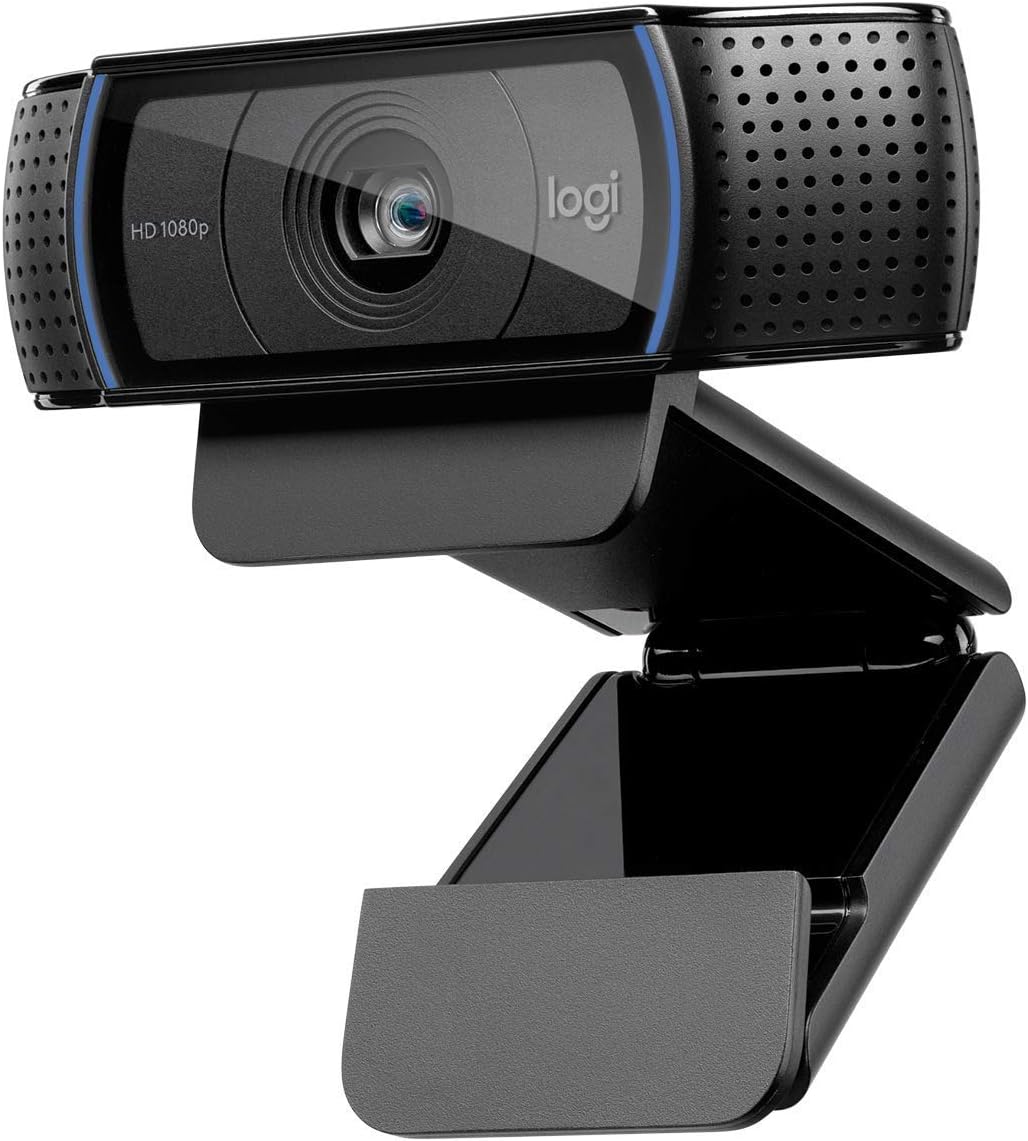


The Logitech C920x stands out as a top choice for users seeking reliable 1080p video quality. With a strong rating from users, it delivers crisp visuals and natural audio during calls and recordings.
We may earn a commission when you buy through this link, at no additional cost to you.
Its autofocus ensures you stay sharp even when moving slightly, while the HD lighting adjustment compensates for dim environments. The dual microphones capture clear sound without needing an external mic setup.
While it lacks a physical privacy shutter, the included XSplit VCam license allows virtual background effects. Some users may prefer a more premium look, but the performance remains consistent for daily tasks.
Ideal for remote workers and streamers needing professional video without complex setup. We recommend this model for its balance of features and ease of use across most platforms.
The 1080p sensor combined with autofocus ensures you remain sharp and detailed during video interactions.
Dual microphones work together to reduce noise and pick up your voice clearly during meetings.
We may earn a commission when you buy through this link, at no additional cost to you.
The Logitech Brio 101 is designed for those who prioritize privacy and image quality. It delivers solid 1080p video while ensuring you control when your camera is active.
We may earn a commission when you buy through this link, at no additional cost to you.
RightLight technology automatically improves brightness to help you look your best in any lighting condition. The slide cover offers quick access to privacy without needing to disconnect cables manually.
You can customize zoom and framing easily with the Logi Options+ app. While the build uses recycled materials for sustainability, the focus remains on reliable performance during calls.
This webcam suits professionals and home users who want a sleek solution with privacy built-in. It works seamlessly with major video platforms and offers excellent ease of use.
The integrated slide cover ensures your lens is physically blocked when not in use.
Auto-light balance technology increases brightness to reduce shadows and improve visibility.
We may earn a commission when you buy through this link, at no additional cost to you.
EMEET C960 offers impressive performance at an accessible price point. It provides clear 1080p video suitable for daily meetings and casual streaming needs.
We may earn a commission when you buy through this link, at no additional cost to you.
Automatic exposure and color adjustment help you look balanced in various rooms. The 90 degree wide-angle lens captures more participants, making it ideal for small group calls.
Dual omnidirectional mics ensure your voice is picked up clearly. Although it lacks some advanced autofocus features, the fixed focus works well for typical desk setups.
This model is perfect for budget-conscious users who need reliable quality. It supports multiple platforms and includes essential privacy features without extra costs.
A 90 degree lens allows you to capture more people without moving the camera.
Built-in mics capture natural sound from multiple directions effectively.
We may earn a commission when you buy through this link, at no additional cost to you.
The Logitech C920S is essentially the C920x with a crucial addition: a privacy shutter. This feature lets you physically block the lens for peace of mind.
We may earn a commission when you buy through this link, at no additional cost to you.
Video quality remains consistent at 1080p, ensuring you look sharp in meetings. The HD autofocus and light correction handle typical home office lighting conditions effectively.
Stereo audio works well for casual calls, though external mics might be needed for high-end production. It offers a straightforward experience without extra software requirements.
If you value privacy and classic Logitech quality, this model fits well. It delivers solid performance and reliability for both work and leisure use.
A snugly fitting cover protects the lens and gives you control over your privacy.
Full HD recording ensures your captured moments look crisp and vibrantly colored.
We may earn a commission when you buy through this link, at no additional cost to you.
The Logitech C920e is built for business environments where reliability is key. It is certified for major platforms like Zoom and Microsoft Teams to ensure seamless integration.
We may earn a commission when you buy through this link, at no additional cost to you.
Its 78 degree field of view is balanced for individual user calls or small group sharing. The privacy screen covers the lens easily when not in use.
Audio quality remains high with dual mics that pick up voice clearly from a meter away. Sync software helps manage devices across an organization efficiently.
This webcam is ideal for corporate teams needing certified hardware. It offers robust performance and management features suited for professional workflows.
Official certification for Teams and Zoom ensures compatibility and smooth integration.
Standard 1/4 inch threads allow mounting on tripods or stands securely.
We may earn a commission when you buy through this link, at no additional cost to you.
The NexiGo N60 is known for its ease of use and broad compatibility. It works with many operating systems and requires no driver installation.
We may earn a commission when you buy through this link, at no additional cost to you.
Its noise-cancelling microphone helps filter out background noise during calls. The privacy cover adds security by physically blocking the lens when not in use.
Video quality is solid with fixed focus optimized for typical desk distances. Software control allows basic adjustments if needed through the provided interface.
Great for casual users or students needing a reliable webcam quickly. It supports major platforms and delivers consistent performance without complexity.
Built-in noise-cancelling reduces ambient sound to enhance voice quality.
Cover blocks the lens to help provide peace of mind.
We may earn a commission when you buy through this link, at no additional cost to you.
The EMEET S600 delivers premium video quality with its Sony 4K sensor. While you asked for 1080p, this model offers 1080p at 60fps for smooth visuals.
We may earn a commission when you buy through this link, at no additional cost to you.
PDAF autofocus is faster and more precise than standard autofocus systems. This ensures you stay sharp during active movements or shifting positions.
It includes noise-canceling microphones and a privacy cover for security. You can adjust the field of view to focus on yourself or include surroundings.
Ideal for streamers needing high fidelity and smooth motion. It balances advanced features with ease of setup for serious content creators.
Phase Detection autofocus offers speed and precision for sharp video.
Adjustable FOV lets you focus on yourself or your surroundings.
We may earn a commission when you buy through this link, at no additional cost to you.
The Logitech C920 is a legendary webcam known for its reliable performance. It delivers Full HD 1080p video ideal for daily communication and recording.
We may earn a commission when you buy through this link, at no additional cost to you.
Its autofocus adjusts quickly to keep you sharp. While the design is older, it still fits well on most monitors and laptops without issues.
The H.264 codec ensures smooth video transmission with less bandwidth. However, it lacks modern privacy features like a physical shutter.
Best for users seeking a straightforward webcam with solid basics. It remains a trusted choice for general use without extra complexity.
H.264 codec delivers crisp HD video with efficient compression.
Clip design makes it easy to mount on laptops or external monitors.
We may earn a commission when you buy through this link, at no additional cost to you.
The Logitech Brio 105 offers excellent value for business users. It combines essential features like RightLight technology and a privacy shutter in an affordable package.
We may earn a commission when you buy through this link, at no additional cost to you.
Auto-light balance improves image quality in suboptimal lighting conditions automatically. The integrated cover gives extra confidence for remote work security.
Certified for Google Meet, it ensures compatibility and stability for work calls. It supports Logitech Sync for efficient remote deployment in organizations.
Perfect for teams needing consistent video at a reasonable cost. It simplifies setup and ensures reliable performance for daily business meetings.
RightLight 2 technology automatically adjusts lighting to keep you visible.
Sync software allows easy deployment and updates for company devices.
We may earn a commission when you buy through this link, at no additional cost to you.
The Logitech Brio 100 Renewed offers a budget-friendly way to access HD quality. It delivers clear video for casual users and basic business needs.
We may earn a commission when you buy through this link, at no additional cost to you.
With a standard USB connection, it works seamlessly with most video apps. The built-in microphone adds convenience for all-in-one use.
The 58 degree field of view is narrower than wide-angle models, focusing tightly on you. Ensure your setup fits this framing before buying.
Great for students or home offices needing reliable video. It provides decent performance at a lower cost point than new premium models.
Plug-and-play USB connection ensures seamless setup with major apps.
Full HD resolution captures clear and smooth video streaming.
We may earn a commission when you buy through this link, at no additional cost to you.
Selecting the right 1080p webcam involves balancing video resolution, features, and budget. This section outlines critical factors to help you make an informed decision.
Look for cameras that offer true 1080p resolution to ensure clear and detailed video during calls. While some models support 30fps, higher frame rates like 60fps can provide smoother motion for active users.
Prioritize resolutions that match your internet speed and device processing power to maintain a stable connection.
A good webcam should have built-in microphones that capture your voice clearly without picking up too much background noise. Dual microphones or noise-canceling features are highly recommended for professional settings.
Consider external mics if you need studio-quality audio, but ensure the webcam has strong default audio for daily use.
Privacy is crucial when using webcams for personal or business calls. Models with physical shutters or slide covers give you peace of mind by blocking the lens when not in use.
Always check if the webcam includes a hardware-based privacy mechanism to protect your visual data.
Adjustable lighting correction and autofocus ensure you look sharp even in dim or changing lighting conditions. These features automatically adapt to your environment to keep the image clear.
Prioritize cameras with these capabilities if you do not have studio lighting at your desk.
Ensure the webcam is compatible with your operating system and favorite video conferencing platforms. Most modern models work with Windows, macOS, and popular apps like Zoom and Teams.
Check for official certifications if you require guaranteed stability for business or critical communications.
The field of view determines how much of your surroundings is captured on camera. A wider angle is useful for group calls, while a narrower angle focuses attention on you.
Select a FOV that matches your typical call size to avoid awkward framing.
Consider how the webcam attaches to your setup. Clip-on designs are common for laptops, while tripod mounts offer flexibility for desktops.
Choose a stable design that fits your desk space and allows for easy angle adjustments.
Some webcams come with software that allows customization of settings like zoom, framing, and audio levels. Advanced software can enhance the experience for streaming or professional use.
Evaluate if you need manual controls or if plug-and-play simplicity is sufficient for your needs.
To get the best image quality, ensure the lens is clean before every major call. Use a soft, lint-free cloth to gently wipe the glass surface to avoid smudges or scratches.
Position your webcam at eye level to create a more natural and flattering angle. This helps you look more professional and reduces neck strain during long meetings.
Keep your environment well-lit to maximize the webcam's performance. Natural light or soft room lighting helps the camera adjust better for sharp and balanced video.
1080p webcams offer clear Full HD video suitable for most meetings and calls, while 4K provides higher detail. Most platforms compress video, so 1080p is often sufficient for general use.
Most 1080p webcams come with built-in microphones that work well for standard calls. However, dedicated external mics may be needed for professional recording or noisy environments.
Yes, most modern 1080p webcams support both macOS and Windows without extra drivers. Always verify specific compatibility on the manufacturer’s website before purchase.
Position a light source in front of you rather than behind you to avoid shadows. Using webcams with auto-light balance features also helps brighten your image in dim rooms.
Not all models include them. Look for features like “privacy shutter” or “privacy cover” in the specs to ensure your lens is blocked when not in use.
Yes, many 1080p webcams support video recording at 30fps. Check the software support to ensure you can save or stream your recordings effectively.
Most webcams use standard USB-A connections. Some newer models may include USB-C adapters for modern laptops, but USB-A remains the most common and reliable.
Drivers often update through your operating system or the manufacturer’s software. Keep your system updated to ensure smooth performance and access to the latest features.
Choosing the best 1080p webcam depends on balancing image quality, audio, and specific features like privacy shutters or wide-angle lenses.
Prioritize models that offer reliable autofocus and clear audio to ensure your calls look and sound professional. Consider your typical environment and platform needs.
Prices and availability may change so verify current specs before buying to ensure the best fit for your needs.