
HDMI Media Player
4.1Editor score
Compact aluminum alloy design
Supports 1080p output
Compatible with USB 3.0
This guide compares ten external hard drive media players for video playback on TVs and monitors using USB and HDMI connections.
Discover the best external hard drive media players to transform your TV into a versatile entertainment hub. These devices allow you to play high-quality videos and music directly from USB drives without needing a subscription.
We evaluated ten top models based on compatibility with 4K formats, ease of use, and connectivity options. Each product was analyzed for its ability to handle large storage devices and diverse file types effectively.
Each pick highlights unique strengths and ideal use cases for home or commercial settings. Remember that pricing and availability fluctuate frequently, so check the latest offers before making your final purchasing decision today.
4.1Editor score

4.1Editor score
4.3Editor score
The following table offers a side-by-side comparison of key specifications for all ten selected devices to help you identify the right model for your specific media playback needs and requirements.


The Micca 4K Ultra-HD stands out as a top-tier choice for users seeking reliable local media playback without the complexity of smart TV interfaces. It offers a straightforward way to access your favorite videos and photos stored on external drives directly through your television.
We may earn a commission when you buy through this link, at no additional cost to you.
This device excels in its ability to handle high-resolution content up to 4K, ensuring that your media looks sharp on modern displays. Its dual USB and microSD readers provide flexible connectivity options for various storage types, making it versatile for different setups.
While it lacks built-in streaming capabilities, this limitation is often a benefit for users who prefer local file playback without internet dependencies. The straightforward interface and support for looping content make it particularly useful for signage or background display applications.
Overall, the Micca 4K is an excellent recommendation for anyone needing a dedicated player for local storage media. It balances performance and ease of use effectively, making it a strong candidate for home entertainment or professional display needs.
With both USB and microSD slots, this player accommodates a wide range of storage devices so you can switch between cards and drives easily.
Automatic playback and resume features allow for hands-off operation ideal for businesses needing consistent message rotation on displays.
We may earn a commission when you buy through this link, at no additional cost to you.
For budget-conscious buyers who still want quality performance, this HDMI Media Player delivers exceptional value without cutting corners on essential features. Its compact design makes it easy to transport and store when not in use.
We may earn a commission when you buy through this link, at no additional cost to you.
The device supports a wide array of video formats ensuring compatibility with most files you might encounter. While it caps at 1080p it handles HD content smoothly which is sufficient for many standard viewing scenarios.
Users looking for a reliable secondary player or a travel option will find this model particularly appealing. The inclusion of AV output ensures you can use it with older TVs that do not support HDMI connections directly.
This player is a smart investment for those who prioritize cost-effectiveness and portability. It provides all the core functionality needed for local media playback without unnecessary extras that drive up the price.
Constructed from aluminum alloy this unit is designed to withstand travel and handling without easily getting damaged during transit.
The included composite AV cable ensures you can connect to older televisions without needing an HDMI adapter or converter.
We may earn a commission when you buy through this link, at no additional cost to you.
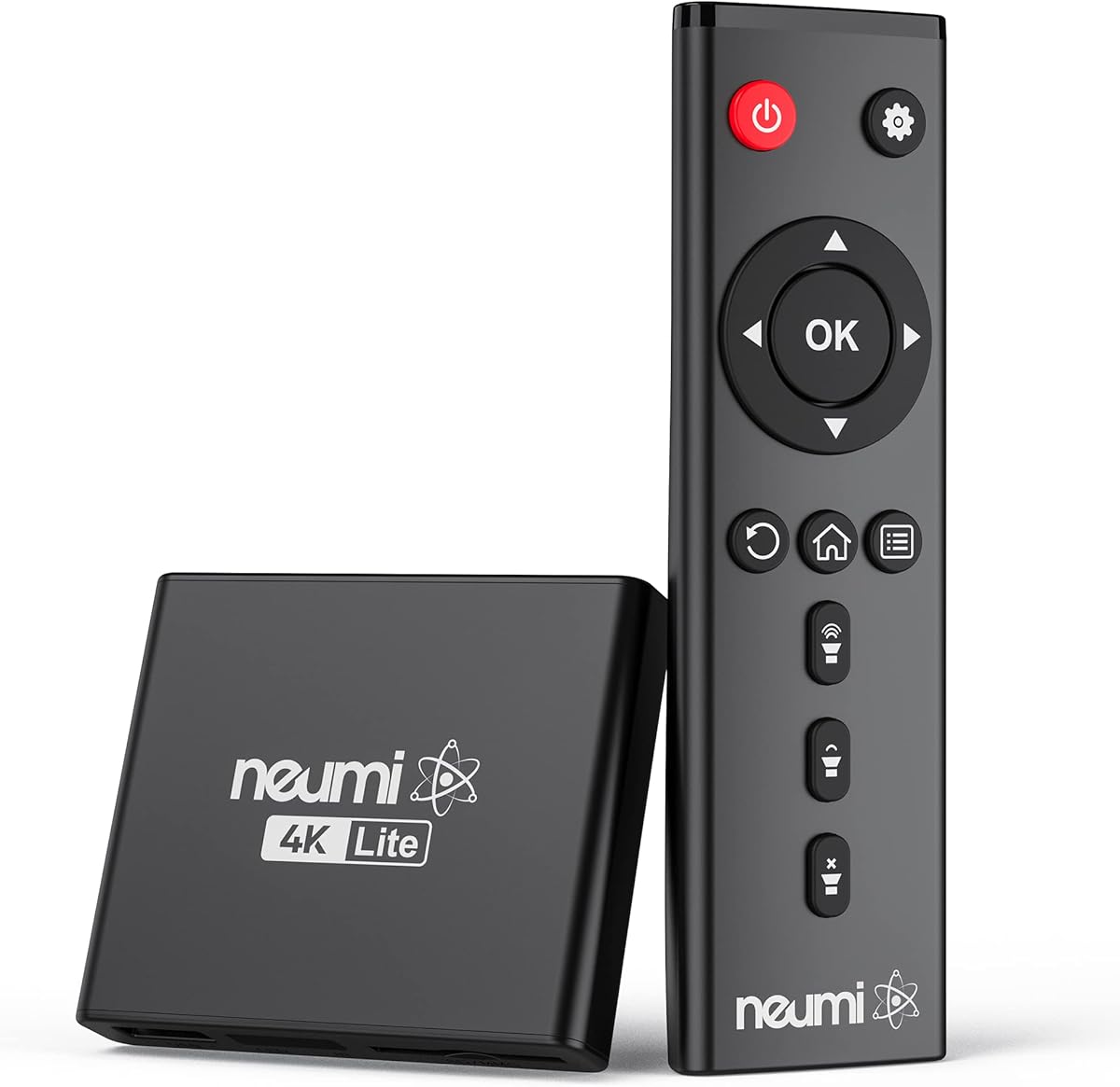
The NEUMI Atom 4K Lite is designed for users who need advanced features like interactive triggers for specialized display applications. It combines high-end performance with a sleek and compact form factor that fits easily into modern setups.
We may earn a commission when you buy through this link, at no additional cost to you.
Its support for 4K at 60Hz ensures buttery smooth playback for high-definition content. The ability to integrate motion or push-button sensors adds a layer of interactivity that is rare in standard media players.
While the trigger sensors must be purchased separately the unit is ready to interface with them out of the box. This makes it a powerful tool for museums galleries or any environment requiring on-demand content delivery.
If you need a premium player with extra capabilities beyond simple playback this model is an excellent choice. It delivers superior video quality and offers unique features that justify the higher price tag for specific use cases.
Connect optional sensors to automatically start videos when motion is detected or a button is pressed for automated displays.
Digital surround sound support ensures your audio matches the high-quality video with clear and immersive sound effects.
We may earn a commission when you buy through this link, at no additional cost to you.
This ACEMAX model offers a unique 2-in-1 design that includes a built-in enclosure for 2.5-inch SATA drives. This feature removes the need for a separate external box saving space and reducing cable clutter on your desk.
We may earn a commission when you buy through this link, at no additional cost to you.
It supports H.265 10bit decoding which ensures high-quality video playback even for complex files. The device is optimized for digital signage with automatic playback and resume capabilities for uninterrupted content loops.
The metal housing helps dissipate heat during long runtimes making it reliable for unattended displays. While setting up the internal drive might be more involved than using a USB stick the result is a sleek and integrated system.
Ideal for commercial installations or home setups where space is at a premium this player combines functionality and form. It simplifies the hardware stack by integrating the drive directly into the media unit itself.
Install your own SATA hard drive directly into the unit for a cleaner setup without extra external enclosure boxes.
The aluminum case helps keep internal temperatures down during extended playback sessions to maintain consistent performance.
We may earn a commission when you buy through this link, at no additional cost to you.
This player is tailored for users who prioritize audio quality alongside high-resolution video playback. With HDMI support up to 7.1 surround sound it ensures that your audio experience matches the visual clarity of the video content.
We may earn a commission when you buy through this link, at no additional cost to you.
It features dual USB ports allowing you to connect multiple storage devices though only one is read at a time. The optical output provides a dedicated option for connecting to high-end audio systems for lossless sound reproduction.
The H.265 decoding capability means files load efficiently without overwhelming bandwidth or storage resources. This model is also capable of handling vertical screen rotation which is useful for digital signage in tighter spaces.
For audiophiles or home theater enthusiasts this model stands out by offering advanced audio output options. It provides a robust platform for playing high-bitrate local files with superior sound fidelity.
Experience cinematic audio with support for multi-channel surround sound via HDMI for an immersive viewing experience.
Use the optical port to connect to dedicated audio systems for higher quality sound than standard analog options.
We may earn a commission when you buy through this link, at no additional cost to you.
This player is highly effective for advertising and multimedia playback in retail environments. It supports 4K output and includes an AV cable in the box making it ready to deploy out of the box without extra purchases.
We may earn a commission when you buy through this link, at no additional cost to you.
Its ability to play files directly from Blu-ray directories simplifies the process of loading promotional content. The fiber optic output ensures that audio can be routed to external speakers without interference or signal loss.
The robust format support means you can load nearly any file type without converting them first. This flexibility saves significant time when managing content for rotating advertising campaigns or promotional displays.
For businesses needing a reliable plug-and-play solution for digital advertising this model is a strong contender. It combines high-resolution playback with practical features like auto-looping and included accessories.
Designed to handle continuous playback and multiple formats ideal for retail signage and promotional displays in stores.
Use the fiber optic port to deliver high-quality audio to external sound systems without analog noise or distortion.
We may earn a commission when you buy through this link, at no additional cost to you.
While this is a storage drive rather than a media player it is an essential companion for any external hard drive media setup. Its reliability and high capacity make it an ideal source for storing large libraries of video files.
We may earn a commission when you buy through this link, at no additional cost to you.
The drive is compatible with both Windows and Mac systems ensuring seamless file access across different computers. USB 3.2 Gen 1 speeds allow for fast transfers so you can get your media onto the drive quickly.
With a proven track record for durability this drive is a safe choice for long-term storage. Its plug and play functionality means no additional drivers or setup are required before you start using it.
Pairing this drive with a media player ensures you have a solid foundation for your entertainment or display system. It provides ample space for high-resolution media without sacrificing speed or reliability.
Compatible with both Windows and macOS systems so you can easily move files between different computers.
USB 3.2 Gen 1 support ensures fast data transfer speeds so large video files move quickly to your drive.
We may earn a commission when you buy through this link, at no additional cost to you.
This model earns a perfect rating for its seamless integration of media playback and drive enclosure. It supports internal 2.5-inch SATA drives directly which creates a compact and unified solution for local media storage.
We may earn a commission when you buy through this link, at no additional cost to you.
The included Type-C cable allows you to transfer data to your laptop easily without needing extra adapters. This feature adds significant utility making it more than just a player but a versatile storage hub.
High resolution playback and shuffle or repeat modes ensure it can handle various media types effectively. Whether you are using it for home entertainment or office displays it offers consistent and smooth performance.
If you value a tidy and integrated system this player is the ideal choice. It simplifies your setup by combining two necessary components into one device without sacrificing quality or features.
Eliminates the need for external cables by housing your drive directly inside the media player unit.
Use the included Type-C cable to access your data on a laptop making it a dual purpose device.
We may earn a commission when you buy through this link, at no additional cost to you.
Designed for commercial digital signage applications this unit delivers consistent performance for business displays. Its auto resume and play features ensure that content continues running without interruption even after a power cycle.
We may earn a commission when you buy through this link, at no additional cost to you.
The device includes a one-year warranty which provides peace of mind for business deployments. Support for both internal and external storage options gives you flexibility in how you manage your content library.
The high resolution output ensures that promotional materials look crisp and clear on any modern monitor or TV. It is a robust tool for keeping customers informed and engaged in retail or office environments.
For businesses needing reliable signage hardware this player is a dependable option. It balances functionality with durability making it a practical choice for professional display requirements.
Comes with a one-year warranty to support business users who need reliability and assistance if issues arise.
Automatically resumes playback from where it left off ensuring continuous content delivery without manual intervention.
We may earn a commission when you buy through this link, at no additional cost to you.
This player offers configurable video rotation which is particularly useful for displays mounted vertically or at odd angles. This flexibility makes it ideal for unique installation scenarios where screen orientation matters.
We may earn a commission when you buy through this link, at no additional cost to you.
It includes an integrated drive enclosure to simplify your storage setup. Supporting USB microSD and internal drives means you have multiple options for accessing your media files without limitations.
The auto playback and resume features ensure that your content loops reliably. While the overall rating is lower its unique rotation feature addresses a specific need that other players in this list may not.
If you need a player that can handle rotated video streams this model is worth considering. It provides the necessary tools for versatile digital signage at an accessible price point.
Rotate your video output 90 180 or 270 degrees to fit specific mounting needs or screen orientations.
Use internal external or card storage options to fit your specific space and capacity requirements easily.
We may earn a commission when you buy through this link, at no additional cost to you.
Selecting the right external hard drive media player involves considering various factors like resolution output storage type and compatibility with your existing devices.
Choose a player that matches your display capabilities to ensure clear and sharp visuals. If you have a 4K TV look for models supporting 4K output to maximize image quality and detail.
Prioritize models supporting 4K if you have a high-resolution screen to ensure your content looks its best.
Ensure the player supports large drives if you have extensive media libraries. Look for models capable of handling drives up to 8TB or more to avoid running out of space.
Check maximum supported drive size to ensure your player can handle your current and future storage needs.
Verify that the device supports the file formats you use regularly such as MKV MP4 and AVI. Broad format support reduces the need for converting files before playback.
Look for broad format support to avoid the hassle of converting files before playing them.
Consider how you want to connect your storage. USB and microSD slots offer flexibility while integrated enclosures save space and reduce cable clutter.
Choose connectivity types that fit your existing hardware and storage setup preferences.
If audio quality is important check for optical or HDMI audio support. High-quality audio output ensures your sound matches the quality of your video playback.
Prioritize optical or HDMI audio outputs for high-quality sound in home theater setups.
Features like loop and resume are vital for digital signage or continuous playback. Auto playback saves time by starting content immediately after power on.
Look for auto playback and resume features for unattended or continuous display needs.
Metal housings often provide better heat dissipation for longer runtimes. Durability ensures the device can withstand regular use over extended periods.
Opt for metal housings for better heat management and durability in daily use.
Balance cost with features to find a model that meets your needs without overspending. Budget options often suffice for basic playback while premium models offer advanced features.
Balance cost with essential features to find a model that meets your specific needs and budget.
Start by connecting the media player to your TV using an HDMI cable. Ensure you use a high-quality cable to support the resolution capabilities of your device for the best image quality.
Insert your USB drive or microSD card into the appropriate port. Navigate the on-screen menu to select your preferred files or enable automatic playback for seamless operation.
Keep the device in a well-ventilated area to prevent overheating during long playback sessions. Avoid covering vents and clean dust regularly to maintain consistent performance and extend the lifespan of your hardware.
Most players support FAT32 and NTFS but it is safer to format your drive to a supported file system before first use. This ensures your files are readable and prevents playback errors or connection issues.
Yes many models include composite AV output for analog TVs. Check the specs of your chosen model to confirm it has the necessary connectors for your specific TV type.
Most of these players support drives up to 8TB which is sufficient for large media libraries. Always double check the product details for specific limitations before purchasing a large drive.
Yes these players function offline as they play media directly from local storage. You do not need an internet connection to play files from your USB or hard drive.
Most models come with a basic infrared remote control for easy navigation. Some remotes may require batteries to be purchased separately so check the product listing for details.
Some advanced models support USB mouse and keyboard inputs for easier navigation. This feature is useful for detailed file management or presentation settings where a remote might be limiting.
Certain players offer video rotation settings in the menu to adjust screen orientation. Look for configurable rotation options if you plan to use the player in a vertical or unusual setup.
Yes HDMI output typically includes both video and audio signals for a simplified connection. Use HDMI for the best combined signal quality if your TV supports it.
These ten models offer a range of options for different needs from budget-friendly 1080p players to advanced 4K signage solutions. Selecting the right one depends on your display capabilities and storage requirements.
Prioritize resolution and file support to ensure your media plays smoothly. Consider features like loop and auto resume if you need hands-off operation for professional applications.
Remember to check current pricing and availability before buying as deals change frequently. This ensures you get the best value for your investment while meeting your media playback goals.