
GOLDENMATE 2000VA
4.4Editor score
Lithium iron phosphate
High output capacity
Long battery life
Discover the top battery backup for workstation PC solutions. We compare leading UPS models for performance, reliability, and value to protect your critical
A reliable battery backup for workstation PC is essential for professionals who cannot afford downtime. These devices protect against power outages and surges ensuring your work remains safe and your hardware stays secure during unexpected electrical issues.
We compared ten leading UPS models focusing on output capacity, waveform type, and connectivity options. Our analysis highlights units with automatic voltage regulation, clear displays, and robust warranties to help you find the right fit for your workspace needs.
Each pick showcases specific strengths like long runtimes or pure sine wave outputs. Prices fluctuate regularly so check current listings before buying. This guide helps you understand key features to ensure your workstation stays protected around the clock.
4.4Editor score

4.5Editor score

4.7Editor score
This side by side comparison helps you quickly identify key differences across all ten models. Look closely at capacity and outlet counts to match the unit to your specific workstation setup and power needs.


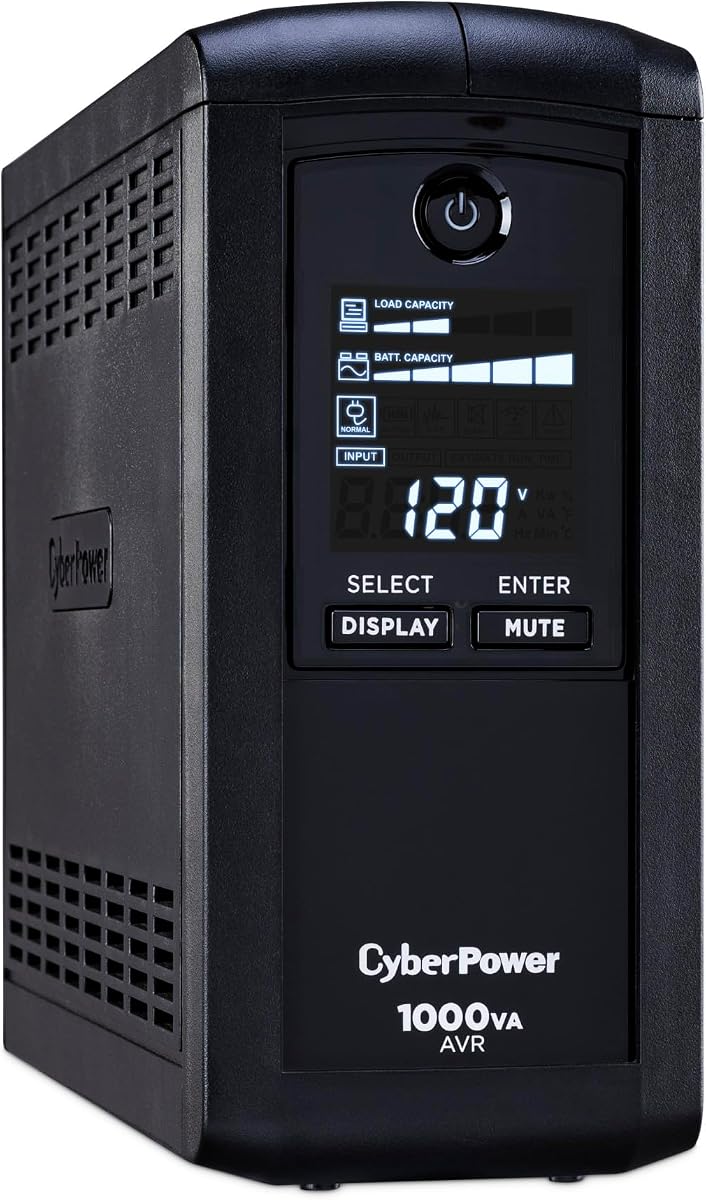


The CyberPower CP1500PFCLCD leads our list as the top choice for workstation protection. It earns a solid 4.5 rating from users who value its pure sine wave output. This feature ensures compatibility with modern active power factor corrected power supplies found in high performance PCs.
We may earn a commission when you buy through this link, at no additional cost to you.
Its 1500VA capacity provides ample headroom for demanding workstations with powerful GPUs. The unit includes twelve outlets split between battery backup and surge protection only The color LCD panel gives immediate feedback on battery health and load conditions which is critical during outages.
The only trade-offs are its size and cost. While larger than budget models it fits easily under most desks. The higher price reflects the advanced sine wave tech and longer runtime you get. These factors make it a worthwhile investment for professional setups.
Buy this unit if you run critical workstation tasks like video editing or 3D rendering. It offers the reliability and compatibility needed to prevent data loss. The included software also allows for automated shutdowns adding an extra layer of safety for your files.
Active PFC power supplies in modern workstations require clean power. This unit delivers a true sine wave that matches utility power quality preventing potential hardware damage.
The color LCD alerts you to issues before they become critical. It shows detailed info like load and runtime making it easy to manage power during storms or grid instability.
We may earn a commission when you buy through this link, at no additional cost to you.
The CyberPower BRG1500AVRLCD2 stands out with an impressive 4.7 user rating. Its five year warranty signals strong confidence from the manufacturer. While it uses simulated sine wave it still delivers solid power for most workstation configurations that do not require pure waveforms.
We may earn a commission when you buy through this link, at no additional cost to you.
This model matches the top choice in capacity and outlet count. The color LCD provides clear status updates at a glance. It also supports remote management cards which is a unique feature for advanced IT environments needing network monitoring capabilities.
Users might find the waveform limitation a downside for sensitive audio equipment. However for general computing tasks it performs reliably. The extended warranty offsets this concern by providing long term peace of mind against battery or component failures.
Choose this if you prioritize long term support and network features. It is ideal for offices where managing multiple devices remotely is valuable. The combination of capacity and warranty makes it a strong premium contender for serious users.
Most units offer three years but this one doubles that to five. This coverage reduces long term ownership costs and shows the brand stands behind its build quality and reliability.
Adding a management card enables network monitoring. This allows admins to track UPS status remotely which is useful in server rooms or distributed workspaces needing centralized oversight.
We may earn a commission when you buy through this link, at no additional cost to you.
The GOLDENMATE 2000VA brings lithium technology to the budget friendly price range. It achieves a 4.4 rating thanks to its unique battery chemistry. Users love that it avoids the typical lead acid replacement cycle saving money over time.
We may earn a commission when you buy through this link, at no additional cost to you.
Its 2000VA output is the highest on this list. The pure sine wave ensures safe charging for all computer types. With over 3000 cycles the battery lasts far longer than standard models. This makes it a smart choice for heavy duty use.
The main drawback is its weight due to the larger transformer needed for lithium. It also has fewer outlets than some CyberPower units. However the longevity and high output justify the size for those willing to allocate space for a robust unit.
Opt for this if you want longevity and high power on a budget. It is perfect for workstations needing extended runtime during outages. The maintenance free operation means you set it up and forget it for years.
LiFePO4 batteries last ten years with over 3000 cycles. This reduces total cost of ownership significantly compared to lead acid units that need replacing every few years.
With 1600W output it supports power hungry workstations. It provides ample runtime even when running multiple monitors and high end graphics cards without strain.
We may earn a commission when you buy through this link, at no additional cost to you.
This model shares the high capacity of the top pick but uses simulated sine wave. It maintains a strong 4.5 rating from users who need more outlets than average. The color LCD is a standout feature for visual feedback during power issues.
We may earn a commission when you buy through this link, at no additional cost to you.
It offers twelve outlets which is great for docking stations and peripherals. The AVR helps correct voltage fluctuations without draining battery. This keeps your workstation running efficiently even during minor brownouts. The USB ports add convenience for charging small devices.
The simulated waveform is the only real trade off. It may not suit equipment needing pure sine wave. But for most office workstations it works well. The balance of features and capacity makes it a solid alternative to the more expensive pure wave model.
Buy this if you need outlets and visual monitoring on a mid budget. It is ideal for setups with many connected devices. The color display adds a premium touch that helps you stay informed about your power status.
Twelve outlets allow you to plug in everything without strips. This reduces clutter and ensures critical devices stay on backup power while non critical ones stay on surge only.
The color LCD makes status easy to read. Alerts are clear and detailed helping you react quickly to power changes or low battery situations.
We may earn a commission when you buy through this link, at no additional cost to you.
The CyberPower CP1000PFCLCD brings pure sine wave power to a smaller package. It holds a 4.2 rating and is perfect for compact workstations. The unit balances power and space effectively making it great for tighter desks.
We may earn a commission when you buy through this link, at no additional cost to you.
Its ten outlets and USB ports offer decent connectivity. The color LCD gives good feedback on load and battery. This model is a strong pick for users who prioritize waveform quality but do not need maximum capacity.
The lower VA rating means shorter runtime for big systems. It might not last long if you run high wattage gear. But for average desktop setups it provides sufficient backup. The compact design saves valuable desk space.
Choose this if you have limited space but need clean power. It suits office PCs that are not power hungry. The pure sine wave ensures your hardware stays safe while keeping your footprint minimal.
This unit fits neatly under desks. It provides pure sine wave power without taking up too much room which is perfect for home offices.
Pure sine wave protects sensitive electronics from stress. This ensures your workstation components last longer and run more efficiently under battery power.
We may earn a commission when you buy through this link, at no additional cost to you.
This unit is a steady performer for general workstation needs. It has a 4.5 rating for reliability. The LCD panel gives detailed info like runtime which helps you plan work around power usage.
We may earn a commission when you buy through this link, at no additional cost to you.
It offers nine outlets which is enough for a standard setup. The AVR adjusts voltage without using battery. This keeps your PC running smoothly during minor fluctuations. It is a practical choice for daily office tasks.
The simulated sine wave is a limitation for some audio gear. But for computing it works well. The battery life is average so plan your shutdown times accordingly. Overall it offers consistent protection without surprises.
Pick this for a dependable workhorse unit. It is good for users who want clear monitoring and solid protection. It balances performance and cost well for typical professional environments.
The LCD shows detailed runtime info. This helps you understand how much time you have during outages so you can save work properly.
AVR helps fix small power issues. This extends battery life and keeps your PC running safely without switching to backup immediately.
We may earn a commission when you buy through this link, at no additional cost to you.
This model focuses on efficiency with its ECO mode feature. It carries a 4.4 rating for users who want to reduce energy waste. When connected devices sleep the UPS cuts power to them saving electricity.
We may earn a commission when you buy through this link, at no additional cost to you.
It includes twelve outlets which is rare at this capacity. The LCD panel provides clear status updates. It is a great entry level unit for those who want smart features without high cost.
The ECO mode might not fit setups needing constant power. But for standard PCs it works well. The lower capacity means shorter runtime for big tasks. Still it offers excellent value for energy conscious users.
Choose this if you want to save energy costs. It suits users who value smart features and outlet count. It is a smart pick for home offices looking to cut power use.
ECO mode turns off peripherals when PC sleeps. This reduces waste and lowers energy bills while keeping your main gear protected.
Twelve outlets allow for full setup protection. You can plug everything in without extra strips keeping your workspace organized and safe.
We may earn a commission when you buy through this link, at no additional cost to you.
The CyberPower AVRG900LCD stands out for network protection. It has a strong 4.6 rating for reliability. Unlike others it includes data line protection which shields modems from surges traveling through phone lines.
We may earn a commission when you buy through this link, at no additional cost to you.
It has twelve outlets and AVR to manage voltage. This unit is ideal for setups with broadband routers and modems. The protection for data lines adds a layer of safety that many workstations need for internet connectivity.
It lacks USB ports and has lower capacity. But for network heavy setups it is valuable. The runtime is decent for shutting down systems. It fills a niche for connectivity protection that other units miss.
Pick this if you need modem protection too. It is great for workstations relying heavily on internet. The added data line safety makes it a smart choice for online work.
Data line protection guards against surges on phone lines. This keeps your modem safe and ensures internet stays up even during power issues.
Twelve outlets let you plug in routers easily. This centralizes power protection for your whole network setup.
We may earn a commission when you buy through this link, at no additional cost to you.
This model offers a slim profile for tight spaces. It earns a 4.5 rating for its efficient design. The unit is thinner than typical units making it easy to tuck away.
We may earn a commission when you buy through this link, at no additional cost to you.
It has twelve outlets with wide spacing. This fits large adapters without blocking others. The high efficiency design reduces power waste. It is a great pick for those who value physical layout.
It lacks some advanced features like USB charging. But for pure power it works well. The slim shape is a big plus for compact setups. It keeps things organized and functional without bulk.
Choose this for clean setups where space is limited. It suits workstations needing simple protection. The design makes it a standout for organized desks.
Slim profile fits under desks easily. This helps keep your workspace tidy and avoids clutter.
Widely spaced outlets allow large plugs. This prevents blocking and ensures all devices stay connected securely.
We may earn a commission when you buy through this link, at no additional cost to you.
This is the entry level option in our lineup. It has a 4.5 rating for consistent performance. The unit is compact and affordable for basic workstation needs.
We may earn a commission when you buy through this link, at no additional cost to you.
It includes nine outlets and LCD display. The AVR helps manage small voltage issues. It is ideal for standard office PCs that do not draw much power.
It has the lowest capacity so runtime is short. But for quick shutdowns it works well. The price makes it accessible for budget conscious users. It delivers core protection without frills.
Pick this if you need basic backup on a budget. It is good for standard office PCs. It offers essential safety at a reasonable cost.
Affordable price makes it accessible. This helps protect systems without high cost.
Core features cover essentials. It provides safety for standard office PCs.
We may earn a commission when you buy through this link, at no additional cost to you.
Choosing the right unit requires looking at several key factors. This guide breaks down what to consider to ensure your workstation gets the right level of protection.
Match the VA rating to your workstation load. High end GPUs and multiple monitors need higher capacity to ensure enough runtime during outages. Check your power supply wattage and add 20 percent for safety.
Choose units with enough headroom to avoid overloading the battery.
Pure sine wave is essential for active PFC power supplies. Simulated waveforms work for standard PSUs but may cause issues with sensitive gear. Check your hardware requirements before choosing a unit.
Ensure waveform matches your hardware needs to prevent damage.
Count all devices you need to protect. Workstations often need power for docking stations and monitors. Units with 12 outlets offer flexibility without extra power strips.
More outlets reduce clutter and ensure critical gear stays backed up.
Lead acid batteries are standard but need replacement. Lithium options last longer and have fewer cycles. Consider total cost of ownership when comparing prices and replacement needs.
Lithium batteries save money long term despite higher upfront cost.
LCD displays show vital info like runtime and battery health. Color panels make alerts easier to spot. This helps you react quickly during power events.
Look for displays that give clear and detailed status info.
Free software enables automated shutdowns during outages. This prevents data loss without your presence. Some units also support remote management for network visibility.
Check if included software works with your OS for safety.
Most units come with three year warranties. Some extend to five years for better value. Longer warranties reduce long term risk for critical setups.
Opt for longer coverage to protect your investment.
Check for certifications like UL for safety. Higher quality builds handle surges better. Consider weight as a sign of transformer quality.
Certified units offer greater peace of mind for reliability.
Install the UPS close to your workstation but allow space for ventilation. Plug it into a wall outlet before connecting your PC to ensure it charges fully.
Use the provided software to set automatic shutdowns so your files save safely during outages. Test the battery every six months by unplugging the unit briefly to confirm it takes over.
Replace batteries when the indicator light turns red or runtime drops significantly. Keep the unit clean from dust and avoid exposure to extreme temperatures to ensure longevity.
Yes if your PC uses an active PFC power supply. Pure sine wave output ensures clean energy for your hardware. Simulated waveforms work for standard PSUs but may cause noise or issues with high end gear.
Runtime depends on capacity and load. A 1500VA unit might give 10 to 15 minutes for a standard workstation. Use this time to save files and shut down safely during outages.
Yes but check capacity. Gaming PCs with high end GPUs need high wattage units. Look for at least 1000W output to avoid overloading the UPS during gaming sessions.
They offer surge protection for connected devices. This includes protection from smaller surges. For major lightning strikes use whole house protection alongside your UPS for full safety.
Most units show a replace battery light. You can also check runtime through the LCD panel. If it lasts less than 30 seconds on battery replace it immediately.
Most units include free management software via download. This helps you monitor battery health and set shutdowns. Always check the manufacturer site for the latest compatible software version.
The CyberPower CP1500PFCLCD leads the pack with pure sine wave power and high capacity. It ensures your workstation stays safe without compatibility issues.
Prioritize features like waveform and runtime based on your gear needs. For long term value consider the GOLDENMATE lithium model for its lifespan.
Always check current availability and features before purchasing. The right unit keeps your work secure and your hardware running smoothly.