
ARCTIC P12 Pro A-RGB
4.7Editor score
3000 RPM Speed
Fluid Dynamic Bearing
High Static Pressure
Addressable RGB fans transform your computer case into a stunning visual display while maintaining optimal thermal performance. These modern cooling solutions combine high airflow with customizable lighting effects that sync across your entire system components.
We evaluated ten leading addressable RGB fan sets based on cooling efficiency, noise output, build quality, and ease of installation. Each product offers unique features ranging from magnetic connectors to reverse blade designs for comprehensive case airflow management.
Every review highlights specific strengths and trade-offs to help you choose the right fans for your budget and build style. Please note that product availability and pricing may fluctuate over time so check current listings before purchasing.
4.7Editor score

4.7Editor score
4.8Editor score
As an Amazon Associate we earn from qualifying purchases.
This side-by-side comparison examines all ten selected addressable RGB fan sets across key performance metrics including airflow, static pressure, noise levels, and lighting capabilities to help you make an informed decision.




The Thermalright TL-C12C-S X5 stands out as the top choice for builders seeking balanced performance and affordability. With a 4.7 rating it delivers reliable cooling and vibrant lighting without breaking the bank making it ideal for budget builds.
We may earn a commission when you buy through this link, at no additional cost to you.
Its S-FDB bearing ensures smooth operation while keeping noise levels below 25.6 dBA even at full speed. The 66.17 CFM airflow provides strong cooling for cases and radiators while the 17 lighting modes offer impressive customization through motherboard sync.
While it lacks reverse blades for intake styling the standard forward design works perfectly for exhaust and CPU cooler mounting. The long 55cm PWM cable simplifies routing in larger cases reducing cable clutter and installation complexity significantly.
We recommend this set for first time builders or those upgrading older systems on a tight budget. The combination of quality bearings low noise and effective lighting makes it the best all round addressable RGB fan available today.
The fan achieves 66.17 CFM airflow with 1.53mm H2O static pressure ensuring efficient heat removal from components during intense gaming or workloads.
High brightness LED atomizing blades reflect light softly creating uniform ARGB effects that sync seamlessly with your motherboard lighting ecosystem.
We may earn a commission when you buy through this link, at no additional cost to you.
The CORSAIR RS120 ARGB offers a premium solution with simplified cable management through its daisy-chain connection design. This triple pack provides 72.8 CFM airflow per fan which is among the highest in its class for efficient cooling.
We may earn a commission when you buy through this link, at no additional cost to you.
Its magnetic dome bearing reduces vibration and noise while allowing speeds up to 2100 RPM. The AirGuide technology directs airflow precisely onto components improving cooling efficiency when mounted on radiators or heatsinks for demanding setups.
Though slightly pricier than competitors the reduced cable clutter and robust build quality justify the investment for mid to high end builds. Compatibility with iCUE software allows deep customization of lighting and performance curves.
Ideal for users who value clean internals and strong performance the RS120 delivers on both fronts. Its high static pressure makes it particularly suitable for liquid cooling radiators where airflow resistance is higher than standard case mounting.
One PWM and one ARGB connector control all three fans reducing cable count and simplifying case management for a cleaner build aesthetic.
Anti-vortex vanes channel air in a specific direction maximizing heat dissipation on targeted components like CPU coolers or GPU radiators.
We may earn a commission when you buy through this link, at no additional cost to you.
The ARCTIC P12 Pro A-RGB delivers outstanding performance for its price point making it the clear budget champion. With a 4.7 rating it proves that affordable fans can still offer reliable cooling and smooth operation for everyday use.
We may earn a commission when you buy through this link, at no additional cost to you.
Its fluid dynamic bearing minimizes noise during operation ensuring silent performance even under load. The speed range extends up to 3000 RPM via PWM allowing precise control from near stop to maximum cooling capacity as needed.
While lighting options are basic compared to premium sets the fan ensures balanced and precise manufacturing reducing gaps and vibrations. This focus on mechanical quality ensures long life and consistent airflow without unnecessary cost additions.
Best for budget builders needing pure cooling power the P12 Pro A-RGB excels where it counts. The combination of high RPM potential and quiet operation makes it an excellent choice for those prioritizing function over flashy lighting.
High precision measurement and automatic balancing minimize gaps and vibrations ensuring smooth running and longer service life for daily use.
Progressive speed control via 4-pin PWM allows operation from less than 5% duty cycle up to 3000 RPM for versatile cooling scenarios.
We may earn a commission when you buy through this link, at no additional cost to you.
The Thermaltake CT120 EX ARGB introduces MagForce 2.0 magnetic connectors that simplify fan daisy-chaining without extra wiring. This triple pack features nine addressable LEDs per fan providing vibrant 16.8 million color customization for your build.
We may earn a commission when you buy through this link, at no additional cost to you.
Its optimized hydraulic bearing ensures reliable silent operation while the embedded anti-vibration mounting system reduces case resonance during high speed operation. The magnetic connection design allows quick installation and rearrangement within your case.
While the magnetic connectors are innovative they require careful handling to avoid misalignment during installation. Overall noise levels are acceptable but may increase at maximum speed which is typical for fans with this design approach.
We suggest this set for builders who value clean cable management and easy installation. The magnetic system reduces clutter effectively and the lighting sync with 5V motherboard software offers excellent visual control.
MagForce 2.0 allows multiple fans to connect with only one cable reducing ports and clutter inside your PC case.
The optimized hydraulic bearing provides long lasting silent operation while the vibration mounting system minimizes unwanted noise.
We may earn a commission when you buy through this link, at no additional cost to you.
This 6 pack set uniquely includes both forward and reverse fans enabling visually consistent intake and exhaust airflow. With 28 ultra-bright LEDs per fan it delivers exceptional lighting brilliance compared to standard RGB fan options.
We may earn a commission when you buy through this link, at no additional cost to you.
The HDB bearing ensures quiet cooling while the included 2-in-1 hub simplifies controller needs for both speed and lighting. Prism design blades enhance visual effects making them stand out in tempered glass cases significantly.
While the rating is slightly lower than top picks the value and versatility of having reverse fans make it compelling. The hub reduces cable clutter but adds one more point of failure in your lighting chain.
Best for builds requiring balanced intake and exhaust visibility this kit covers all needs in one box. The reverse blades maintain lighting consistency when installed as bottom or side intake improving overall aesthetics.
Reverse blades keep lighting fully visible when installed as intake ensuring consistent visual flow across all case positions.
Each fan packs 28 LEDs offering 25% more light points than typical fans for vivid even lighting effects.
We may earn a commission when you buy through this link, at no additional cost to you.
The Thermalright TL-C12C-S X3 offers the same quality as the 5-pack in a smaller more affordable package. With identical specs including 1550 RPM speed and 66.17 CFM airflow it provides excellent cooling for compact builds.
We may earn a commission when you buy through this link, at no additional cost to you.
Its S-FDB bearing maintains minimal noise levels while the soft ARGB lighting ensures pleasing visual effects. The 55cm PWM cable allows flexible series control making it easy to manage multiple fans in smaller cases.
While it lacks the extra fans of the 5-pack version it remains a solid choice for those needing three reliable fans. The price difference reflects the quantity rather than any compromise in performance or durability.
We recommend this set for smaller cases or systems needing minimal cooling. The consistent quality from Thermalright ensures reliable performance and the ARGB sync works well with standard motherboard headers.
The 3-pack maintains the same cooling specs as the larger version delivering 66.17 CFM airflow with low noise operation.
With a 55cm PWM cable you can daisy chain fans easily reducing cable clutter in compact case setups.
We may earn a commission when you buy through this link, at no additional cost to you.
The Thermalright TL-C12C-S X5 Silent emphasizes low noise performance with intelligent temperature control features. This 5-pack set provides automatic speed adjustment based on motherboard temperature reducing noise during idle periods effectively.
We may earn a commission when you buy through this link, at no additional cost to you.
With noise below 25.6 dBA it remains quiet even under load while delivering 66.17 CFM airflow. The S-FDB bearing ensures smooth long term operation and the ARGB lighting offers 17 modes for customization.
While it lacks advanced features like magnetic connectors its simplicity and silent design make it ideal for noise sensitive environments. The included long cables simplify installation for multiple fan setups.
We recommend this set for office PCs or quiet gaming builds. The automatic temperature control ensures fans only spin up when needed balancing cooling and silence effectively for daily tasks.
PWM temperature control automatically adjusts speed based on system temperature removing need for manual speed configuration.
Noise levels kept under 25.6 dBA ensuring silent operation suitable for home offices or noise sensitive setups.
We may earn a commission when you buy through this link, at no additional cost to you.
The Thermaltake CT120 ARGB offers a reliable 2-pack option with a redefined 7-blade design for optimized airflow. Its daisy-chain design simplifies installation requiring fewer ports while providing bright 9 LED addressable lighting.
We may earn a commission when you buy through this link, at no additional cost to you.
With speeds up to 2000 RPM it delivers solid airflow and static pressure suitable for case or radiator mounting. The anti-vibration mounting system ensures stable operation reducing unwanted case resonance.
While limited to two fans this pack works well for small cases or partial upgrades. The hydraulic bearing ensures quiet operation but may lack the extra cooling headroom of larger multi-fan kits.
Best for minimal builds or budget upgrades the CT120 ARGB delivers on quality and lighting. Its compatibility with 5V motherboard sync makes it easy to integrate into existing RGB systems.
Redefined blade structure balances CFM and static pressure for efficient cooling across case and radiator use.
Daisy-chain design requires less cables and fewer ports reducing cable clutter for cleaner builds.
We may earn a commission when you buy through this link, at no additional cost to you.
The Thermaltake LE120 ARGB earns a 4.8 rating for its balanced performance and reliable operation. Its 9-blade design delivers 66.1 CFM airflow with 1.41mm static pressure making it suitable for general case cooling.
We may earn a commission when you buy through this link, at no additional cost to you.
A 3-way PWM splitter included simplifies installation allowing all three fans to connect easily. The hydraulic bearing ensures quiet operation while the 9 addressable LEDs sync with 5V motherboard software.
While it lacks daisy-chain capability the splitter serves a similar purpose reducing wiring complexity. The design is practical and reliable for users who need a straightforward 3-pack solution without premium features.
We recommend this set for standard builds needing reliable cooling and lighting. Its high rating reflects consistent performance and ease of installation making it a safe choice for most PC setups.
Nine blades at 1500 RPM deliver optimized airflow for efficient heat dissipation without excessive noise.
Included 3-way PWM splitter simplifies wiring allowing quick setup for multiple fans.
We may earn a commission when you buy through this link, at no additional cost to you.
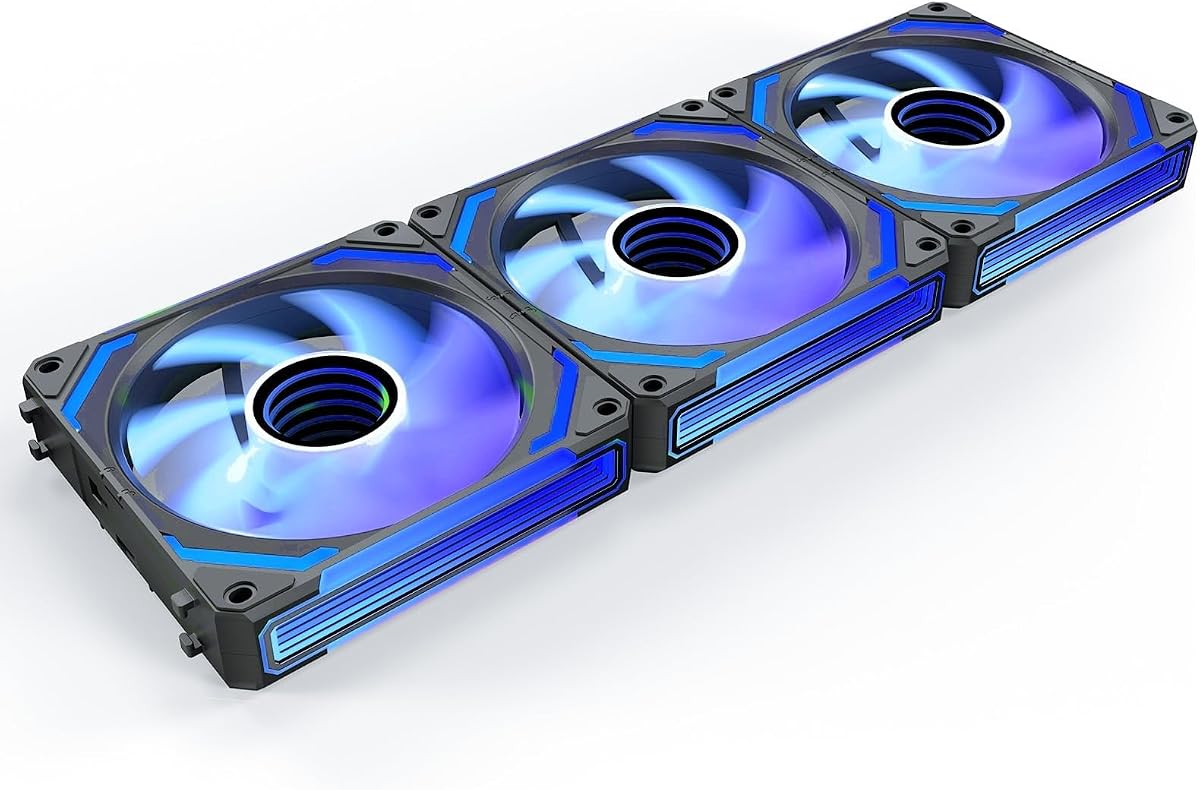
The AsiaHorse COSMIQ 120mm delivers premium visuals with its infinity mirror lighting design creating a layered high-end atmosphere. This 3-pack includes reverse fans for consistent aesthetics and supports music sync for interactive lighting.
We may earn a commission when you buy through this link, at no additional cost to you.
Its hydrodynamic bearing keeps noise below 29.2dB even at full 2000 RPM speed. The daisy chain wiring reduces cable clutter significantly improving internal airflow and build tidiness.
While the music sync feature is niche the main lighting effects provide stunning visual impact for showcase builds. The included small controller allows independent lighting control without motherboard dependence.
Best for enthusiasts prioritizing aesthetics this set offers unique beauty without sacrificing cooling. The combination of premium design solid airflow and flexible wiring makes it the top choice for high end showcases.
Stunning layered RGB design transforms ordinary cases into beautiful desktop landscapes with visual depth.
Built-in sound pickup supports eight music rhythm modes creating dynamic lighting effects synchronized with game audio.
We may earn a commission when you buy through this link, at no additional cost to you.
Selecting the right addressable RGB fans requires balancing cooling performance, lighting quality, and case compatibility to ensure a successful build.
Airflow measured in CFM determines how much air the fan moves for general case ventilation while static pressure measured in mm H2O indicates its ability to push air through dense radiators or filters. Look for higher airflow numbers for front intake and higher static pressure for radiator mounts to ensure effective cooling.
Choose fans with high CFM for airflow needs and high static pressure for radiator restrictions.
The bearing type affects fan noise and lifespan significantly. Fluid dynamic bearings offer smooth operation and durability while ball bearings provide longer life at higher speeds. Hydraulic and sleeve bearings are budget-friendly but may be noisier over time.
Select S-FDB or FDB bearings for balanced quiet performance and longevity.
PWM control via 4-pin connectors allows precise speed adjustment based on temperature reducing noise at idle. ARGB fans require 5V 3-pin connectors separate from standard 12V RGB headers. Ensure your motherboard supports both 4-pin PWM and 5V 3-pin ARGB for full functionality.
Confirm your motherboard has both PWM and ARGB headers before purchasing.
Daisy-chain and magnetic connection designs reduce cable clutter by allowing multiple fans to connect through a single controller or connector. Traditional wiring requires individual cables for each fan which can complicate cable management in tight cases.
Opt for daisy-chain or magnetic connectors for cleaner builds and easier installation.
Addressable RGB fans offer per-LED customization allowing complex effects compared to standard RGB. Check the number of LEDs per fan and software compatibility with your motherboard or controller. Some sets include dedicated controllers for lighting independence.
Prioritize fans with high LED counts and compatible software for vibrant effects.
Standard fans show blades when viewed from the front while reverse fans hide blades for cleaner aesthetics on intake mounts. Using mixed forward and reverse fans allows consistent lighting without seeing spinning blades on intake points.
Choose sets with reverse fans if you prioritize consistent visual aesthetics.
Noise measured in dBA affects build comfort especially in quiet environments. Look for models with noise below 25 dB for silent operation or those with low speed modes. High speed fans may be louder but provide better cooling under load.
Check noise ratings to match your tolerance for audible fan sounds.
Fans often come in packs of two three five or six. Consider how many fans your case requires for balanced airflow before buying larger packs. Larger packs often offer better per-fan pricing but may include unnecessary fans.
Buy the pack size that matches your case fan slots for best value.
Connect the 4-pin PWM connector to your motherboard CPU or system fan header to enable automatic speed control based on temperature. Connect the 5V 3-pin ARGB connector to a compatible motherboard header or controller to manage lighting. Ensure the fans are oriented correctly with the arrows indicating airflow direction.
Use your motherboard software or dedicated controller to customize lighting effects and speed profiles. Most ARGB fans sync with common RGB software allowing centralized control. Adjust fan curves to balance cooling performance with noise levels based on your workload.
Regularly clean dust from fan blades using compressed air to maintain airflow efficiency. Ensure fans rotate freely without obstruction and check connections periodically for security. Proper care extends fan life and keeps your system running quietly and efficiently.
Addressable RGB fans require a motherboard with a 5V 3-pin ARGB header and a 4-pin PWM fan header. Most modern motherboards support these connections but older models may not. Always check your motherboard manual before purchasing to confirm compatibility.
Standard RGB lighting changes all LEDs on a device simultaneously to one color while addressable RGB allows individual LEDs to be controlled independently. This enables dynamic effects like color cycling and animations across the fan rather than uniform color changes.
Yes you can use ARGB fans by connecting only the PWM power cable and ignoring the ARGB connector. The fan will still provide cooling and speed control but without any lighting effects. This works for users who prioritize function over aesthetics.
Ideally install three to six fans depending on case size and cooling needs. A standard setup includes front intake fans and rear or top exhaust fans for positive pressure. Add more fans if you have high heat components or a liquid cooling radiator.
Some ARGB fan sets include a controller for easier management while others rely on motherboard software. If you have multiple fans without daisy-chain support a controller reduces cable clutter. Check the product details to confirm what is included in the box.
Reverse fans provide the same cooling performance as standard fans but hide the blades when viewed from the front creating a cleaner look. They are ideal for intake mounts where appearance matters. Choose them if aesthetics are a priority in your build.
Use compressed air to blow dust off fan blades and housing regularly. Avoid removing fan covers if they are sealed as this can void warranties. Ensure the system is powered off before cleaning to prevent electrical damage.
You can mix brands but lighting effects may not sync properly without a unified controller. Some software platforms allow multiple brands but consistency varies. For best lighting uniformity choose fans from the same ecosystem or use a universal RGB controller.
The Thermalright TL-C12C-S X5 leads as the best overall choice offering exceptional value with quality bearings and cooling performance. The ARCTIC P12 Pro A-RGB provides the most affordable performance while the AsiaHorse COSMIQ 120mm delivers premium aesthetics with its infinity mirror design.
When choosing prioritize your specific needs such as cooling performance noise levels or visual customization. Ensure your motherboard supports both PWM and ARGB connections before purchase. Consider daisy-chain options for cleaner cable management in your case.
Always verify current product availability and pricing as offers may change. Use the links provided to check real-time details and purchase from trusted retailers. Selecting the right addressable RGB fans enhances both cooling and style for your ultimate PC build.