
Comulytic Note Pro AI Voice Recorder
4.2Editor score
Unlimited free transcription
Ultra-slim aluminum design
Wi-Fi sync capability
This guide compares the top 10 AI meeting transcription devices for 2026, evaluating audio quality, transcription accuracy, and smart features for professionals
Finding the right tool to capture meeting insights can transform your workflow. Modern AI meeting transcription devices offer more than simple recording. They provide real-time summaries, action items, and secure storage to help you focus on discussion rather than note-taking.
We evaluated ten leading devices based on audio clarity, AI capabilities, battery life, and security standards. Each product was analyzed for its ability to handle different environments from quiet offices to crowded conference rooms. This list covers the most reliable options available this month.
Every pick includes detailed specs, pros, cons, and expert analysis to help you choose. Prices and availability may change over time. Check current listings before purchasing to ensure you get the best value for your specific professional needs and workflow requirements.
4.2Editor score

4.8Editor score

4.5Editor score
Here is a side-by-side comparison of all ten devices to help you quickly identify key differences in features, battery life, and security standards before making your final decision.


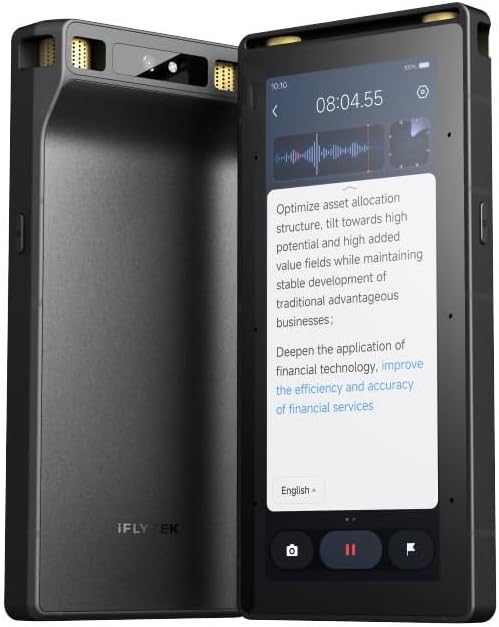
The Comu Action Pro stands out as our top pick for professionals needing actionable outputs beyond transcripts. Its ability to auto-generate docs like slides and emails saves significant post-meeting time. With a 70-hour battery life and robust AI features, it handles long workdays effortlessly.
We may earn a commission when you buy through this link, at no additional cost to you.
Its adaptive six-mic setup ensures clear audio capture in various environments. The bone-conduction mic and motion sensor enhance accuracy during calls or meetings. You can translate conversations in 113 languages and get editable follow-ups with a dedicated AI button.
While the device offers unlimited core features, some advanced tools require an upgrade. The higher price point may not suit casual users. However, for business professionals, the productivity gains justify the investment in this powerful tool.
Buy this if you need a device that turns conversations into work-ready documents automatically. It is ideal for frequent meeting attendees who value efficiency and high-quality audio capture across global teams.
The device automatically drafts slides, emails, and reminders without prompts. This feature significantly reduces manual post-meeting work for busy professionals.
Six mics with motion sensors ensure clear audio even in noisy environments. The bone-conduction mic specifically targets phone call clarity.
We may earn a commission when you buy through this link, at no additional cost to you.
This device offers impressive value with unlimited free transcription and summaries. Its slim design fits easily into pockets, and magnetic accessories keep it secure. You get 45 hours of continuous recording and fast Wi-Fi syncing for your meeting notes.
We may earn a commission when you buy through this link, at no additional cost to you.
The device uses advanced AI to capture professional terms across various industries. With 113 language support and a vertical knowledge base, it handles specialized vocabulary well. AES encryption and CCPA compliance ensure your data remains private and secure at all times.
While basic summaries are free, advanced features like instant abstracts require an upgrade. The battery life is excellent but might not match extreme endurance models. Still, the balance of features and cost makes it highly attractive for daily users.
Buy this if you need reliable unlimited transcription without monthly fees. It is perfect for professionals and students who want solid AI features and secure storage at a budget-friendly price point.
Users get unlimited free transcription and basic summaries without a subscription. This saves costs for frequent recording needs.
A vertical knowledge base improves accuracy for terms in law, finance, and real estate. This ensures professional transcripts are more accurate.
We may earn a commission when you buy through this link, at no additional cost to you.
The Plaud Note Pro excels with multimodal input, letting you add photos and notes during recording. This richer context helps AI generate more accurate summaries. Its AI directional audio minimizes noise for crystal-clear voice capture in meetings.
We may earn a commission when you buy through this link, at no additional cost to you.
Security is a major strength with ISO and HIPAA compliance. Local data encryption ensures privacy for sensitive legal or medical conversations. The Ask Plaud feature allows you to chat with recordings for deeper insights and email drafting.
Unlimited transcription requires an upgrade from the free Starter Plan. Battery life caps at 30 hours in Enhance Mode. Despite these trade-offs, the device is a top choice for professionals prioritizing privacy and context-rich documentation.
Buy this if you need top-tier security and multimodal context for complex meetings. It is ideal for legal, medical, or business professionals handling sensitive information requiring high privacy standards.
Snap photos or type notes while recording to give AI richer context. This improves summary accuracy for document-heavy meetings.
ISO 27001 and HIPAA compliance protect sensitive conversations. Encrypted local data ensures privacy for legal and medical use.
We may earn a commission when you buy through this link, at no additional cost to you.
This AI assistant is designed for seamless integration with MagSafe devices. Attach it to your iPhone for hands-free recording without interruptions. It automatically captures meetings and creates summaries with action items and conversation maps.
We may earn a commission when you buy through this link, at no additional cost to you.
Ask Pocket allows instant questions and next-step generation grounded in recordings. The battery lasts up to four days on a single charge. Its core features are included out of the box, making it easy to start using immediately.
Advanced tools are optional for power users, which may limit functionality if not upgraded. It does not explicitly mention offline modes for travel. Still, for iPhone users wanting effortless daily recording, it is a highly practical choice.
Buy this if you want a device that attaches to your phone effortlessly. It is best for iPhone owners who prioritize hands-free recording and need organized summaries for meetings and ideas.
Attaches to iPhone for hands-free use without holding the device. Perfect for walking meetings or desk recording.
Transforms recordings into clear summaries and action items. This helps review what matters quickly without digging through audio.
We may earn a commission when you buy through this link, at no additional cost to you.
EurekaMind offers unlimited transcription and summaries for free with its Starter Plan. Its Ask AI feature lets you search the web for insights beyond recordings. This makes it a powerful tool for research and follow-up questions.
We may earn a commission when you buy through this link, at no additional cost to you.
The device identifies speakers and highlights action items automatically. It adheres to ISO 27001 and GDPR standards for enterprise security. Its credit card size and magnetic design make it easy to carry and use anytime.
While free features are generous, advanced productivity tools like calendar sync require upgrades. The product description does not specify exact battery life details. Still, it is a strong choice for users needing web-enhanced AI assistance.
Buy this if you want unlimited free transcription and AI that can search the web. It is great for researchers and professionals who need deeper insights beyond the meeting audio.
Ask AI can search the web to find deeper insights beyond recordings. This adds context and data to your meeting notes.
Start with unlimited transcription and summaries in the free plan. This makes it accessible for everyday use without subscriptions.
We may earn a commission when you buy through this link, at no additional cost to you.
This device offers fast Wi-Fi sync that is ten times quicker than Bluetooth. You can back up recordings while talking without interruptions. Its 64GB storage and unlimited cloud backup ensure your files are always safe.
We may earn a commission when you buy through this link, at no additional cost to you.
The triple-mic array with noise cancellation captures clear audio within five meters. It includes a built-in real-time language translator for global travel. Free transcription and basic summaries make it accessible for students and journalists.
Premium features like Deep Dive Analysis require an optional subscription. The free plan is generous but might lack advanced analytics. However, the sync speed and storage capacity make it stand out among competitors.
Buy this if you need rapid file sync and ample storage. It is perfect for users who want to back up recordings instantly while continuing to speak without delays.
Syncs files 10x faster than Bluetooth while recording. Real-time backup happens without interrupting your conversation.
Includes a real-time translator mode for global travelers and ESL students. This helps bilingual professionals and students communicate effectively.
We may earn a commission when you buy through this link, at no additional cost to you.
Powered by GPT-5.5, RECPOINT delivers industry-leading 98% transcription accuracy. It supports 150 languages and generates mind maps for deeper analysis. With 1080 free AI minutes monthly, it offers generous core access.
We may earn a commission when you buy through this link, at no additional cost to you.
End-to-end encryption ensures your data sovereignty. A rugged aluminum body with a 3.5mm profile resists drops. The included desktop software allows for advanced editing and export across devices.
Battery life is 30 hours but does not compete with longer endurance models. Premium tools like translation require careful use of free minutes. Still, its accuracy and ecosystem make it a strong contender.
Buy this if accuracy is your top priority. It is ideal for users needing high-precision transcripts and robust desktop software for managing audio files.
Uses GPT-5.5 to achieve 98% transcription accuracy. This ensures reliable transcripts for negotiations and academic lectures.
Includes powerful desktop software for audio management and editing. This gives you professional workflow control from recording to archiving.
We may earn a commission when you buy through this link, at no additional cost to you.
This device switches between phone call and meeting modes for tailored capture. Its Vibration Conduction Sensor ensures clear call recordings. You can store up to 64GB locally to record securely offline.
We may earn a commission when you buy through this link, at no additional cost to you.
Multimodal input lets you type notes and mark key moments while recording. Security standards include ISO 27001 for HIPAA compliance. The Starter Plan includes 300 minutes monthly to get started.
Unlimited transcription requires an upgrade to Pro or Unlimited plans. It lacks some premium features of the Pro version. Still, its dual-mode capabilities and security make it solid for daily business use.
Buy this if you need separate modes for calls and meetings. It is best for professionals needing secure local storage and multimodal context without the highest price.
Automatically switches between call and meeting modes. Ensures high-quality audio for both in-person and phone conversations.
Captures internal phone sounds for clear call recordings. Ensures phone calls are recorded without external interference.
We may earn a commission when you buy through this link, at no additional cost to you.
This device processes transcription offline without needing internet. Its 8-mic array captures audio from up to 20 meters away. Hardware encryption ensures sensitive data is secure at lock screen and file levels.
We may earn a commission when you buy through this link, at no additional cost to you.
Real-time projection allows live transcriptions during meetings. A 5-year Pro Membership is included with all premium features. Cross-device sync supports seamless workflow across your devices.
The price is significantly higher than other models. It lacks specific battery life details in the description. However, for secure offline workflows and large room capture, it is unique.
Buy this if you need offline processing and large room audio capture. It is ideal for cross-border business needing hardware-level security and live projection support.
Processes transcription anywhere without internet dependency. Ideal for secure cross-border business communication.
Three-tier hardware encryption safeguards sensitive data at device level. Ensures high security for confidential business scenarios.
We may earn a commission when you buy through this link, at no additional cost to you.
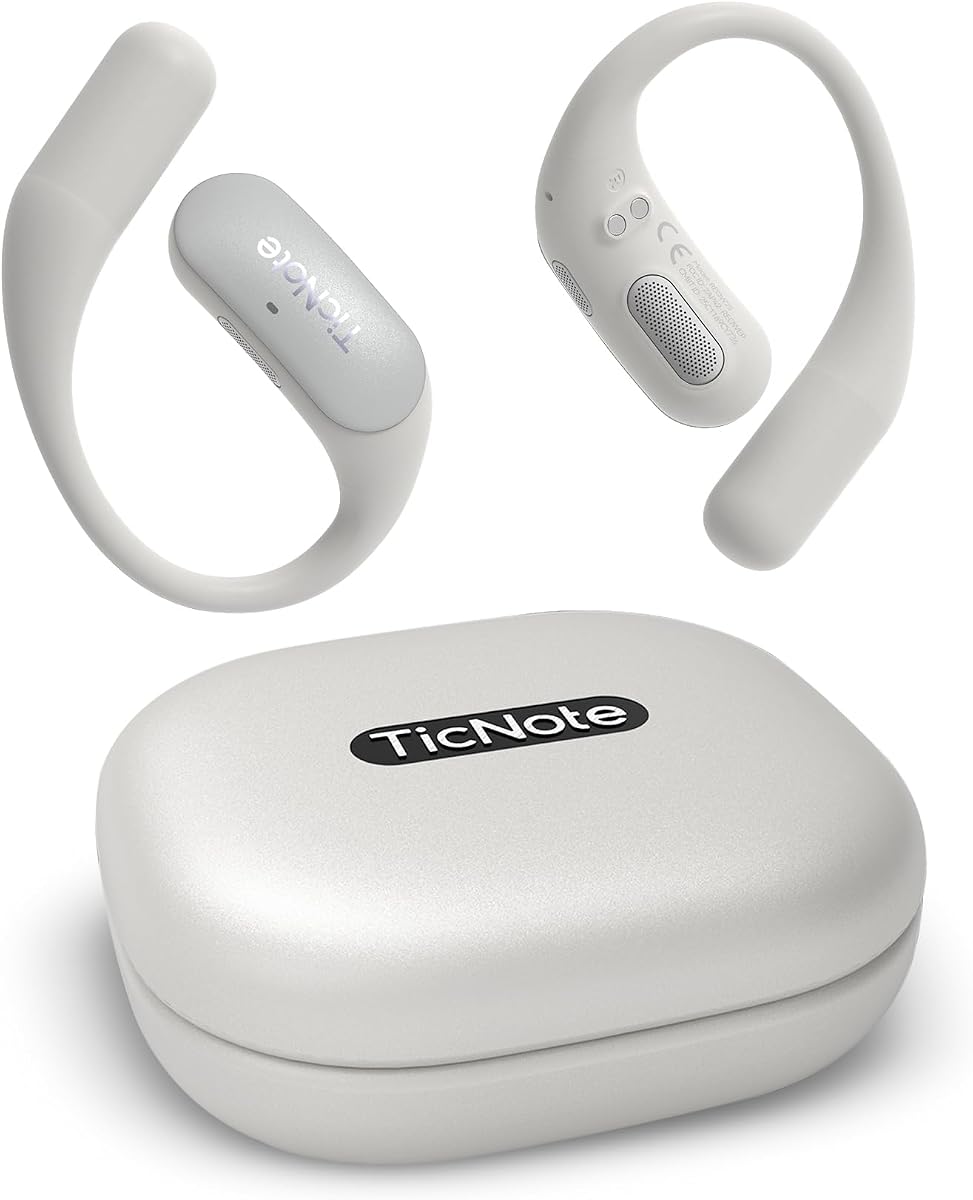
Designed for WiFi environments, TicNote Pods supports 120+ languages. Shadow AI helps organize meeting notes and highlights. Team collaboration features allow sharing transcripts with your team securely.
We may earn a commission when you buy through this link, at no additional cost to you.
End-to-end encrypted storage keeps data safe on US-based servers. The dual-mic array ensures clear audio in busy meeting rooms. Battery lasts up to five hours for continuous recording sessions.
Battery life is shorter than competitors, limiting all-day use without recharging. It relies on WiFi for syncing which may be a drawback outdoors. Still, its collaborative tools are strong for teams.
Buy this if you need team collaboration and language support. It is best for teams working in WiFi offices who need secure sharing and translation tools.
Share notes and recordings with your team. Supports collaborative editing and version history for smoother workflows.
Shadow AI helps turn conversations into useful outputs. Enhances note-taking efficiency for work and follow-up.
We may earn a commission when you buy through this link, at no additional cost to you.
Selecting the right device depends on your specific workflow, budget, and security needs.
Look for devices using advanced AI engines like GPT models or proprietary AI. High accuracy ensures your transcripts are reliable and require less editing.
Prioritize models offering 98% accuracy for critical business meetings.
Multiple microphones with noise cancellation help capture clear audio in noisy rooms. Directional mics focus on speakers while ignoring background noise.
Ensure the device supports at least 5 meters of range for standard rooms.
Check for ISO 27001, HIPAA, or GDPR compliance to protect sensitive data. Encryption at rest and in transit is essential for legal or medical professionals.
Choose devices that encrypt files locally and offer user control over data.
Long battery life is crucial for all-day conferences. Look for 30 to 70 hours of continuous recording to avoid interruptions.
Consider devices with fast charging for quick top-ups between meetings.
Offline processing allows transcription without internet. This is vital for secure cross-border business or areas with poor connectivity.
Ensure cloud sync is available for accessing files on other devices.
For global teams, support for multiple languages is key. Devices offering 100+ languages help with translation and international collaboration.
Check if real-time translation is available for seamless cross-border meetings.
Some devices offer unlimited free transcription while others require subscriptions. Evaluate hidden costs for premium features like advanced analysis.
Look for devices with free Starter Plans to minimize initial expenses.
Slim, credit-card sized devices are easier to carry. Magnetic designs or MagSafe compatibility can enhance convenience during recording.
Choose a design that fits your daily workflow and storage needs.
Start by fully charging your device before the first meeting. Ensure software and AI features are updated to the latest version for optimal performance.
Place the recorder centrally in the room or use magnetic attachments on phones. For phone calls, enable vibration sensors if available to capture internal audio.
Regularly sync files to cloud or desktop apps to secure backups. Clean the microphones with a soft brush to prevent dust buildup that affects sound quality.
Some devices include vibration sensors that detect phone calls and switch modes. Others require manual selection for call recording. Always check if the device supports call capture before purchasing.
Certain models support offline AI transcription without internet. This is useful for secure meetings in areas with poor connectivity. Always verify offline capabilities in the product specs.
Many devices offer free Starter Plans with basic transcription and summaries. Advanced features or unlimited minutes might require a paid upgrade. Always check the included features before buying.
Top devices use AES encryption and comply with ISO standards. Local data encryption ensures privacy for sensitive conversations. Ensure the device offers end-to-end encryption for maximum security.
Most models support 100 to 150 languages. Translation and transcription for these languages are handled by built-in AI. This is essential for global meetings and international teams.
Battery life ranges from 5 hours to 70 hours. Long-duration models suit all-day conferences. Consider charging habits and meeting frequency when choosing a battery capacity.
We reviewed ten top AI meeting transcription devices, highlighting strengths from battery life to security. Each model offers unique features tailored to different professional workflows and needs.
Prioritize transcription accuracy and privacy standards for secure work. For high-volume users, check unlimited plans and offline capabilities. Always ensure the device supports your primary meeting environments.
Check current prices and availability before purchasing as terms may change. Verify that included Starter Plans meet your monthly transcription needs. With the right choice, these devices can transform productivity.