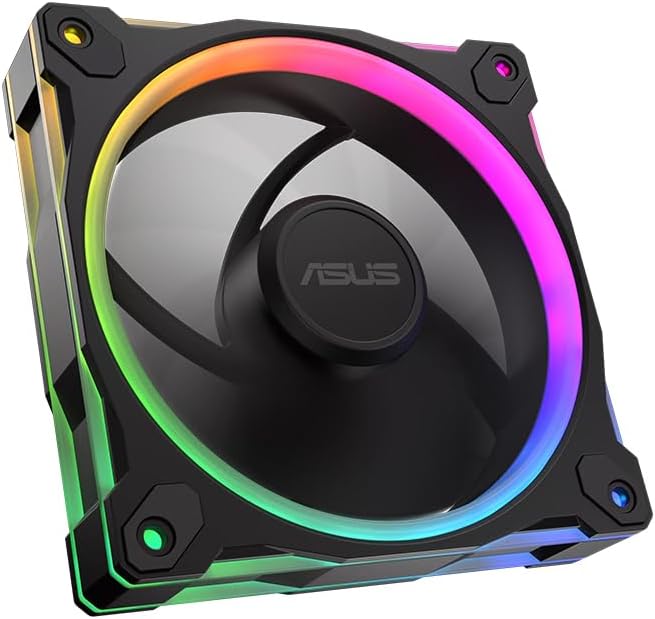
ASUS Prime MR120 ARGB Reverse Fan
4.6Editor score
28mm extra thick frame
Double sided lighting design
Quiet operation at 23dB
This guide compares the top ASUS case fans for cooling performance, noise levels, and RGB lighting to help you choose the right model for your build.
Choosing the right cooling solution is essential for maintaining system stability and extending hardware lifespan. ASUS offers a diverse range of case fans designed to balance airflow, static pressure, and acoustic performance for various computing needs.
We evaluated ten top models based on build quality, motor efficiency, lighting customization, and real-world thermal results. Each fan was assessed for its ability to handle high-performance workloads while keeping noise levels manageable in typical desktop environments.
Each pick highlights unique strengths such as frame thickness, blade design, and ecosystem compatibility. Prices may vary depending on retailer and availability, so check current listings before making your final purchasing decision for your specific setup.
4.6Editor score

4.6Editor score

5.0Editor score
The following table provides a side-by-side overview of all ten selected fans, highlighting key specifications and unique features to help you quickly identify the model that best fits your cooling requirements and aesthetic preferences.


The ASUS Prime MR120 ARGB Fan Triple Pack stands out as a top contender for builders seeking balanced performance and aesthetics. With a 4.6 rating from users, it delivers consistent cooling while offering vibrant lighting effects through its dual-sided frame design.
We may earn a commission when you buy through this link, at no additional cost to you.
Its extra-thick 28mm frame allows for optimized airflow and static pressure, making it suitable for both intake and exhaust configurations. The PWM control ensures speeds up to 1600 RPM, adapting dynamically to thermal demands without excessive noise.
While it lacks color options beyond black, the lighting quality compensates with 20 addressable LEDs arranged in a circular pattern. The only minor drawback is dependency on an Aura Sync compatible motherboard for full customization control.
This pack is ideal for users upgrading older systems or building new rigs where cost efficiency matters. It strikes a strong balance between cooling efficiency and visual appeal, making it a reliable choice for most gaming or workstation setups.
The dual-sided lighting design ensures fans look consistent from any angle, eliminating the need to hide cable sides inside tight enclosures.
PWM control adjusts fan speeds based on real-time thermal feedback, maintaining silence during idle and maximizing airflow during heavy tasks.
We may earn a commission when you buy through this link, at no additional cost to you.
The ASUS ProArt PF120 Single Pack achieves a rare 5.0 rating, reflecting its exceptional build quality and performance. Designed for professionals and enthusiasts, it prioritizes reliability and acoustic comfort over flashy visual elements.
We may earn a commission when you buy through this link, at no additional cost to you.
Equipped with LCP composite blades and a CNC-milled brass bearing housing, this fan maintains stability at high speeds while minimizing vibration. The 3-phase motor delivers smooth torque, reducing noise even under continuous heavy-load conditions.
Though it lacks RGB lighting, its engineering quality justifies the investment for silent workstation builds. The only limitation is the premium price point, which may not suit budget-conscious buyers focused purely on aesthetics.
This model is best suited for users who prioritize longevity and noise reduction. It excels in environments where consistent cooling and minimal acoustic distraction are critical, such as content creation studios or quiet home offices.
The CNC-milled brass bearing ensures tight tolerances and extended lifespan, making it reliable for continuous operation in demanding professional environments.
Advanced motor design and balanced blades work together to significantly reduce operational noise, ideal for users seeking a quiet computing environment.
We may earn a commission when you buy through this link, at no additional cost to you.
The ASUS Prime MR120 ARGB Reverse Fan offers excellent value for single-unit purchases, delivering reliable cooling and attractive lighting at a competitive price. Its reverse blade design simplifies airflow direction management within a case.
We may earn a commission when you buy through this link, at no additional cost to you.
With a noise level as low as 23dB, it ensures that cooling doesn't interfere with audio or concentration during use. The 28mm frame provides sturdy construction while accommodating standard 120mm mounting points without modification.
The only drawback is that it comes as a single fan, requiring multiple purchases to outfit an entire system. Additionally, lighting options are functional rather than highly customizable compared to newer RGB models.
This fan suits builders who need a single replacement or supplemental cooling without overspending. It provides solid performance and decent aesthetics, making it a practical choice for upgrades or budget-focused PC builds.
The reverse blade configuration allows visible frame and lights when used as an intake fan, improving case aesthetics without extra hardware.
A compact frame paired with optimized blade geometry keeps airflow strong while maintaining minimal acoustic output during typical operations.
We may earn a commission when you buy through this link, at no additional cost to you.
The ASUS ProArt PF120 PWM Fan is built for performance-oriented applications requiring maximum airflow and static pressure. With speeds reaching 3000 RPM, it handles high thermal loads effectively in demanding workloads.
We may earn a commission when you buy through this link, at no additional cost to you.
Its daisy-chain design simplifies wiring when installing multiple units, reducing clutter in tight spaces. The LCP blades maintain shape and balance at high speeds, ensuring longevity and consistent cooling performance over time.
However, operating at maximum speed generates more noise, which may not suit quiet builds. Additionally, compatibility depends on having the correct PWM headers to control the fan properly without risking instability.
This fan is recommended for overclocked systems or servers where cooling efficiency outweighs noise concerns. It offers robust engineering and flexible installation options for users who prioritize raw thermal performance above all else.
The 3000 RPM speed and optimized blade pitch deliver exceptional airflow and static pressure for radiator or restricted intake setups.
Daisy-chain connectors allow multiple fans to share power and control signals, reducing cable clutter and simplifying system assembly.
We may earn a commission when you buy through this link, at no additional cost to you.
The ASUS TUF Gaming TR120 ARGB delivers impressive airflow with 76.3 CFM, making it suitable for intake fans or cases with restricted ventilation. Its reverse blade style enhances case aesthetics without compromising performance.
We may earn a commission when you buy through this link, at no additional cost to you.
Addressable RGB LEDs offer customization through motherboard software, allowing users to match their system theme. PWM control maintains speeds up to 2000 RPM, providing flexibility based on cooling requirements during various tasks.
At maximum speed, noise levels can increase, which might be noticeable in quiet environments. The single-pack format also means buying multiple units for full system cooling, which affects overall project budget.
This fan is ideal for gamers who prioritize airflow and visual integration. It balances performance with aesthetics effectively, making it a strong addition to mid-range gaming rigs or workstation builds needing reliable cooling.
Sixteen individually addressable LEDs enable diverse lighting patterns and colors that sync with your system for a cohesive visual experience.
Blade design and motor tuning maximize CFM output, ensuring efficient heat dissipation even in tightly packed computer cases.
We may earn a commission when you buy through this link, at no additional cost to you.
The ASUS TUF Gaming TR120 ARGB Triple Pack offers comprehensive cooling with a high static pressure of 3.3mm, ideal for radiators or restrictive cases. Users appreciate the consistent performance across all three units in the pack.
We may earn a commission when you buy through this link, at no additional cost to you.
Dual-layer LED matrix design creates vivid, seamless lighting effects when synced via Aura Sync. PWM control ensures adaptability, allowing each fan to adjust speed independently based on temperature readings.
The only trade-off is the higher upfront cost compared to single fans, though the bundle provides better long-term value. Black-only finishes may limit customization for builds requiring white or multicolor themes.
This pack is perfect for users building high-performance systems needing uniform cooling and lighting. It delivers reliability and visual impact, making it a top choice for gamers seeking both function and form.
A three-pack ensures all major intake and exhaust points are covered, promoting balanced airflow and consistent internal temperatures.
With 3.3mm H2O static pressure, these fans perform well in high-restriction environments like radiators or dense filters.
We may earn a commission when you buy through this link, at no additional cost to you.
The CORSAIR RS120 ARGB Triple Pack provides strong airflow and static pressure suitable for diverse cooling setups. Its magnetic dome bearing technology ensures longevity and low noise during operation.
We may earn a commission when you buy through this link, at no additional cost to you.
Daisy-chain connectors allow single-cable control for all three fans, simplifying builds. With 72.8 CFM and 2.8mm static pressure, these fans handle radiators and standard cases efficiently without excessive vibration.
Users should note compatibility with their motherboard ecosystem, as these are not part of the ASUS Aura Sync family. ARGB headers and software support are required to fully utilize lighting customization.
This pack is excellent for builders seeking cost-effective, high-performance cooling. It offers strong reliability and ease of installation, making it a practical choice for multi-fan configurations in gaming or office PCs.
The bearing design minimizes friction and wear, extending fan life while maintaining low operational noise levels over time.
Daisy-chain technology reduces cable clutter by linking fans together, creating a cleaner interior layout for improved airflow and aesthetics.
We may earn a commission when you buy through this link, at no additional cost to you.
The ASUS TUF Gaming TF120 ARGB White Edition is designed for builders seeking cohesive color schemes in white-themed PCs. It delivers quiet, efficient cooling with consistent lighting effects across its frame.
We may earn a commission when you buy through this link, at no additional cost to you.
The advanced dynamic plain bearing supports long-term operation, reducing wear and maintaining performance. Anti-vibration pads minimize rattling, ensuring smooth and silent airflow during extended use.
Its main limitation is availability as a single pack, requiring separate purchases to outfit a full system. Also, white finishes may show dust more visibly than darker alternatives in dusty environments.
This fan suits white build enthusiasts prioritizing aesthetics alongside performance. It offers reliable cooling and clean visuals, making it a great choice for those focused on creating a visually unified system.
Dynamic plain bearing technology ensures extended operational hours, providing consistent cooling and reducing maintenance needs.
Anti-vibration pads dampen mechanical noise, ensuring a quieter environment even during high-load thermal conditions.
We may earn a commission when you buy through this link, at no additional cost to you.
The ASUS TUF Gaming TR120 ARGB White Triple Pack offers a full set of white fans for uniform case illumination and cooling. Its 28mm frame ensures structural integrity and compatibility with standard mounts.
We may earn a commission when you buy through this link, at no additional cost to you.
With sixteen individually addressable RGB LEDs, it allows extensive customization through Aura Sync. PWM control provides speed flexibility, balancing noise and thermal performance based on workload conditions.
Cost is higher than single purchases, though bundled pricing offers value. White-only options limit flexibility for mixed-color designs, so planning is essential for cohesive setups.
This pack is perfect for white build enthusiasts seeking performance and aesthetics. It delivers consistent cooling and vibrant lighting, making it a top choice for high-end gaming or content creation PCs.
Matching white fans create a clean look throughout the case, enhancing visual appeal when paired with white components and accessories.
The 28mm frame adds rigidity and improves structural durability, ensuring long-term reliability even under constant use conditions.
We may earn a commission when you buy through this link, at no additional cost to you.
The ASUS Prime MR120 ARGB Reverse Single Pack White Edition combines quiet operation with modern white aesthetics. Its reverse blades and double-sided lighting enhance case visibility without compromising cooling function.
We may earn a commission when you buy through this link, at no additional cost to you.
Users rate it highly for low noise levels, as low as 23dB, making it suitable for office or quiet home use. PWM speeds reach 1600 RPM, providing enough airflow for standard case ventilation needs.
While 58 CFM is moderate, it suffices for non-restrictive cases. As a single pack, it is best for targeted cooling rather than full system setups requiring multiple units.
This fan fits white builds prioritizing silence and simplicity. It offers consistent lighting and reliable cooling, making it ideal for users seeking a no-fuss, aesthetically pleasing solution.
Optimized for low noise, this fan maintains airflow while keeping sound minimal, ideal for noise-sensitive environments.
Reverse blade design shows the frame and LEDs when used as an intake fan, enhancing case appearance without additional parts.
We may earn a commission when you buy through this link, at no additional cost to you.
Selecting the right case fan requires evaluating several technical factors that affect cooling efficiency, noise, and compatibility with your system.
A 28mm thick frame improves airflow and static pressure by reducing turbulence. Look for this spec when prioritizing cooling efficiency in high-performance builds.
Thicker frames also add durability and stability during prolonged use.
Static pressure measures how well a fan pushes air through restricted areas like radiators or dust filters. Airflow (CFM) measures total volume for open cases. Choose high static pressure for radiators and high airflow for standard vents.
Match the spec to your installation location for optimal results.
Noise is measured in decibels (dB); lower numbers mean quieter operation. For silent PCs, prioritize fans rated below 25 dB during typical loads.
Balance noise with cooling needs; high RPM often increases sound.
PWM allows fans to adjust speed based on temperature, reducing noise when cooling demand is low. Ensure your motherboard supports PWM headers for proper control.
PWM is essential for energy efficiency and dynamic thermal management.
Addressable RGB LEDs offer customization through software like Aura Sync. Confirm your motherboard has compatible headers for full color control.
Lighting adds aesthetics but may increase power consumption slightly.
Bearing materials like ceramic, fluid dynamic, or plain affect longevity and noise. Fluid dynamic and ceramic bearings offer longer lifespans and quieter operation.
Check bearing specs for reliability in continuous operation setups.
Fans sold in packs often cost less per unit. Consider triple packs for full-system coverage versus single fans for spot replacements or upgrades.
Buying in bulk ensures consistent color and performance across your setup.
Color options (black or white) and blade designs affect overall look. Match fans to your case and component colors for a cohesive appearance.
Reverse blades can enhance front-intake aesthetics with visible lighting.
Install fans securely using screws or rubber grommets to minimize vibration. Orient intake fans toward open vents and exhaust fans toward rear panels for efficient airflow.
Connect power and PWM headers carefully to avoid loose cables that restrict airflow. Use daisy-chain connectors where available to simplify wiring.
Clean dust regularly from blades and filters using compressed air. Ensure fans spin freely and listen for unusual noises that may indicate bearing wear.
Most ASUS fans use standard PWM or voltage headers, making them compatible with non-ASUS motherboards. However, RGB synchronization may require compatible headers or third-party software like ASUS Aura Sync alternatives.
Reverse blades allow the frame and lighting to be visible when used as intake fans. This improves aesthetics by showing consistent LED patterns rather than obscured motor hubs from the front.
Yes, 28mm frames increase rigidity and reduce turbulence, improving airflow and static pressure. They also offer more mounting points for stronger installation in tight enclosures.
Most ASUS fans operate between 20dB and 25dB at typical speeds. At maximum RPM, noise increases slightly but remains manageable for most office or gaming environments without excessive disturbance.
Yes, you can mix different models provided they share the same voltage and connector types. For optimal RGB sync, ensure all fans support Aura Sync or use separate control software.
Regular dust cleaning and ensuring free spin are the main needs. Check bearings annually for grinding sounds. Tighten screws and grommets to maintain vibration dampening over time.
Most ASUS fan packs include mounting screws, but additional sets may be needed for full-system installs. Verify contents before purchase or acquire compatible hardware separately if required.
Balance intake and exhaust counts to maintain positive or neutral pressure. Position fans to move air directly from cool zones to hot zones without obstruction.
The ASUS Prime MR120 ARGB Fan Triple Pack and ProArt PF120 Single Pack lead in value and engineering quality respectively. Each model offers distinct advantages for different build styles and cooling needs.
Prioritize frame thickness, noise levels, and RGB compatibility to match your setup. Fans with higher static pressure suit radiators, while high airflow fans are better for open cases.
Prices and availability may fluctuate. Verify current listings and stock levels before purchasing to ensure the best deal for your specific requirements and budget.