
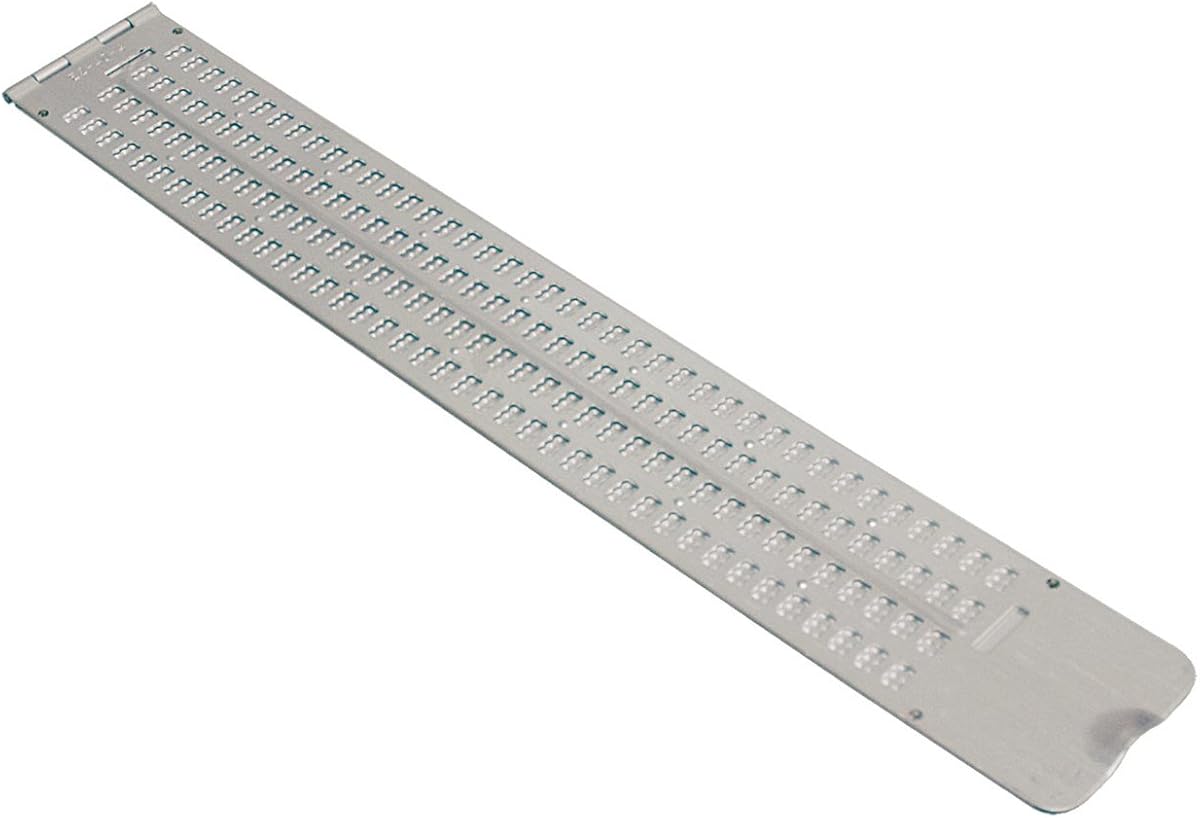
The Braille Store Business Card Slate
4.9Editor score
Ultra-thin aluminum design
Built-in signature guide
Perfect for business cards
This guide compares the top Braille displays for blind users, evaluating portable refreshable units, slates, keyboards, and learning tools for accessibility.
Braille displays transform digital text into tactile dots, enabling blind users to read and write independently. These devices range from compact slates to sophisticated refreshable units that connect to computers and smartphones seamlessly.
We evaluated ten leading products based on connectivity, durability, ease of use, and specialized features. Our analysis covers refreshable displays, manual slates, keyboards, and learning tools to help you find the right accessibility solution.
Each pick highlights key strengths, real-world applications, and potential trade-offs for different users. Please note that product availability and pricing may change over time, so check current listings before purchasing any device.
4.9Editor score

5.0Editor score

5.0Editor score
This side-by-side comparison summarizes the core specifications and strengths of each product to help you make an informed decision based on your specific needs and budget constraints.




The Brailliant BI 20X stands out as a top choice for blind users seeking a reliable refreshable braille display. With a 20-cell display and robust connectivity options, it offers a seamless experience for reading and writing across multiple devices.
We may earn a commission when you buy through this link, at no additional cost to you.
Its ability to connect to up to five Bluetooth devices simultaneously makes it incredibly versatile for users who switch between phones, tablets, and computers throughout the day. The onboard KeySoft Lite apps further enhance productivity by providing tools like an editor and calculator without needing additional software.
While the price is a consideration, the device delivers strong value through its durability and extended battery life. The compact size ensures it fits easily into daily carry bags, making it a practical companion for work or travel environments.
This device is ideal for professionals or students who need a dependable braille display for regular use. If you prioritize portability and connectivity alongside solid battery performance, this model is a highly recommended investment for accessibility.
Connecting to multiple devices allows seamless transitions between platforms without needing to physically swap cables or restart sessions.
Built-in applications like the Editor and Calculator enable users to perform tasks directly on the device, reducing reliance on external screens.
We may earn a commission when you buy through this link, at no additional cost to you.
The Brailliant BI 40X offers an expanded viewing area with a 40-cell refreshable braille display, making it ideal for users who prefer more context while reading. This premium model retains all the connectivity strengths of the 20X but doubles the internal storage for more content.
We may earn a commission when you buy through this link, at no additional cost to you.
With Bluetooth 5 technology, wireless connections are faster and more stable compared to older standards. This reliability is crucial for users who depend on consistent screen reader access during critical work or study sessions without interruptions.
The increased price reflects the additional features and storage capacity. However, for power users or those who store large amounts of braille files locally, the extra space and display real estate justify the higher cost over time.
This device suits professionals or students who need advanced capabilities and robust performance. If you want the best available refreshable display with premium features and strong battery life, this model is the top choice for high-end needs.
Bluetooth 5 ensures stable, faster wireless connections which are vital for seamless interaction with modern smartphones and computers.
32GB of internal storage allows users to store more books, documents, and files directly on the device for offline access.
We may earn a commission when you buy through this link, at no additional cost to you.
This manual braille slate provides a simple, affordable way for users to write braille without electronic components. With 13 lines and 36 cells per line, it offers ample space for notes or longer writing tasks using traditional embossing methods.
We may earn a commission when you buy through this link, at no additional cost to you.
The aluminum construction ensures durability for regular use in various settings. The pins down orientation and included stylus make it ready to use right out of the package, making it a practical choice for learning or occasional writing needs.
While it lacks electronic features, the low cost and reliability make it a strong budget option. It is ideal for students or beginners who need a basic tool to practice braille writing without investing in expensive technology.
This slate is best for users seeking a straightforward writing tool without digital dependencies. If you want an inexpensive, durable slate for notes or study sessions, this model provides solid value for basic braille tasks.
The aluminum construction ensures the slate can withstand daily handling and storage without warping or breaking easily.
As a manual device, it does not require batteries or charging, making it reliable whenever you need to write.
We may earn a commission when you buy through this link, at no additional cost to you.
This ultra-thin aluminum slate is specifically designed for embossing business cards, labels, or short notes. With four lines of twelve cells each, it is compact enough to carry anywhere while providing a professional writing surface.
We may earn a commission when you buy through this link, at no additional cost to you.
The built-in signature guide helps users write straight lines and signatures accurately. Combined with the durable stylus included in the package, this slate is an excellent tool for quick tasks or braille demonstrations to others.
Its small size makes it easy to store in a pocket or bag. While not suitable for long documents, it excels at specific tasks like labeling containers or creating short cards for personal or business use.
This slate is perfect for users needing a specialized tool for labels or brief notes. If you want a compact, portable option that handles small braille writing tasks efficiently, this model is a highly rated choice.
The built-in guide ensures straight lines for professional-looking signatures and business card embossing.
Ideal for creating braille labels for containers or personal items with precision and ease.
We may earn a commission when you buy through this link, at no additional cost to you.
This full-page slate accommodates standard letter-size paper with twenty-five lines of twenty-eight cells, making it ideal for writing assignments or notes. Its design allows you to leave paper inside while moving between tasks or pages.
We may earn a commission when you buy through this link, at no additional cost to you.
The plastic construction ensures quiet operation, which is useful in shared spaces. It includes guides for embossing braille on standard labeling tape, making it a versatile tool for various writing and labeling tasks.
While plastic may feel less premium than metal, it is durable and practical for desk use. The quiet operation makes it suitable for classrooms or offices where noise might be a concern during writing sessions.
This slate is best for students or home users needing a larger writing surface. If you write frequent assignments or need a versatile braille tool for desk use, this model is a practical and economical choice.
Designed specifically for North American letter-size paper, providing a large writing area without needing to shift the slate.
Plastic construction ensures minimal noise during embossing, making it suitable for quiet environments like classrooms.
We may earn a commission when you buy through this link, at no additional cost to you.
This pocket slate features four lines with forty cells each, offering high-density writing in a compact form. Made of lightweight aluminum, it is durable and easy to carry in a briefcase or backpack for daily use.
We may earn a commission when you buy through this link, at no additional cost to you.
The pins up orientation allows users to check braille dots after embossing before removing the paper. Its size makes it practical for quick notes or corrections while traveling or commuting without needing bulky equipment.
While it has fewer lines than larger slates, its portability is a significant advantage. The aluminum build ensures longevity even with frequent handling, making it a reliable tool for on-the-go writing needs.
This slate is ideal for users needing a portable option for quick tasks. If you want a lightweight, durable slate that fits easily in your daily carry, this model is a highly practical choice.
With forty cells per line, it offers more character space in a compact form compared to standard slates.
Lightweight aluminum construction ensures it fits easily in bags or pockets without adding bulk.
We may earn a commission when you buy through this link, at no additional cost to you.
The Hable One is a portable braille keyboard designed to connect to smartphones and tablets. It features eight tactile buttons that allow accurate typing and navigation without needing to touch the screen directly.
We may earn a commission when you buy through this link, at no additional cost to you.
Its intuitive design means no prior braille knowledge is needed to get started. Access to free onboarding calls and tutorials helps users master the device quickly, making it accessible for beginners.
The device supports privacy by allowing typing with the phone secured in a pocket. Combined with long-lasting battery life, it is a reliable companion for users who rely on mobile accessibility daily.
This keyboard is perfect for users seeking a simple, private typing method for mobile devices. If you want an easy-to-learn accessory that works with existing screen readers, this model is a great option.
You can type with your phone in your pocket ensuring privacy and accessibility without exposing the screen.
Over a month of battery life ensures the device stays ready for use whenever you need to type.
We may earn a commission when you buy through this link, at no additional cost to you.
This manual label-maker helps users create braille labels for organizing and marking items at home. It embosses on standard 3/8 or 1/2 inch vinyl labeling tape using a simple spin dial and trigger mechanism.
We may earn a commission when you buy through this link, at no additional cost to you.
The upper rim of the dial is embossed in braille for easy navigation by touch. Combined with the included tape roll, this device is a practical tool for labeling kitchen items, documents, or containers.
While it requires manual effort, it is lightweight and durable for repeated use. The design supports both blind and sighted users, making it versatile for family organizing or shared accessibility needs.
This label-maker is ideal for users who need to organize spaces with braille labels. If you want a simple tool to label items around the house without digital setup, this model is a great choice.
The braille embossed dial allows users to select letters by touch without needing visual alignment.
Includes one roll of tape so you can start labeling items immediately after purchase.
We may earn a commission when you buy through this link, at no additional cost to you.
These transparent braille stickers allow users to add tactile braille labels to existing computer keyboards. Made from durable Lexan material with 3M adhesive, they stay in place without slipping or curling during use.
We may earn a commission when you buy through this link, at no additional cost to you.
The transparent design ensures the original key legends remain visible, creating a bilingual keyboard. This is helpful for users who sometimes rely on sighted helpers or need to use standard keys alongside braille.
Installation is simple using a peel-and-stick method. While they may not last forever like physical keys, they are an economical way to upgrade accessibility on a standard PC keyboard.
These overlays are ideal for users seeking a cost-effective braille solution. If you want to add braille to your existing keyboard without buying new hardware, this product is a practical option.
The clear Lexan material allows original key legends to show through for bilingual visibility.
3M adhesive ensures the stickers stay securely in place without slipping or curling.
We may earn a commission when you buy through this link, at no additional cost to you.
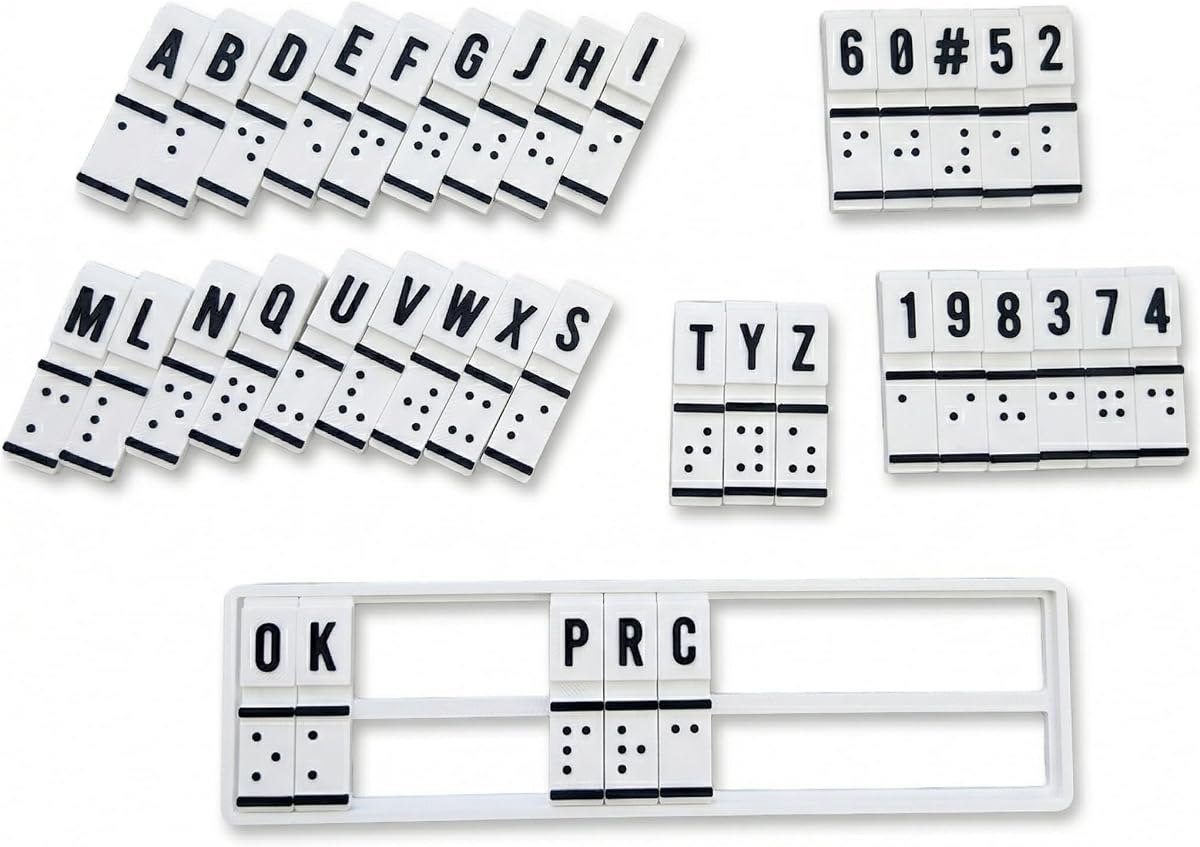
This interactive braille trainer combines education and translation functions in one compact device. It allows users to feel and create braille directly without relying on electronics, making it helpful for building muscle memory.
We may earn a commission when you buy through this link, at no additional cost to you.
It is designed for beginners, educators, or families practicing braille literacy. The tactile design supports self-study or classroom teaching by enabling users to convert text to braille physically.
While it receives lower ratings than professional displays, it serves a specific purpose for learning. It is a practical aid for rehabilitation specialists or parents helping children practice braille skills at home.
This tool is ideal for users focusing on learning and education rather than daily productivity. If you want a tactile trainer for practice or teaching without electronics, this model offers a simple approach.
Raised cells and mechanisms allow direct manual input which helps build confidence and muscle memory.
The design is suitable for classroom settings where teachers can guide students through braille practice.
We may earn a commission when you buy through this link, at no additional cost to you.
Choosing the right braille display depends on your specific needs, budget, and technical skills. This section breaks down key factors to consider before purchasing.
Display size determines how much text is visible at once. Options range from 20 cells to 40 or more. Larger displays provide more context for reading but often come at a higher cost and size.
Consider how much text you need to see per line when reading documents or web pages.
Modern displays connect via Bluetooth or USB to various devices like phones and computers. Multi-device connectivity allows seamless switching between platforms without manual reconfiguration.
Ensure the device supports the devices you use daily for accessibility.
Battery life affects how long you can use the device without charging. Look for units offering 10 to 20 hours or more of continuous use.
USB-C charging is becoming standard and offers fast charging capabilities.
If you travel or move between locations frequently, consider the weight and dimensions of the device. Compact models are easier to carry but may offer fewer features.
Lightweight aluminum or plastic designs help reduce bulk in bags or pockets.
Some displays come with built-in tools like editors, calculators, or terminal access. These features increase productivity by reducing reliance on external screens.
Check if the device supports the applications you need for work or study.
Compatibility with screen readers like NVDA, VoiceOver, or JAWS is essential for full functionality. Verify the device works with your operating system and screen reader setup.
Most major devices support standard industry protocols for seamless integration.
Durable materials like aluminum or reinforced plastic ensure longevity. Devices used daily should withstand frequent handling and transportation.
Look for warranties or protective cases included with the purchase.
Refreshable displays range from affordable slates to premium high-end units. Manual slates are significantly cheaper but lack electronic features.
Consider the long-term value and functionality when deciding on a price point.
Before using your device, charge it fully and connect it to your primary device via Bluetooth or USB. Follow the manufacturer's guide to install any necessary drivers or software updates.
Clean the display regularly with a soft, dry cloth to remove dust and debris. Avoid using liquids or harsh chemicals that may damage the sensitive braille pins or screen surface.
Store the device in a protective case when not in use to prevent accidental bumps or scratches. Keep the braille pins free from dust by covering them when transported in a bag.
A refreshable braille display is an electronic device that connects to computers and smartphones to show dynamic text as tactile dots. A manual slate is a static tool used to emboss braille by hand using a stylus.
Yes, many modern braille displays connect via Bluetooth to iOS and Android smartphones. They work seamlessly with built-in screen readers like VoiceOver or TalkBack for navigation.
Basic reading and typing functions work offline without internet access. However, features like online library access or text-to-speech synthesis may require an active internet connection.
Battery life varies by model but typically ranges from 10 to 20 hours on a single charge. Some models offer extended battery life for longer travel or usage sessions.
Prices vary widely. Manual slates cost under 50 dollars, while high-end refreshable displays can cost several thousand dollars. Budget options are available depending on your needs.
Yes, many displays support word processing and writing apps. You can type using braille keys and see text reflected on your connected device or screen.
Use a soft, dry cloth to gently wipe the pins. Avoid liquids or compressed air that could force debris inside the device or damage the pin mechanisms.
Most reputable braille displays are compatible with both Mac and Windows operating systems. Ensure you install the correct drivers or use standard industry protocols like BRLTTY.
Our top picks highlight the best options for different needs, from the Brailliant BI 40X for premium features to affordable slates for basic writing tasks.
Prioritize connectivity and battery life if you use your display daily across multiple devices. For casual writing, a manual slate may be a more practical and economical choice.
Please check current prices and availability before purchasing as listings may change over time. Investing in the right braille display can significantly improve accessibility and productivity for blind users.