
USB Fast Charger Block 50% Smaller 100W Max
4.3Editor score
Compact six port design
One hundred watt total output
Lightweight travel friendly build
This guide compares the top 10 charging station for multiple devices options available in 2026, evaluating port counts, charging speeds, and build quality to
Finding the right charging station for multiple devices is essential for modern households and offices. With so many gadgets competing for outlet space, a centralized hub keeps your workspace organized and your tech powered up efficiently.
We have analyzed ten highly rated charging stations to help you make an informed decision. Our comparison focuses on port variety, total wattage output, safety features, and overall design durability to ensure reliable performance.
Each pick below highlights specific strengths and ideal use cases for different needs. Please note that product availability and pricing can change frequently, so always check the latest details before making your final purchase decision.
4.3Editor score

4.5Editor score

4.6Editor score
The following table provides a side-by-side overview of all ten selected charging stations. It highlights key specifications like port counts and total wattage to help you quickly identify which model fits your specific device ecosystem needs.




The Zobirez 420W charging station stands out as a powerful hub for power users needing to charge ten devices simultaneously. With a total output of 420W and five USB-C ports, it handles everything from smartphones to high-demand laptops efficiently.
We may earn a commission when you buy through this link, at no additional cost to you.
Its dual 65W GaN ports allow you to charge laptops like MacBook Pro models while other ports handle smaller gadgets. The inclusion of 8 short mixed charging cables means you can start using it immediately without buying extra wires.
The sturdy one-piece slots are designed to hold devices securely, including tablets with cases. While it takes up significant space, the organization benefits for a busy office or family room are substantial.
This station is ideal for households with many Apple and Android devices that need constant power. The advanced safety protections give you peace of mind when leaving multiple devices charging overnight.
The dual 20V fast charging capability ensures that laptops charge at optimal speeds rather than just maintaining battery levels.
Having 10 compatible cables in the box removes the hassle of sorting through a drawer of mismatched cords for each device type.
We may earn a commission when you buy through this link, at no additional cost to you.
This Zobirez model offers an impressive 750W total output which is significantly higher than many competitors. It features five USB-C ports that each deliver up to 120W making it capable of charging professional grade laptops with ease.
We may earn a commission when you buy through this link, at no additional cost to you.
The design includes wide center bays that can accommodate tablets or even laptops even if they have thick protective cases. This practical feature ensures your devices stay upright and organized during charging sessions.
Constructed from flame-retardant ABS material this charging station prioritizes safety and durability. The inclusion of 10 specific cables ensures you have the right connector for every device in your ecosystem.
Ideal for tech heavy offices or large families this station removes the need for multiple chargers. The high power headroom ensures devices charge quickly even when all ports are in use simultaneously.
The ability to deliver 120W per USB-C port means even high power laptops can charge efficiently without throttling speeds.
The use of flame-retardant materials and a solid one-piece design ensures long term reliability in demanding environments.
We may earn a commission when you buy through this link, at no additional cost to you.
Anker Prime brings a robust 200W total output to the table allowing for simultaneous charging of high demand devices. Its proprietary safety system monitors temperature continuously to protect your valuable electronics from potential risks.
We may earn a commission when you buy through this link, at no additional cost to you.
With two USB-C ports capable of 100W each you can charge two high performance laptops like MacBook Pros at the same time. The compact width fits well on a crowded desk without dominating the workspace.
Although it is slightly heavier than typical chargers the weight contributes to stability. The build quality reflects the premium nature of the product ensuring it remains functional and stylish for years.
This station is perfect for professionals who need reliable power for laptops and tablets. The advanced safety features and warranty make it a trusted choice for high value electronic devices.
Having two dedicated 100W ports allows users to power multiple workstations without needing separate adapters.
The built-in monitoring system helps maintain optimal operating temperatures during extended charging sessions.
We may earn a commission when you buy through this link, at no additional cost to you.
This charging block is designed for users who prioritize portability and efficiency. Its small footprint makes it ideal for travelers or those with limited desk space while still providing six charging options.
We may earn a commission when you buy through this link, at no additional cost to you.
With a total output of 100W it is perfect for charging multiple phones and tablets quickly. The included 5ft detachable AC extension cord offers flexibility in placement where outlets might be inconvenient.
The GaN technology ensures it remains cool during operation despite its small size. Safety features protect against over charging and short circuits ensuring reliable performance over time.
It is an excellent choice for students or light users who need to charge phones and small accessories. The combination of size and functionality makes it a great budget friendly addition to any setup.
The compact dimensions allow it to fit easily into bags or small nightstands without taking up much room.
Works seamlessly with a wide range of popular devices including iPhones and Android smartphones for everyday use.
We may earn a commission when you buy through this link, at no additional cost to you.
This charger is tailored for Apple users who want to charge their iPhone Watch and AirPods without cables. The 15W wireless output ensures consistent speeds that match original MagSafe technology for efficient power delivery.
We may earn a commission when you buy through this link, at no additional cost to you.
It features official certification for the Apple Watch allowing it to charge the latest series from zero to full in just over an hour. The adjustable angle allows you to view your phone in landscape or portrait modes easily.
The compact footprint makes it perfect for bedside tables or minimal desk setups. Since it is designed for wireless charging it reduces cable clutter significantly on your nightstand or workspace.
Ideal for iPhone users who value convenience and aesthetics. The ability to charge multiple devices wirelessly eliminates the need for multiple power bricks and tangled cords effectively.
Certified charging ensures your Apple Watch is charged safely and efficiently without damaging the battery over time.
The vertical adjustment supports different viewing preferences whether you want to use your phone as an alarm clock or media player.
We may earn a commission when you buy through this link, at no additional cost to you.
This unique charger combines traditional AC outlets with modern USB ports providing a complete power solution for your desk. The built-in surge protector safeguards your connected electronics from unexpected power spikes.
We may earn a commission when you buy through this link, at no additional cost to you.
With three AC outlets and six USB ports it can power larger appliances alongside small devices simultaneously. The stable weight ensures it stays in place even with multiple cables connected.
The design allows for flexible connectivity without needing extra adapters. It serves as a central hub for power in home offices where multiple devices need constant access to electricity.
It is a versatile choice for users who need both traditional plugs and USB charging. The combination of features makes it a practical investment for protecting and powering diverse equipment.
Having both AC and USB options means you can charge laptops and traditional electronics in one consolidated unit.
The integrated safety features help protect your valuable devices from electrical surges and unexpected power fluctuations.
We may earn a commission when you buy through this link, at no additional cost to you.
This budget-friendly option offers a practical way to organize five devices using standard USB-A ports. It comes with seven short cables so you can connect most phones and tablets right away without extra purchases.
We may earn a commission when you buy through this link, at no additional cost to you.
The removable dividers allow you to adjust the space between slots to fit larger tablets or smaller phones. Smart current detection ensures each device gets the appropriate power level for efficient charging.
While it lacks USB-C ports it covers the basics for most family needs effectively. The visual switch indicator gives a clear view of the power status which is helpful for quick checks.
It is a great starter station for families or offices with older devices. The included cables and adjustable slots make it convenient and accessible for daily use by everyone.
The mix of Lightning Micro USB and Type C cables ensures compatibility with a wide range of older and current devices.
Removable dividers give you the flexibility to customize the charging station to match your specific device sizes.
We may earn a commission when you buy through this link, at no additional cost to you.
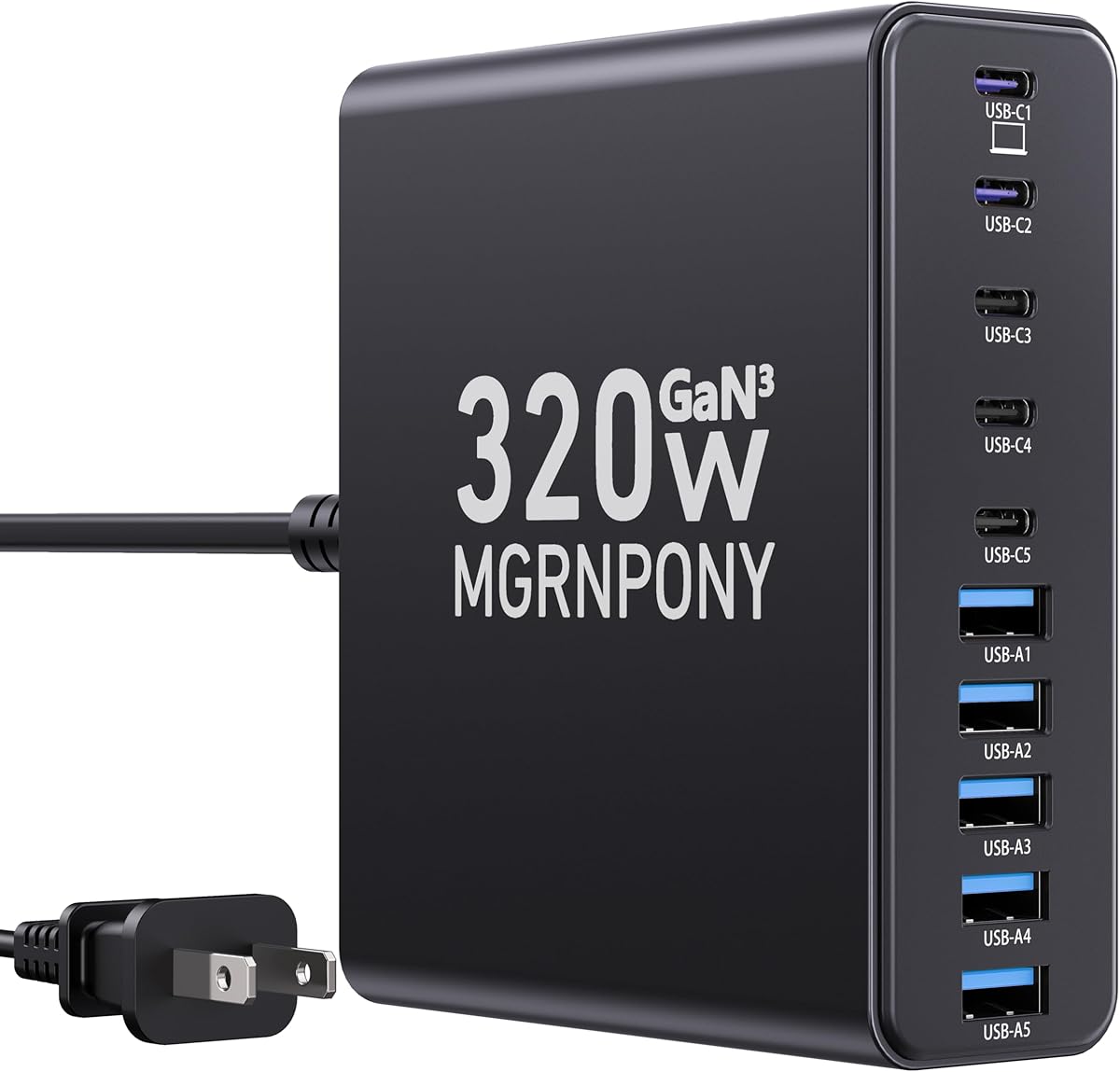
This station balances power and portability by packing 320W into a lightweight frame. It supports fast charging for laptops and multiple phones simultaneously making it a robust choice for power users on the go.
We may earn a commission when you buy through this link, at no additional cost to you.
Powered by IceShield GaN III technology it monitors temperature over three million times a day to ensure safety. The design allows you to plug in multiple devices without slowing down the output significantly.
The 5ft cord provides enough reach for various outlet setups whether at home or in a hotel. Its compact nature means it fits easily in a travel bag alongside your other essentials.
Ideal for frequent travelers who need to charge multiple devices reliably. The combination of high output and safety features ensures your electronics stay powered up regardless of location.
Continuous monitoring ensures the unit stays cool and safe during long charging sessions in varying environments.
With ten ports available you can connect almost any device you need to charge without carrying multiple adapters.
We may earn a commission when you buy through this link, at no additional cost to you.
This charger solves cable clutter by using retractable cords that extend up to 80cm when needed. It supports up to eight devices simultaneously making it a versatile solution for shared family spaces.
We may earn a commission when you buy through this link, at no additional cost to you.
The built-in cables eliminate the need to sort through a drawer of wires. GaN technology ensures fast charging speeds for your devices while keeping the unit cool and efficient.
It is ideal for nightstands or desks where cable management is a priority. The design keeps your space looking clean and organized since all cables are stored within the unit.
For users who want a tidy setup without compromising on power this is a strong candidate. The retractable mechanism makes it convenient to use and store after each charging session.
The retractable design ensures that unused cables stay neatly inside the unit rather than dangling or tangling.
Mixed cable types ensure compatibility with iPhones Android phones and other common electronic devices.
We may earn a commission when you buy through this link, at no additional cost to you.
This charging station focuses on durability with a solid one-piece body that cannot be disassembled. The build ensures that the unit remains stable and intact even with frequent device insertion and removal.
We may earn a commission when you buy through this link, at no additional cost to you.
It offers a robust 300W output to handle laptops and smaller devices efficiently. The extra wide slots in the middle are designed to hold larger tablets with cases securely without wobbling.
Anti-slip rubber pads protect your desk surface and keep the unit firmly in place during use. While it does not include cables the performance and build quality make it a reliable choice.
It is an excellent option for those who prioritize stability and longevity. The safety certifications and strong build quality provide confidence that your devices are charging safely.
The non-assembled design prevents loose parts and ensures the charging station remains structurally sound over time.
The wide central slots accommodate thicker devices ensuring they stand upright and charge efficiently without sliding.
We may earn a commission when you buy through this link, at no additional cost to you.
Selecting the right charging hub involves evaluating several key factors to ensure it meets your specific technical needs and space constraints.
Total wattage determines how much power the station can deliver to all connected devices. Look for stations that support high power outputs if you plan to charge laptops alongside phones.
Higher wattage ensures devices charge quickly even when multiple ports are active simultaneously.
Check whether the station provides USB-C USB-A or wireless ports based on your devices. Modern setups often require a mix of port types to support different technologies.
Adequate port counts prevent bottlenecks and allow everyone to charge their devices at once.
Materials like flame-retardant ABS plastic are crucial for safety and longevity. A sturdy build protects internal components and ensures the unit withstands daily wear.
Solid construction reduces the risk of mechanical failure over time.
Look for built-in protections against over-voltage short circuits and overheating. These features protect your expensive electronics from damage caused by electrical issues.
Robust safety systems are essential for reliable and safe charging.
Features like dividers anti-slip pads and cable management systems help keep your workspace tidy. Good design prevents devices from falling over or cables from tangling.
Effective organization improves the user experience and desk aesthetics.
Some stations come with a bundle of compatible cables which saves time and money. Verify the types and lengths of included cables before buying.
Included cables ensure you can start using the station immediately.
Consider the physical size of the station relative to your available space. If you plan to move it frequently look for lightweight travel-friendly options.
Balancing size with power needs is key for both desk and travel use.
Check for manufacturer warranties that cover defects or performance issues. Good customer support can be crucial if you encounter problems with the product.
A solid warranty provides peace of mind for your investment.
Begin by placing the charging station on a stable flat surface away from direct heat sources or moisture. Ensure that the power outlet you use is grounded and stable to prevent electrical issues.
Connect your devices using the provided cables and arrange them in the designated slots to avoid tangling. Make sure that the connections are secure to ensure consistent power delivery without interruption.
Regularly clean the charging station with a dry cloth to remove dust and debris that may accumulate around the ports. Avoid using water or chemical cleaners that could damage the electronics inside the unit.
Yes many modern charging stations offer high wattage USB-C ports capable of charging laptops. Look for models that support at least 65W output per port to ensure your laptop charges efficiently.
While not strictly required using the provided cables often ensures optimal performance. Third party cables may vary in quality and might not support fast charging protocols correctly.
Ensure the station is placed in a well ventilated area to allow heat to dissipate. Avoid covering the unit with blankets or placing it inside enclosed cabinets while charging.
Yes most modern stations have safety features that prevent overcharging and manage temperature. However it is always a good practice to unplug devices once they are fully charged.
Charging speed may be shared among ports depending on the station's design. Some high power stations distribute power intelligently to maintain speed while others reduce output when ports are active.
Yes many stations include USB-A ports to ensure compatibility with older devices. Check the product specs to confirm the number and type of ports available.
Choosing the right charging station depends heavily on your specific device needs and workspace requirements. The options reviewed range from compact budget friendly hubs to powerful premium stations.
Prioritize total wattage and port types to ensure your devices can charge simultaneously without slowdowns. Safety features and build quality are also critical factors for long term reliability.
Always verify the latest product details and availability before purchasing. With the right station you can keep your devices powered and your workspace organized effortlessly.