
Power Strips with Surge Protection
4.8Editor score
16 IN 1 Charging Station
Flat Plug Ultra Slim Design
1080 Joules Protection Rating
Discover the top desk mounted outlet towers for 2026. This guide compares features, safety, and charging speed to help you organize your workspace efficiently.
In today's digital workspace, managing cables and power sources is crucial for productivity. A desk mounted outlet tower consolidates multiple outlets into a single vertical unit, reducing clutter significantly. These devices often include USB ports for direct charging, eliminating the need for bulky wall adapters on your desk surface.
We evaluated ten leading models based on port count, surge protection, cord length, and build quality. Our analysis focused on real-world usability in home offices, dorms, and professional environments. Each product was assessed for safety features like overload protection and the convenience of flat plugs for tight spaces behind furniture.
This guide presents detailed reviews and comparisons to help you select the ideal power solution. Each pick highlights specific strengths, such as high-wattage USB-C charging or space-saving designs. Please note that product availability and pricing may change, so verify current details before purchasing your next charging station.
4.8Editor score

4.8Editor score

5.0Editor score
This side-by-side comparison highlights key specifications across all ten reviewed models to help you make an informed decision quickly.




The Anker Nano Power Strip stands out as the top choice for professionals seeking high-performance charging. With a 4.8 rating, it offers a unique desk clamp design that frees up valuable surface space. Its dual-zone layout keeps cables organized while providing ample power for multiple devices.
We may earn a commission when you buy through this link, at no additional cost to you.
Key strengths include a 70W USB-C port capable of fast charging laptops, a significant advantage for power users. The 1500J surge protection ensures safety for expensive electronics against power spikes. The adjustable clamp holds securely, allowing one-handed operation without shifting the unit.
Trade-offs involve a higher price compared to standard towers and specific clamp requirements for desk thickness. However, these are acceptable given the space-saving benefits and high-wattage capabilities. The lack of a long cord is also noted but typical for clamp models.
This model is ideal for modern offices with sturdy desk edges where space optimization is critical. It replaces bulky adapters and reduces cable chaos effectively. For those prioritizing laptop charging speed and a clutter-free desk, this is the recommended choice.
The 70W USB-C port uses GaN technology to deliver efficient power for laptops and tablets without needing separate bricks.
The adjustable clamp fits desk edges 0.6 to 1.8 inches thick, keeping the tower secure and out of the way.
We may earn a commission when you buy through this link, at no additional cost to you.
This model offers exceptional value with a 4.8 rating and a broad range of ports for the price. It features a 16 IN 1 design that powers numerous devices simultaneously without crowding the desk. The flat plug ensures it fits easily behind furniture without blocking other outlets.
We may earn a commission when you buy through this link, at no additional cost to you.
Its strengths include an 1875W power rating and wide spacing between AC outlets for large adapters. The braided fabric cord adds durability and a decorative touch to any room. Overload protection circuits safeguard connected electronics effectively during irregular voltage events.
While it lacks advanced fast-charging protocols compared to premium models, it handles standard charging well. The basic build is adequate for dorms or home offices where budget is a priority. Users should expect reliable performance without extra frills.
Ideal for students or home users needing a reliable, low-cost solution for multiple devices. It simplifies power management and keeps cords organized efficiently. This tower delivers solid safety features and functionality at a competitive price point.
The vertical tower design includes long space between outlets, making it easier to use large equipment without blocking neighbors.
With a 0.35 inch ultra-slim plug, the tower sits flush against the wall, fitting tight spaces behind sofas and nightstands.
We may earn a commission when you buy through this link, at no additional cost to you.
The Uncaged Ergonomics tower earns a perfect 5.0 rating due to its innovative retractable cord system. It pulls out only the length needed and rewinds automatically, keeping floors safe from tripping hazards. This design is rare in power towers and adds significant functional value.
We may earn a commission when you buy through this link, at no additional cost to you.
Its premium features include mountable feet to fix the unit under a desk or wall, reclaiming floor space. The 320 joule surge protection guards devices against grid spikes reliably. The stable cube body ensures it stays put even with frequent plugging and unplugging.
The main trade-off is fewer AC outlets compared to other models, which might limit heavy users. However, the space-saving benefits outweigh this for many setups. The cord management alone justifies the higher cost for those seeking a tidy workspace.
This model suits users who value clean floors and minimal clutter above high port counts. It works well in home offices where cables tend to tangle. The auto-rewind function makes daily use convenient and mess-free for everyone.
The built-in base rewinds the 6 ft cord on release, preventing slack that could coil or trip over users.
Feet allow you to fix this tower to a wall or under-desk surface, maximizing available floor and desk space.
We may earn a commission when you buy through this link, at no additional cost to you.
TenTrend delivers a robust 230W charging station optimized for fast laptop and phone charging. Its 4.5 rating reflects solid performance with two 65W USB-C ports for rapid device replenishment. The flat plug and slim design prevent wall congestion effectively.
We may earn a commission when you buy through this link, at no additional cost to you.
Key strengths include the mix of USB-C and USB-A ports for diverse device compatibility. The 5FT flat cord sits flush on the floor, avoiding tripping hazards in open spaces. The compact tower maintains a clean desk environment without consuming too much space.
Trade-offs include fewer AC outlets than some competitors, limiting high-power equipment plugs. Surge protection is present but less detailed than premium models. Users should prioritize USB charging needs over AC-only requirements for this unit.
This tower is perfect for users with many USB devices needing fast charges simultaneously. It balances speed and space efficiency well. Ideal for home offices where keeping cords neat and charging fast is a top priority.
Two orange USB-C ports provide up to 65W fast charging for laptops, while green and blue ports handle phones and tablets.
With a thickness of only 0.31 inches, the plug fits snugly against the wall to avoid protruding or taking up extra space.
We may earn a commission when you buy through this link, at no additional cost to you.
This SMALLRT tower offers massive capacity with 12 AC outlets and 4 USB ports for 16 devices simultaneously. Its 4.7 rating highlights reliability in heavy-use environments like dorms or shared workspaces. The vertical design accommodates large power supplies without crowding.
We may earn a commission when you buy through this link, at no additional cost to you.
Features include four separated switches to control different parts of the tower independently. This energy-saving feature allows turning off unused sections without unplugging devices. The 6.5FT cord ensures reach flexibility across various room sizes.
Trade-offs involve a taller profile that might not fit under all desks. USB charging is standard rather than fast-charging focused. However, the sheer number of outlets compensates well for users with many high-power devices.
Ideal for college dorms or offices where multiple users share power sources. It keeps everything organized in one compact footprint. This model excels in maximizing outlet availability while maintaining safety and control.
4-Separated Switches control 4 parts, making it easy to turn off multiple electronics when not in use efficiently.
The 6.5FT extension cord allows the tower to be easily placed in any place within room boundaries.
We may earn a commission when you buy through this link, at no additional cost to you.
This variant offers a 4.8 rating with a focus on safety and capacity for 16 devices. The 16 IN 1 design ensures every gadget has a dedicated port. The use of pure copper in the cord enhances durability and conductivity significantly.
We may earn a commission when you buy through this link, at no additional cost to you.
Safety features include flame retardant materials rated to 1382°F for fire prevention. Overload protection automatically cuts power to safeguard expensive electronics. The anti-slip mat on the bottom prevents wobbling on smooth surfaces effectively.
Trade-offs are minimal but include standard USB speeds rather than fast charging options. The aesthetic is functional rather than decorative. However, the safety features and lifetime support make it a robust choice for budget-conscious buyers.
Perfect for home offices or dorm rooms needing reliable, safe power distribution. It provides peace of mind with fire-resistant build and support. This tower balances cost, safety, and utility effectively for daily use.
Environmental protection and fire-resistance PC shell with flame retardant makes it more safe and longer lifetime.
The steady base with anti-slip mat on the bottom effectively avoids wobbling and slipping around on desks.
We may earn a commission when you buy through this link, at no additional cost to you.
This tower supports up to 21 devices simultaneously with 16 AC sockets and 5 USB ports. A 4.6 rating indicates solid performance for high-density charging needs. The wide spacing between outlets ensures even large adapters do not block adjacent ports.
We may earn a commission when you buy through this link, at no additional cost to you.
It delivers high wattage power suitable for home or office use. The 10A overload protection and lightning protection ensure device safety. Compact design helps organize space while providing extensive power options.
Trade-offs include standard USB charging speeds and basic plastic construction. It may lack premium materials found in costlier models. However, the port count is unmatched for the price point effectively.
Ideal for environments where many devices need power simultaneously without clutter. It simplifies power distribution and keeps cables organized efficiently. A practical solution for shared workspaces needing broad connectivity.
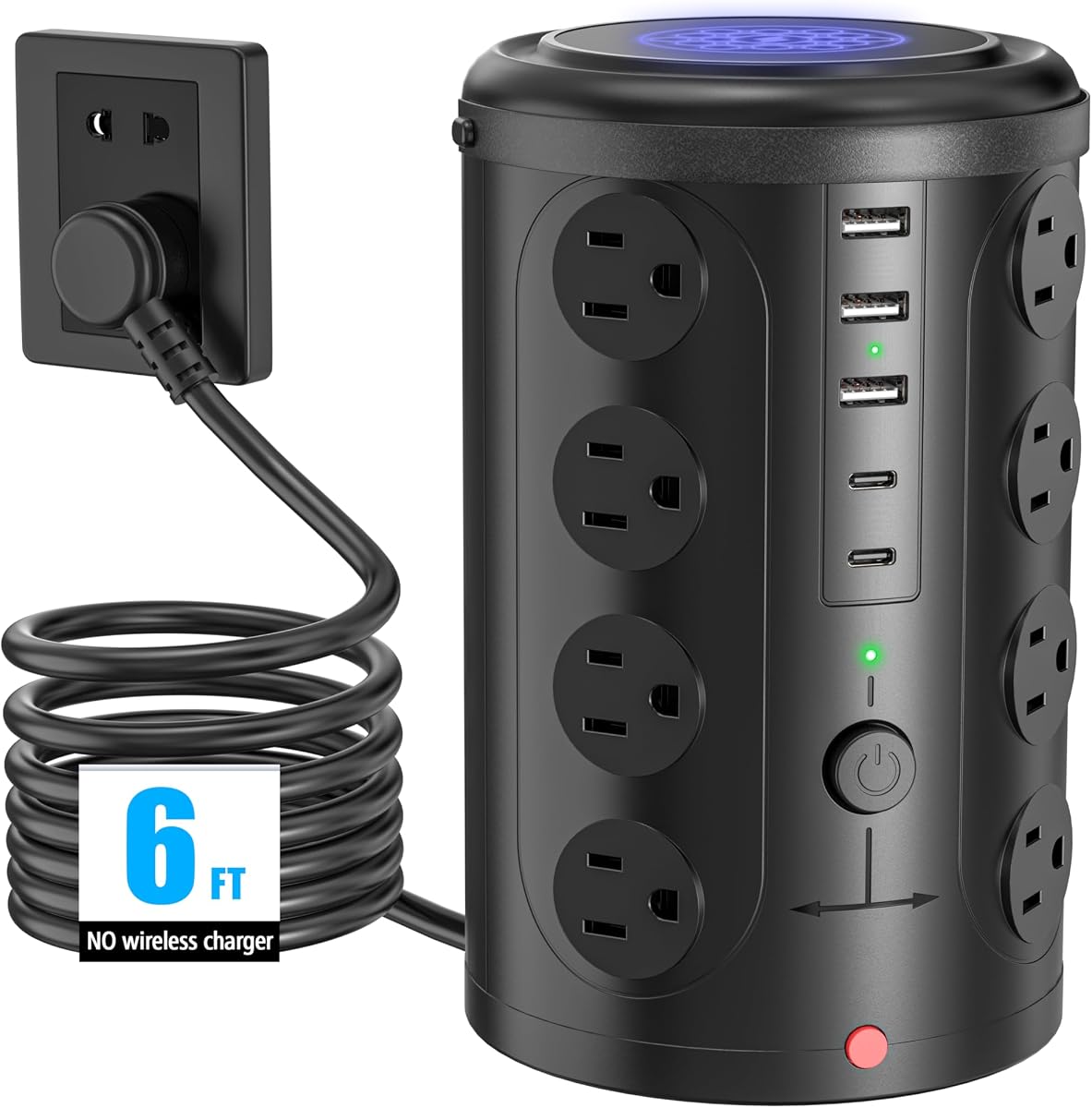
Featuring 16 AC sockets, 2 USB-C ports, and 3 USB ports, this power strip can charge up to 21 devices simultaneously.
16 wide spaced outlets afford 1875W power and allow equipment to fit without blocking each other.
We may earn a commission when you buy through this link, at no additional cost to you.
TESSAN offers a 4.8 rated flat plug tower ideal for tight spaces. Its 0.31 inch thin head fits flush against walls or furniture. The 45-degree right angle design creates extra space for other plugs below.
We may earn a commission when you buy through this link, at no additional cost to you.
Surge protection includes 1050J and over-current safeguards to protect electronics. The 4-side compact tower takes up little space on desks. Rubber feet keep the cord from slipping or sliding on smooth surfaces.
Trade-offs include no fast USB charging speeds for newer devices. The design prioritizes physical space savings over advanced electronics. However, for basic power distribution, it remains highly effective and safe.
This model fits well in apartments or dorms with limited space. It cleans various cords and keeps desktops organized efficiently. A practical choice for users prioritizing wall clearance and safety.
With only 0.31 in ultra thin flat head design, the power strip can easily fit in tight spots and hide behind furniture.
45-degree right angle design creates an extra space for other plug below without blocking existing wall outlets.
We may earn a commission when you buy through this link, at no additional cost to you.
This VILONG tower features a dual-layer design to separate power needs by layer. It mounts securely to desks without drilling, keeping floors clear. A 4.4 rating reflects its solid functionality for organized workspaces.
We may earn a commission when you buy through this link, at no additional cost to you.
It offers 13 outlets and a 700J surge protector to guard against spikes. The clamp fits desks up to 1.6 inches thick with easy installation. The design supports both under-desk and desktop charging options.
Trade-offs include a lower surge rating and 20W USB-C charging speed. The clamp may not fit very thick desks. However, it excels at keeping cables managed and out of sight on busy desks.
Ideal for users wanting to mount power access under the desk for better visibility. It reduces clutter significantly while providing versatile charging. A good solution for professional office setups.
The unique dual-layer design supports both under-desk and desktop charging options, providing flexible power access.
Requires no drilling or extra tools for installation. Simply clamp it to your desk and twist to secure easily.
We may earn a commission when you buy through this link, at no additional cost to you.
This mini vertical tower offers a compact 3.15×5.79 inch design ideal for small spaces. It provides 16 in 1 power capacity and 1800J surge protection. A 4.7 rating confirms its reliability for daily charging needs.
We may earn a commission when you buy through this link, at no additional cost to you.
The flat plug sits flush against the wall and fits tight spaces easily. Smart USB ports detect devices to deliver optimal charging speed automatically. Rubber feet at the bottom keep the tower rock-solid in place.
Trade-offs include a 6FT cord and fewer AC outlets than larger towers. However, the surge protection and compact size compensate well. Users save space while maintaining safety and efficiency.
Perfect for home users with limited desk surface area. It keeps devices organized and prevents cable clutter. This tower is a solid choice for minimalists seeking power consolidation.
The mini vertical power tower takes up less space than a traditional power strip when charging multiple devices.
Smart USB ports detect charging devices and deliver optimal charging speed automatically for compatible devices.
We may earn a commission when you buy through this link, at no additional cost to you.
Selecting the right power tower depends on your specific device mix and workspace constraints.
Assess how many devices you need to charge simultaneously. Towers vary from 10 to 21 ports. Choose a model with enough AC and USB outlets to cover all your gear without needing extensions.
Ensure the total count meets your current and future device needs to avoid clutter from additional hubs.
Surge protection ratings like 1050J or 1800J indicate safety for electronics. Higher values protect against voltage spikes better. Check if the tower includes circuit breakers for overload safety.
Prioritize models with higher joule ratings to safeguard expensive laptops and monitors effectively.
Cord length typically ranges from 5 to 6.5 feet. Flat cords prevent tripping and fit snugly against walls. Retractable cords save space but limit length flexibility.
Select a cord type that matches your room layout and keeps paths clear for safety.
Clamp towers save desk space by hanging on edges. Standalone towers sit on desks or floors. Mountable feet allow wall attachment for under-desk solutions.
Choose a mounting style that aligns with your desk thickness and available floor space.
Fast USB-C charging like 65W or 70W supports laptops directly. Standard 5V ports charge phones but not laptops. Check wattage labels to ensure compatibility with power-hungry devices.
Opt for high-wattage USB-C ports if you need to charge laptops without a separate power brick.
Compact towers fit under monitors or on nightstands. Wider spacing between outlets accommodates large adapters. Measure your workspace to ensure the tower fits vertically without blocking screens.
Look for slim profiles and wide outlet spacing to avoid overcrowding your power source.
Look for overload, short-circuit, and overheat protection mechanisms. Reset switches allow manual power cycling. Fire-resistant materials add an extra layer of safety against heat buildup.
Verify the presence of multiple safety circuits to ensure reliable operation during power fluctuations.
Budget towers offer basic functionality while premium models add retractable cords or clamps. Warranty periods often range from one to two years. Compare cost against feature sets to find the best value.
Balance your budget with required features to invest in a unit that lasts longer.
Start by plugging the tower into a grounded wall outlet. For clamp models, attach the base securely to your desk edge ensuring it is stable. Standalone units should be placed on a flat surface away from moisture or heat sources to prevent damage.
Distribute your devices across AC and USB ports evenly. Avoid overloading any single section by unplugging unused outlets when possible. Use the reset switch to cycle power if devices fail to charge due to tripped breakers.
Regularly inspect the cord for wear and tear. Keep the tower free of dust by wiping it with a dry cloth. Ensure the flat plug remains clean to maintain good contact with the wall socket. Store excess cord neatly if it is not retractable.
Most models feature built-in surge and overload protection that safely manages power during sleep. However, unplugging devices when not in use is recommended for maximum safety and energy conservation.
Yes, many towers include wide-spaced outlets specifically designed to fit bulky power bricks without blocking adjacent ports.
Clamp towers require solid edges for grip. Glass desks usually lack the necessary thickness or edge structure for a secure clamp mount without damage.
Flat plugs sit flush against walls to save space and allow other outlets to be used. Round plugs often protrude and can block neighboring sockets on standard wall plates.
Some models support 125V-240V ranges. Always check the product label for specific voltage compatibility before traveling to use with different wall standards.
Surge protection degrades over time after absorbing spikes. It is recommended to replace units every 3 to 5 years to ensure continuous protection.
We explored ten top-rated tower models ranging from retractable cord designs to high-wattage USB-C chargers. Each option brings unique benefits like space-saving clamps or massive port counts for complex setups.
Prioritize safety ratings and charging speeds that match your devices. For users with laptops, high-wattage USB-C ports are essential. For those with limited floor space, clamp or wall-mountable towers are superior choices.
Prices and availability shift regularly on retail platforms. Always verify current stock and warranty terms before purchase to ensure you get the best deal for your specific workspace needs.