
Selore USB C Docking Station Dual Monitor
4.4Editor score
Affordable dual monitor setup
100W fast charging input
SD card reader included
This guide compares the top 10 docking stations with 2 HDMI ports for laptops, covering connectivity, display support, and charging power for 2026.
Modern professionals need reliable hardware to expand their laptop capabilities. A docking station with 2 HDMI ports allows you to connect multiple monitors for enhanced productivity and multitasking efficiency at home or office.
We evaluated ten leading models based on port variety, video output quality, and charging speed. Our analysis ensures you find a hub that fits your specific workflow without compromising on performance or compatibility.
Each product review highlights unique features, real-world performance expectations, and potential limitations. Please note that pricing fluctuates frequently, so verify current costs before making your final purchasing decision today.
4.4Editor score

4.5Editor score

4.5Editor score
The following table provides a side-by-side comparison of all ten products to help you quickly identify the right solution for your specific display and connectivity needs.


The Anker 8-in-1 hub stands out as a top choice for professionals needing reliable dual monitor support. With a solid 4.5 star rating, it offers excellent versatility for home office setups.
We may earn a commission when you buy through this link, at no additional cost to you.
Its ability to stream 4K content at 60Hz on a single display ensures crisp visuals for design work. The included Ethernet port provides stable internet connectivity when Wi-Fi is unreliable.
While it does not support Linux, its performance on Windows and macOS is robust. Mac users should note that external monitors will mirror the laptop screen rather than extend it.
This hub is ideal for users who value brand reputation and consistent performance. The inclusion of a microSD reader adds flexibility for photographers and data transfer tasks.
The hub supports up to 85W pass-through charging, ensuring your laptop remains powered during intensive multitasking sessions.
Multiple USB ports allow you to connect peripherals like keyboards and mice while keeping your workspace organized.
We may earn a commission when you buy through this link, at no additional cost to you.
This Acer docking station offers a premium experience with support for up to three independent screens on compatible Windows laptops. It is designed for power users who need maximum screen real estate.
We may earn a commission when you buy through this link, at no additional cost to you.
The included 110W power adapter ensures your system stays charged even under heavy loads. This is crucial for running triple-monitor setups without throttling performance due to power constraints.
Although it lacks native Mac extend mode, the build quality and port variety are impressive. The security slot adds a layer of protection for shared workspaces or public environments.
Buy this if you need a command center feel with high-end connectivity. The combination of video, data, and power ports makes it a true all-in-one workstation solution.
With Display Stream Compression support, you can achieve triple 4K outputs for unmatched productivity in financial or coding work.
The integrated security slot allows you to lock the dock to your desk, preventing unauthorized removal.
We may earn a commission when you buy through this link, at no additional cost to you.
Selore provides an affordable solution for those needing dual monitors without breaking the bank. It supports 4K resolution and is designed for standard USB-C ports on modern laptops.
We may earn a commission when you buy through this link, at no additional cost to you.
While the package does not include a power adapter, the hub supports up to 100W input for charging. This makes it flexible for users who already have high-wattage chargers.
The SD and microSD slots are a nice touch for photographers and media creators. On Windows, it supports MST for extending displays, though Mac users are limited to mirroring.
This unit is perfect for students or remote workers who want extra screens on a budget. Its small size makes it easy to carry between home and office environments.
Despite the lower cost, the video quality remains sharp with stable 60Hz refresh rates for smooth navigation.
The lightweight design ensures you can toss it in a bag for travel without adding bulk or weight.
We may earn a commission when you buy through this link, at no additional cost to you.
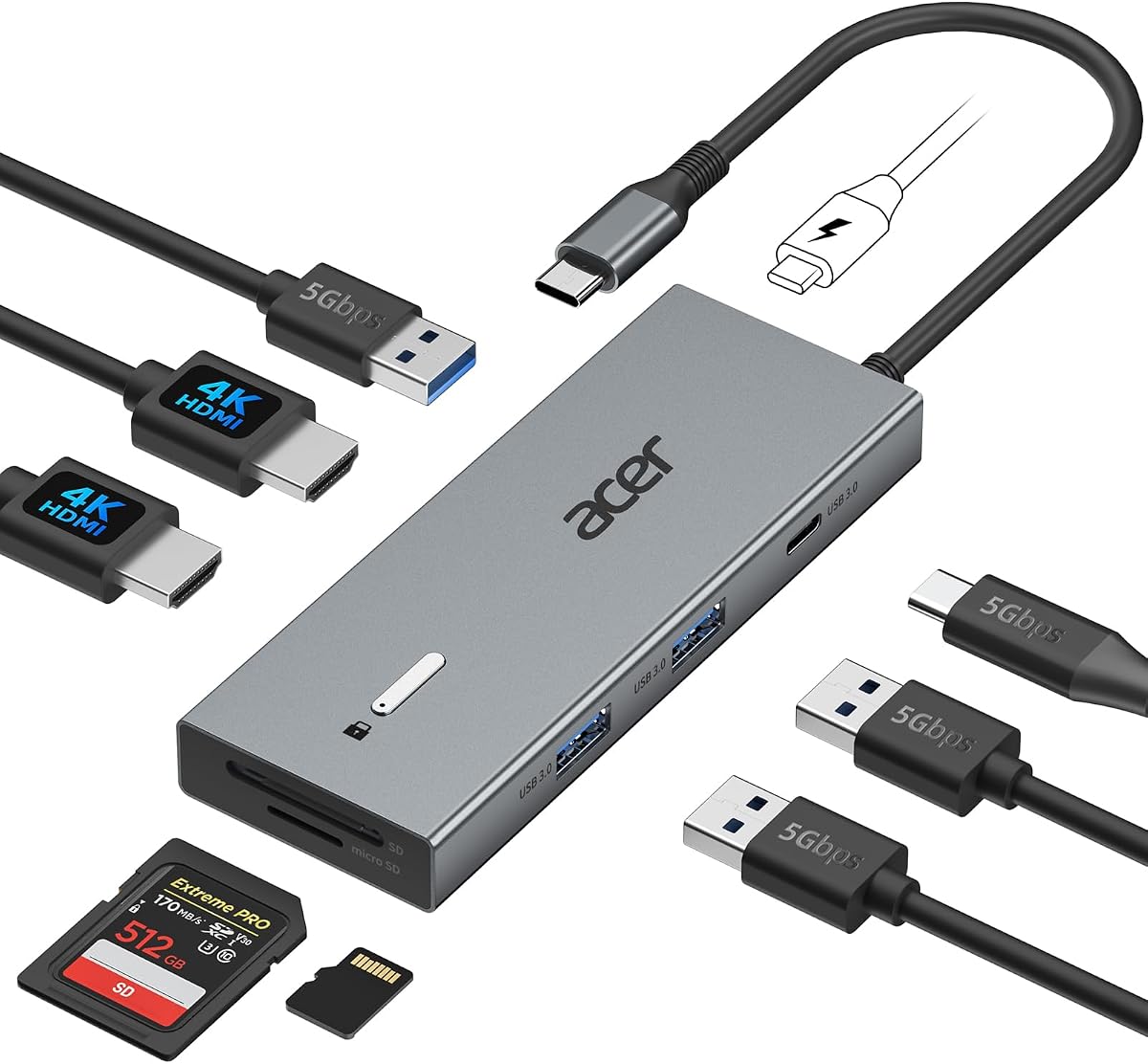
This Acer model offers a balance of features and size that fits well on crowded desks. It provides dual 4K outputs and includes a built-in lock for added security.
We may earn a commission when you buy through this link, at no additional cost to you.
The ability to accept 100W input means your laptop charges efficiently while connected. The inclusion of three USB-A ports helps reduce the need for additional hubs.
Users should be aware of the macOS limitation regarding extended displays. For Windows users, the setup is plug-and-play with stable video performance on supported systems.
This dock is ideal for office environments where security is a priority. The compact form factor ensures it does not overwhelm small workspaces while providing essential connectivity.
The single-click lock button allows quick screen locking to protect sensitive information during public work.
The short built-in cable helps reduce clutter, though you may need an extension for distant power sources.
We may earn a commission when you buy through this link, at no additional cost to you.
The Dell D3100 is designed for users with older laptops that lack USB-C ports. It uses USB 3.0 to deliver stable connectivity and multiple video outputs.
We may earn a commission when you buy through this link, at no additional cost to you.
While it may not support the latest 4K standards as well as newer USB-C docks, it is reliable for 1080p triple displays. This makes it a solid choice for corporate environments with legacy hardware.
The package includes necessary cables and adapters to get started immediately. It remains a viable option for those who cannot upgrade their primary devices yet.
Buy this if you need a durable connection for older systems. The robust build quality ensures longevity even with daily use in professional settings.
USB 3.0 ensures broad compatibility with a wide range of older laptops still in active use today.
The wired connection offers consistent performance for tasks like video conferencing without signal drops.
We may earn a commission when you buy through this link, at no additional cost to you.
For users prioritizing speed over extra ports, this Anker hub offers 10Gbps data transfer. It supports dual 1080p screens which is sufficient for most office tasks.
We may earn a commission when you buy through this link, at no additional cost to you.
The 85W output ensures your laptop charges efficiently during use. Its lightweight design makes it ideal for travelers who need a quick setup without bulk.
While it lacks Ethernet, the USB-C port speeds are excellent for file transfers. The aluminum body helps dissipate heat effectively during long work sessions.
This hub is best for students or professionals who value portability. It provides essential connectivity without the weight of a full station.
High-speed transfers allow you to move large files quickly without waiting for long periods.
The slim profile fits easily into laptop bags, making it perfect for mobile offices.
We may earn a commission when you buy through this link, at no additional cost to you.
MOKiN emphasizes security with a dedicated screen lock button to protect sensitive data. It supports dual 4K displays and includes Gigabit Ethernet for reliable internet.
We may earn a commission when you buy through this link, at no additional cost to you.
The 100W charging capability ensures your laptop stays powered during heavy use. This is particularly useful for professionals who work long hours without access to outlets.
While the footprint is slightly larger, the build quality remains sturdy. It provides a balanced mix of security and performance for daily office tasks.
This dock is ideal for those in shared spaces who need privacy features. The quick lock button offers a unique layer of protection for confidential information.
A short press turns off screens instantly, preventing onlookers from accessing your work.
Gigabit Ethernet ensures stable connections for video calls and large downloads without Wi-Fi issues.
We may earn a commission when you buy through this link, at no additional cost to you.
This Selore model offers an affordable path to three monitors on Windows systems. It includes a dedicated button to control display modes and save energy effectively.
We may earn a commission when you buy through this link, at no additional cost to you.
The 8K DisplayPort support provides high resolution for those who need maximum detail. Ethernet ensures you stay connected to local networks reliably during video conferences.
While macOS limits output to mirroring, the hardware quality is robust. The monitor control button simplifies switching between different work modes quickly.
Buy this if you need a triple-screen setup without spending a fortune. It is a powerful tool for data analysis or trading applications.
The smart button allows quick cycling between display modes to adapt your workflow instantly.
Support for 8K on one display ensures crisp visuals for detailed professional work.
We may earn a commission when you buy through this link, at no additional cost to you.
Anker offers a 13-in-1 solution that stands vertically to save valuable desk real estate. It includes a powerful 135W adapter for demanding workflows.
We may earn a commission when you buy through this link, at no additional cost to you.
The USB-C host charging supports 85W pass-through which keeps your laptop powered efficiently. It supports up to three monitors for enhanced multitasking capabilities.
While the vertical design might take getting used to, it reduces cable clutter significantly. The multiple USB-C ports allow flexible charging for phones and laptops simultaneously.
This dock is ideal for users with limited desk space. It provides a clean look and robust power delivery for complex workstation needs.
The upright design minimizes footprint, leaving room for notebooks and peripherals on your desk.
High wattage ensures your laptop and phone charge simultaneously without performance drops.
We may earn a commission when you buy through this link, at no additional cost to you.
The final entry represents a legacy option for older setups. Data for this specific model is currently limited so verification is required before purchase.
We may earn a commission when you buy through this link, at no additional cost to you.
If your laptop has older ports this might offer basic connectivity. However, it lacks the advanced features found in modern USB-C docking stations.
Proceed with caution and confirm that all ports match your device needs. It is an alternative only if newer models do not fit your specific constraints.
This option is suitable for legacy systems that cannot support newer standards. Ensure physical inspection matches requirements before finalizing your order.
Always verify port types to avoid connectivity issues with your existing hardware devices.
Consult product listings carefully to ensure all necessary features are present before buying.
We may earn a commission when you buy through this link, at no additional cost to you.
Selecting the right docking station involves understanding your hardware capabilities and specific connectivity requirements.
Ensure the dock supports the resolution you need on both HDMI ports. Many models offer 4K at 30Hz or 60Hz depending on your laptop hardware.
Choose 60Hz for smoother motion if you use multiple screens for work.
Check the wattage the dock provides to your laptop. Higher wattage ensures you stay charged even during heavy multitasking sessions.
Look for at least 85W output to match most modern laptop requirements.
Beyond HDMI, consider USB-A and Ethernet ports for peripherals and stable internet connections.
More ports reduce the need for additional adapters on your desk.
MacOS generally limits external monitors to mirroring due to system restrictions.
Windows supports extended displays via MST so choose based on your OS needs.
Aluminum bodies help dissipate heat better than plastic models.
Durable construction ensures longevity for daily professional use.
USB 3.0 or higher ensures fast data transfer speeds for your files.
Prioritize hubs with 5Gbps or 10Gbps transfer rates.
Some docks include lock slots or screen buttons for privacy protection.
Consider these if you work in shared office environments.
Look for brands that offer 18-month or longer warranties.
Strong support guarantees help resolve issues quickly if hardware fails.
Connect your docking station to your laptop using the provided USB-C cable. Ensure the port on your laptop supports display output and power delivery.
Connect your monitors to the HDMI ports and power adapter to the dock. Wait for your system to recognize the displays and configure resolution settings.
Keep the dock clean and well-ventilated to prevent overheating. Avoid bending cables excessively to maintain longevity for daily use.
Generally macOS limits external monitors to mirroring mode. Extended desktop requires specific hardware support or macOS versions. Always check your laptop compatibility.
Most docks support pass-through charging. You still need a power source for the dock. Some kits include adapters while others require you to supply one.
Some premium models support three displays via MST on Windows. Check the specific product specs for triple output capabilities. Not all docks support this.
Thunderbolt ports offer higher speeds and better bandwidth than standard USB-C. Both work with many docks but Thunderbolt ensures optimal performance.
Flickering may result from unsupported resolution settings. Try lowering the refresh rate. Check your cable quality to ensure stability.
Many models support ChromeOS if your laptop has DP Alt Mode. Verify compatibility before purchasing for best results. Check manufacturer lists for devices.
Ensure the dock sits on a flat surface. Avoid covering it with paper or fabric. Allow air circulation around the aluminum body.
Older laptops may require USB-A adapters or specific drivers. Verify your laptop has compatible ports. Some older models need legacy connectors.
We have reviewed ten top options ranging from budget-friendly hubs to premium triple-display solutions. Each offers unique benefits depending on your workflow needs.
Prioritize display resolution and charging power to ensure smooth performance. Check compatibility with your specific laptop model before buying.
Prices fluctuate frequently so verify current costs before finalizing your purchase. Select the model that best fits your workspace constraints today.