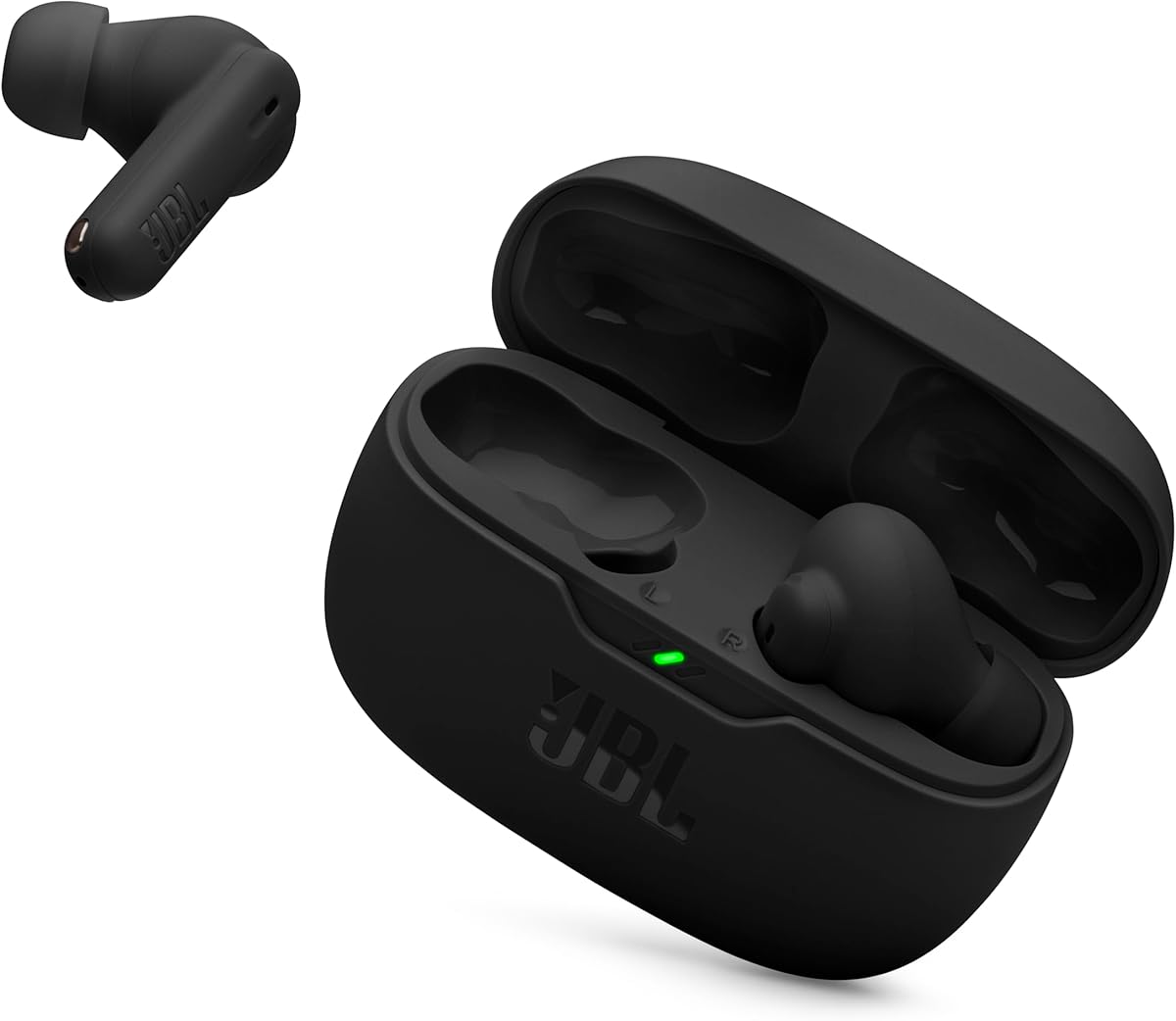
JBL Vibe Beam 2
4.1Editor score
Four microphones for clear calls
Active Noise Cancelling support
Long battery life value
This guide compares the top earbuds for Teams meetings based on mic quality, noise cancellation, battery life, and comfort for professional use.
Finding the right earbuds for Teams meetings is crucial for clear communication and focus. You need reliable microphones, effective noise cancellation, and a comfortable fit for long calls.
We compared ten top models based on their call performance, battery life, connectivity, and compatibility with Teams. Each pick offers unique strengths for different work environments and budgets.
Each section details specific features, pros, cons, and ideal use cases for every product. Prices and availability change frequently so check current listings before purchasing.
4.1Editor score

3.7Editor score
3.5Editor score
This comparison table highlights key technical specifications and features across all ten reviewed models to help you quickly identify the best fit for your workflow.


The Logitech Zone True Wireless stands out as the best overall choice for Teams meetings due to its official certification and specialized hardware designed for professional conferencing. With a rating of 3.7 based on available user feedback, it balances advanced features with practical daily usability for remote workers.
We may earn a commission when you buy through this link, at no additional cost to you.
Its standout feature is the six-microphone setup distributed across both earbuds, which uses beamforming and cascaded noise reduction to isolate your voice effectively from background noise. The hybrid Active Noise Cancellation blocks distractions while Transparency mode lets you hear when needed. You also get a USB receiver for more stable PC connections compared to standard Bluetooth.
Trade-offs include a higher price point than many consumer earbuds and a rating that suggests some users might prefer stronger noise cancellation for very loud environments. However these limitations are acceptable given the dedicated Teams optimizations and enterprise-grade reliability for business communication needs.
If your work relies heavily on Microsoft Teams or Zoom meetings this is the most reliable option to ensure your voice comes through clearly and connections stay stable during long workdays. It is the recommended pick for professionals prioritizing call quality over music performance.
Certified for Microsoft Teams, Zoom, Google Meet and Google Voice ensuring seamless integration and optimal performance across common conferencing apps.
Three mics in each earbud distinguish your voice through beamforming and dynamic processing to deliver clear communication even in noisy spaces.
We may earn a commission when you buy through this link, at no additional cost to you.
The JBL Vibe Beam 2 offers exceptional value for teams looking for reliable call quality without a premium price tag. With a solid 4.1 rating from users, it delivers the essential features needed for effective remote work meetings at a budget-friendly cost.
We may earn a commission when you buy through this link, at no additional cost to you.
Key strengths include its four-mic system which ensures your voice is transmitted clearly even in moderately noisy environments like busy home offices or coffee shops. The Active Noise Cancelling helps filter out distracting sounds and Smart Ambient mode allows you to stay aware when required. Battery life is robust with up to 40 total hours of playtime.
Some trade-offs are expected at this price including simpler touch controls and noise cancellation that does not match high-end models. These compromises are acceptable for most work scenarios where clarity and reliability matter more than advanced audio tuning or ultra-strong ANC.
This is the ideal choice for budget-conscious professionals or secondary work devices where you need dependable meeting performance without overspending. It strikes the right balance between price and performance for everyday Teams and conference calls.
Two microphones on each earbud pick up and transmit your voice clearly while canceling ambient noise for crisp calls on the go.
Enjoy 10 hours of playtime per charge plus 30 additional hours in the case for days of uninterrupted meeting capability.
We may earn a commission when you buy through this link, at no additional cost to you.
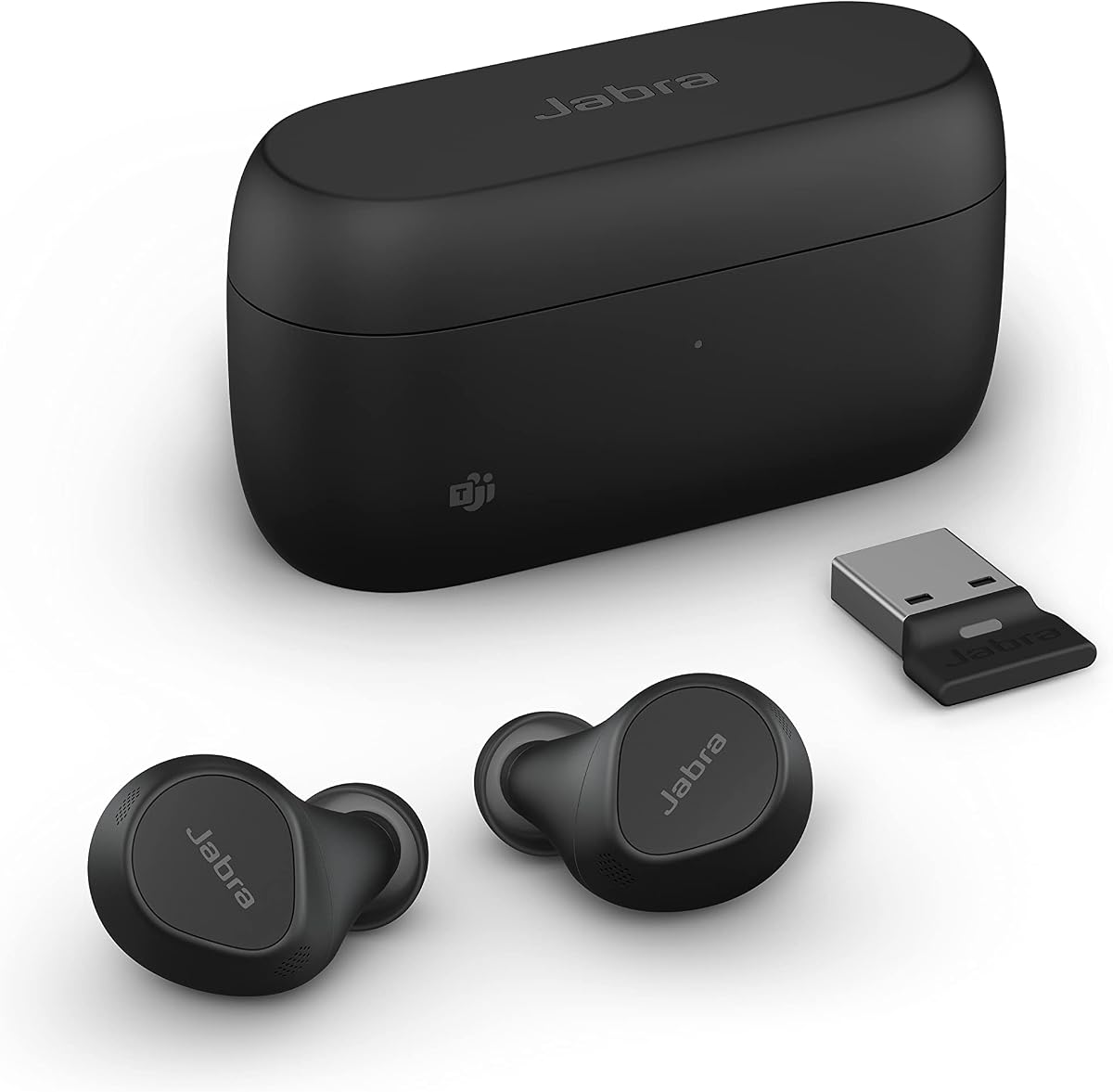
The Jabra Evolve2 True Wireless represents a premium option tailored for professionals who demand the highest standards in call technology and device integration. Although user ratings vary at 3.5, the hardware features and enterprise certifications justify the investment for critical work environments.
We may earn a commission when you buy through this link, at no additional cost to you.
Its standout technology includes four microphones paired with bone conduction sensors to cut through background noise for unparalleled voice clarity. Advanced Bluetooth Multipoint keeps you connected to both your laptop and smartphone simultaneously which simplifies workflows during busy days. You can connect via Bluetooth or use the included USB dongle for enhanced stability on meeting platforms.
Trade-offs include a higher price and potential initial setup steps for optimal performance with enterprise systems. These are minor inconveniences given the comprehensive feature set and durability designed for daily professional use. The compact ergonomic fit and water resistance ensure comfort during extended wear.
Buy this if you need enterprise-grade reliability and seamless switching between devices for meetings on the go. It offers a complete professional ecosystem for teams who prioritize call quality and connectivity over cost savings.
Four mics plus bone conduction sensors work together to filter background noise so you hear and are heard clearly anywhere.
Advanced Multipoint Bluetooth keeps you connected to laptop and phone simultaneously for easier switching between work tools.
We may earn a commission when you buy through this link, at no additional cost to you.
The Dell Pro Plus EB525 earbuds bring workstation-focused features with AI-enhanced voice clarity and adaptive noise management tailored for hybrid work environments. Rated 4.1 by users, they combine modern Bluetooth technology with intuitive controls designed for seamless professional use.
We may earn a commission when you buy through this link, at no additional cost to you.
Standout qualities include an AI-based noise-cancelling mic that recognizes and filters your voice to deliver best-in-class call quality. You can switch between deep focus and heightened awareness using Adaptive ANC and transparency modes easily with a pinch. On-device touch controls make managing calls and music straightforward without needing to access your device.
Trade-offs involve limited app customization compared to competitors and a feature set optimized mainly for Dell ecosystems though it works broadly. These are acceptable given the strong focus on voice clarity and user convenience for daily meetings. The ergonomic design ensures comfort during long work sessions.
Choose this if you value intelligent noise management and easy controls for frequent Teams or conference calls. It offers reliable performance for professionals seeking modern features without complex setup or management overhead.
AI-based mic intelligently filters background noise to ensure your voice is heard loud and clear during any meeting scenario.
Easily switch between Adaptive ANC for focus or transparency mode to stay aware of your surroundings with a simple pinch.
We may earn a commission when you buy through this link, at no additional cost to you.
The XIAOWTEK Wireless Earbuds impress with standout specs including next-gen Bluetooth 5.4 and massive battery life that supports extended work sessions and travel. With a remarkable 4.9 rating from users, these earbuds offer impressive performance features at an accessible price point.
We may earn a commission when you buy through this link, at no additional cost to you.
Key strengths lie in the upgraded Bluetooth 5.4 chip which provides stronger signal penetration and lower latency for smooth audio and meetings. The 4-mic ENC system blocks up to 80 percent of background noise ensuring crystal clear calls. Battery life reaches 50 hours total with quick charging support and IPX7 waterproofing ensures durability during active days.
Trade-offs include less brand recognition and fewer advanced app features compared to established premium names. These are acceptable for users prioritizing raw specs and reliability over software ecosystems. The ergonomic in-ear design provides a secure and comfortable fit for long use.
Pick this if you want top-tier connectivity and battery life without the premium price. It suits professionals who need dependable performance for meetings on the go with excellent value for the feature set.
Bluetooth 5.4 offers 35% stronger signal and 30% lower power consumption for stable connections up to 15 meters range.
Enjoy 50 hours total playtime with the 470mAh case providing four full charges and each earbud lasting six hours per charge.
We may earn a commission when you buy through this link, at no additional cost to you.
The TAGRY Hybrid Active Noise Cancelling Earbuds deliver an industry-leading 80 hours of total playtime making them perfect for professionals who travel or work long shifts without frequent recharging. Rated 4.4 by users, they combine endurance with solid call performance for reliable daily use.
We may earn a commission when you buy through this link, at no additional cost to you.
Highlights include Hybrid Active Noise Cancelling that reduces up to 90 percent of ambient noise plus Hi-Res Audio tuned for clarity across treble and bass. The soft earhook design ensures a secure fit for active days while IPX7 waterproofing protects against sweat and rain. A 1000mAh case extends use to 80 hours and charges fully in one hour.
Trade-offs include a larger case size and simpler app support compared to premium competitors. These do not detract from the core strengths of long battery life and effective noise cancellation. The wide compatibility ensures seamless connection across phones and laptops.
Choose this if uninterrupted power and strong ANC are priorities for your workflow. It offers excellent value for users who need all-day battery and reliable call performance without frequent charging breaks.
Up to 80 hours total playtime ensures you never run out of battery during long workdays or travel trips.
Integrated chip adjusts noise optimization dynamically to reduce ambient sound while keeping music quality clear.
We may earn a commission when you buy through this link, at no additional cost to you.
The Soundcore P30i stands out for its versatile case that doubles as a phone stand and solid AI-enhanced call performance making it ideal for hybrid workers. Rated 4.3 by users, it balances convenience features with reliable audio quality for meetings and media.
We may earn a commission when you buy through this link, at no additional cost to you.
Features include a 2-in-1 charging case that serves as a phone stand for hands-free viewing during meetings or breaks. The 4-mic AI system enhances voice clarity and Adaptive ANC reduces up to 42dB of noise automatically. Bluetooth 5.4 ensures easy pairing and long battery life reaches 45 hours total with quick charge support.
Trade-offs involve the case size and ANC that may not silence very loud environments completely. These are minor compared to the unique functionality and solid call quality. The Anker app adds EQ customization to tailor sound profiles.
Buy this if you need flexible features for work and media with dependable call clarity. It offers a practical package for users who appreciate design innovation and versatile connectivity for daily tasks.
The charging case includes a built-in stand for hands-free phone viewing during meetings or breaks without needing a separate holder.
Four microphones with AI algorithm pick up your voice with precision for clear communication anywhere you go.
We may earn a commission when you buy through this link, at no additional cost to you.
The Soundcore Liberty 5 Pro Max introduces groundbreaking AI Note-Taker functionality alongside top-rated voice quality that holds a Guinness World Record. Rated 4.2 by users, it offers high-end features for professionals who value productivity tools and secure communication.
We may earn a commission when you buy through this link, at no additional cost to you.
Key strengths include an AI-powered charging case that transcribes in-person meetings and generates summaries with key points. Call quality is exceptional with 10 sensors and Thus AI Chip ensuring clarity in noisy environments. Privacy is prioritized with AES-256 encryption and compliance standards for confidential data protection.
Trade-offs include a subscription model for advanced AI features and higher price points for premium benefits. These are acceptable for users who need advanced productivity tools and security for business use. The AMOLED display case adds customizable style and control.
Choose this if you want cutting-edge AI tools and the highest call quality available. It suits professionals who value secure, smart workflows and are willing to invest in premium audio tech.
Smart case records and transcribes in-person meetings to generate summaries and action items helping manage workflows efficiently.
Local AES-256 encryption and compliance standards ensure your audio and transcription content remain private and secure.
We may earn a commission when you buy through this link, at no additional cost to you.
The JLab Work Buds bridge the gap between earbuds and traditional headsets with a detachable boom mic for maximum call clarity and Multipoint Bluetooth for dual device connectivity. Rated 3.9 by users, they offer robust features for professionals who prioritize voice quality.
We may earn a commission when you buy through this link, at no additional cost to you.
Highlights include a noise-canceling boom mic that ensures your voice is heard clearly even in noisy offices. Multipoint Bluetooth keeps you connected to laptop and phone while USB-C charging dock organizes and powers the system. Battery life exceeds 55 hours total and fit remains comfortable with in-ear design.
Trade-offs include a larger form factor than standard earbuds and fewer app-based customization options. These are minor compared to the reliable mic performance and connectivity. The design focuses on practicality and clear communication for daily meetings.
Buy this if you need headset-level mic quality with wireless convenience. It suits users who prefer the reliability of a boom mic and long battery life for intensive call schedules.
Detachable noise-canceling boom mic provides superior voice isolation and clarity during meetings compared to standard in-ear microphones.
Bluetooth Multipoint allows seamless switching between laptop and smartphone so you never miss a call on either device.
We may earn a commission when you buy through this link, at no additional cost to you.
The TOZO NC3 Hybrid ANC earbuds deliver strong noise cancellation and call performance with six microphones and up to 68 hours of playtime. Rated 4.3 by users, they provide a well-rounded solution for work calls with excellent durability features.
We may earn a commission when you buy through this link, at no additional cost to you.
Strengths include Hybrid ANC reducing noise up to 45dB and 6-mic ENC technology ensuring your voice comes through clearly during meetings. IPX8 waterproof rating protects against heavy sweat and rain. Bluetooth 5.3 offers stable low-latency connections and the app provides 32 EQ presets for sound customization.
Trade-offs involve limited advanced AI features and simpler controls compared to higher-end models. These are acceptable for users seeking reliable performance and strong ANC without complex setups. The battery and water protection ensure durability for daily use.
Choose this if you need effective noise cancellation and water resistance for active work environments. It offers strong value for professionals needing clear calls and reliable battery life.
Hybrid ANC reduces ambient noise up to 45dB targeting low-frequency sounds like airplane or AC noise for better focus.
Six microphones with ENC technology reduce background noise for clearer voice transmission during calls and meetings.
We may earn a commission when you buy through this link, at no additional cost to you.
Selecting the right earbuds requires balancing call quality, comfort, and connectivity. This section breaks down key factors to help you decide which model best fits your workflow.
Microphone performance is the most critical factor for Teams meetings as it determines how clearly others hear you. Look for earbuds with multiple microphones and ENC or beamforming technology which isolate your voice from background noise like keyboard typing or street sounds. Active Noise Cancellation helps you focus by blocking external distractions during calls and in-person work. The best models use hybrid ANC combining feedforward and feedback sensors for maximum noise reduction.
Prioritize earbuds with at least four microphones and dedicated noise isolation features to ensure clear communication in noisy environments.
Ensure your earbuds connect reliably with your meeting devices whether that is a laptop smartphone or desktop computer. Bluetooth 5.3 or newer ensures stable low-latency connections for audio sync during meetings. Some professional models include USB receivers or dongles for more secure connections without Bluetooth pairing issues. Multipoint connectivity allows switching between devices seamlessly which is essential for hybrid workflows.
Check that your earbuds support your conferencing platforms like Microsoft Teams or Zoom and offer stable Bluetooth versions for uninterrupted calls.
Long battery life ensures you can work all day without interruptions. Look for at least 30 total hours including the charging case to cover multiple meetings and commute times. Quick charging features like 10 minutes charge for two hours use are valuable for last-minute prep. Consider charging cases with USB-C ports for fast reliable power delivery on your desk.
Choose models offering at least 5 hours per charge and 30 total hours for uninterrupted work days without frequent recharging breaks.
Comfort becomes critical during extended meetings and all-day work. Earbuds with multiple ear tip sizes and ergonomic shapes reduce fatigue. Some include earhooks or wing tips for added stability during movement. A light weight and balanced design prevent pressure points during long conference calls. Test fit for comfort and secure seal which helps noise isolation too.
Look for adjustable ear tips and lightweight designs that feel comfortable for hours to avoid ear fatigue during workdays.
Durability ensures your earbuds last through daily use and variable environments. IPX4 or higher ratings protect against sweat and rain which is helpful for commuters or gym-goers. Water resistant materials also extend product life in humid or active conditions. Check build quality materials and warranty coverage for reliability over time.
Pick models with at least IPX4 water resistance for protection against sweat and rain during active or travel-based work.
Intuitive controls reduce friction during meetings allowing quick muting or call management. Touch controls should be responsive without accidental activation. Physical buttons can be more reliable for busy users. Look for controls that let you adjust volume or switch ANC modes easily without accessing your device. Voice assistant support adds extra convenience for multitasking.
Ensure controls are simple and reliable for managing calls and volume without interrupting your workflow or causing accidental activation.
Price varies widely from budget to premium models. Decide which features matter most for your use case. Budget models may lack advanced ANC or app features but still offer clear calls. Premium models provide better durability and integration but at higher cost. Balance your budget with essential needs like microphone quality and comfort for daily work.
Match your budget to the features you need daily and avoid overspending on extras you will not use regularly for meetings.
Many earbuds include companion apps for EQ adjustment and firmware updates. Look for apps that let you customize ANC levels or microphone settings. Regular updates improve performance and compatibility over time. Some offer AI transcription or note-taking features for advanced productivity. App quality can impact long-term usability and personalization options.
Prefer models with companion apps that allow customization and updates to improve performance and meet evolving work needs.
Pair your earbuds with your meeting device using Bluetooth or included USB receiver. Ensure Bluetooth is on your meeting app is updated and permissions for microphone access are granted. Test your mic before important calls to check levels and noise reduction settings.
Use noise cancellation settings appropriately by enabling ANC during focused work or transparency mode when you need to hear surroundings. Adjust volume levels to protect hearing during long listening sessions. Use controls or app settings to manage call mute and volume without touching your device.
Care for your earbuds by regularly cleaning ear tips with mild soap and drying them before use. Store in charging case when not in use to protect from damage and extend battery. Charge fully before long workdays and avoid exposing to water beyond rated limits for longer product life.
The Logitech Zone True Wireless is top for Teams due to certification and six-mic clarity. For budget, JBL Vibe Beam 2 offers strong mic performance. Premium users may prefer Jabra Evolve2 with advanced sensors.
A good mic uses multiple microphones with beamforming or ENC to isolate voice from background noise. Look for models with at least four mics and adaptive noise filtering for clear communication in busy environments.
Not always. Budget models like Soundcore P30i offer solid mic and battery performance. Premium models add features like better ANC or multipoint but cost more. Choose based on needed features rather than price alone.
Earbuds with 30 hours total battery life cover most workdays. Look for at least 5 hours per charge for long calls. Recharge case quickly via USB-C to avoid downtime during busy schedules.
Yes, most wireless earbuds work with Teams via Bluetooth. For best stability, use models with USB dongles or certified apps. Ensure connection is stable and microphone permissions are granted.
Clean ear tips for better seal and microphone performance. Adjust ANC settings to reduce background noise. Position the earbud so mic faces your mouth. Use app EQ to boost vocal clarity if available.
Prioritize microphone quality with ENC or beamforming and reliable Bluetooth connection. Battery life should cover full workdays. Comfort for long wear and basic controls for mute and volume are also essential for smooth workflows.
Yes, especially in noisy environments. Active noise cancellation blocks distractions and improves your focus during meetings. Some models use adaptive ANC to adjust based on your surroundings dynamically.
The Logitech Zone True Wireless, JBL Vibe Beam 2, and Jabra Evolve2 stand out as top picks for their specialized Teams integration, budget-friendly reliability, and premium features. Each offers distinct advantages depending on whether you prioritize compatibility, price, or advanced connectivity options for daily calls.
Prioritize models with strong microphone performance and at least 30 hours total battery life to ensure clear communication and uninterrupted work. Comfort for long wear and reliable connectivity are equally vital for maintaining professionalism during important meetings.
Remember that prices and availability change frequently so check current listings for the best deals before buying. Your ideal choice depends on your specific budget and workspace needs but these models provide solid starting points for professionals.