
Kayoubi LCD Writing Tablet
4.6Editor score
14.5 inch large screen
One-click erase function
Eye-friendly blue light free
This guide compares the top electronic sketch pads for artists and students, evaluating screen quality, pressure sensitivity, and portability to help you
Electronic sketch pads have revolutionized how artists, students, and professionals capture ideas on the go. These devices combine the tactile feel of traditional paper with the convenience of digital storage and editing tools. Whether you need a simple doodle board for kids or a high-end tablet for illustration, the right choice depends on your specific workflow and budget constraints.
We analyzed ten leading electronic sketch pads based on display quality, stylus technology, battery life, and software compatibility. Our team reviewed user feedback, technical specifications, and real-world performance to identify the most reliable options. This list covers everything from budget-friendly LCD writing tablets to standalone color displays designed for serious creative work.
Each selection in this guide highlights unique strengths, such as paper-like textures, offline capabilities, or educational features for young learners. Remember that product availability and pricing can change frequently on major retail platforms. Always verify current stock and specifications before making a purchase decision to ensure the device meets your evolving creative requirements.
4.6Editor score

4.4Editor score

4.4Editor score
The following table provides a side-by-side comparison of all ten electronic sketch pads featured in this guide. We highlight key specifications such as screen size, pressure sensitivity, and primary use cases to help you quickly identify the device that aligns with your artistic or educational goals.




The XPPen 10.95 Standalone stands out as the top choice for artists needing a self-contained digital canvas. With a 4.4 rating from users, it delivers a realistic sketching experience through its AG nano-etching technology that mimics traditional paper friction.
We may earn a commission when you buy through this link, at no additional cost to you.
Its 16K pressure sensitivity allows for nuanced shading and line weight control essential for professional illustration. The device runs Android 14, enabling access to Google Play apps for diverse creative workflows without requiring a computer connection.
While the price is higher than basic LCD tablets, the versatility justifies the cost for serious creators. The 90Hz refresh rate ensures smooth stroke transitions, eliminating lag that can disrupt the artistic process during detailed work.
This tablet is ideal for students and professionals who need portability and power. If you want a device that replaces both a notepad and a drawing tablet, the XPPen Magic Note Pad offers the best balance of features available today.
The AG nano-etching technology creates a textured surface that reduces glare and provides friction similar to pencil on paper.
Running on Android 14, you can download sketching apps, read PDFs, or manage notes directly without connecting to a host computer.
We may earn a commission when you buy through this link, at no additional cost to you.
The XP-PEN Artist12 is a powerhouse for digital artists who want a high-resolution display at an accessible price point. Its 11.6-inch FHD screen provides vivid colors and sharp details, making it a favorite for photo editing and detailed illustration work.
We may earn a commission when you buy through this link, at no additional cost to you.
Equipped with 8192 pressure levels, the PN06 pen offers precise control for varying line thickness and opacity. The device works seamlessly with Windows, Mac, and Linux systems, supporting popular software like Photoshop and Clip Studio Paint without driver conflicts.
While it requires a computer connection, which limits portability compared to standalone tablets, the visual fidelity is unmatched in this category. The included multi-function pen holder and glove add value, ensuring comfort during extended drawing sessions.
Professional designers and educators will find this monitor ideal for presentations and client reviews. If you need a reliable screen for a desktop studio setup, the Artist12 delivers professional-grade performance at a mid-range cost.
The 11.6-inch screen covers 72% NTSC color gamut, ensuring your artwork displays with accurate and vibrant colors for professional results.
Teachers can use it as an extended display to write notes or equations directly on screen, enhancing remote learning experiences effectively.
We may earn a commission when you buy through this link, at no additional cost to you.
The Kayoubi LCD Writing Tablet offers an incredible value with its massive 14.5-inch screen, providing ample space for children to draw freely. With a high 4.6 rating, it is praised for its durability and ability to keep kids entertained without the mess of paper and crayons.
We may earn a commission when you buy through this link, at no additional cost to you.
This board features eye-friendly technology that eliminates harsh blue light and glare, making it safe for extended use. The one-click erase button allows for instant clearing, while the lock function prevents accidental deletion of completed masterpieces.
While it lacks color and advanced pressure sensitivity, it excels as a simple, focused tool for creativity. The large canvas encourages detailed storytelling and drawing, helping develop fine motor skills in a fun, pressure-free environment.
Parents looking for a travel-friendly activity for kids will find this an essential gadget. It is perfect for keeping children quiet on road trips or at restaurants, offering hours of engagement without worrying about stains or lost supplies.
The zero blue light and anti-glare screen ensure safe usage for little eyes during long periods of creative play or homework.
Say goodbye to paper waste and ink stains as you can draw and erase thousands of times on this reusable digital surface.
We may earn a commission when you buy through this link, at no additional cost to you.
The HUION Note is a unique hybrid that bridges the gap between traditional notebooks and digital tools. Rated 4.2 by users, it allows you to write on real paper while simultaneously capturing digital copies via a specialized pen and Bluetooth connection.
We may earn a commission when you buy through this link, at no additional cost to you.
This device is perfect for meetings or classes where physical writing feels more natural but digital backup is necessary. The included app syncs your notes and allows audio recording to match your handwriting, ensuring you never miss a word during lectures.
It also offers a graphics tablet mode by replacing the paper pages with a digital panel, adding versatility to its functionality. The battery-free pen means you never need to charge your tool, keeping you ready for spontaneous note-taking moments.
For students and professionals who prefer pen and paper but need digital organization, this tool is a smart choice. It combines the joy of handwriting with modern convenience, offering a seamless workflow for organizing and sharing your ideas.
Write on real A5 paper for a natural feel while the smart pen captures vector data for easy digital editing later.
Record audio alongside your notes and replay your handwriting process to review complex discussions or lectures effectively.
We may earn a commission when you buy through this link, at no additional cost to you.
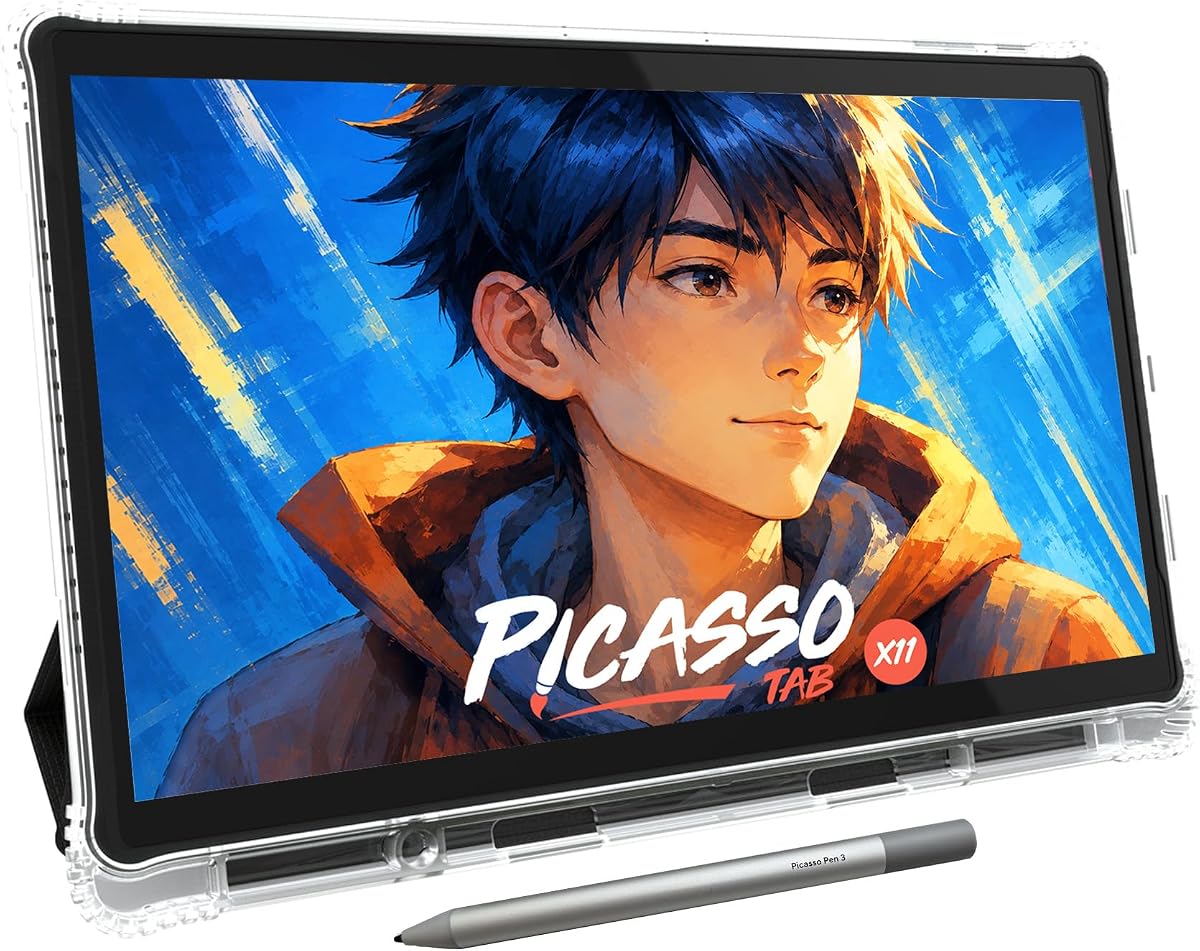
The PicassoTab X11 is designed specifically for beginners and students who want a dedicated device for creativity. With a 4.2 rating, it comes preloaded with five creative apps and includes lifetime VIP tutorials, making it an educational powerhouse out of the box.
We may earn a commission when you buy through this link, at no additional cost to you.
Its 11-inch laminated screen reduces parallax, providing a paper-like experience that feels natural for drawing and animation. The device runs on an octa-core processor with 6GB RAM, ensuring smooth performance when switching between drawing apps or video tutorials.
Unlike generic tablets, this one focuses on art and learning, with features like an adjustable stylus sensitivity for shading. It also comes with bonus accessories like a case and screen protector, offering great value for anyone starting their digital art journey.
This tablet is ideal for kids and hobbyists who do not need the complexity of a full computer setup. If you want a guided path to learning art without installing third-party software, the PicassoTab X11 provides a supportive and fun environment.
The included lifetime VIP tutorials offer step-by-step lessons, allowing beginners to improve skills without searching for external resources.
A fully laminated 2K screen minimizes the gap between pen and cursor, creating a more direct and realistic drawing experience.
We may earn a commission when you buy through this link, at no additional cost to you.
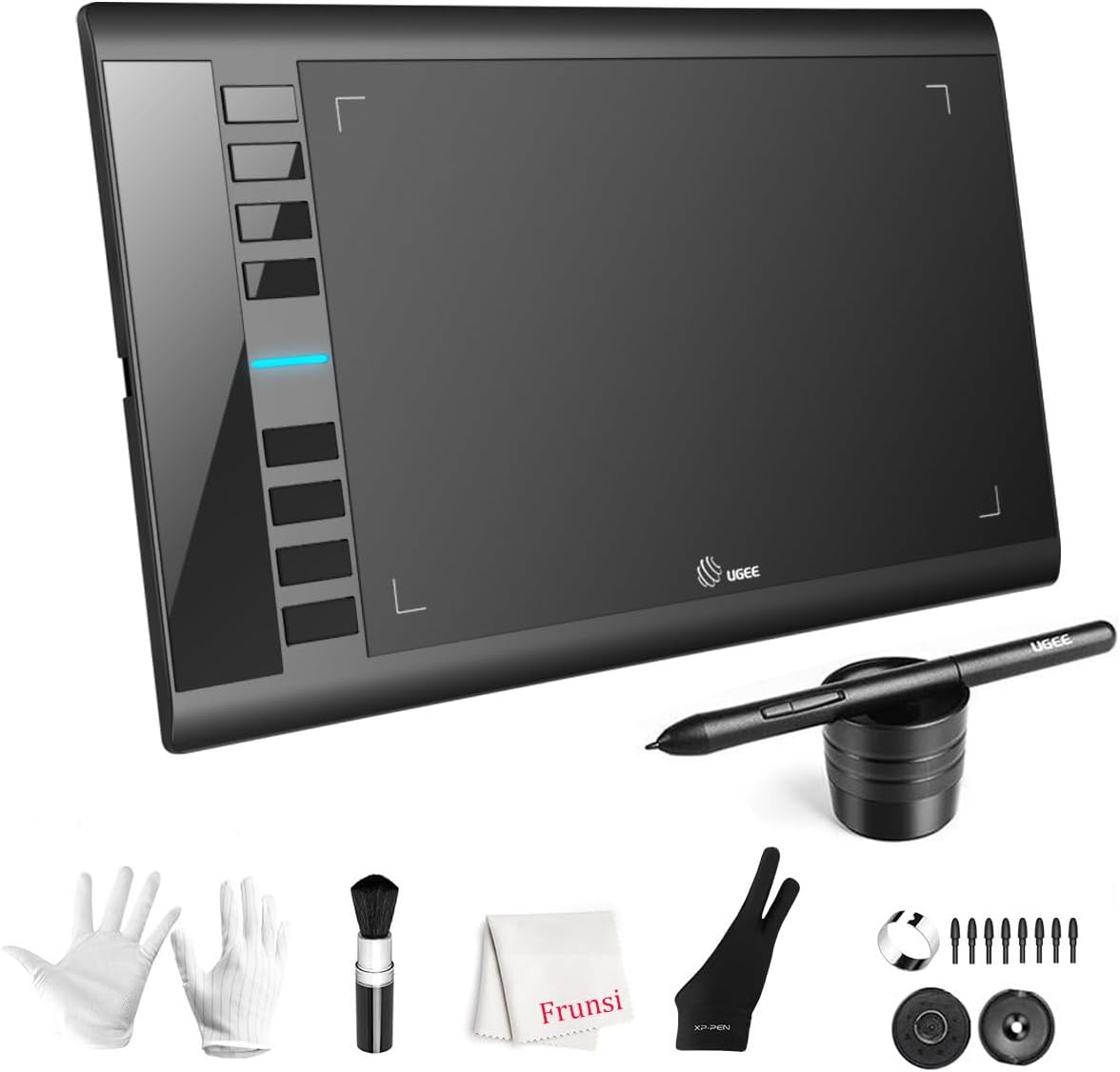
The UGEE M708 is a reliable entry-level tablet that offers a large 10×6 inch active space for comfortable drawing. Rated 4.4 by users, it features 16384 levels of pressure sensitivity, allowing for precise control without needing expensive hardware.
We may earn a commission when you buy through this link, at no additional cost to you.
Designed for flexibility, it works with Windows, Mac, Android, and Linux systems, making it accessible regardless of your current tech setup. The eight express keys on the side provide quick access to shortcuts like zoom and undo, streamlining your workflow significantly.
This tablet is particularly friendly for ambidextrous users, with a design that accommodates both left and right-handed artists easily. The passive pen requires no charging, ensuring you can sketch whenever inspiration strikes without battery concerns.
For beginners transitioning from paper to digital art, the M708 is an excellent choice. Its combination of size, sensitivity, and compatibility makes it a versatile tool for learning digital painting, photo editing, or 3D modeling efficiently.
The 10×6 inch active area provides generous room for sweeping strokes and detailed work, reducing hand fatigue during long sessions.
Supporting multiple operating systems and creative software ensures you can integrate it into any existing workflow seamlessly.
We may earn a commission when you buy through this link, at no additional cost to you.
The Bravokids 10 Inch LCD Writing Tablet is designed specifically for young children aged 3 to 8. With a 4.6 rating, it is praised for its colorful screen that encourages creativity without exposing kids to harmful radiation or glare from typical tablets.
We may earn a commission when you buy through this link, at no additional cost to you.
Its durable plastic body with rounded corners is built to withstand drops, making it suitable for active kids. The screen supports over 100,000 rewriting cycles, which means it can be used for years without needing replacement or paper waste.
The one-second erase button and lock key make it simple for children to use independently. It is an ideal solution for keeping kids occupied during car rides or in restaurants, offering a quiet activity that reduces parental stress.
Parents looking for an educational yet fun gift will find this tablet a hit for birthdays. It fosters imagination and fine motor skills while being easy to clean and store, making it a practical addition to any family's toy collection.
The design ensures zero radiation and glare, protecting young eyes from strain during long hours of imaginative play.
Saving thousands of paper sheets by reusing this board contributes to a greener environment while encouraging sustainable habits.
We may earn a commission when you buy through this link, at no additional cost to you.
The TEKFUN LCD Writing Tablet is a compact and durable option for young children who love to draw. Rated 4.5, it weighs only 150 grams, making it easy to carry in a bag or pack for travel without adding significant weight.
We may earn a commission when you buy through this link, at no additional cost to you.
Built with high-quality waterproof and anti-fall materials, this tablet is designed to handle the rigors of active play. The lock switch effectively prevents accidental clearing, ensuring your child's artwork remains safe until you decide to delete it.
With a battery life of six months, it offers long-term usage before needing replacement. The pressure-sensitive technology responds to stylus or nails, allowing kids to express themselves easily without needing specialized pens or markers.
This tablet is a fantastic gift for road trips or airplane journeys. It keeps children engaged and quiet without the risk of spills or breaks, providing a reliable, mess-free way to entertain little artists anywhere you go.
The waterproof and anti-fall plastic construction ensures the device survives drops and spills, extending its usable life for kids.
At just 150 grams, it is the perfect lightweight travel companion that fits easily in any bag for on-the-go creativity.
We may earn a commission when you buy through this link, at no additional cost to you.
The Mafiti LCD Writing Tablet offers a compact 8.5-inch screen perfect for quick notes or doodles. With a 4.2 rating, it is appreciated for its kickstand feature, which allows you to prop up the device to display messages to family or coworkers.
We may earn a commission when you buy through this link, at no additional cost to you.
Weighing only a fraction of a pound, this tablet is incredibly portable and easy to slip into a pocket or purse. The replaceable CR2016 battery ensures that when power runs out, you can quickly swap it out and continue writing without replacing the whole unit.
The stylus doubles as a kickstand, adding a functional touch to its design. It supports over 100,000 write cycles, providing ample durability for daily notes or children's drawings without degradation over time.
Ideal for home offices or classrooms, this tablet is great for quick brainstorming or leaving reminders. If you need a simple, lightweight board for memos or casual sketches, the Mafiti offers a practical and budget-friendly solution.
The stylus can be used as a kickstand to display your written messages hands-free, adding convenience to its functionality.
With a replaceable battery, you avoid electronic waste and can keep using your board for years without buying a new one.
We may earn a commission when you buy through this link, at no additional cost to you.
The Wacom Intuos Small is a trusted choice for digital artists seeking reliable performance from a leading brand. With a 4.6 rating, it uses Wacom's EMR technology to provide a natural pen-on-paper feel without the need for charging a battery.
We may earn a commission when you buy through this link, at no additional cost to you.
This tablet works with virtually any creative software, from Photoshop to Clip Studio Paint, making it versatile for various workflows. It also includes software and online training, which helps beginners get started quickly with professional tools.
Although it has a smaller active area compared to some competitors, its precision and durability make up for the size. Professionals prefer it for its consistency and accuracy, ensuring that your digital strokes translate exactly as you intend.
For those new to digital art or needing a compact workspace, the Intuos Small is a solid investment. If you value brand reputation and software compatibility, this tablet offers a reliable foundation for creative work.
Wacom's industry-leading pen technology is the preferred choice for professional graphic designers worldwide for its precision.
Registering your tablet grants access to premium creative software and training, helping you master digital art faster.
We may earn a commission when you buy through this link, at no additional cost to you.
Selecting the right electronic sketch pad requires understanding your specific needs, budget, and technical requirements. We have outlined key factors to consider to ensure you find a device that supports your creative journey.
Decide if you need a standalone device that runs on its own or a tablet that connects to a computer. Standalone tablets offer more portability, while connected ones provide access to full desktop software.
Choose standalone for travel and quick notes; choose connected for professional software and large workspace.
Screen types range from basic LCD doodle boards to high-resolution color displays. Larger screens offer more drawing space but may be heavier to carry around.
For detailed art, opt for a larger screen; for notes and kids, a smaller size suffices.
Pressure sensitivity determines how well the pen captures line thickness and shading. Higher levels like 8192 or 16K allow for more nuanced artistic expression.
Look for at least 2048 levels for casual drawing; higher is better for professional work.
Battery-free pens are generally preferred for convenience as they never need charging. Some pens include features like eraser tips or programmable buttons.
Prioritize battery-free styluses for uninterrupted creative sessions and less maintenance.
Ensure the tablet works with your preferred operating system and applications. Some devices come with bundled software that can be a valuable starting point.
Check for drivers and app support before buying to avoid compatibility issues later.
Since drawing tablets can be dropped or bumped, robust build quality is essential. Look for water-resistant or anti-fall features if you plan to use it on the go.
Durable materials extend the lifespan of the device and protect your investment over time.
Consider how easy it is to carry the device with you. Lighter models are better for travel, while heavier ones might stay on a desk.
If you travel often, prioritize lightweight designs under 1 pound for convenience.
Extra features like screen lock, kickstands, or audio recording can add value depending on your use case. These features can simplify your workflow significantly.
Identify features that match your specific habits to avoid paying for unnecessary extras.
Start by installing any required drivers or apps on your device to ensure the stylus functions correctly. For standalone models, ensure the software is updated to access the latest features and improvements.
Clean the screen regularly with a soft microfiber cloth to remove dust and fingerprints. Avoid using harsh chemicals or rough materials that could scratch the display or damage the pen.
Store your tablet in a protective case when not in use to prevent accidental drops. Keep it away from extreme temperatures and moisture to maintain optimal performance and battery life.
No, not all sketch pads require a computer. Standalone models like the XPPen Magic Note Pad run on their own operating systems, while others like the UGEE M708 must connect to a PC or Mac to function properly.
A writing tablet is usually a simple LCD device for kids or notes without pressure sensitivity. A drawing tablet offers high pressure sensitivity and is designed for detailed artistic work on a computer or standalone system.
Check the product specifications for pressure levels. A standard writing pad has no levels, while drawing tablets typically list values like 2048, 8192, or 16384 pressure levels for varying line thickness.
Yes, most LCD writing tablets are designed with eye protection and zero radiation to ensure safety. However, always supervise young children to prevent them from swallowing small parts or breaking the device.
Many professional tablets use battery-free pens that do not need charging. However, some LCD models use replaceable coin-cell batteries that may need replacement after a few months of heavy use.
No, electronic sketch pads require a compatible stylus to register strokes. Using a standard pen or pencil may not work and could potentially damage the screen surface.
Battery life varies by model. Standalone drawing tablets often last 10 to 18 hours on a full charge, while LCD writing tablets use coin-cell batteries that can last several months.
Not always. Some brands like Wacom include software bundles with registration, while others may require you to download apps from a store or purchase software separately.
We have reviewed ten excellent electronic sketch pads that cater to different needs, from children's doodle boards to professional drawing monitors. The XPPen 10.95 Standalone, XP-PEN Artist12, and Kayoubi LCD Writing Tablet stand out as top picks for their unique features and value.
When making your decision, prioritize what matters most for your workflow. Whether it is portability, screen quality, or budget constraints, focusing on your primary use case will help you select the device that serves you best.
Remember that prices and availability can change quickly online. Always check the latest listings before purchasing to ensure you get the best deal and the correct model for your needs.