
Rioddas External CD/DVD Drive for Laptop
4.3Editor score
Affordable price point
Plug and play setup
Built-in copper mesh tech
This guide compares the top external CD drives for ripping audio and video files, evaluating speed, compatibility, and reliability for all users.
External CD drives have become essential tools for preserving physical media in a digital age. Whether you want to archive old music CDs or convert DVD collections to MP4 files, a reliable external drive ensures smooth data transfer without internal hardware limitations.
We evaluated ten top-rated models based on ripping speed, software compatibility, build quality, and connection stability. Each product was analyzed for its ability to handle various disc formats and support modern operating systems including Windows 11 and macOS Sonoma.
Every pick highlights specific strengths like USB 3.0 performance, portability features, and error correction tech. Please note that product availability and pricing may fluctuate over time. Always verify current listings before making your final purchasing decision for your setup.
4.3Editor score

4.4Editor score

4.5Editor score
The following table offers a side-by-side look at every model featured in this guide. Compare core specifications like interface type, supported operating systems, and unique features to find the drive that matches your ripping workflow needs.



This ROOFULL drive ranks as our top choice for users seeking high quality ripping performance. With a rating of 4.4 stars, it combines speed and reliability into one portable package. Its standout quality lies in its ability to handle both audio and video ripping with consistent precision.
We may earn a commission when you buy through this link, at no additional cost to you.
The built-in USB 3.0 cable ensures fast data transfer rates up to 5Gbps which is crucial for ripping large DVD collections without lag. It supports all common disc formats and includes intelligent error correction that prevents data loss during the reading process.
One trade-off is that on Mac systems the disc icon might not appear immediately after insertion. This is a known OS restriction that users can resolve by checking Finder settings. Despite this the drive remains stable once recognized.
It is ideal for users who need a dependable ripping tool for travel or home archiving. The included case protects the drive during transport making it perfect for archivists or travelers who want to preserve physical media.
The USB 3.0 interface ensures that ripping multiple albums or DVDs takes significantly less time than older USB 2.0 models.
The included protective sleeve adds value and extends the lifespan of the drive when used in transit or office settings.
We may earn a commission when you buy through this link, at no additional cost to you.
The Rioddas drive offers excellent value for budget-conscious users who still need reliable ripping capabilities. Its 4.3 star rating reflects consistent performance in reading and writing discs. It stands out due to its copper mesh technology which stabilizes the connection.
We may earn a commission when you buy through this link, at no additional cost to you.
Its key strength is the stable data transmission that minimizes freezing during ripping sessions. The physical eject button ensures you can recover discs even if the system locks up. This feature is crucial for protecting your physical media from damage.
The drive lacks a carrying case which means you should handle it with care during travel. While the build is solid it does not offer the same premium feel as higher cost options. Still it gets the job done effectively for daily tasks.
This drive is perfect for students or casual users who need occasional ripping access. If you want a reliable tool without paying premium prices this model delivers solid performance for basic audio and video conversion needs.
Copper mesh shielding helps prevent signal interference during data transfer ensuring consistent ripping speed even with older cables.
The manual eject button provides a safety net for retrieving discs when software interfaces become unresponsive.
We may earn a commission when you buy through this link, at no additional cost to you.
This ASUS model represents the premium tier of external drives with a focus on longevity and security. With a 4.5 star rating it offers high quality construction that lasts longer than standard units. Its standout feature is the inclusion of M-DISC support for archiving.
We may earn a commission when you buy through this link, at no additional cost to you.
The drive supports USB Type C natively which matches modern laptop standards and ensures fast data transfer speeds. It also offers disc encryption allowing you to protect sensitive data stored on physical media. The cable storage design keeps your workspace organized.
The main drawback is the higher cost compared to other options on this list. Additionally while it is fast it does not exceed 8X DVD writing speeds. However for users prioritizing security and build quality these are acceptable trade-offs.
It is recommended for professional users or archivists who need secure long term storage solutions. If you value data protection and premium build materials this drive provides peace of mind for your important media collections.
Disc encryption allows users to password protect files making this ideal for sensitive business or personal data backups.
The 14.6mm thickness makes it one of the slimmest drives available fitting easily into any laptop sleeve.
We may earn a commission when you buy through this link, at no additional cost to you.
The Amicool drive excels in flexibility due to its dual interface design supporting both USB 3.0 and Type C ports. It received a 4.2 star rating for its reliable performance in reading and writing various disc formats. It is particularly useful for users with mixed hardware setups.
We may earn a commission when you buy through this link, at no additional cost to you.
Its key strength is the universal compatibility with Windows Linux and macOS which makes it easy to use across different environments. The 24X CD read speed ensures that audio ripping is performed quickly without excessive waiting time.
However it does not support DVD-RAM or Blu-ray discs which may be a limitation for users with older archive formats. The power requirements can also be high meaning you should connect it directly to the motherboard on desktops.
It is ideal for tech-savvy users who need a versatile drive for various operating systems. If you want a budget friendly option that bridges legacy USB ports with modern Type C connectors this model is a strong contender.
Support for both USB-A and Type-C eliminates the need for dongles making it convenient for all laptop types.
With 24X read speeds converting CD collections to digital files is significantly faster than older 8X drives.
We may earn a commission when you buy through this link, at no additional cost to you.
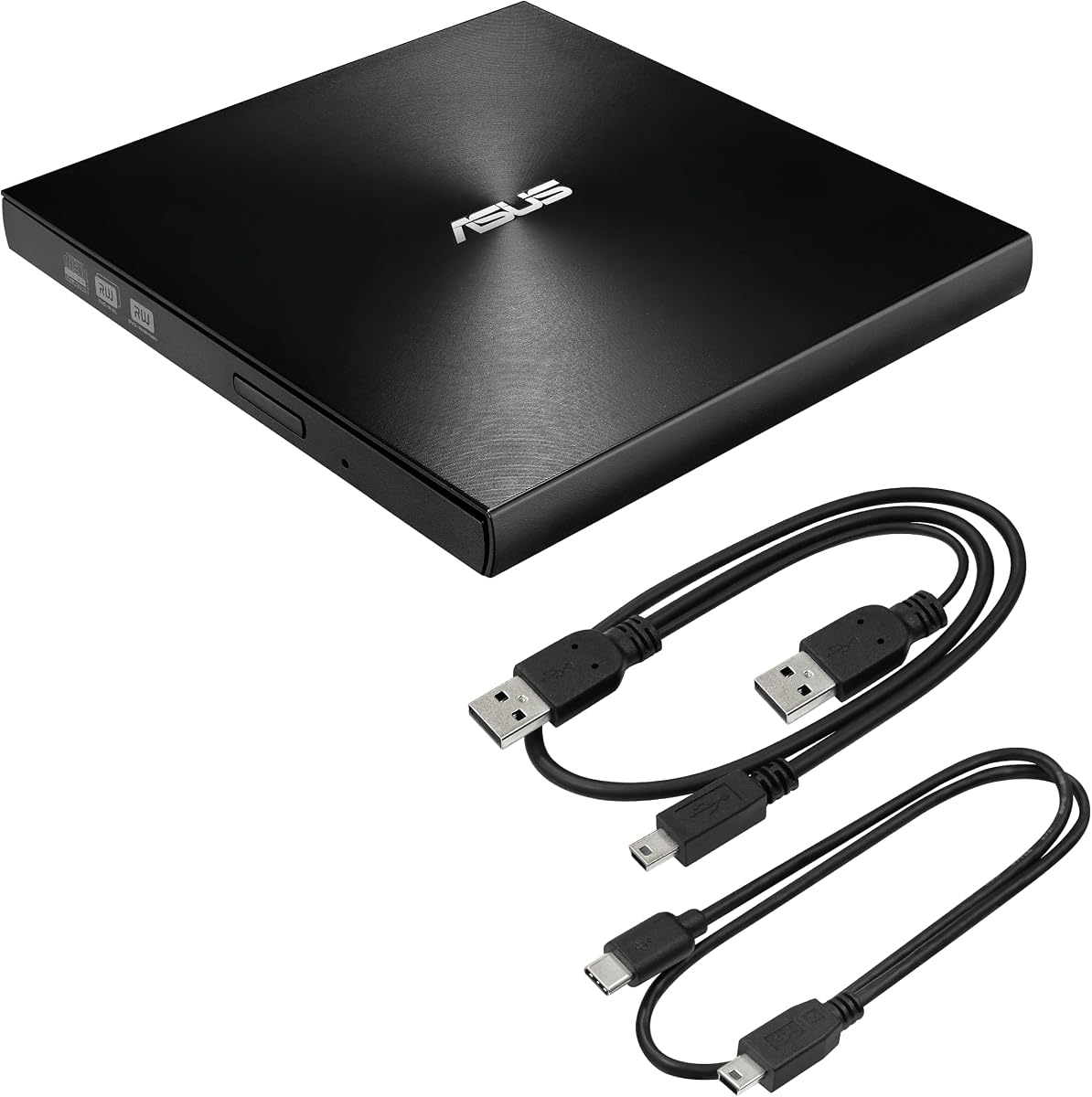
The ASUS ZenDrive is recognized for its ability to support M-Disc which allows for long-term archival storage. It holds a 4.3 star rating and features an extremely slim 13mm profile that makes it highly portable. This model is designed for longevity and reliability.
We may earn a commission when you buy through this link, at no additional cost to you.
Its standout feature is the M-Disc support which ensures data remains readable for years without degradation. The included USB C and USB 2.0 cables offer flexibility for older and newer systems. It also comes with Nero BackItUp software for easy backups.
The primary trade-off is that some versions use USB 2.0 which may slow down ripping large video files. Additionally the 8X DVD speed is standard rather than exceptional. However for audio ripping this limitation is rarely noticeable.
It is recommended for users who want to create lasting backups of their digital media. If preserving data integrity is your top priority this drive provides the tools needed to store files safely for the long term.
M-Disc technology is engineered to last over 100 years making it ideal for critical data preservation needs.
The included Nero software allows you to back up files directly to Android devices adding mobile versatility.
We may earn a commission when you buy through this link, at no additional cost to you.
The ORIGBELIE drive focuses on durability with anti-shock technology that protects data during transport. It has earned a 4.2 star rating for stable performance in various environments. Its slim 13mm design makes it easy to carry in a laptop bag.
We may earn a commission when you buy through this link, at no additional cost to you.
Its key strength is the ability to handle movement without disrupting the reading process. This is valuable for users who travel frequently or work in mobile environments. The drive also supports USB 3.0 and Type C for versatile connectivity.
The warranty is shorter than premium options covering only 90 days. You may need to buy a separate storage bag if one is not included. Despite this the build quality is robust enough for daily use without extra protection.
It is a great choice for travelers who need a reliable ripping tool on the go. If durability and portability are your main concerns this model offers solid protection against drops and shocks during transit.
Anti-shock features prevent read errors when the drive is used in moving environments like vehicles or buses.
The lightweight design ensures it adds minimal weight to your laptop bag during daily commutes.
We may earn a commission when you buy through this link, at no additional cost to you.
This drive supports a wide array of disc formats making it versatile for complex ripping projects. It holds a 4.1 star rating reflecting solid performance with occasional connection hiccups. Its main advantage is the ability to read various disc types reliably.
We may earn a commission when you buy through this link, at no additional cost to you.
Its key feature is the compatibility with common and specialized formats ensuring you can rip almost any disc you own. The USB 3.0 and Type C interface ensures fast data transfer rates for efficient workflow during large batch ripping tasks.
The drive has a lower rating than premium models which may indicate less consistent quality control. It also lacks bundled software meaning you must use third-party tools for ripping. Despite this it remains a cost-effective option for specific needs.
It is ideal for users with diverse disc collections who need broad compatibility. If you have a mix of CD DVD and other formats this drive offers the flexibility to handle them all without additional adapters.
Support for multiple disc types ensures you can rip older media without worrying about drive limitations.
The hidden cable slot keeps the connection wire organized and reduces the risk of losing essential accessories.
We may earn a commission when you buy through this link, at no additional cost to you.
This model is designed for simplicity and reliability in basic ripping tasks. With a 4.2 star rating it offers a straightforward experience for users who want to avoid technical complications. Its design focuses on functionality over complex features.
We may earn a commission when you buy through this link, at no additional cost to you.
Its key strength is the disc clearance design that prevents issues with thicker labeled discs. This ensures a smooth reading process without jams or errors during ripping. The anti-skid rubber base keeps the drive stable during operation.
The trade-off is that it lacks extra accessories like carrying cases or software bundles. You will need to provide your own storage solutions and ripping software. However for basic daily use this remains a practical solution.
It is recommended for users who prefer a no-frills drive for everyday needs. If you want a reliable tool that just works without unnecessary extras this model delivers consistent performance for standard audio and video ripping.
The internal structure allows thicker discs to fit without getting stuck ensuring consistent reading performance.
Anti-skid rubber pads ensure the drive does not slide around on your desk during active use.
We may earn a commission when you buy through this link, at no additional cost to you.
This drive stands out for its widened disc bay which accommodates discs with thick labels. It has a 4.0 star rating indicating decent performance for basic tasks. Its compact design makes it easy to integrate into tight workspaces.
We may earn a commission when you buy through this link, at no additional cost to you.
Its key feature is the widened bay that prevents disc jams during reading operations. The anti-slip rubber pads keep the drive stable during spinning ensuring consistent data transfer. It also includes a slot for storing the cable neatly.
The trade-off is that it scores lower on reliability compared to higher rated models. It also lacks advanced features like encryption or archival support. However for standard ripping this remains a functional option.
It is ideal for users with discs that have thick printed labels. If you often deal with custom printed media this design prevents mechanical issues that would stop the ripping process on other drives.
The internal structure is designed to handle non-standard disc thickness without causing read errors or jams.
Rubber pads on the base ensure the unit remains in place during high-speed rotation.
We may earn a commission when you buy through this link, at no additional cost to you.
The LG drive is highly rated for its compatibility with Surface Pro devices and modern laptops. With a 4.4 star rating it offers reliable performance for ripping needs. Its slim profile makes it ideal for travel or mobile office setups.
We may earn a commission when you buy through this link, at no additional cost to you.
Its key strength is the specific optimization for Surface Pro systems ensuring plug-and-play functionality without extra drivers. It also supports M-DISC which allows for long-term storage of your ripped content securely. The 8X DVD speed is standard but sufficient.
The trade-off is the limited write speed which may slow down large video ripping tasks. It also lacks bundled software meaning you must provide your own ripping tools. Despite this the hardware quality remains solid.
It is recommended for Surface Pro users who need seamless integration. If you own a Surface device and require a reliable external drive this model is optimized for your hardware environment.
Optimized drivers and form factor ensure this drive works seamlessly with Microsoft Surface devices without extra adapters.
This drive allows you to connect to certain TVs enabling playback of media files without a computer.
We may earn a commission when you buy through this link, at no additional cost to you.
Choosing the right external CD drive for ripping depends on your hardware needs and the types of discs you plan to convert.
Ensure the drive supports your computer's ports. Look for USB 3.0 or Type C to ensure fast data transfer speeds during ripping. Older USB 2.0 drives may cause delays with large video files.
Choose a dual interface drive if your laptop uses different connectors to avoid carrying extra dongles.
Verify that the drive works with your operating system. Most drives support Windows and macOS but some may not support ChromeOS or Linux without drivers. Check compatibility notes before purchasing.
For Mac users ensure the drive supports native OS requirements for mounting discs properly.
Check which disc formats the drive supports. Most handle CD-R and DVD-R but some may not support DVD-RAM or Blu-ray. Ripping audio CDs requires good read speeds while video requires consistent burn capability.
Select a drive that matches the types of media you plan to archive regularly.
Ripping large collections requires fast data transfer speeds. USB 3.0 interfaces provide up to 5Gbps which ensures your process completes in reasonable time. Look for drives with 8X or higher DVD read speeds.
Higher read speeds reduce the time you spend waiting for files to transfer to your hard drive.
A sturdy drive is essential if you plan to move it between locations. Look for anti-shock technology or metal shells to prevent damage during transit. A slim profile helps fit the drive into your laptop bag easily.
Durability ensures the drive lasts longer even with daily use in busy environments.
Some drives need external power if the USB port does not supply enough energy. Ensure you have a powered USB hub or extra cable if needed. Desktop users should connect directly to motherboard ports for stability.
Avoid hubs that do not provide enough power to prevent connection drops during ripping.
Many drives do not include ripping software so you will need third-party tools. Ensure the drive is compatible with software like VLC or Exact Audio Copy. Some premium drives include bonus backup tools.
Check if the drive supports the specific software you prefer using for your workflow.
If you travel often look for drives with built-in cables or carrying cases. Integrated cable slots reduce the risk of losing connectors. A lightweight design helps reduce overall weight in your bag.
Portable accessories ensure your drive is ready to use without searching for extra accessories.
To use your drive correctly plug it directly into a USB port on your computer. Wait for the system to detect the drive before inserting a disc. This ensures the device has enough power to spin the disc smoothly.
Install ripping software like VLC or Exact Audio Copy before starting. These tools allow you to select output formats like MP3 or MP4. Always select the external drive as the source device in the software settings.
Care for your drive by avoiding exposure to dust or moisture. Store it in a protective case when not in use to prevent scratches. Clean the laser lens only with approved cleaning discs if reading issues occur.
No standard external CD drives cannot rip Blu-ray discs. They typically support CD and DVD formats only. For Blu-ray ripping you need a dedicated Blu-ray external drive.
Most external drives are plug and play and do not need drivers. However on some Linux systems you may need to install software. Always check the manufacturer support page for specific OS requirements.
This usually happens due to power issues or bad USB ports. Try connecting directly to a motherboard port. Also ensure your USB hub provides enough power for the drive.
Popular options include Exact Audio Copy for high fidelity or VLC for basic needs. Some drives include Nero BackItUp for backups. Check compatibility before installation.
Mac users should use the Type-C connector if available. If the disc icon does not appear go to Finder settings to enable external disks. Ensure the drive is powered properly.
M-DISC support is useful for long-term archival storage. It ensures data remains readable for many years. For general ripping it is optional but beneficial for preservation.
Yes portable drives are designed for travel. Use the included carrying case to protect it. Ensure you have the correct power cable for your laptop while on the move.
We reviewed ten external drives that cover various needs from budget-friendly options to premium archival tools. Each model offers unique strengths depending on your specific ripping workflow and hardware setup.
Prioritize USB 3.0 performance and compatibility with your operating system before purchasing. Ensure the drive supports the disc formats you need to convert reliably without errors during the process.
Prices and stock availability can change quickly so verify current listings before buying. Checking recent reviews helps confirm that the product meets your expectations for performance and durability.