
SSK Portable SSD 1TB
4.5Editor score
Ultra lightweight design
SLC caching technology
Heat dissipation case
Compare the top 10 external SSDs for Mac Mini M4 including speed, compatibility, durability and value to find the best storage expansion for your setup today.
Choosing the right external storage for your Mac Mini M4 is crucial for maintaining workflow efficiency. High performance drives ensure smooth editing and seamless file transfers across your ecosystem.
We analyzed ten leading models based on speed, durability, and macOS compatibility. Each product was evaluated for its ability to integrate with M4 chips and support creative professional tasks effectively.
Every pick highlights key strengths and potential trade-offs for different user needs. Please note that availability and pricing may fluctuate so verify current details before making your final purchase decision.
4.5Editor score
4.5Editor score

3.9Editor score
This side by side comparison breaks down the critical specifications of every drive we reviewed to help you identify the perfect match for your Mac Mini M4 storage needs.




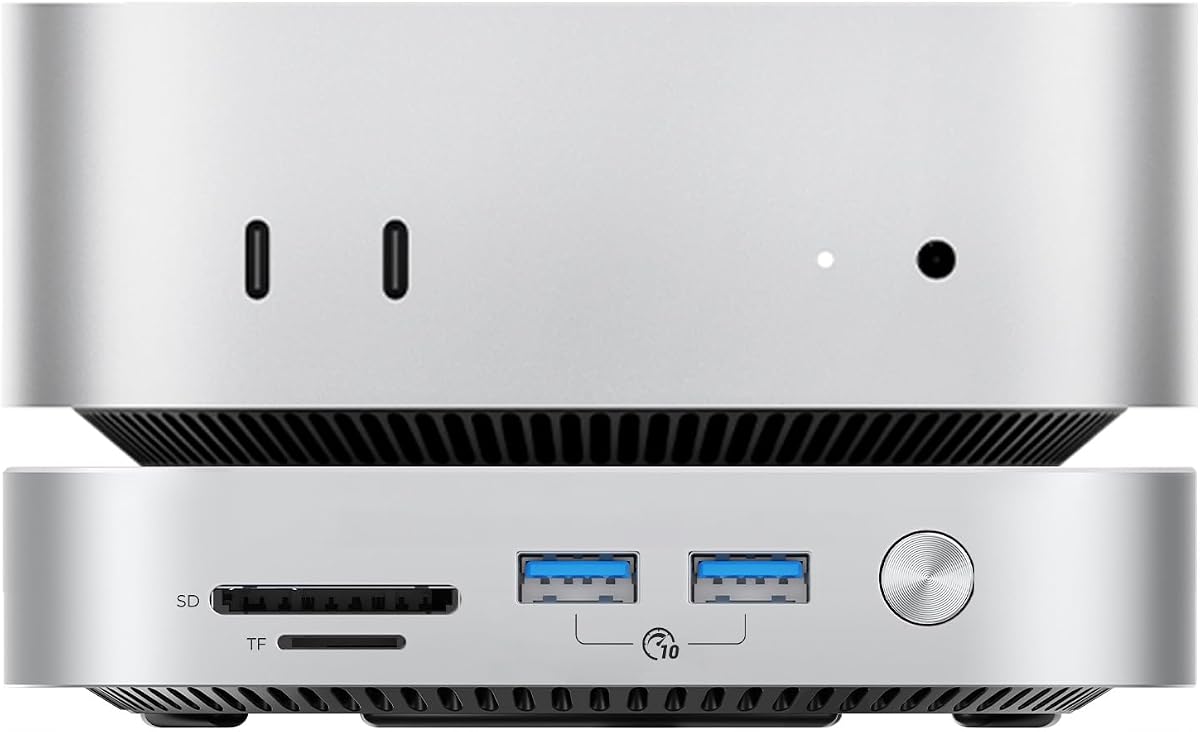
The ORICO 2TB External SSD stands out as the top choice for Mac Mini M4 users needing serious storage expansion. It features a robust dual SSD design that seamlessly attaches to the system while maintaining desktop elegance. The unit is certified for Apple ecosystems ensuring plug and play functionality with Time Machine compatibility right out of the box.
We may earn a commission when you buy through this link, at no additional cost to you.
Its standout quality lies in the intelligent cooling and power systems. The aerospace grade aluminum body sustains peak speeds without overheating even during heavy 4K or 8K workflows. Smart sleep mode cuts power usage significantly when idle making it ideal for 24/7 operation without wasting energy or generating unnecessary heat.
While it offers immense connectivity through multiple USB ports and card readers the size is slightly larger than standard portable drives. This trade-off is acceptable given the added versatility of an SD card reader and multiple peripherals connections which are essential for creative pros managing diverse file types.
Anyone looking for a reliable permanent storage solution for their Mac Mini M4 should prioritize this bundle. It balances speed capacity and convenience perfectly making it the definitive choice for professionals who need desktop reliability with portable flexibility.
Multiple USB 3.0 ports and card readers allow seamless connection of cameras and peripherals without extra hubs.
Certified for macOS Sonoma and M series chips ensures seamless integration and reliable performance across all Apple devices.
We may earn a commission when you buy through this link, at no additional cost to you.
The Samsung T7 Portable SSD is a legendary choice for creators who need dependable speed and durability. It delivers fast speeds up to 1050MB/s making it almost twice as fast as previous generations. This performance is crucial for backing up large working files or editing high resolution video directly on the drive.
We may earn a commission when you buy through this link, at no additional cost to you.
Its sturdy sidekick design offers fall protection up to six feet ensuring your data stays safe during travel or accidental drops. The aluminum unibody construction adds to its longevity while providing excellent heat dissipation during intensive data transfers. Samsungs in house production of DRAM and NAND further guarantees quality and reliability.
The weight is a bit higher than some ultra slim competitors but this adds to its robust feel and durability. This is a fair trade-off for users who value data safety and consistent performance over pocketability. The drive also supports high resolution recording like iPhone ProRes video.
This drive is perfect for anyone who values trust and speed in their workflow. Whether you are a student gamer or professional its compatibility with phones and PCs makes it a versatile team player for all your storage needs.
Supports iPhone 15 ProRes 4K at 60fps directly onto the drive for professional mobile content creation.
All firmware and components are produced in house by Samsung ensuring quality and trust in every drive.
We may earn a commission when you buy through this link, at no additional cost to you.
The SanDisk Professional 4TB PRO-G40 is the ultimate choice for professionals requiring extreme durability and maximum speed. It boasts speeds up to 3000MB/s with Thunderbolt 3 allowing you to move 50GB in a minute. This is unmatched for workflows involving massive datasets or high bandwidth video projects.
We may earn a commission when you buy through this link, at no additional cost to you.
Its ultra rugged design features IP68 dust and water resistance plus 4000lb crush resistance. The aluminum core pulls heat away efficiently maintaining performance under load. Being Mac ready with APFS format ensures seamless integration without extra formatting steps for your Mac Mini M4 environment.
The high price point reflects its pro grade enclosure and massive capacity. While it might be overkill for casual users the investment pays off for field professionals who need reliable storage in harsh conditions. The dual mode compatibility with USB-C also adds versatility when Thunderbolt ports are unavailable.
If you need the fastest and most durable storage possible this drive is the clear winner. It offers premium strength you can feel and is built for those who demand consistent performance regardless of the environment or file size.
Survives 3m drops and harsh elements making it perfect for on location shoots or travel in extreme conditions.
Delivers blazing fast 3000MB/s read speeds with Thunderbolt 3 for high bandwidth workflows and quick backups.
We may earn a commission when you buy through this link, at no additional cost to you.
The Lexar 2TB ES3 External SSD delivers incredible speed at a competitive price point making it a strong value pick. It is 9.5x faster than traditional hard disk drives with read speeds up to 1050MB/s. This performance boost is immediately noticeable during file transfers and system backups on your Mac Mini.
We may earn a commission when you buy through this link, at no additional cost to you.
A standout feature is the built-in double layer graphite sheets that quickly conduct heat away from the drive. This enhances heat dissipation ensuring the drive stays cool even during blazing fast transfers. It is also drop-resistant up to 2 meters ensuring durability for everyday office use and occasional travel.
The price is slightly higher than some budget options but the robust cooling and durability features justify the cost. You get instant storage expansion with a 2-in-1 USB-C/USB-A cable included for plug-and-play convenience across various devices. The sleek design fits well in any professional environment.
This drive is ideal for users who want high speed and reliability without paying for premium Thunderbolt speeds. It balances performance and durability well making it a practical choice for creative professionals needing reliable daily storage.
Double layer graphite sheets ensure the drive stays cool during heavy use preventing thermal throttling and maintaining speed.
Includes a 2-in-1 USB-C and USB-A cable ensuring compatibility with PCs Macs tablets and smartphones easily.
We may earn a commission when you buy through this link, at no additional cost to you.
The Sandisk 1TB Extreme Portable SSD is engineered for users who prioritize speed and portability. It offers transfer speeds up to 2000MB/s nearly doubling the performance of the previous generation. You can move 1000 high-res photos in under 60 seconds making it perfect for quick backups and fast workflow.
We may earn a commission when you buy through this link, at no additional cost to you.
It features an IP65 rating providing protection against spills and drops which adds peace of mind during travel. The drive is pocket sized fitting easily in bags without bulk. 256-bit AES encryption keeps private files secure with password protection ensuring your data remains safe wherever you go.
The main trade-off is the requirement for specific cables to maximize its speeds which might be an extra cost. However the speed and protection benefits outweigh this minor inconvenience. It also supports AI content storage making it relevant for modern editing needs.
This drive is best suited for on-the-go creatives who need fast access to large files. Its balance of speed protection and security makes it a top contender for those who demand performance in a small package.
Move 1000 high-res photos in under 60 seconds thanks to near 2x faster speeds compared to previous models.
256-bit AES encryption with password protection helps keep private files secure from unauthorized access or theft.
We may earn a commission when you buy through this link, at no additional cost to you.
The Lexar ES3 1TB Portable SSD is a sleek and stylish option for those who value portability. It is only 10.5mm thick and weighs just 42g making it smaller than a standard card. This design allows it to easily fit in your pocket for on-the-go storage needs.
We may earn a commission when you buy through this link, at no additional cost to you.
It supports USB 3.2 Gen 2 with read speeds up to 1050MB/s ensuring fast file transfers for efficient work. The drive comes with a Type-C cable for plug-and-play convenience and supports compatibility with various devices including iPhone 17 series. DataShield encryption adds a layer of security for your files.
One limitation is that MagSafe is not available in this version limiting some specific mounting options. However the lightweight design and wide compatibility make it a great travel companion. It works well with Android devices consoles and PCs offering versatile connectivity.
Ideal for mobile users this drive offers speed and convenience in a minimal package. If you need a drive that is barely noticeable in your bag but delivers solid performance for daily tasks this is the pick.
Weighing only 42g and being 10.5mm thick it is smaller than a card and fits easily in any pocket.
Includes Lexar DataShieldTM 256-bit AES encryption software to protect your valuable files from unauthorized access.
We may earn a commission when you buy through this link, at no additional cost to you.
The SSK Portable SSD 1TB offers fantastic performance at a budget-friendly price point. It delivers blazing-fast read speeds up to 1050MB/s and write speeds up to 1000MB/s. The SLC caching technology ensures steady speeds during transfers within the cache capacity making it reliable for large file moves.
We may earn a commission when you buy through this link, at no additional cost to you.
Weighing just 36.6g it is incredibly lightweight and portable for daily carry. The 2mm thick aluminum alloy case provides superior heat dissipation preventing overheating during extended use. It includes both USB-C and USB-A cables bridging devices effortlessly for seamless cross-platform file transfers.
Users should note that capacity variance appears on Windows due to binary calculation but shows full TB on Mac. The LED light indicates activity and S.M.A.R.T. health diagnostics help maintain longevity. It supports iPhone 4K ProRes capturing making it versatile for mobile creators.
This drive is perfect for students or anyone needing reliable extra storage without breaking the bank. It balances speed and weight beautifully making it a top choice for everyday use and portable backups.
2mm thick aluminum alloy case keeps the drive cool and extends longevity during heavy use without overheating.
Weighing only 36.6g it is incredibly light and easy to carry in pockets or small bags.
We may earn a commission when you buy through this link, at no additional cost to you.
The Crucial X10 2TB Portable SSD provides massive storage with ultra-fast speeds for creators and gamers. It delivers read speeds up to 2100MB/s ensuring rapid data access for demanding projects. Its matte blue external design is both stylish and durable fitting well into any environment.
We may earn a commission when you buy through this link, at no additional cost to you.
Built to last it features IP65 dust and water resistance and drop resistance up to 9.8 feet. This durability makes it perfect for travel and all weather conditions. The drive also comes with bonus software including three months of Mylio Photos plus and Acronis True Image adding extra value.
While the color options are limited the performance and capacity are undeniable. It connects effortlessly via USB-C and USB-A supporting Mac iPad Pro Android Linux and consoles. This broad compatibility makes it a versatile tool for anyone managing diverse file types.
This drive is ideal for those needing significant space without sacrificing speed. Whether for gaming backups or creative work the large capacity and fast transfer rates make it a top contender for heavy users.
Includes three months of Mylio Photos plus and Acronis True Image enhancing the drive with useful backup and editing tools.
IP65 dust water resistance and 9.8 ft drop resistance ensure reliability wherever you go.
We may earn a commission when you buy through this link, at no additional cost to you.
The Samsung T9 Portable SSD is designed for creators needing sustained high performance during long projects. It features read and write speeds up to 2000MB/s allowing you to race through projects without waiting. The dynamic thermal guard ensures the drive stays cool even in heavy use maintaining ideal temperatures.
We may earn a commission when you buy through this link, at no additional cost to you.
Its advanced thermal solution withstands heat effectively ensuring longevity and reliability. The Magician Software keeps the drive running like new with firmware updates and health monitoring. It is compatible with desktops consoles and mobile devices offering true versatility for team players.
The main limitation is the requirement for USB 3.2 Gen 2×2 to achieve max speeds on some systems. However most modern Macs support this protocol well. The solid build gives you longevity to last through heavy use with one convenient drive.
This drive is best for power users who need consistent high speeds for long editing sessions. The thermal management and software support make it a standout choice for professionals who rely on their storage daily.
Dynamic Thermal Guard keeps the SSD at ideal temperatures even during heavy use preventing throttling and overheating.
Includes Magician Software for firmware updates encryption and health monitoring to keep the drive running like new.
We may earn a commission when you buy through this link, at no additional cost to you.
The SABRENT Rocket Nano XTRM offers high-speed Thunderbolt 3 performance in a remarkably compact form factor. It delivers speeds up to 2700MB/s over the 40 Gbps interface perfect for uninterrupted 4K video editing. It also falls back seamlessly to USB 3.2 Gen 2 ensuring compatibility with older ports.
We may earn a commission when you buy through this link, at no additional cost to you.
Despite its small size it houses 2TB of NVMe storage in a shirt-pocket sized aluminum body. The solid chassis improves heat dissipation protecting data during transfers. It comes with both Thunderbolt and USB-C to USB-A cables so no extra purchases are needed right out of the box.
While it requires a Thunderbolt port for maximum speed it is fully bus-powered requiring no adapter. The included silicone sleeve adds extra drop and scratch protection for demanding field environments. It works with Mac PC and Linux offering wide system support.
Ideal for professionals moving between locations this drive combines power and portability. The reliable performance and extensive connectivity options make it a top choice for field work and studio editing where speed is critical.
2TB of storage in a 2.95 inch body with up to 2700 MB/s speeds for professional editing.
Comes with both Thunderbolt and USB-A cables plus a silicone sleeve for travel protection.
We may earn a commission when you buy through this link, at no additional cost to you.
Selecting the right external SSD involves balancing speed capacity and durability to match your workflow needs with your Mac Mini M4.
Ensure the drive supports USB-C or Thunderbolt 3/4 to match your Mac Mini M4 ports. Faster interfaces like Thunderbolt 3 offer speeds up to 3000MB/s ideal for video editing.
Look for drives compatible with macOS to avoid reformatting and ensure plug-and-play functionality for a smooth experience.
Consider your storage requirements based on file types and project sizes. A 1TB drive is sufficient for photos and documents but video editors may need 2TB or more.
Selecting the right capacity avoids frequent backups and ensures you have enough space for current and future projects without clutter.
For field work choose drives with metal enclosures and IP ratings for water and dust resistance. Shock resistance is vital if you travel or use the drive in rugged environments.
Aluminum cases also help with heat dissipation ensuring stable performance during long data transfers.
Check read and write speeds especially for heavy file transfers. Speeds around 1000MB/s are standard but higher speeds significantly reduce wait times.
Look for features like SLC caching which maintains consistent speeds during large file transfers to prevent slowdowns.
Prioritize drives with hardware encryption like 256-bit AES to protect sensitive data. Password protection ensures only authorized users can access your files.
Security is critical for professionals handling confidential work or client data on external drives.
Verify the included cables match your Mac Mini M4 setup. Having both USB-C and USB-A cables adds versatility for connecting to other devices or older ports.
Avoid drives requiring proprietary adapters to simplify your desk setup and reduce extra costs.
Choose brands offering at least a three-year warranty to protect your investment. Reliable customer support ensures quick resolution if issues arise.
Extended warranties offer added peace of mind for drives used in critical workflows.
Look for drives that offer companion software for backups and monitoring. Native Mac support ensures seamless integration with system tools.
Additional software can streamline workflows and provide essential maintenance for your external storage.
Connect your SSD to a USB-C or Thunderbolt port on your Mac Mini M4 using the included cable. Ensure the drive is recognized in Finder before proceeding with file transfers or backups.
Format the drive to APFS if using it exclusively with Mac systems for best performance and Time Machine support. This step ensures seamless integration and compatibility with macOS features.
Store the drive in a cool dry place away from direct sunlight to maintain hardware longevity. Avoid dropping or exposing it to liquids especially if it lacks an IP rating to prevent data loss.
Yes an external SSD is faster more durable and more reliable than a traditional HDD. SSDs have no moving parts and offer significantly quicker data access speeds essential for editing or running apps on your Mac Mini M4.
Use the Thunderbolt 3/4 or USB-C ports on your Mac Mini M4 for best performance. These ports support high-speed data transfer ensuring you get the maximum speed your SSD can offer without bottlenecks.
If the drive is not recognized by Mac you may need to format it to APFS or Mac OS Extended. Use Disk Utility to format safely ensuring your drive is ready for use with Time Machine.
Yes you can run many applications directly from a fast external SSD on Mac Mini M4. Ensure the drive has sufficient speed and capacity to handle application load times and file operations.
You can use built-in Disk Utility or third-party software to check your external SSD health. Some SSDs provide companion apps that display status and performance metrics to keep track of your drive.
A 1TB SSD is a good starting point for general users but creative professionals might need 2TB or more. Consider your file sizes and number of projects when deciding on capacity.
We reviewed ten top external SSDs for Mac Mini M4 ranging from budget options to premium Thunderbolt drives. Each offers unique strengths in speed capacity and durability suitable for different workflows.
Prioritize interface speed and durability based on your work habits and environment. Choose drives that align with your capacity needs and offer reliable data security features.
Always check current pricing and availability before purchasing as deals fluctuate frequently. Ensuring compatibility with your specific Mac Mini M4 model guarantees optimal performance and satisfaction.