
MSI H270 Gaming PRO Carbon
4.0Editor score
Steel Armor PCIe slots
Gaming LAN protection
Mystic Light RGB sync
This guide compares ten top H270 motherboards for 2026, evaluating features, performance, and compatibility to help you choose the ideal board for your Intel
Finding the right H270 motherboard is crucial for building a stable and efficient system with 6th and 7th generation Intel processors. These boards offer a balance of connectivity, expansion slots, and reliable power delivery without the high cost of Z-series chipsets. Whether you need gaming performance or workstation stability, the H270 platform provides solid foundations for various user needs.
We analyzed ten distinct models ranging from established brands like ASUS and ASRock to specialized gaming and utility options. Our comparison focuses on key specifications such as DDR4 support, M.2 slot availability, and rear I/O port configurations. We also considered build quality, protection features, and user feedback to determine which boards offer the most value and reliability for modern computing tasks.
Each product entry in this list highlights specific strengths, potential limitations, and ideal use cases to guide your selection process effectively. You will find detailed breakdowns of chipset capabilities, expansion options, and unique features like RGB lighting or enhanced audio solutions. Please note that availability and pricing can fluctuate frequently, so verify current stock and offers before making your final purchase decision.
4.0Editor score

4.2Editor score

4.4Editor score
The following table provides a side-by-side overview of the ten selected H270 motherboards, highlighting their core specifications and standout features to facilitate a quick comparison of their capabilities.




The ASUS ROG Strix H270F Gaming stands out as a top-tier option for users seeking premium features within the H270 chipset limits. It delivers a robust platform for gaming and high-performance computing with a focus on aesthetics and connectivity. The board integrates advanced audio and lighting systems that appeal to builders who value visual appeal and sound quality in their desktop setups.
We may earn a commission when you buy through this link, at no additional cost to you.
Its standout features include dual M.2 slots which allow for rapid storage configurations alongside traditional SATA drives. The board supports Intel Optane Memory, providing a unique way to speed up system responsiveness without switching to SSDs entirely. Additionally, the SupremeFX S1220A audio driven by Japanese capacitors ensures clear sound output for games and media consumption.
However, the higher price point means you are paying for features like AURA Sync lighting and enhanced build quality that budget boards lack. While the PCIe slots are reinforced for heavy GPUs, the fan management software might not offer granular control for users who manually tune cooling systems extensively. These trade-offs are acceptable for those prioritizing design and connectivity over bare minimum functionality.
This motherboard is ideal for enthusiasts building a system around 6th or 7th generation Intel Core processors who want a balance of performance and style. If you need high-speed storage and premium audio without moving to a Z-series chipset, this board offers excellent value. We recommend it for users who want a visually striking and capable foundation for their next computer build.
Dual M.2 slots and Intel Optane support provide versatile high-speed storage solutions that modern builds require for fast boot times and loading.
The SupremeFX audio system and Aura Sync RGB lighting create an immersive gaming environment with superior sound and customizable visual effects.
We may earn a commission when you buy through this link, at no additional cost to you.
The MSI H270 Gaming PRO Carbon delivers a compelling mix of durability and gaming features at a budget-friendly price. It supports 6th and 7th generation Intel Core processors while offering Steel Armor PCIe slots for added physical protection. The board focuses on delivering essential gaming enhancements like LAN protection and audio boost without unnecessary extras that drive up costs.
We may earn a commission when you buy through this link, at no additional cost to you.
Key strengths include the Mystic Light RGB synchronization which allows for visual consistency across compatible components. The Audio Boost 4 with Nahimic 2 enhances audio processing for a more immersive gaming experience. It also features a robust LAN system designed to minimize lag and network interruptions during online play.
While the board is sturdy and feature-rich for its class, it has fewer USB ports compared to other premium boards in the roundup. Users might find the manual documentation less detailed than top-tier offerings from ASUS. These limitations are minor considering the cost savings and the solid performance it provides for mainstream gaming and general computing tasks.
This motherboard is an excellent choice for gamers and hobbyists who want reliable performance without overspending on high-end features. It is particularly suitable for builds where budget is a primary concern but quality cannot be compromised. We recommend it for users looking for a balanced entry point into H270 platform capabilities.
Gaming LAN with LAN protect ensures a stable connection for online gaming by prioritizing network traffic and reducing latency spikes.
Steel Armor reinforced PCIe slots provide stronger anchoring for graphics cards preventing physical damage during installation or heavy use.
We may earn a commission when you buy through this link, at no additional cost to you.
The ASUS Prime H270-PLUS represents a solid high-performance option that balances reliability and modern connectivity features effectively. It offers Dual M.2 slots for fast storage options and integrates Intel Optane Memory compatibility for enhanced system speed. The board is designed with long-term stability in mind using advanced hardware safeguards to protect against common failures.
We may earn a commission when you buy through this link, at no additional cost to you.
Its standout features include the 5X Protection III which provides advanced hardware safeguards for all-round protection against electrical and thermal issues. FanXpert 2 PLUS delivers advanced fan control ensuring optimal cooling for system components during heavy loads. The inclusion of on-board 3D-printing mounts allows users to create unique designs for their customized builds.
While the premium pricing reflects its high quality and extensive features, users might find the front panel USB 3.0 slightly dated compared to newer USB 3.1 Type-C options. The board is robust but the cost might be steep for those who do not need its specific protection and expansion capabilities. These trade-offs are acceptable for users prioritizing build longevity and customization.
This motherboard is ideal for professionals and power users who need a reliable platform with extensive expansion options and durability. It is well-suited for workstations or high-end home systems where reliability is paramount. We recommend it for users who want a premium build experience with proven protection features.
5X Protection III ensures component longevity through hardware-level safeguards protecting against dust heat and power surges.
FanXpert 2 PLUS optimizes fan curves for dynamic cooling maintaining system stability under heavy thermal loads.
We may earn a commission when you buy through this link, at no additional cost to you.
The ASRock H270 PRO4 is a straightforward motherboard designed for users who need extensive expansion capabilities without extra frills. It supports 6th generation Intel Core processors and provides dual PCIe 3.0 x16 slots for multi-GPU setups or additional add-in cards. The board includes a mix of SATA and M.2 options to support various storage configurations.
We may earn a commission when you buy through this link, at no additional cost to you.
Its key strengths include the provision of two PCIe x16 slots which is rare in this segment allowing for flexible GPU or capture card installations. The inclusion of SATA Express and Ultra M.2 slots ensures compatibility with a wide range of storage technologies. The board offers reliable performance for daily tasks and moderate gaming loads.
However, the board lacks modern RGB lighting or high-speed USB 3.1 Type-C ports which might deter users focused on aesthetics or latest connectivity. The fan control features are functional but not as advanced as those found on gaming focused boards. These trade-offs are acceptable for users who prioritize raw connectivity over visual flair or cutting-edge ports.
This motherboard is best suited for workstation builds or budget gaming rigs that require multiple expansion cards. It offers a practical solution for users who need physical slot variety. We recommend it for those who value utility and compatibility over premium features.
Dual PCIe 3.0 x16 slots allow for versatile multi-GPU configurations or the addition of multiple high-bandwidth expansion cards.
SATA Express and Ultra M.2 slots provide broad compatibility with both legacy and modern high-speed storage devices.
We may earn a commission when you buy through this link, at no additional cost to you.
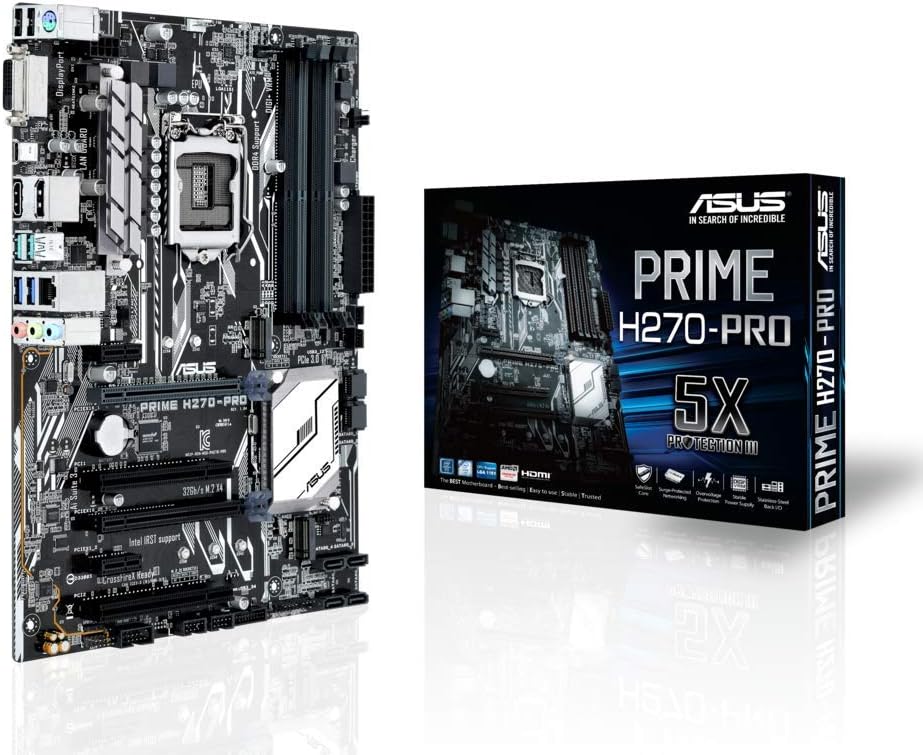
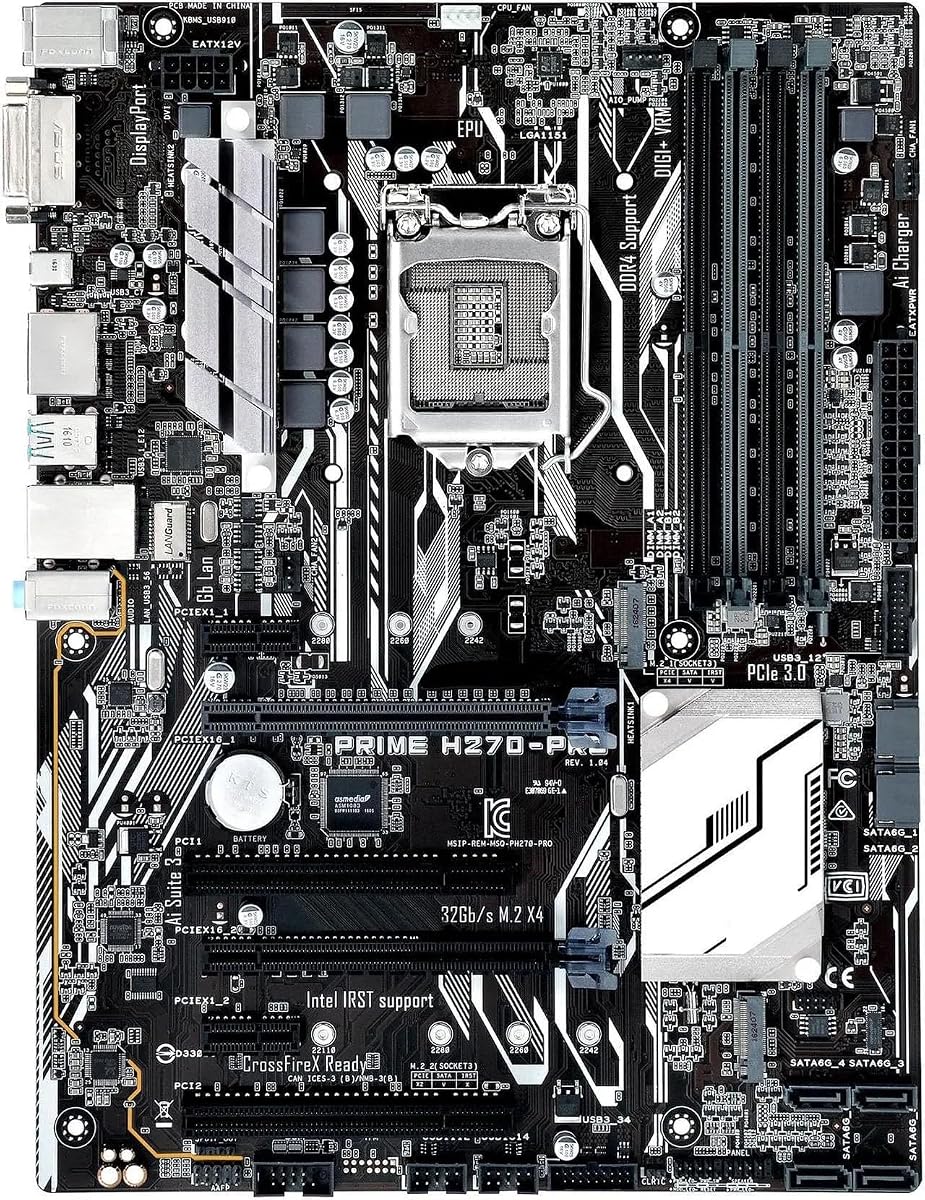
The Asus Prime H270-PRO offers a wide array of connectivity options including a USB 3.1 Type-C port on the rear I/O panel. It supports up to 64GB of dual channel DDR4 memory ensuring ample capacity for demanding applications. The board features multiple video output options including HDMI DVI-D and Displayport for flexible monitor connections.
We may earn a commission when you buy through this link, at no additional cost to you.
Its standout features include the USB 3.1 Type-C port which provides fast data transfer speeds for external drives. The board also supports 5X Protection III hardware-level safeguards ensuring component longevity and reliability. FanXpert 4 allows for dynamic fan calibration optimized system cooling while gaming or working on intensive tasks.
While the board is strong on connectivity it lacks front panel USB 3.1 ports which might be inconvenient for users who frequently connect peripherals. The audio features are adequate but not as advanced as those found on specialized gaming boards. These trade-offs are acceptable for users who prioritize rear connectivity over front panel convenience.
This motherboard is ideal for general users and office builds requiring diverse connectivity and reliable performance. It offers a balanced mix of modern and legacy ports. We recommend it for users who need a stable platform with excellent rear I/O options.
USB 3.1 Type-C provides high-speed data transfer and versatile external device support for modern peripherals.
Multiple video outputs including HDMI DVI-D and Displayport allow for diverse monitor setups and compatibility.
We may earn a commission when you buy through this link, at no additional cost to you.
The GIGABYTE GA-H270 Gaming 3 is designed with networking and gaming performance in mind featuring Killer E2500 Gigabit Ethernet. It supports 6th and 7th generation Intel Core processors and provides a USB 3.1 Type-C port on the rear I/O panel. The board allows for 2-Way Crossfire graphics support to boost performance in supported titles.
We may earn a commission when you buy through this link, at no additional cost to you.
Its key strengths include the Killer E2500 networking solution which prioritizes game traffic for a smoother online experience. The inclusion of USB 3.1 Type-C ensures compatibility with newer external storage devices and peripherals. The board supports dual channel DDR4 memory for efficient data handling.
However, the audio features are standard and might not satisfy audiophiles or those seeking immersive sound experiences. The M.2 options are limited compared to boards with dual slots which could be a drawback for storage enthusiasts. These trade-offs are acceptable for users prioritizing network stability over audio or storage variety.
This motherboard is ideal for gamers who need reliable network performance and basic gaming features. It offers a solid foundation for dual GPU setups. We recommend it for users who value network optimization in their gaming builds.
Killer E2500 Gigabit Ethernet prioritizes game traffic for a smoother online experience with lower latency and lag.
2-Way Crossfire support allows for multi-GPU configurations to increase graphics performance in compatible games.
We may earn a commission when you buy through this link, at no additional cost to you.
The Motherboard Fit for ASUS Prime is designed specifically to resolve contact issues and provide a stable alternative for damaged systems. It features an optimized power design to support multi-core processors and deliver smooth performance under load. The board includes advanced heatsinks to improve thermal management during extended usage periods.
We may earn a commission when you buy through this link, at no additional cost to you.
Its key strengths include the focus on resolving issues caused by poor contact dust or static electricity which can disrupt normal operation. The layout is designed for stability ensuring that the system operates reliably even under heavy loads. Quality assurance practices are emphasized to provide confidence in performance and reliability.
However, the board is primarily focused on replacement utility rather than offering new cutting-edge features or RGB aesthetics. The specs are less detailed in public descriptions compared to major brand models which might complicate specific compatibility checks. These trade-offs are acceptable for users needing a reliable solution for restoring functionality.
This motherboard is best suited for users replacing a damaged board with a functional alternative. It prioritizes stability over advanced features. We recommend it for those who need to restore system operations without significant investment.
Designed to resolve contact issues and ensure stable operation even under heavy thermal loads.
Advanced heatsink design increases heat dissipation area for better thermal management during extended use.
We may earn a commission when you buy through this link, at no additional cost to you.
The H270 Performance Motherboard 1151 provides a functional platform supporting 64GB of DDR4 memory and M.2 storage options. It features a LGA 1151 socket compatible with various Intel Core processors including i5 and i3 series. The board offers an ATX form factor to fit standard cases and includes essential expansion slots for general use.
We may earn a commission when you buy through this link, at no additional cost to you.
Its strengths include support for high memory capacity and fast M.2 storage which are key for multitasking and application performance. The ATX format ensures compatibility with many existing PC cases and cooling solutions. It provides an accessible entry point for those seeking an H270 platform without premium branding costs.
However, the documentation and brand recognition are limited compared to major manufacturers which could make troubleshooting harder. The feature set is basic and may lack specific gaming or enthusiast enhancements found on other boards. These trade-offs are acceptable for users building functional systems where cost and basic specs matter most.
This motherboard is suitable for budget builds or general purpose computers needing decent memory and storage. It offers a practical alternative for those prioritizing specifications over brand. We recommend it for users who want a functional board at a reasonable price point.
64GB DDR4 memory support allows for heavy multitasking and application demands.
M.2 ATX format provides fast storage options alongside traditional expansion slots.
We may earn a commission when you buy through this link, at no additional cost to you.
The H270 Motherboard 64GB is a cost-effective option designed to support high memory capacities and standard Intel CPUs. It utilizes the LGA 1151 socket and DDR4 memory type to provide a modern computing platform. The board offers essential connectivity and expansion for daily tasks without advanced gaming features.
We may earn a commission when you buy through this link, at no additional cost to you.
Its strengths include support for up to 64GB of memory and a standard LGA 1151 socket compatible with many processors. The H270 chipset provides a balance of reliability and speed suitable for most users. It serves as an accessible option for entry-level builds.
However, the feature set is basic with limited premium ports or specialized enhancements found on higher-tier boards. The documentation and support resources may be less detailed than major brands. These trade-offs are acceptable for users focused on core functionality and affordability.
This motherboard is suitable for basic computing needs and general home use. It offers a practical foundation for budget-friendly systems. We recommend it for users seeking a straightforward H270 solution.
Affordable pricing makes this board an accessible choice for budget builds.
LGA 1151 and DDR4 support ensure compatibility with widely available processors.
We may earn a commission when you buy through this link, at no additional cost to you.
The H270-PLUS Motherboard offers a value-oriented option with M.2 support and high memory capacity. It supports 64GB of DDR4 memory and features a LGA 1151 socket compatible with a range of Intel processors. The ATX form factor ensures it fits standard cases and provides essential connectivity for general use.
We may earn a commission when you buy through this link, at no additional cost to you.
Its strengths include the inclusion of an M.2 slot for fast storage and support for high memory capacity for demanding applications. The board offers a budget-friendly entry point into the H270 platform with reliable performance for daily tasks. It serves as a practical foundation for basic to mid-level computing.
However, the audio and USB features are basic compared to premium models which might limit audio or connectivity options. The documentation is minimal which could affect troubleshooting ease. These trade-offs are acceptable for users prioritizing core value and essential features over extras.
This motherboard is suitable for budget systems needing standard performance and storage capabilities. It offers a reliable platform for everyday computing. We recommend it for users seeking a simple H270 solution.
Affordable pricing and essential features provide a practical foundation for budget systems.
M.2 slot inclusion allows for faster storage options alongside standard SATA interfaces.
We may earn a commission when you buy through this link, at no additional cost to you.
Choosing the right H270 motherboard involves balancing performance needs connectivity requirements and budget constraints. This guide outlines the essential factors to consider to ensure you select a board that fits your specific build goals.
Ensure the motherboard has the correct LGA 1151 socket to match your chosen Intel Core processor. Compatibility with 6th and 7th generation CPUs is standard for H270 boards but always verify before purchase.
Verify socket type before buying to avoid physical incompatibility and ensure your CPU fits the motherboard.
Check the maximum supported RAM capacity and speed. Most H270 boards support DDR4 2133MHz and up to 64GB of dual channel memory for high performance.
Prioritize boards that support your target memory capacity to avoid future upgrade limitations.
Look for enough PCIe slots to fit your graphics cards and other add-in cards. Some boards offer multiple x16 slots while others might have fewer options.
Choose a board with sufficient slots for your planned hardware configuration.
Evaluate M.2 and SATA port availability. Modern builds benefit from M.2 slots for fast SSDs while SATA ports support standard drives.
Ensure the board has enough storage interfaces for your needs.
Consider the number and type of USB ports video outputs and network ports available on the back panel. USB 3.1 Type-C is a premium feature.
Check I/O to ensure it matches your peripheral and monitor requirements.
Look for features like PCIe slot reinforcement heatsink quality and power circuit protection. High quality boards often include protection against electrical surges and heat.
Prioritize boards with robust build quality for long term reliability.
If visual customization is important look for boards with RGB headers and lighting support. Features like Aura Sync allow color matching across components.
Select RGB capable boards if you value custom lighting and visual effects.
Compare features against price to find the best value. Premium boards cost more for extra features while budget boards offer essential performance.
Set a budget range and choose the best board that meets your needs within that price.
Install the motherboard by securing it in the case standoffs and connecting all necessary power and data cables carefully. Ensure the CPU and RAM are inserted properly and secured to prevent physical damage.
Keep the motherboard clean from dust and debris using compressed air and ensure proper airflow to manage heat. This helps maintain performance and longevity of the components.
Update the BIOS regularly to ensure compatibility with newer CPUs and improved stability. Monitor system temperatures and fan speeds to catch any potential overheating issues early.
H270 motherboards generally do not support CPU overclocking like Z-series boards do. They are designed for stability and basic performance with locked multiplier options for Intel Core processors.
Most H270 motherboards support up to 64GB of DDR4 memory. Some lower end models may have limits of 32GB so always verify the specs before purchase.
Many H270 motherboards include at least one M.2 slot for fast NVMe SSDs. High-end models may offer two slots for more storage flexibility.
H270 boards support 6th and 7th generation Intel Core processors using the LGA 1151 socket. They are not compatible with newer 8th and 9th gen CPUs.
Some H270 boards support CrossFire for multiple AMD graphics cards. NVIDIA SLI is less common on H270 so check the manual for specific multi-GPU support.
Yes many modern H270 motherboards include USB 3.1 Type-C on the rear I/O panel for faster data transfer speeds and modern device support.
Download the latest BIOS file from the manufacturer website and use the update utility in the BIOS or a USB drive. Follow instructions carefully to avoid flashing errors.
Yes several brands offer gaming specific H270 boards with enhanced audio LAN protection and aesthetics. These boards are tuned for performance and visual customization.
This guide highlighted ten strong options ranging from premium gaming focused boards to reliable budget solutions. The ASUS ROG Strix H270F Gaming MSI H270 Gaming PRO Carbon and ASUS Prime H270-PLUS stood out as top picks.
Prioritize features that match your build goals like M.2 slots memory capacity and connectivity options. A balanced board ensures stability and performance for both work and gaming tasks.
Remember to verify current pricing and availability before purchasing since offers fluctuate regularly. Choosing the right board sets a solid foundation for your system longevity.