
NZXT H5 Flow
4.7Editor score
Ultra-fine mesh on all sides
PSU shroud perforated for intake
Two pre-installed Quiet Airflow fans
This guide compares the top high airflow PC cases for cooling performance, build quality, and value to help you choose the right chassis for your next build.
Finding the right case is crucial for thermal performance and longevity. High airflow PC cases prioritize ventilation to keep components cool under load. They often feature mesh panels and optimized fan layouts to ensure efficient heat dissipation during intensive tasks.
We evaluated ten leading models based on airflow design, build quality, and feature sets. Each case was assessed for compatibility with modern hardware, cable management options, and pre-installed cooling solutions. This list helps you navigate the market to find the best fit for your needs.
Each pick highlights specific strengths like modular design, fan count, or unique cooling features. Prices and availability can change frequently so check current listings before purchasing. Our goal is to provide clear insights so you can build a reliable and efficient system.
4.7Editor score

4.8Editor score

4.8Editor score
This side-by-side comparison highlights key specifications and features across all ten selected cases to help you evaluate options quickly and choose the right airflow solution for your build.





The MONTECH AIR 903 MAX earns our Editor's Choice for delivering exceptional airflow performance right out of the box. With four pre-installed fans and a highly ventilated front panel it prioritizes cooling without compromising on aesthetics. Its rating of 4.8 reflects strong user satisfaction with thermal results and build ease.
We may earn a commission when you buy through this link, at no additional cost to you.
This case stands out for its immediate cooling readiness featuring three 140mm fans at the front and one at the rear. The mesh front ensures unrestricted air intake which is vital for high-performance GPUs and CPUs. The chassis supports up to 360mm radiators on the front and top allowing flexible liquid cooling options.
While the fan performance is robust users might find the front I/O placement slightly low for some desk setups. The cable routing space is generous but the lack of deep sleeves could challenge tidy builds without extra ties. These trade-offs are minimal given the superior thermal performance and component support it offers.
Ideal for builders seeking a balance of value and cooling power this case fits E-ATX boards and large graphics cards comfortably. Whether you are air cooling or planning liquid loops the 903 MAX provides a reliable foundation. Its combination of included hardware and airflow focus makes it a top contender for performance builds.
With four ARGB fans pre-installed you avoid extra costs and setup time for a cooled system.
The large chassis dimensions accommodate E-ATX motherboards and graphics cards up to 400mm without obstruction.
We may earn a commission when you buy through this link, at no additional cost to you.
The NZXT H5 Flow delivers excellent thermal performance at a budget friendly price making it our top pick for cost conscious builders. Its design focuses on unrestricted airflow through fine mesh panels on the front top and sides. Users praise its ability to keep components cool even during demanding tasks.
We may earn a commission when you buy through this link, at no additional cost to you.
A standout feature is the perforated PSU shroud which enables air intake from the bottom for better power supply cooling. The case supports up to 360mm radiators on the front and 240mm on top providing strong liquid cooling potential. Pre-installed Quiet Airflow fans ensure decent out-of-the-box performance for many users.
The compact size limits support to ATX and smaller motherboards which may not suit expansion-heavy builds. Some versions may ship without fans so verify the contents before purchasing. These constraints are acceptable for those prioritizing space efficiency and cooling value over maximum component capacity.
For small to mid-size builds this case offers a perfect blend of airflow and affordability. Its seamless cable management and sleek mesh design keep things tidy and stylish. Choose this if you need reliable cooling without overspending on a chassis.
Perforations in the shroud allow fresh air to reach the power supply improving overall system thermal efficiency.
The smaller footprint saves desk space while maintaining strong airflow and cooling capabilities for standard builds.
We may earn a commission when you buy through this link, at no additional cost to you.
The Cooler Master HAF II 500 is our Best Premium choice for its oversized cooling system and robust build. Featuring dual 220mm intake fans and a large 180mm rear exhaust it maximizes airflow volume effortlessly. This case is built for those who demand top-tier thermal performance and advanced features.
We may earn a commission when you buy through this link, at no additional cost to you.
Its low airflow resistance design uses large ventilation openings to move air efficiently through the chassis. The MasterRail mounting system provides flexibility for fan and radiator configurations at the front and top. Additionally the split-level cable management optimizes space for oversized rear exhaust cooling setups.
The large dimensions and higher price might be too much for casual builders with limited budgets or desk space. The GPU holder is stable but adds bulk for single GPU setups. These aspects are justified by the superior cooling capacity and thoughtful design for high-end enthusiast systems.
Choose this case if you need maximum airflow and support for massive cooling components. It is ideal for workstations or gaming rigs requiring aggressive thermal solutions. The combination of large fans and smart layout ensures your hardware stays cool under heavy loads.
The 220mm and 180mm fans provide exceptional air volume for cooling demanding CPUs and GPUs effectively.
Split-level routing creates extra space for complex cable runs and larger cooling components inside the case.
We may earn a commission when you buy through this link, at no additional cost to you.
The CORSAIR 4000D RS offers unique modularity allowing you to upgrade parts like the motherboard tray or I/O panel over time. It includes three RS ARGB fans and a 3D Y-Pattern airflow panel for targeted cooling. This design appeals to users who want a case that evolves with their needs.
We may earn a commission when you buy through this link, at no additional cost to you.
The FRAME system gives new meaning to customization with options like billet aluminum trays and panel swaps. InfiniRail allows flexible fan placement up to 200mm for precise airflow control. The steel front panel minimizes obstruction for cool air to enter the chassis efficiently.
Some users might find the modular features add complexity to initial setup and require extra planning. The optional upgrades can increase the total cost beyond the base unit price. These considerations are worth it for those prioritizing long-term adaptability and premium aesthetics.
Select this case if you value future-proofing and precise airflow control. Its high-quality construction and versatile mounting options support diverse cooling strategies. It is a strong choice for enthusiasts who want a personalized build experience.
Upgrade the case components like the I/O panel or motherboard tray as your needs or budget change over time.
InfiniRail lets you mount fans anywhere on the front rail for optimal air targeting and cooling efficiency.
We may earn a commission when you buy through this link, at no additional cost to you.
The LIAN LI LANCOOL 216 excels with massive 160mm front fans for high volume airflow out of the box. It features a modular I/O panel allowing you to adjust motherboard position for better cooling paths. This case is praised for its ease of installation and comprehensive cable management tools.
We may earn a commission when you buy through this link, at no additional cost to you.
Fine mesh panels on the front top and PSU shroud ensure consistent ventilation throughout the build. The removable top radiator bracket simplifies installing smaller radiators without pressure leaks. Velcro straps and small clips help keep cables organized for a clean look inside.
The heavy-duty steel and glass construction make the case heavier to handle during setup. Some I/O ports might be partially obstructed depending on the motherboard orientation. These are minor issues compared to the cooling benefits and build flexibility it offers.
Choose this case for a balance of cooling power and user-friendly features. It supports large GPUs and offers flexible mounting for various cooling setups. Ideal for builders who want strong performance without sacrificing cable management simplicity.
The pre-installed 160mm fans deliver high air volume for cooling GPUs and CPUs efficiently without extra cost.
Move the motherboard to a higher or lower position to optimize airflow or cable routing for your build.
We may earn a commission when you buy through this link, at no additional cost to you.
The Antec Flux Pro stands out as a full-tower option with six PWM fans and unique thermal monitoring features. Its multi-directional vent design supports up to 12 fans for maximum airflow capacity. This case targets users needing room for E-ATX boards and advanced cooling configurations.
We may earn a commission when you buy through this link, at no additional cost to you.
The iShift PSU mount rotates the power supply 90 degrees to improve airflow and reduce noise in the build. A dual temperature display on the front offers real-time monitoring of CPU and GPU heat levels. The material mix of metal glass and wood adds a distinct premium look.
The large size can be challenging for smaller rooms or desk setups and requires careful space planning. Some may find the wood elements less durable or harder to clean than standard metal. These factors depend on personal preference and available workspace.
Select this case if you need a full-tower solution with advanced thermal monitoring. It supports simultaneous radiator setups and offers robust ventilation options. Perfect for enthusiast workstations needing room and control over cooling performance.
The CPU and GPU temperature display provides real-time heat data for better tuning and system optimization.
The iShift PSU mount allows 90 degree rotation improving airflow paths and reducing overall case noise.
We may earn a commission when you buy through this link, at no additional cost to you.
The CORSAIR 3500X RS offers a panoramic glass view while maintaining strong cooling capacity. It comes with three RS120-R ARGB fans and supports up to 10 fans for customization. This case balances aesthetics and performance for users who want their build on display.
We may earn a commission when you buy through this link, at no additional cost to you.
The wraparound tempered glass panels provide a stunning view of components with minimal obstruction to airflow. Mounting points are located at the side roof and PSU area for versatile fan setups. Removable glass panels make building and accessing hardware straightforward.
Some airflow restriction may occur compared to full mesh designs so fan configuration is key for cooling. Glass panels can show fingerprints and require regular cleaning to maintain their pristine look. These trade-offs are common for glass cases prioritizing visual appeal.
Choose this if you want a premium look without sacrificing essential cooling features. Its high fan capacity ensures you can configure airflow to suit your needs. Ideal for builders who value visibility alongside system performance.
The panoramic glass design showcases your build fully while still providing essential cooling capabilities.
With support for up to 10 fans you can optimize airflow for specific cooling needs and performance.
We may earn a commission when you buy through this link, at no additional cost to you.
The Lian Li V100RX is designed with back-connect motherboard compatibility in mind for cleaner cable routing. It includes four PWM-controlled fans and an integrated RGB strip for lighting. This case is praised for its tool-less access and high-end hardware support.
We may earn a commission when you buy through this link, at no additional cost to you.
Supporting ATX and back-connect boards allows for a cable-free look on the motherboard rear. Each side panel uses a tool-less mechanism for quick access to internal components during builds. The integrated LED strip adds full spectrum color control without extra cables.
Back-connect motherboards are less common and may limit compatibility with current hardware options. Some users might prefer a fan-only lighting setup over the included LED strip. These aspects are acceptable for those exploring modern clean build aesthetics.
Pick this case if you plan to use back-connect motherboards for a tidy build. It offers excellent cooling with included fans and high GPU clearance. Perfect for enthusiasts looking for a forward-thinking approach to cable management.
Compatibility with back-connect motherboards like ASUS BTF allows a cleaner look by hiding cables behind the board.
Tool-less side panels let you access components quickly without screws for easier maintenance and upgrades.
We may earn a commission when you buy through this link, at no additional cost to you.
The NZXT H9 Flow separates main components from PSU and drives with a dual-chamber design for better thermals. It features perforated panels and a panoramic glass view to showcase the build. This case supports high-end GPUs and large radiators for demanding systems.
We may earn a commission when you buy through this link, at no additional cost to you.
The dual-chamber layout improves cable management and thermal separation between hot and cool components. Perforated panels and angled fans ensure efficient airflow paths through the chassis. Back-connect motherboard compatibility adds a modern clean aesthetic for your system.
Reduced internal space due to the second chamber may limit expansion options for some storage needs. Glass panels require regular maintenance to keep them clear and scratch-free. These design choices balance aesthetics and performance effectively for most users.
Choose this case for superior airflow separation and a seamless build view. It supports large radiators and modern motherboard types comfortably. Ideal for builders prioritizing thermal performance and clean aesthetics.
Separating the PSU from main components reduces heat interference and improves overall system thermal performance.
Support for up to 420mm radiators on top allows powerful liquid cooling options for high-end systems.
We may earn a commission when you buy through this link, at no additional cost to you.
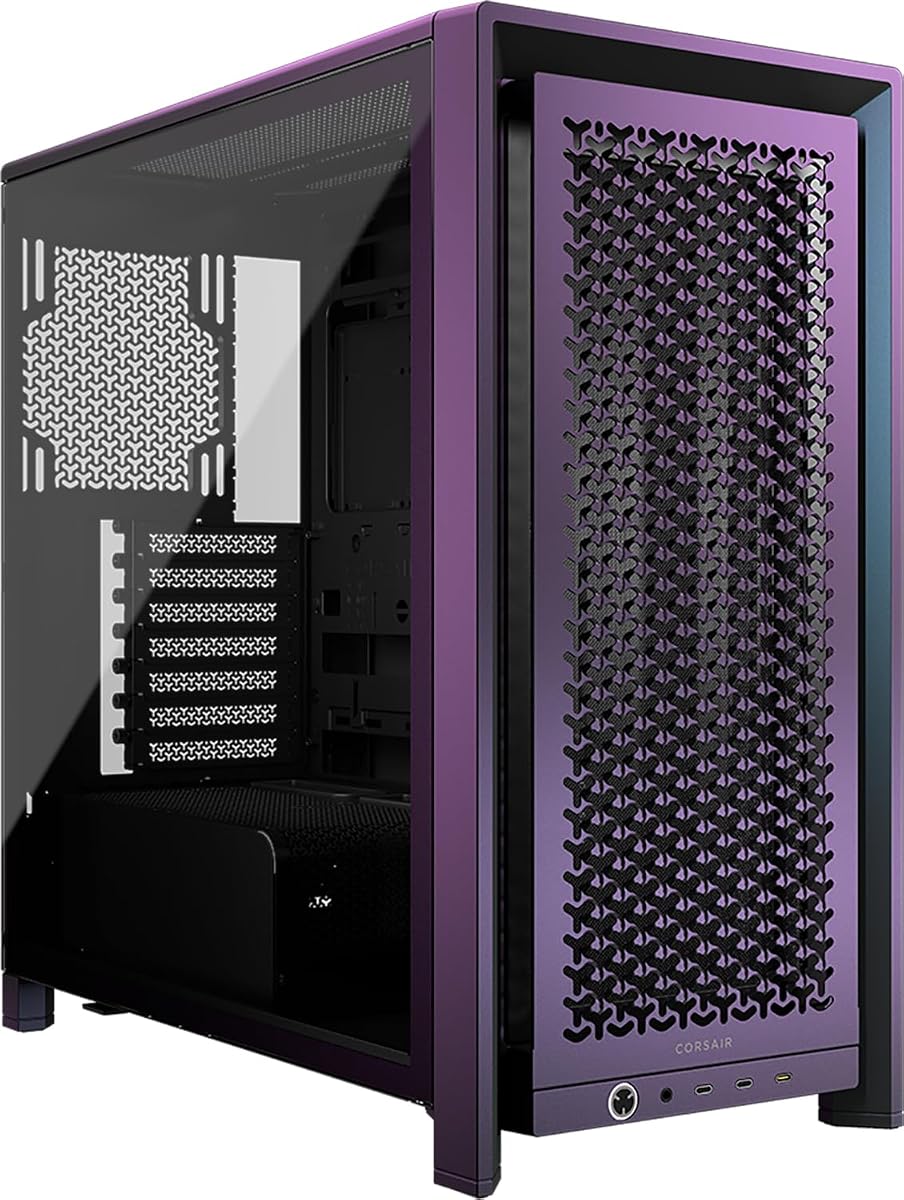
The CORSAIR Frame 4000D Vault Series features a unique limited edition finish with modular flexibility. It includes the FRAME system and InfiniRail for customizable fan and component layouts. This case is designed for collectors and enthusiasts seeking exclusivity and performance.
We may earn a commission when you buy through this link, at no additional cost to you.
As part of the Vault Series it showcases the Galaxy finish in a strictly limited run of 1337 units. The chassis supports dual 360mm radiators and up to twelve 120mm fans for maximum cooling potential. InfiniRail offers flexible mounting for front and roof configurations.
The collectible nature means availability is scarce and prices may vary significantly from standard models. Some features overlap with the standard 4000D so extra cost depends on finish value. These factors appeal mainly to collectors who value exclusivity.
Opt for this if you want a rare case with standard airflow features and modularity. Its unique finish and modular design make it stand out in any setup. Perfect for enthusiasts who appreciate limited releases.
The Galaxy finish and numbered production make this a unique collectible piece for enthusiasts.
Support for up to 12 fans and dual 360mm radiators enables extreme cooling configurations.
We may earn a commission when you buy through this link, at no additional cost to you.
Selecting the right case requires understanding airflow design and component compatibility to ensure optimal cooling and future upgrades.
Look for cases with mesh panels on the front top and sides to maximize air intake. A solid glass panel may restrict airflow unless balanced with strong fans or vents elsewhere. Effective ventilation keeps components cool under sustained load.
Prioritize mesh designs over glass fronts if cooling is your main priority. Ensure the front has perforations or open spaces for unrestricted air entry.
Cases with multiple fans included save you money and ensure adequate cooling from day one. Check fan sizes and PWM support for better control over noise and performance levels.
Choose models with at least three fans in key positions like front intake and rear exhaust for balanced airflow.
Verify the case supports your motherboard form factor such as ATX or E-ATX to avoid fit issues. Larger boards need sufficient clearance for cable routing and component installation.
Select a case that matches your board size to ensure smooth assembly and future upgrade flexibility.
Check the maximum GPU length supported especially if you have or plan to buy large graphics cards. Modern cards often exceed 300mm and need space for cooling modules and brackets.
Choose a case that supports your current GPU with extra room for future upgrades to avoid obstructions.
If you use liquid cooling confirm the case can fit the radiator size you need on the front or top. Larger radiators like 360mm provide better cooling for overclocked components.
Ensure radiator mounts are compatible with your cooling system and do not conflict with fans or headers.
Good cable management features like wide channels and straps keep airflow clear and builds tidy. Look for grommets and tie-down points to secure cables away from fans.
Select cases with ample space behind the motherboard tray for clean cable routing and airflow optimization.
Modular cases allow you to swap parts like I/O panels or trays for customization and longevity. This flexibility helps adapt the case to different hardware needs over time.
Consider modular options if you want to upgrade specific case components without buying a new chassis.
Steel construction and sturdy hinges ensure the case remains durable during transport and setup. Check panel fit and glass thickness for long-term reliability and aesthetics.
Prioritize solid build materials to protect components and maintain structural integrity over years of use.
Position your case in a well-ventilated area with at least a few inches of space from walls to allow unrestricted airflow. Avoid placing the case on carpets that trap dust or block bottom intake fans.
Clean intake filters and fans every few months to prevent dust buildup that restricts airflow. Use compressed air to remove debris from mesh panels and fan blades to maintain cooling efficiency.
Manage cables neatly using provided straps or ties to avoid blocking internal air paths. Route cables behind the motherboard tray to keep the interior clear and ensure smooth fan operation.
A high airflow PC case features mesh panels and open ventilation on the front and top to allow maximum air intake. It typically includes multiple fans to push cool air over components and expel hot air efficiently. These designs prioritize cooling performance over sealed aesthetics to keep your system running cool under load.
Not necessarily since many cases come with three or more fans in optimal positions for balanced airflow. Extra fans may help if you run high-end components or add more radiators to the setup. Check the case capacity and airflow direction before adding more fans to avoid disrupting air paths.
Mesh panels allow air to flow freely into the case without obstruction from solid steel or glass. This increases the volume of cool air reaching the motherboard and GPU which lowers overall temperatures. They are essential for high-performance builds that generate significant heat during use.
Yes most high airflow cases support multiple radiator sizes on the front and top for liquid cooling. Look for models that accommodate at least 360mm radiators for effective heat dissipation. Ensure fans and fans do not interfere with radiator mounting or airflow paths.
Larger cases often provide more space for fans and radiators which can improve airflow potential. However design matters more than size as a well-designed smaller case can cool effectively. Prioritize airflow layout and ventilation over sheer volume when choosing a case.
They can be louder if fans spin at high speeds to move air quickly. However many include PWM fans that adjust speed based on load to reduce noise. Using quality fans and proper curves helps maintain cooling performance without excess noise.
The top picks like the MONTECH AIR 903 MAX NZXT H5 Flow and Cooler Master HAF II 500 offer standout airflow and build quality. Each case provides unique benefits from modularity to compact designs to suit different needs and budgets.
Prioritize cooling performance and component compatibility when selecting a case for your build. Ensure it supports your motherboard GPU and cooling plans without restricting airflow or future upgrades.
Remember that prices and availability change frequently so check current listings before purchasing. Visit the provided links to view the latest offers and ensure you get the best value for your setup.