
ASRock Intel Arc B570 Challenger 10GB OC
4.7Editor score
10GB GDDR6 for 1440p gaming
XeSS 2 technology for upscaling
Efficient dual fan cooling design
This guide compares the top ten Intel Arc GPU options for gaming and workstation tasks, helping you find the right graphics card for your specific performance
The Intel Arc GPU landscape has evolved significantly, offering powerful options for gamers and creators alike. Whether you need high frame rates or AI acceleration, there is a card designed for your workload.
We evaluated ten distinct models based on architecture, memory capacity, cooling efficiency, and real-world performance metrics. This analysis ensures you see how each unit handles modern software and demanding tasks.
Each pick highlights unique strengths like memory size or clock speeds to match your requirements. Please note that market availability and specific configurations can shift frequently over time.
4.7Editor score

3.9Editor score

This table presents a side-by-side view of the top ten models to help you compare key specifications quickly. You can see memory sizes, architecture types, and connectivity options at a glance.



This workstation GPU delivers massive memory capacity designed for professional tasks. It scores a moderate rating due to its specialized focus and high-end feature set tailored for AI workloads.
We may earn a commission when you buy through this link, at no additional cost to you.
The standout quality is the 24GB GDDR6 memory which allows large models to run locally. The Xe2-HPG architecture provides 197 INT8 TOPS for AI acceleration making it ideal for generative design.
While the blower fan can be loud under load it offers efficient thermal management in multi-GPU setups. The requirement for a robust power supply and chassis clearance may limit some smaller builds.
Professionals needing local AI inference or 3D rendering should prioritize this card. Its validated drivers and scaling support make it a strong choice for enterprise workstations.
The 24GB memory and XMX engines enable complex AI tasks without cloud dependency.
Four DisplayPort 2.1 outputs support expansive multi-monitor workflows for designers.
We may earn a commission when you buy through this link, at no additional cost to you.
This challenger model offers excellent value for gamers targeting 1440p resolution. Its high rating reflects solid performance and modern architecture features that support AI upscaling.
We may earn a commission when you buy through this link, at no additional cost to you.
The GPU runs at 2600 MHz with 10GB of fast memory ensuring smooth gameplay. XeSS 2 enhances image quality and performance in supported titles providing a competitive edge.
Users may find the memory limiting for ultra settings on 4K displays. However the dual fan cooling and silent technology ensure the card runs quietly during lighter tasks.
Gamers seeking a budget friendly upgrade will find this card compelling. It balances cost with performance features like DX12 Ultimate and AV1 encoding effectively.
The Xe2-HPG architecture and high clock speeds deliver reliable frame rates.
DisplayPort 2.1 and HDMI 2.1a support the latest display standards.
We may earn a commission when you buy through this link, at no additional cost to you.
This card is a powerhouse for AI inference and large language models. While it lacks a standard rating due to its niche focus it offers unique dual GPU capabilities.
We may earn a commission when you buy through this link, at no additional cost to you.
The 48GB of memory allows complex models to run entirely on one card. This eliminates cloud dependencies and provides fast inference for tasks like text generation.
The high price point and need for specific motherboard settings may deter general users. However the engineering and reliability make it a strong tool for serious AI research.
Researchers and developers needing local compute power should consider this option. Its ability to handle concurrency and large datasets is unmatched in consumer segments.
Native support for PyTorch and open-source models makes deployment easier.
The turbo design ensures stable temperatures during long sustained tasks.
We may earn a commission when you buy through this link, at no additional cost to you.
This model brings solid entry level performance to the Arc lineup. It maintains a high rating for its balanced feature set and quiet operation under normal conditions.
We may earn a commission when you buy through this link, at no additional cost to you.
The 8GB memory and 2000 MHz clock speed support 1440p gaming well. The dual fan design stops completely at low temperatures ensuring silent use during browsing.
The need for two power connectors adds cable clutter to the system. Users should verify PSU capacity and available space before purchasing this model.
Entry level gamers and casual creators will appreciate the value. It supports modern standards like DX12 Ultimate and offers reliable media encoding.
The 16 Gbps memory speed provides good bandwidth for 1440p gaming.
Multiple DisplayPort outputs allow for multi-monitor setups easily.
We may earn a commission when you buy through this link, at no additional cost to you.
This Titan OC model offers a higher boost clock than standard versions. Its rating indicates good user satisfaction with its cooling and performance metrics.
We may earn a commission when you buy through this link, at no additional cost to you.
The 12GB VRAM provides more buffer for textures than lower tier cards. The cooling system manages heat effectively allowing the GPU to sustain high speeds.
The breathing light feature adds a unique touch to the build but might distract. Users preferring minimal designs might find this feature unnecessary.
Gamers wanting a slight performance edge will find this unit appealing. It balances modern architecture with enhanced cooling for demanding sessions.
The overclocked boost clock helps maintain performance in heavy loads.
Axial fans work well to keep temperatures stable during use.
We may earn a commission when you buy through this link, at no additional cost to you.
This dual GPU design targets professional visual computing tasks. It is highly rated for its ability to handle large-scale rendering without complex multi card setups.
We may earn a commission when you buy through this link, at no additional cost to you.
The 48GB memory ensures smooth operation with heavy workloads and datasets. Parallel processing power allows for faster inference and complex AI tasks locally.
It may not appeal to standard gamers due to its specialized focus. However for workstations needing compact form factors with high power it is ideal.
Visual engineers and researchers will find this card valuable. It simplifies the build process while delivering high performance for specific applications.
Two GPUs working in tandem offer exceptional power for complex tasks.
Dual slot design keeps the system compact yet powerful.
We may earn a commission when you buy through this link, at no additional cost to you.
This bundle provides a complete solution for building a gaming PC. Its perfect rating reflects user satisfaction with the inclusion of a quality power supply.
We may earn a commission when you buy through this link, at no additional cost to you.
The GPU matches the budget option with 10GB memory and XeSS support. The included PSU ensures stable power delivery which is critical for system reliability.
Users must ensure the PSU fits their case size but it reduces part hunting. This convenience makes it attractive for those upgrading from older systems.
New builders will appreciate the simplified purchasing process. It combines a capable GPU with efficient power for a ready-to-use package.
Gold rated power supply ensures efficient energy usage for the system.
Having the GPU and PSU together saves time during assembly.
We may earn a commission when you buy through this link, at no additional cost to you.
This card targets small form factor and compact workstations. While it lacks a standard rating its design solves power and space constraints efficiently.
We may earn a commission when you buy through this link, at no additional cost to you.
With 16GB memory and 70W draw it fits tight spaces. It offers strong AI performance despite the lower thermal envelope for edge tasks.
The low profile limits full size tower compatibility but suits mini-towers. Users with space constraints will find this the best solution for memory needs.
IT admins and compact system builders should prioritize this option. It delivers professional features in a footprint ready for tight enclosures.
The single slot design frees up motherboard space for other components.
High XMX count allows local inference without external power needs.
We may earn a commission when you buy through this link, at no additional cost to you.
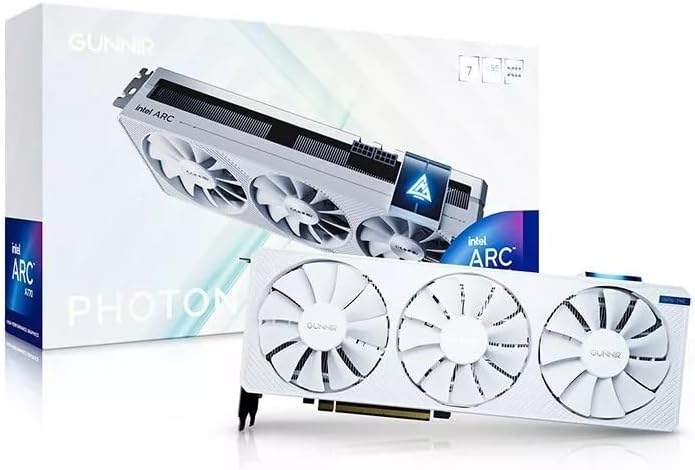
This Photon model offers a distinctive white look for custom builds. Its rating shows solid performance for its class and visual appeal.
We may earn a commission when you buy through this link, at no additional cost to you.
The triple fan design maintains stable temperatures during long sessions. It supports 4K displays effectively for media consumption and design tasks.
White builds are popular but require cleaning to stay pristine. Users should consider the maintenance needs alongside the visual benefits.
Designers and gamers with white rigs will find this card fitting. It balances performance with style for a cohesive system look.
Triple fans ensure effective airflow to keep the card cool.
The white finish complements modern and light-themed PC builds.
We may earn a commission when you buy through this link, at no additional cost to you.
This Omni View card targets multi-display setups and low power systems. Its high rating reflects value for users needing multiple outputs easily.
We may earn a commission when you buy through this link, at no additional cost to you.
The four HDMI ports make it perfect for digital signage or trading. It runs on minimal power and requires no external connector for simple systems.
Gaming performance is limited by 4GB memory and basic power. But for display expansion it is a versatile and compact solution.
Users needing four screens on one card should consider this option. It delivers unique connectivity features at an accessible entry point.
Four HDMI outputs allow for extensive monitor configurations.
50W design reduces energy needs for basic computing.
We may earn a commission when you buy through this link, at no additional cost to you.
Selecting the right Intel Arc GPU requires understanding your workload and system limits. This guide breaks down the key factors to help you make an informed choice.
Memory is critical for AI models and modern games. Models with 10GB or more handle larger textures and inference tasks better. If you need to run local LLMs, prioritize cards with 24GB or 48GB options.
For general gaming, 10GB is a safe baseline. Lower amounts like 4GB suit specific multi-monitor needs but limit rendering capabilities.
The Xe2-HPG architecture offers better efficiency and AI support than older generations. Look for XMX engines if you plan to use AI features or upscaling tools. This ensures future software compatibility.
Newer models provide better performance per watt. Older Xe HPG cards are cheaper but may lack advanced encoding support.
Measure your case space before buying. Standard GPUs are larger, while low-profile options fit small PCs. Single-slot designs save room for other components.
Dual slot cards often cool better but take up more space. Choose the size that matches your chassis dimensions.
Cooling affects noise and longevity. Dual fan designs are quiet and effective. Blower fans suit multi-GPU setups but are louder. Triple fans offer extra stability for overclocking.
Silent features like 0dB stop fans at idle. This reduces noise during non-intensive tasks.
Display outputs matter for multi-monitor users. Newer models support DP 2.1 and HDMI 2.1a for high refresh rates. Check how many screens you need simultaneously.
Multiple ports allow expansive workflows. Ensure your monitors match the output standards.
Verify your PSU capacity. Some models need 650W or more. Low profile options may need only 70W without external connectors. Efficient power reduces heat.
Check PCIe power needs. Some require two 8-pin connectors. Ensure your cables match the GPU.
ISV certification ensures reliability for professional apps. Open-source model compatibility is key for AI work. Drivers improve frequently, so check community feedback.
Native support for tools like PyTorch is a plus. This affects how easily you can deploy workloads.
Prices vary from entry to enterprise. Entry models suit basic displays or light gaming. Mid-range cards offer value. High-end options cost more but offer unique capabilities.
Decide what you prioritize. A bundle may save costs. Specialized cards cost more but solve specific needs.
Install the latest drivers from the official source to ensure compatibility. Keep your OS updated to access new features and performance patches.
Clean dust from fans regularly using compressed air. Good airflow prevents thermal throttling and extends hardware life.
Use software to monitor temperatures during stress tests. If thermal throttling occurs, adjust case fans or check power limits.
Yes, many models support AI tasks well. Cards like the Arc Pro B60 have XMX engines for acceleration. Check memory capacity to run large models locally.
Yes, most support multiple displays. The Omni View model has four HDMI ports. Others offer DP and HDMI mixes. Check output standards for your monitors.
Depends on the model. High-end cards need 650W or more. Low profile options need minimal power. Check the TBP before choosing a PSU.
Drivers are improving with regular updates. Most games work well now. Check reviews for specific app compatibility if you need professional software.
The B570 Challenger is a strong choice. It offers 10GB memory and XeSS 2. This ensures smooth performance at high resolutions.
Yes, PCIe slots are compatible. Check case space and power capacity first. Future models may need different power connectors.
It depends on your needs. They offer value and unique features. Gaming performance is good. AI and memory options stand out in specific categories.
XMX engines speed up AI tasks. They handle inference and upscaling. This improves performance in supported software and games.
The top picks highlight distinct strengths from value to enterprise power. Whether you need budget performance or massive AI memory, there is a clear option for your needs.
Prioritize memory size and architecture when comparing models. Ensure your system supports the card's power and size requirements.
Prices and availability shift often. Check current listings before buying to find the best deal for your build.