
Redragon K617 HE Wired Hall-Effect Rapid Trigger Magnetic Gaming Keyboard
4.3Editor score
Hall Effect magnetic switches for fast response
8000Hz polling rate for instant inputs
Compact 60% layout for more mouse space
Discover the top keyboards for CS2 in October 2026. This guide compares Hall Effect switches, Rapid Trigger tech, and ergonomic designs for competitive FPS
Finding the right keyboard for CS2 can transform your gameplay experience significantly. Competitive players need responsive inputs and precise actuation to succeed in high-stakes matches. This guide explores the best options available now.
We evaluated ten top keyboards based on switch technology, polling rates, and build quality. Each product offers unique features tailored for FPS gaming like Counter-Strike 2. Our comparisons help you decide which model fits your playstyle best.
Each pick highlights key strengths and potential trade-offs for clarity. Prices and availability change frequently so verify details before purchasing. Use this guide to invest wisely in equipment that supports your competitive goals.
4.3Editor score
4.4Editor score
4.5Editor score
This table compares key specifications across all ten keyboards to help you choose quickly. Look at switch types, polling rates, and form factors to find your ideal match for CS2 gameplay.


The Redragon K617 HE is a standout budget option for CS2 players seeking advanced features. With a 4.3 rating, it delivers Hall Effect magnetic switches that enable Rapid Trigger capabilities without breaking the bank. Its compact 60% design frees up desk space for precise mouse movements essential in tactical shooters.
We may earn a commission when you buy through this link, at no additional cost to you.
Key strengths include its ability to fine-tune actuation points from 0.1mm to 3.4mm through software. This allows players to adjust sensitivity for rapid tapping during strafes or heavier resistance for accurate aiming. The 8000Hz hyper-polling ensures inputs register instantly, giving you an edge in high-speed engagements.
While the build quality is solid for the price, it lacks some premium features found in higher-end models. The driver software is functional but not as robust as competitors like Razer or Corsair. However, for gamers on a tight budget, these trade-offs are acceptable given the performance benefits.
Buy this keyboard if you want competitive-grade features at an entry-level price. It is ideal for budget-conscious players who prioritize speed and customization over luxury materials or advanced software ecosystems. Final recommendation is strong for value seekers.
Rapid Trigger resets keys at the slightest lift of a finger, enabling faster movement and strafing. This feature is critical for CS2 where quick direction changes determine match outcomes.
The 60% layout removes the numpad and navigation cluster, providing more room for wide mouse swipes. This ergonomic advantage helps reduce wrist strain during long gaming sessions.
We may earn a commission when you buy through this link, at no additional cost to you.
The Redragon K686 HE builds on the success of the K617 with added structural refinements. Rated 4.4, it features a dual-module floating structure that reduces wobble and improves typing stability. This design, paired with noise dampening layers, offers a smoother and quieter experience than typical budget boards.
We may earn a commission when you buy through this link, at no additional cost to you.
UltraMag POM magnetic switches provide consistent performance across all keys. The dedicated control knob simplifies media playback and backlight adjustments without memorizing key combos. Rapid Trigger technology ensures that directional changes in CS2 are executed with minimal delay.
However, the software lacks advanced profile management compared to top-tier competitors. The keyboard focuses on hardware improvements rather than deep software integration. Despite this, the balance between performance and price makes it a strong contender for mid-range buyers.
Choose this model if you value build quality and noise reduction alongside gaming features. It suits players who want a reliable keyboard with premium touches without paying flagship prices. Final recommendation is positive for balanced performance.
The floating structure design minimizes wobble, ensuring key presses feel consistent. This stability is crucial during intense moments in competitive games like CS2.
A single control knob adjusts brightness and media, streamlining desk setup. This convenience saves time during gameplay when quick adjustments are needed.
We may earn a commission when you buy through this link, at no additional cost to you.
The Redragon K673 HE offers similar features to the K686 with a focus on core functionality. Rated 4.1, it maintains the UltraMag POM switches that deliver rapid triggering and adjustable actuation. The dual-module floating structure ensures durability and a satisfying tactile feel.
We may earn a commission when you buy through this link, at no additional cost to you.
Key advantages include sound dampening that reduces the harsh clack often found in mechanical boards. This makes it suitable for shared spaces or late-night gaming. The Rapid Trigger feature supports fast counter-strafing needed in CS2.
A lower rating compared to siblings suggests potential inconsistencies in quality control or software experience. Users may find the driver less intuitive than competitors. Still, the hardware remains capable of handling demanding gameplay sessions effectively.
Buy this if you need a solid keyboard with essential FPS features. It is best for players prioritizing raw input speed over aesthetic or software extras. Final recommendation is decent for functional needs.
Internal dampening layers reduce noise, creating a quieter typing experience. This helps maintain focus during long matches without disturbing others.
Rapid Trigger enables instant key resets for faster movement control. This technology is essential for mastering movement mechanics in CS2.
We may earn a commission when you buy through this link, at no additional cost to you.
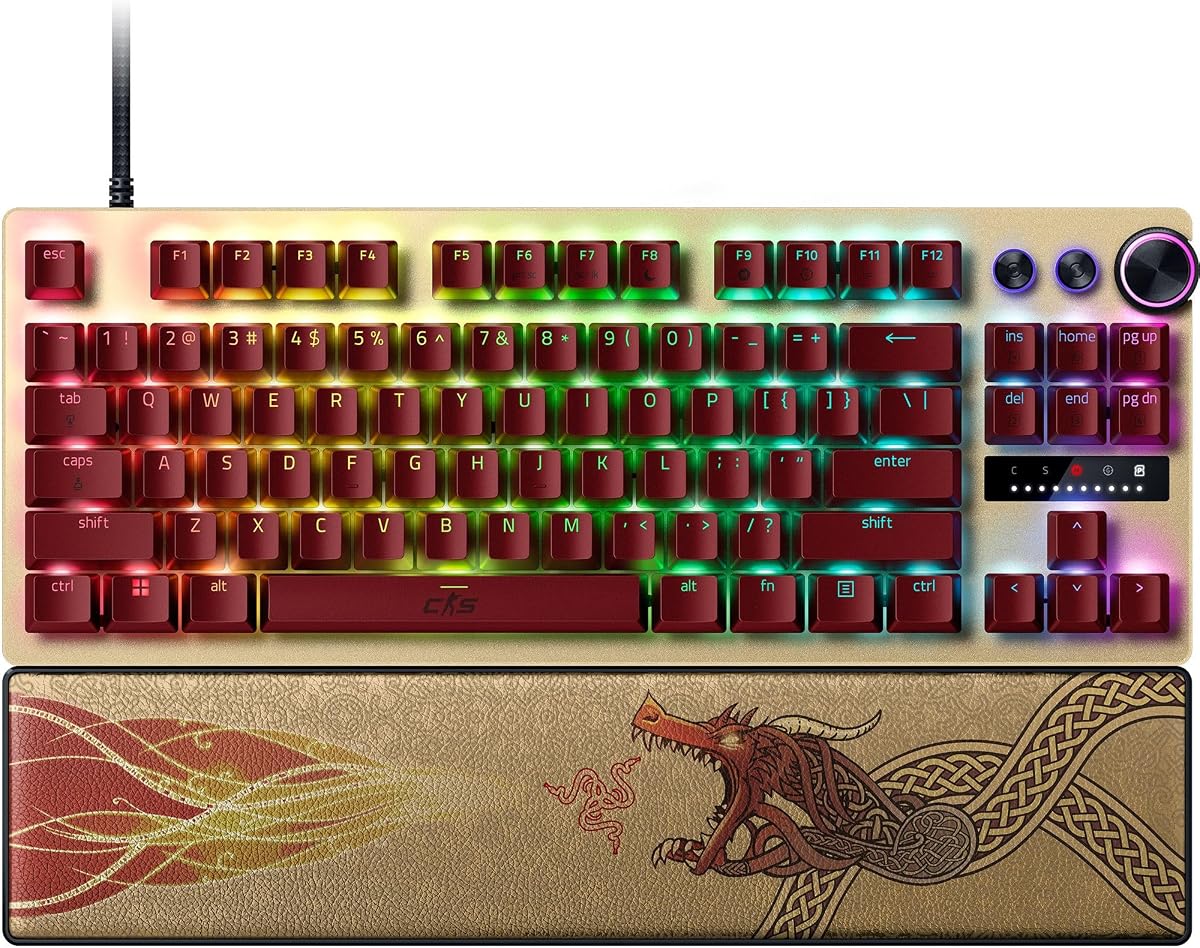
The Razer Huntsman V3 Pro TKL Counter Strike 2 Edition is engineered specifically for elite competitive play. With a 4.4 rating, it features Analog Optical Switches Gen-2 that support Rapid Trigger and adjustable actuation. This keyboard is chosen by pros for its unmatched responsiveness in FPS titles.
We may earn a commission when you buy through this link, at no additional cost to you.
Snap Tap mode prioritizes inputs between two keys without releasing the previous one, enabling near-instant directional changes. This is a game-changer for movement-heavy strategies in CS2. Onboard adjustments allow quick tweaks without software, saving valuable time before matches.
Despite its premium price, the durability and performance justify the investment for serious gamers. The textured PBT keycaps resist wear, and the magnetic wrist rest adds comfort. Some features require firmware updates to function fully, which can be a minor hurdle.
Invest in this keyboard if you demand the absolute best for competitive CS2. It is designed for players who need every millisecond advantage. Final recommendation is highly positive for serious competitors.
Snap Tap allows near-instant directional changes, crucial for CS2 movement. This feature gives an unbeatable edge in high-pressure situations.
Analog optical switches reset at the slightest finger lift, ensuring precision. This level of control is essential for consistent performance.
We may earn a commission when you buy through this link, at no additional cost to you.
The Corsair Clipper PRO MINI brings Hall Effect technology to a compact 60% form factor. Rated 4.4, it features MGX Hyperdrive core switches that offer rapid triggering and adjustable actuation. Its IP57 rating ensures durability against spills, making it robust for intense sessions.
We may earn a commission when you buy through this link, at no additional cost to you.
FlashTap SOCD enables cleaner directional inputs, improving counter-strafing accuracy. The 8000Hz polling rate guarantees that every movement and shot lands exactly when needed. Smart Tap and Tap Lock features reduce finger fatigue during extended play.
While water resistance is a major plus, drying times may affect usage after accidents. The absence of dedicated media keys means you rely on software for adjustments. Despite this, its performance and durability make it a top choice for FPS fans.
Choose this keyboard for its blend of speed and resilience. It suits players who need a compact, durable board for daily gaming. Final recommendation is strong for durability and performance.
Water and dust resistance protects the board from accidents, extending lifespan. This is ideal for intense gaming environments where spills occur.
FlashTap SOCD enables sharper counter-strafing for precise movement. This feature ensures every input is registered accurately during fast play.
We may earn a commission when you buy through this link, at no additional cost to you.
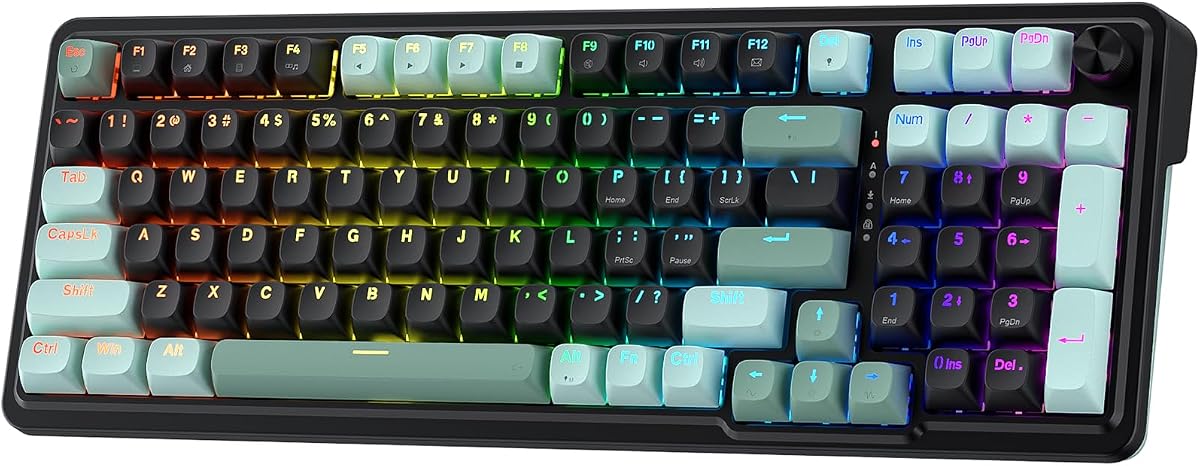
The Redragon K745 HE combines magnetic switches with vibrant RGB lighting for a balanced budget board. Rated 3.9, it includes 5-layer noise dampening for a softer keystroke feel. Its 8000Hz polling rate ensures responsive inputs for competitive gameplay.
We may earn a commission when you buy through this link, at no additional cost to you.
UltraMag switches provide consistent performance and adjustable actuation for personalized playstyles. The rapid trigger technology helps minimize redundant keystrokes during quick direction changes. However, the lower rating may reflect quality inconsistencies or software quirks.
For gamers seeking style and speed at a low cost, this model delivers. The software allows actuation profiles but lacks depth compared to premium options. Still, it remains a viable choice for those prioritizing value over perfect build quality.
Buy this if you want RGB flair without high costs. It works well for budget-conscious players needing solid FPS performance. Final recommendation is acceptable for casual to semi-competitive use.
Adjustable RGB lighting brings the desk to life with vibrant modes. This aesthetic feature adds to the gaming vibe without costing much.
5-layer noise dampening reduces harsh sounds for quieter operation. This improves comfort during long sessions without disturbing others.
We may earn a commission when you buy through this link, at no additional cost to you.
The Keychron C0 HE is a specialized one-handed keypad designed for high-level FPS gameplay. Rated 4.2, it features an 8K polling rate and Rapid Trigger Hall Effect switches for instant resets. This keypad frees up mouse space while keeping essential commands within reach.
We may earn a commission when you buy through this link, at no additional cost to you.
Beyond gaming, it suits streamers and content creators with quick access to OBS scenes or editing shortcuts. The web-based configurator simplifies customization across Windows and macOS without software installation. This flexibility makes it ideal for multi-system setups.
Using it requires a separate full keyboard for typing and general use. Mapping keys takes time initially but pays off during gameplay. Despite the learning curve, its precision and versatility are unmatched in this category.
Consider this keypad if you need specialized control for competitive play. It complements a main keyboard effectively for MMO or FPS gamers. Final recommendation is positive for specialized use cases.
Fully compatible with Windows and macOS for seamless multi-system use. This ensures consistent performance regardless of your operating system.
Browser-based customization eliminates software installation hurdles for users. This convenience speeds up setup and maintenance processes significantly.
We may earn a commission when you buy through this link, at no additional cost to you.
The renewed Razer Huntsman V3 Pro TKL offers flagship performance at a lower cost. Rated 3.5, it retains the same high-end specs as the new version, including Snap Tap and Rapid Trigger. This option provides access to elite hardware without the premium price tag.
We may earn a commission when you buy through this link, at no additional cost to you.
Snap Tap mode prioritizes the latest inputs between keys for instant directional changes. The brushed aluminum top plate ensures durability and stability. However, as a renewed item, condition and warranty vary, so check seller details carefully.
This model is suitable for budget-conscious players who still want top-tier tech. While reliability is generally good, refurbished items carry some risk compared to new units. Still, it remains a compelling value for Razer enthusiasts.
Buy this if you want premium features affordably and accept refurbished risks. It is ideal for gamers prioritizing performance over new-item guarantees. Final recommendation is acceptable for value seekers.
Snap Tap mode enables faster directional changes for competitive edges. This feature is vital for mastering movement in FPS games like CS2.
Aluminum top plate resists wear and provides a solid typing feel. This durability ensures longevity even during intense daily use.
We may earn a commission when you buy through this link, at no additional cost to you.
The Corsair K55 RGB PRO offers reliable entry-level gaming performance with membrane switches. Rated 4.4, it features IP42 spill resistance and dedicated macro keys for shortcuts. This keyboard provides a comfortable experience with a detachable palm rest for long sessions.
We may earn a commission when you buy through this link, at no additional cost to you.
Dynamic RGB backlighting allows customization via iCUE software for vibrant effects. The six macro keys help automate complex commands without extra hardware. However, it lacks Rapid Trigger or Hall Effect tech found in competitive boards.
For casual gamers or those on tight budgets, this model offers great value. While it does not match mechanical precision, it remains durable and user-friendly. It is a practical choice for general use and light gaming.
Choose this if you need affordability and spill resistance over speed. It suits players who do not require competitive features for CS2. Final recommendation is positive for general budget gaming.
Spill-resistant design guards against accidents, protecting gameplay continuity. This durability ensures you stay in the game even after minor mishaps.
Six dedicated macro keys enable quick access to functions and shortcuts. This boosts efficiency during gameplay and streaming workflows.
We may earn a commission when you buy through this link, at no additional cost to you.
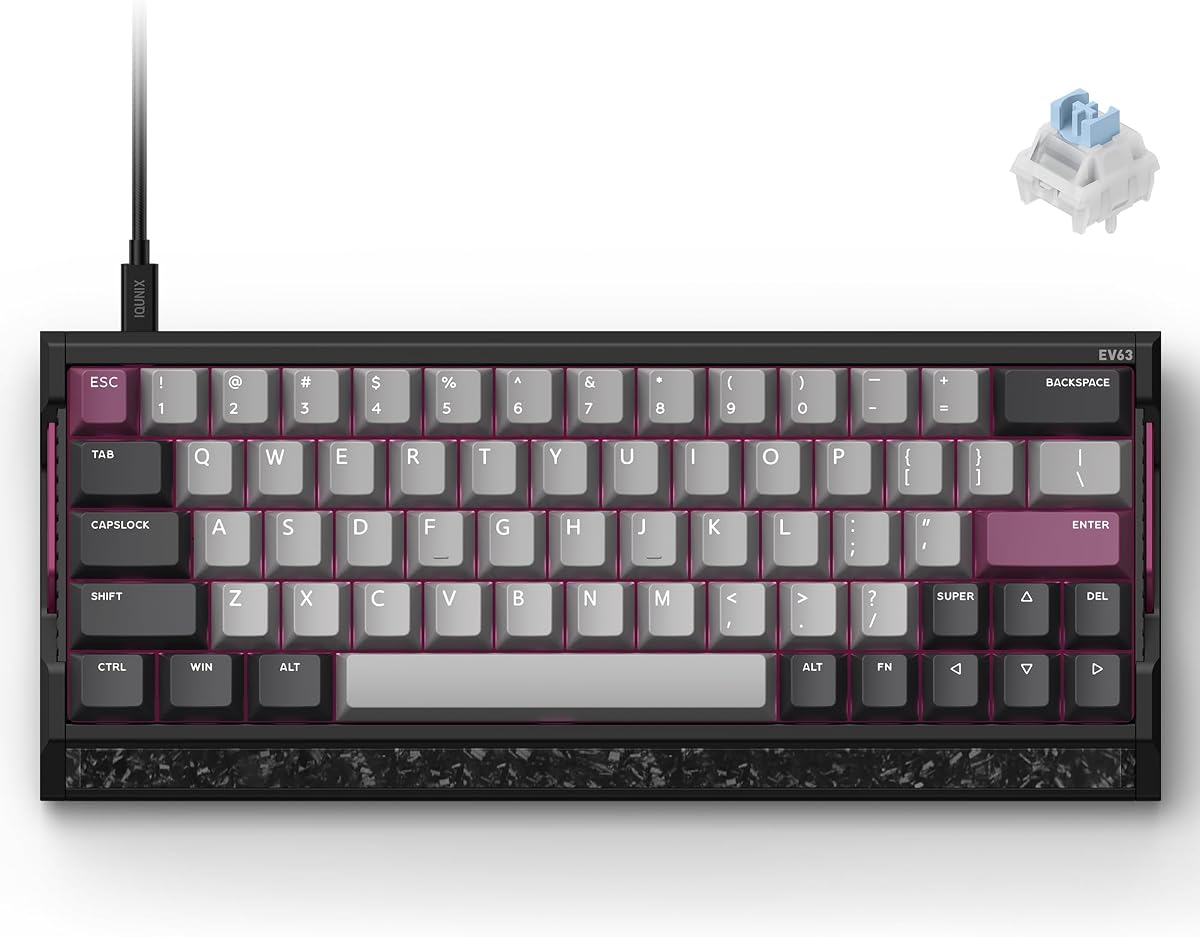
The IQUNIX EV63 Hall Effect keyboard delivers ultimate performance for CS2 players. Rated 4.5, it features Magnetic X Ultra switches with 0.01mm rapid trigger and 8kHz polling. The aluminum and forged carbon chassis ensures a stable, premium feel that reduces unwanted movement.
We may earn a commission when you buy through this link, at no additional cost to you.
Driver 3.0 includes pro-tuned FPS presets based on champion settings, simplifying setup. The M.A.T. 2.0 algorithm checks keys in real time to reduce latency and sticky inputs. This level of engineering supports consistent, high-speed gameplay without glitches.
Its compact 60% layout offers more mouse space but may require adjustment for some users. The high price reflects the quality and specialized features offered. For enthusiasts seeking the best build and performance, it stands out in its category.
Invest in this keyboard for uncompromising quality and speed. It is designed for players who want custom-like stability in a compact design. Final recommendation is excellent for premium FPS gaming.
M.A.T. 2.0 checks keys in real time to ensure stable input. This reduces missed inputs during high-speed FPS movements effectively.
Aluminum and forged carbon provide a solid, vibration-resistant chassis. This enhances control and comfort during long competitive sessions.
We may earn a commission when you buy through this link, at no additional cost to you.
Selecting the right keyboard involves balancing switch technology, layout, and build quality. This guide outlines key factors to consider for optimal performance in Counter-Strike 2.
Hall Effect and optical switches provide faster response and adjustable actuation. These technologies outperform traditional mechanical switches for rapid inputs in FPS games.
Look for keyboards supporting adjustable actuation to tailor keypresses to your style.
A higher polling rate like 8000Hz ensures inputs register instantly without delay. This reduces latency, which is critical in competitive matches where milliseconds matter.
Prioritize models with high polling rates for smooth and responsive gameplay.
Compact layouts such as 60% or TKL free up desk space for mouse movement. This is essential for low-sensitivity aiming in CS2.
Choose a layout that balances key availability with mouse space for your setup.
Advanced software allows actuation customization, profile management, and macros. Good driver support improves long-term usability and adaptability.
Select a keyboard with intuitive software for seamless customization and updates.
Durable materials like aluminum or carbon fiber enhance stability and longevity. A solid chassis prevents unwanted movement during intense sessions.
Invest in sturdy build materials to ensure consistent performance over time.
Comfort features like wrist rests and keycap texture reduce strain. Long gaming sessions require ergonomic support to maintain focus.
Check for ergonomic accessories to protect your hands during extended use.
IP ratings indicate resistance to water and dust. This protects your investment from accidents common in gaming environments.
Prioritize keyboards with water resistance to safeguard against spills.
Budget keyboards offer basic speed while premium models include advanced features. Align your budget with your competitive needs and preferences.
Determine if extra features justify higher costs for your specific playstyle.
Install the manufacturer's software to calibrate actuation points and profiles. Adjust settings based on your preference for sensitivity during aiming or movement.
Keep the keyboard clean by dusting it regularly with a soft cloth. Avoid liquids near the keyboard to prevent damage to internal components.
Use the provided wrist rest to maintain proper hand posture. This minimizes fatigue during long matches and promotes healthier gaming habits.
Hall Effect switches use magnetic sensing to enable Rapid Trigger, which resets keys instantly when fingers lift. This allows faster counter-strafing and movement, giving you a competitive edge in CS2. Adjustable actuation further tailors performance to your style.
Yes, a 60% keyboard offers more mouse space for precise aiming, which is vital in CS2. While you lose numpad keys, most functions are accessible via layers. Many pros prefer compact layouts for better ergonomics and movement.
Most keyboards require driver software to enable and customize Rapid Trigger features. However, some models offer onboard adjustments without software. Always check product details to confirm initial setup requirements.
Snap Tap prioritizes the latest input between two keys without releasing the previous one. This enables instant directional changes during gameplay, improving movement efficiency in CS2. It is ideal for complex strafing techniques.
Many keyboards like Keychron offer full macOS compatibility. Others may support Mac functionality through drivers or onboard settings. Verify OS support before purchasing to ensure seamless integration.
Modern Hall Effect and optical keyboards surpass traditional mechanical ones for CS2 due to Rapid Trigger and adjustable actuation. They offer faster response and better customization. For competitive play, these advanced features are highly recommended.
This guide reviewed ten keyboards offering advanced features for competitive CS2. From budget-friendly Redragon to premium IQUNIX models, each brings unique strengths.
Prioritize rapid trigger tech and high polling rates for consistent performance. Consider layout and ergonomics to match your play style and desk setup.
Prices change often so check current listings before buying. Choosing the right keyboard elevates your gameplay and provides long-term value.