
Adesso Easy Touch 630Ub
4.2Editor score
IP67 waterproof rated design
Large durable high-contrast keys
Spill resistant for harsh use
Choosing the right keyboard for a POS system is critical for efficient retail and hospitality operations. You need durable hardware that handles constant use, resists spills, and integrates seamlessly with your point of sale software to keep transactions moving smoothly without downtime.
We evaluated ten top-rated keyboards based on durability, connectivity, layout, and specialized features like magnetic stripe readers or touchpads. Our analysis covers wired and wireless options, mechanical and membrane switches, and designs tailored for compact counters or industrial environments.
Each pick below highlights specific strengths and trade-offs to help you match the device to your workflow. Note that availability and pricing change frequently, so verify current stock and deals before finalizing your purchase decision for your business setup.
4.2Editor score
4.5Editor score

4.2Editor score
As an Amazon Associate we earn from qualifying purchases.
The following table provides a side-by-side comparison of all ten keyboards evaluated in this guide. Review key specifications like connectivity, special features, and durability ratings to find the model that best fits your point of sale environment.


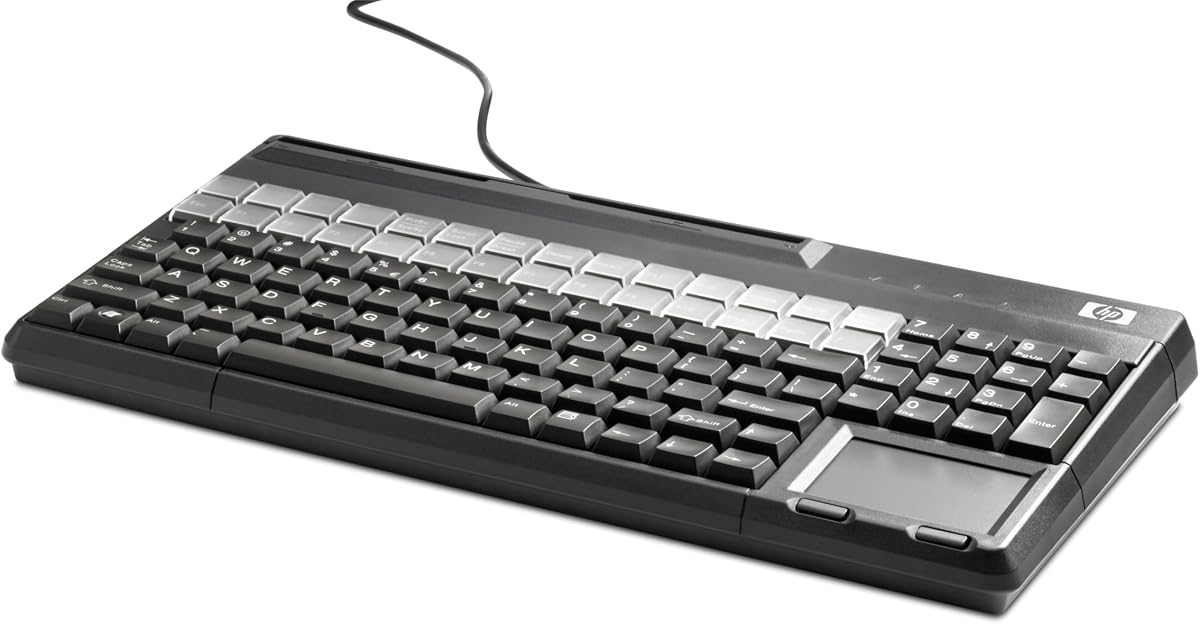
The HP POS Keyboard stands out as a top choice for businesses needing a complete input solution. With a strong reputation for reliability, it offers a full 106-key layout and a built-in magnetic stripe reader for quick card processing.
We may earn a commission when you buy through this link, at no additional cost to you.
Its standout feature is the set of 28 relegendable keys, allowing you to customize function keys for specific POS software commands. This reduces the need for memorization and speeds up transactions significantly during busy retail or restaurant shifts.
While the price is higher than basic models, the included touchpad and specialized key count justify the investment for high-volume environments. The only trade-off is the lack of wireless options, which may limit flexibility in some counter setups.
If you need a dedicated POS device with integrated card reading and customizable controls, this HP model is the most practical choice. It delivers professional performance and durability that supports consistent daily operations.
This feature allows cashiers to swipe credit cards directly through the keyboard, saving desk space and reducing peripheral clutter in tight counter areas.
With 28 keys you can label as needed, you can map common POS commands directly to physical buttons for faster access and fewer clicks.
We may earn a commission when you buy through this link, at no additional cost to you.
The Cherry G86-62401 delivers a compact yet full-featured experience ideal for space-constrained counters. It features an integrated touchpad and spill-resistant design, making it a durable choice for environments where space and cleanliness matter.
We may earn a commission when you buy through this link, at no additional cost to you.
Cherry is known for robust hardware, and this model maintains that standard with solid construction and a reliable USB interface. The touchpad eliminates the need for a separate mouse, simplifying the setup and reducing cable clutter effectively.
While the price is higher than standard office keyboards, the added convenience of an integrated touchpad and spill resistance justifies the cost for POS setups. The only drawback is the lack of wireless connectivity for more flexible placement.
Choose this keyboard if you need a reliable, compact unit that combines typing and navigation in one device. It offers the premium build quality expected from Cherry for demanding point of sale tasks.
The integrated touchpad removes the need for an external mouse, freeing up valuable counter space for transactions and other equipment.
Designed to withstand common liquid spills, this keyboard ensures longevity in food service or busy retail environments where accidents happen.
We may earn a commission when you buy through this link, at no additional cost to you.
The Adesso Easy Touch 630Ub is an exceptional value for environments where spills and harsh conditions are daily realities. With an IP67 waterproof rating, it can withstand submersion and rough handling, making it perfect for industrial kitchens or workshops.
We may earn a commission when you buy through this link, at no additional cost to you.
Its large, durable keys offer excellent readability and contrast, ensuring accuracy even in low light or dirty conditions. The simple plug and play setup means you can deploy it quickly without needing drivers or complex configuration steps.
While it lacks advanced features like programmable keys or a touchpad, its primary strength is rugged durability at a budget price. The membrane switches provide a reliable typing experience without the complexity of mechanical alternatives.
For businesses that prioritize resilience and cost savings over advanced features, this keyboard is the best option. It ensures your POS system stays operational even in challenging environments where standard keyboards would fail.
Rated to withstand submersion in water up to 3 feet for 30 minutes, this keyboard is ideal for areas prone to heavy spills or washing.
The keys are twice the size of standard print, offering better contrast and easier cleaning for busy staff using the system.
We may earn a commission when you buy through this link, at no additional cost to you.
The Cherry Lpos G86-71411 is engineered for high-volume POS stations that demand extensive key access. With 169 keys and 42 relegendable options, it offers unmatched customization for complex retail or hospitality software requirements.
We may earn a commission when you buy through this link, at no additional cost to you.
The built-in magnetic stripe reader simplifies checkout processes, reducing the need for separate card swipe devices. Its mechanical construction ensures long-term durability, making it a reliable investment for businesses that prioritize performance and speed.
While the larger size requires more desk space, the functionality it provides is worth the trade-off for busy environments. The relegendable keys allow for intuitive workflows that reduce training time for new staff members.
If your POS system requires extensive shortcut keys and card reading, this Cherry model is the most comprehensive choice. It delivers the power and flexibility needed for demanding enterprise-level operations.
With 42 relegendable keys, you can map complex functions directly to the keyboard, streamlining operations and reducing errors.
The built-in stripe reader handles card swipes directly, keeping your counter organized and speeding up transaction processing.
We may earn a commission when you buy through this link, at no additional cost to you.
The Perixx PERIBOARD-513III combines a full-size keyboard and touchpad into a single streamlined device. Its quiet scissor switches provide a laptop-like feel, which is ideal for open retail environments where noise control matters.
We may earn a commission when you buy through this link, at no additional cost to you.
The extended six-foot cable offers flexible placement options, allowing you to position the keyboard comfortably even with remote POS terminals. Multimedia hotkeys provide convenient access to system controls without leaving your application.
While the touchpad is functional, it may not replace a dedicated mouse for precise tasks. However, for basic navigation, it effectively saves desk space. The scissor keys offer a smooth typing experience suitable for long shifts.
For businesses seeking a space-saving design with quiet operation, this keyboard is a strong contender. It balances functionality and comfort, making it a practical choice for modern counter setups.
These keys provide a smooth and quiet typing experience, reducing noise pollution in customer-facing retail or restaurant environments.
The six-foot cable allows for flexible placement on deep counters or under-desk installations without needing extra extensions.
We may earn a commission when you buy through this link, at no additional cost to you.
The Logitech K120 is a standard full-size keyboard known for exceptional reliability and ease of use. With its spill-proof design and anti-fade keys, it stands up well to daily office or counter tasks without needing special care.
We may earn a commission when you buy through this link, at no additional cost to you.
Its plug-and-play USB setup ensures it works immediately with Windows systems, making deployment simple. At a budget-friendly price point, it is a practical choice for businesses that need a dependable typing tool without extra features.
While it lacks specialized POS features like touchpads or readers, its durability and cost efficiency make it a solid workhorse. The deep-profile keys provide comfortable typing for long shifts, reducing fatigue over time.
Choose this keyboard if you need a straightforward, durable option that works well with standard POS software. It is a safe bet for businesses prioritizing reliability and cost savings over advanced functionality.
Designed to resist liquid spills, this keyboard helps prevent hardware damage in environments where drinks or cleaning solutions are common.
The key characters are printed to resist fading over time, ensuring readability and reducing the need for replacement.
We may earn a commission when you buy through this link, at no additional cost to you.
The Cherry G86-71401 offers a compact design with an integrated touchpad and extensive programmable keys. It is ideal for setups where space is tight but you still need significant control over your POS software.
We may earn a commission when you buy through this link, at no additional cost to you.
With 127 programmable and 42 relegendable keys, this keyboard allows deep customization to match your workflow. The touchpad adds navigation convenience without taking up extra desk space, keeping the area tidy and efficient.
Although user ratings are mixed compared to other Cherry models, the build quality remains robust. It may lack a magnetic reader, but the extensive key customization compensates for complex operational needs.
If you need a compact unit with high customization options and navigation capabilities, this model is a strong fit. It balances size and functionality effectively for specialized retail tasks.
With 127 programmable keys, you can tailor every button to your specific software needs, reducing mouse clicks and boosting speed.
The built-in touchpad eliminates the need for an external mouse, saving counter space in tight POS setups.
We may earn a commission when you buy through this link, at no additional cost to you.
The Cherry KC 1000 is designed for security-conscious businesses that require smartcard authentication. With a built-in smartcard reader and FIPS 201 approval, it ensures high-level compliance for government or financial transactions.
We may earn a commission when you buy through this link, at no additional cost to you.
Its secure PIN entry protects sensitive data while allowing for one-handed operation, which improves efficiency at the counter. The EMV 2000 Level 1 approval means it meets global standards for secure payment processing.
While this keyboard is specialized for security applications and may not suit general retail, it is unmatched in compliance. The thin design keeps the counter surface clear while providing robust security features.
If you need a device for secure login or payment processing with strict compliance requirements, this model is the best choice. It delivers peace of mind with advanced encryption and card support.
The built-in smartcard reader supports secure authentication, ideal for government access or high-security financial transactions.
FIPS 201 and EMV 2000 approvals ensure the device meets strict standards for secure data handling and transaction processing.
We may earn a commission when you buy through this link, at no additional cost to you.
The Cherry G80-1800 is built for industrial environments that demand extreme durability. Its mechanical MX Black switches are rated for over 100 million actuations, ensuring long-term reliability in high-use POS stations.
We may earn a commission when you buy through this link, at no additional cost to you.
The compact design saves counter space while maintaining a number pad for essential data entry. With both USB and PS/2 connectivity options, it offers flexibility for older or specialized POS systems.
While the price is higher than membrane keyboards, the mechanical durability justifies the investment for heavy use. The gold crosspoint contacts ensure reliable signal transmission even in dusty or harsh conditions.
If your business requires industrial-grade performance and mechanical feedback, this keyboard is the top choice. It provides the robustness needed to withstand demanding daily operations without failure.
Designed for continuous use, these switches offer a linear tactile feel and are tested to last for over 100 million keystrokes.
Includes both USB and PS/2 connections, offering compatibility with a wide range of legacy and modern POS hardware.
We may earn a commission when you buy through this link, at no additional cost to you.
The Logitech K270 offers wireless convenience with a full-size layout and reliable 2.4 GHz connection. Its 24-month battery life means minimal maintenance, making it suitable for POS setups where cable management is a challenge.
We may earn a commission when you buy through this link, at no additional cost to you.
The spill-proof design protects against accidental liquid damage, ensuring durability in busy environments. With multimedia hotkeys and a familiar typing feel, it provides comfort and efficiency for long shifts.
While wireless can introduce minor latency compared to wired models, the reliability of this device keeps it practical for most retail use. The compact receiver ensures it doesn't take up extra USB ports.
If you need a wireless keyboard that balances comfort, battery life, and durability, this Logitech model is ideal. It offers the flexibility of wireless while maintaining essential business functionality.
With up to 24 months of battery life, this keyboard reduces downtime and maintenance, ideal for busy POS setups.
The 2.4 GHz wireless connection provides a reliable range of up to 33 feet, allowing flexible placement on the counter.
We may earn a commission when you buy through this link, at no additional cost to you.
Choosing the right keyboard for your POS system requires evaluating durability, connectivity, and specific features that match your industry's needs.
For point of sale environments, durability is paramount. Look for keyboards with spill-resistant or waterproof designs, especially in food service or retail settings where accidents happen frequently. Industrial-grade models often feature metal components or reinforced plastics to withstand daily wear.
Prioritize models with high actuation ratings if your staff types constantly. Mechanical switches generally last longer than membrane ones and provide tactile feedback that reduces typing errors.
Ensure the keyboard supports the full QWERTY layout you need for your POS software. Some systems require specific function keys or a number pad for data entry. Consider compact models if space is limited, but verify they still support all essential commands.
Customizable or relegendable keys can streamline workflows by mapping complex functions to simple presses. This reduces training time and speeds up transaction processing significantly.
Decide between wired and wireless connections based on your counter setup. Wired USB keyboards offer stable connectivity without battery concerns, while wireless models reduce cable clutter. Check if your POS system supports USB, PS/2, or Bluetooth connections.
For large counters, a long cable or strong wireless range is essential. Verify the connection type matches your computer or terminal before purchasing.
Advanced POS keyboards often include built-in magnetic stripe readers or smartcard slots. These integrated features save counter space and reduce peripheral clutter. If you process card payments, ensure the reader meets EMV standards for security.
Some models come with integrated touchpads to replace external mice. This is useful in tight spaces where every inch of counter matters for customer interactions.
Confirm the keyboard is compatible with your operating system, whether Windows, macOS, or Linux-based POS software. Plug-and-play models are preferred to avoid driver installation hassles. Check system requirements listed by the manufacturer.
Ensure the keyboard's layout supports your specific region or language. US English layouts are standard, but other regions may require different key maps.
Set a realistic budget based on your business needs. While basic keyboards are affordable, investing in durable models with specialized features can save money long-term by reducing replacements and downtime.
Compare warranty terms and customer support options. A reliable manufacturer often provides better service if the keyboard fails unexpectedly during peak hours.
In food service or healthcare, easy cleaning is essential. Look for keyboards with seamless designs and smooth surfaces that resist bacteria buildup. Waterproof models allow for thorough washing without damaging electronics.
Anti-fade key legends ensure the keyboard remains readable even after frequent cleaning. This helps maintain efficiency and safety for staff using the system.
Staff often spend hours typing, so ergonomic design reduces strain. Look for comfortable key profiles and adjustable tilt to maintain proper wrist posture. Comfortable keyboards improve morale and reduce repetitive stress injuries over time.
Consider key travel distance and feedback. Keys that are too shallow or too deep can cause fatigue. A balanced tactile feel helps maintain accuracy throughout long shifts.
Start by connecting the keyboard securely to your POS terminal using the appropriate port. For USB devices, simply plug them into an available port. If using a wireless model, insert the receiver and ensure the battery is charged.
Test the keyboard immediately after setup. Type a few characters and check if the system recognizes all keys, including function keys and the number pad. This ensures everything is working before opening your business for the day.
Clean the keyboard regularly using a soft, slightly damp cloth. For waterproof models, you may rinse them under cool water. Avoid using harsh chemicals that might damage the key legends or electronics.
Mechanical keyboards offer greater durability and tactile feedback, which can reduce typing errors in high-volume environments. While they cost more, their longer lifespan often makes them a better investment for businesses where staff type constantly.
A relegendable key has a label that can be changed. This allows you to customize the key to match your POS software commands, making it easier for staff to execute complex tasks quickly without memorizing code.
Yes, wireless keyboards work well for POS systems as long as the connection is stable. However, ensure the battery life is sufficient and that there are no interference issues in your environment to avoid transaction delays.
While not mandatory, spill-proof keyboards are highly recommended for retail and food service. They protect internal electronics from liquid damage caused by drinks or cleaning solutions, extending the device's lifespan significantly.
Membrane switches are budget-friendly and quiet, while scissor switches offer a laptop-like feel with better stability. Both are suitable for POS, but scissor switches may feel more comfortable for extended typing sessions.
Unplug the keyboard and rinse it under cool running water. Let it dry completely before reconnecting. This ensures all liquids and debris are removed without damaging the internal components.
No, magnetic stripe readers are optional features. If you process credit card payments, choose a model that includes one to keep your counter organized and avoid adding extra peripheral devices.
Compact keyboards are ideal for counters where space is tight. However, if your staff types frequently, a full-size layout with a number pad is more efficient and reduces typing fatigue over the workday.
We reviewed ten top keyboards for POS systems, covering everything from budget options to specialized mechanical models. The HP POS Keyboard offers the best all-around features with its relegendable keys and built-in card reader.
When choosing, prioritize durability and connectivity that match your specific workflow. Whether you need waterproof protection or wireless flexibility, the right keyboard ensures your business runs smoothly without technical interruptions.
Remember to check current pricing and availability before purchasing as these values change. Select the model that best fits your operational needs and budget for long-term success.