
LeapFrog 2-in-1 LeapTop Touch
4.7Editor score
2-in-1 laptop tablet mode
Customizable name spelling
Five learning modes included
This guide compares the top laptops for 5 year olds focusing on educational value durability and ease of use to help parents choose the right device for their
Finding the right laptop for a five year old requires balancing educational content with durable design. Children at this age are curious and ready to explore digital learning tools that match their developing skills.
We compared ten top rated options based on features like keyboard layout screen quality and included activities. Our analysis focuses on products designed specifically for young learners to ensure safety and engagement.
Each pick highlights key benefits and potential trade-offs to help you decide. Prices and availability change frequently so please check current listings before making your final purchase decision today.
4.7Editor score

4.5Editor score

4.2Editor score
The following table provides a side-by-side comparison of all ten selected laptops. It highlights key specifications and features to help you quickly identify the model that best fits your child needs needs and your budget constraints.





The VTech Genio Bilingual JuniorBook stands out as the top pick for five year olds seeking a realistic computer experience. With a rating of 4.5 stars it offers over 80 activities that cover math science and language arts making it a comprehensive learning tool.
We may earn a commission when you buy through this link, at no additional cost to you.
Its full-size QWERTY keyboard helps children develop proper typing skills early on. The bilingual feature allows switching between English and Spanish which is excellent for language immersion. All activities are pre-loaded so there is no need for an internet connection or complex setup.
While it requires four AA batteries which can add to ongoing costs this is typical for toy laptops. The screen is not touch-enabled but the mouse controller provides a good alternative for navigation. These trade-offs are acceptable given the educational value and durability.
This laptop is ideal for parents who want a device that mimics a real computer without the complexity. It encourages independent play and learning while keeping content safe and age-appropriate. We recommend it for any child ready to explore basic computer skills.
The full-size keyboard mimics real computers helping kids learn proper finger placement and typing techniques early in their educational journey.
Switching between English and Spanish activities supports bilingual development allowing children to practice vocabulary in both languages seamlessly.
We may earn a commission when you buy through this link, at no additional cost to you.
The LeapFrog 2-in-1 LeapTop Touch offers exceptional value for families seeking an affordable educational toy. With a high rating of 4.7 stars it transforms from a laptop to a tablet easily catering to different play styles and learning needs effectively.
We may earn a commission when you buy through this link, at no additional cost to you.
Its customizable name spelling feature allows parents to personalize the experience which increases engagement for young learners. The five learning modes cover ABCs numbers and music providing a well-rounded introduction to core concepts without overwhelming the child.
The screen is smaller than dedicated learning tablets but this keeps the device lightweight and easy for small hands to manage. It runs on three AA batteries and is designed for ages two to five making it suitable for younger siblings too.
We recommend this as a budget-friendly starter laptop for children beginning their digital learning journey. It balances fun and education effectively while remaining accessible to most families. Its simplicity makes it a great first device for preschoolers and kindergarteners.
The ability to switch between laptop and tablet modes keeps children engaged longer by adapting to their current activity preferences and attention spans.
Customizing the device with the child's name helps them feel ownership and encourages them to interact with spelling and name recognition features.
We may earn a commission when you buy through this link, at no additional cost to you.
The LEXiBOOK LAPTAB 10 inch laptop delivers a premium experience for older five year olds ready for more advanced features. Its 4.2 star rating reflects satisfaction with its large HD touchscreen and powerful processor which support smoother gameplay and app navigation.
We may earn a commission when you buy through this link, at no additional cost to you.
Unlike toy laptops this device runs on Android allowing access to Google Play for thousands of educational apps and games. The 128GB storage ensures plenty of space for downloads and the parental controls help manage screen time and content access safely.
The price is significantly higher than toy options but it offers longevity as the child grows into primary school. It requires Wi-Fi and setup which adds complexity but provides a more realistic computing environment for learning coding and creativity.
We suggest this for families wanting a bridge between toy laptops and real devices. It is best suited for tech-savvy parents who can manage settings and controls. This is an investment in a device that can grow with the child over several years.
Access to Google Play allows children to download specific educational apps that match their interests and learning goals more precisely.
The built-in Qwant Junior browser and parental controls ensure children only access age-appropriate web content without risk of inappropriate sites.
We may earn a commission when you buy through this link, at no additional cost to you.
The Lexibook Unicorn Educational Laptop brings a unique thematic appeal that often attracts children interested in magic and creativity. With a 4.3 star rating it focuses heavily on logic music and memory which are essential cognitive skills for young learners.
We may earn a commission when you buy through this link, at no additional cost to you.
Its music activities go beyond simple playback to include composing and playing melodies which fosters creativity. The design is slim and ergonomic making it easy to carry around for travel or playdates anywhere at home or outside.
Parents will appreciate the bilingual content that supports vocabulary building in two languages. However the screen resolution is basic which limits visual clarity compared to modern tablet displays. This trade-off is acceptable for the interactive tactile nature of the keyboard.
This model is a great choice for children who enjoy structured learning mixed with creative play. It is especially useful for developing focus and memory through its specific game types. We recommend it for those seeking a balance between education and entertainment.
The music mode allows kids to compose simple melodies teaching them about notes and rhythm in a fun interactive way.
Specialized games target memory and logic skills helping children improve their cognitive abilities while having fun with structured challenges.
We may earn a commission when you buy through this link, at no additional cost to you.
This Kids Laptop features a 4.3 inch color screen that makes learning visuals crisp and engaging for young children. With 48 learning modes covering alphabet math and animals it provides a broad scope of educational content for independent play at home.
We may earn a commission when you buy through this link, at no additional cost to you.
The realistic mouse and keyboard encourage children to mimic adult computer use which helps build confidence in digital literacy. The ergonomic design ensures the laptop fits comfortably in small hands making it easy to carry from room to room easily.
While the build materials are standard for toy laptops the protective film on the screen must be peeled off for best visibility. This minor setup step ensures the display looks its best from the start and avoids glare during use sessions.
We recommend this laptop for children who respond well to visual learning tools. The variety of modes keeps them engaged for longer periods. It is a solid mid-range option for parents seeking a colorful interactive learning tool for their preschooler.
The color screen helps illustrate concepts like shapes and animals more clearly than monochrome displays enhancing visual learning.
Using a realistic mouse and keyboard helps children practice motor skills and get comfortable with standard computer input methods.
We may earn a commission when you buy through this link, at no additional cost to you.
The VTech Play Smart Preschool Laptop stands out with its ability to personalize the experience with a child's name avatar and age. This customization boosts engagement making the device feel like a personal tool rather than a generic toy.
We may earn a commission when you buy through this link, at no additional cost to you.
With 30 leveled activities children can progress at their own pace which helps prevent frustration during learning sessions. The inclusion of beginner Spanish words and sounds introduces language concepts gently for young learners ready to explore new vocabulary.
Its compact size makes it perfect for small hands and travel. While the activity count is lower than some competitors the quality of content is high for early learners. This model is excellent for focused short learning sessions.
We recommend this for children who benefit from personalized learning environments. It is particularly effective for early literacy and number recognition. Parents looking for a high-rated beginner-friendly device will find this a reliable and effective choice.
Adding the child's name and avatar creates a sense of ownership that encourages them to return to the device for more learning.
Activities are structured by difficulty allowing children to grow their skills gradually without feeling overwhelmed by advanced tasks.
We may earn a commission when you buy through this link, at no additional cost to you.
The Kids Laptop with Camera offers a unique creative edge with a built-in camera and photo frame effects. With a 4.6 rating it provides 64 activities that include photography logic and math making it a versatile choice for creative learners.
We may earn a commission when you buy through this link, at no additional cost to you.
The camera allows kids to take funny pictures of themselves and family which boosts confidence and creativity. While the images are not stored permanently the experience of using a camera is valuable for understanding digital tools at a young age.
The 4.3 inch color display is vibrant and clear which supports engaging visuals across all activities. It combines traditional learning with creative play ensuring balanced development. This is ideal for children who express themselves through images and art.
We recommend this laptop for parents wanting to foster creativity alongside academic skills. The camera feature sets it apart from standard educational toys. It is an excellent gift for birthdays or holidays to encourage imaginative play.
Using the camera and filters allows children to explore photography concepts and express their unique perspective on the world.
Interacting with a camera function helps build early digital literacy skills relevant to modern technology and communication tools.
We may earn a commission when you buy through this link, at no additional cost to you.
The LeapFrog LeapPad Academy Tablet is designed for kids aged three to eight providing robust educational growth. It features 20 educator-approved apps covering math reading and coding making it suitable for older five year olds advancing in skills.
We may earn a commission when you buy through this link, at no additional cost to you.
A major advantage is the 7-inch shatter-safe screen which protects against drops and bumps common with young users. The device includes a rechargeable battery eliminating the need for disposable batteries and offering convenience for long play sessions.
While it includes a three-month trial of LeapFrog Academy accessing more content may require a subscription. This adds ongoing cost but ensures access to fresh materials. Parents can manage time limits and app access through robust controls.
We recommend this for families ready to transition from toy laptops to tablet devices. It offers longevity and depth in learning. The sturdy design makes it a practical choice for households with active children who need durable tech.
The pre-installed apps are vetted by educators to ensure they align with early childhood learning standards and goals.
Parents can download additional games and eBooks from the LeapFrog App Center to keep content fresh and engaging over time.
We may earn a commission when you buy through this link, at no additional cost to you.
The Lexibook Barbie Educational Laptop leverages a beloved theme to make learning more inviting for many young children. With 124 activities it offers a rich library of content covering math logic and music for sustained interest and play.
We may earn a commission when you buy through this link, at no additional cost to you.
Its compact design makes it highly portable for travel or outings. The bilingual support ensures that both English and Spanish speakers can engage fully with the content. This inclusivity helps build vocabulary in a natural and fun way.
The screen size is smaller than some competitors which may limit visual detail. However the high activity count compensates for this by offering varied challenges. Parents should consider if the theme aligns with their child's interests.
We recommend this for children who enjoy themed toys and prefer familiar characters during play. It is effective for learning while maintaining a sense of fun. It serves as a great travel companion for keeping kids occupied and learning.
With over 120 activities children have ample choices to keep them engaged without quickly running out of new content to try.
The compact size and lightweight design make it easy to pack for road trips or family vacations without taking up much space.
We may earn a commission when you buy through this link, at no additional cost to you.
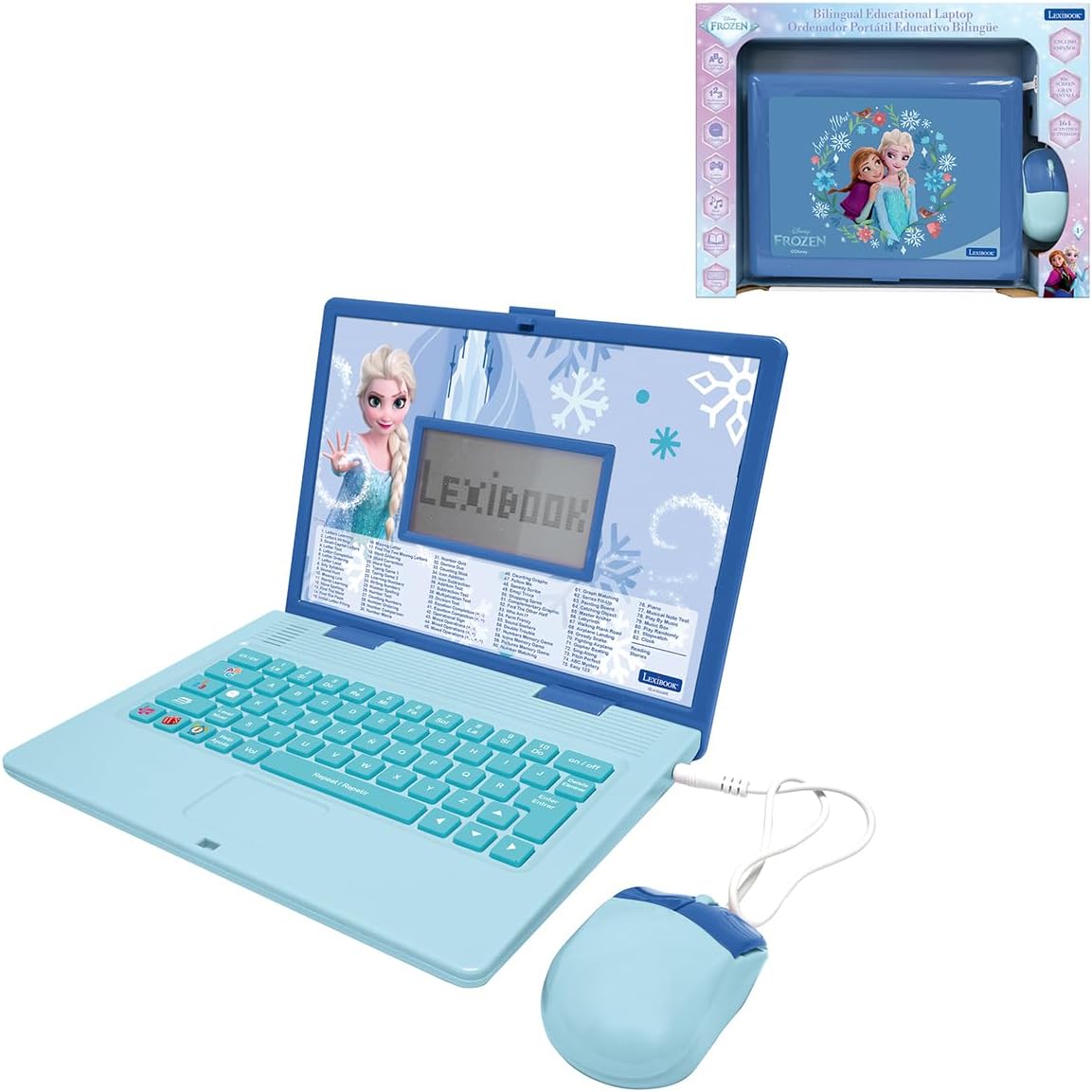
The LEXiBOOK Frozen Educational Laptop offers 164 activities designed to engage young learners with a popular theme. It is lightweight and features voice guidance which helps children navigate activities independently without constant parent assistance.
We may earn a commission when you buy through this link, at no additional cost to you.
This device supports bilingual learning in English and Spanish making it useful for families interested in early language exposure. The clear LCD screen and helpful voice prompts ensure that even younger children can access the content easily and independently.
As a newer product it does not yet have user ratings but the brand reputation suggests quality construction. The activity count is among the highest in this category providing plenty of variety for daily play and learning routines.
We recommend this for children who love the Frozen theme and are ready for structured learning. It is a solid choice for parents seeking a lightweight reliable learning tool for young children to explore at home or on trips.
Voice instructions help children navigate menus and activities independently building confidence and self-reliance during learning time.
With 164 activities the device offers a wide range of challenges that keep learning fresh and engaging over extended periods.
We may earn a commission when you buy through this link, at no additional cost to you.
Selecting the right laptop for a five year old involves considering durability educational content and ease of use. We have compiled key factors to help you make an informed decision.
Look for laptops that offer age-appropriate activities covering math literacy and problem-solving. High-quality content ensures the device remains useful as the child's skills grow and prevents boredom.
Choose models with varied activities to support balanced learning across different subjects.
Young children can be rough with toys so a durable build is essential. Look for products made from sturdy plastic and with protective features for screens.
Durable laptops last longer and withstand drops or bumps during play.
A realistic keyboard helps children practice typing skills early. Some models offer touchscreens for different navigation experiences.
Ensure the interface matches your child's motor skill development for ease of use.
Consider whether the laptop uses AA batteries or a rechargeable battery. AA batteries are easy to replace but cost over time.
Rechargeable options offer convenience but may require charging time for use.
Larger screens provide better visuals but can be heavier for small hands. Ensure the display is clear and has adequate resolution.
A balanced screen size ensures visibility without compromising portability.
Some laptops support English and Spanish which is valuable for language development. This feature allows families to introduce second languages naturally.
Bilingual features help expand vocabulary in multiple languages.
For more advanced devices parental controls help manage screen time and content access. This ensures a safe digital environment.
Controls protect children from inappropriate content and manage usage limits.
Many toy laptops work offline which simplifies use. Others may require Wi-Fi for app access or downloads.
Offline options reduce setup complexity and ensure play anywhere.
First ensure that batteries are inserted correctly or charge the device before first use. Follow the instructions included in the package for safe setup.
Second supervise initial play sessions to help your child understand the keyboard and screen functions. Encourage them to explore activities independently after guidance.
Third store the laptop in a safe place away from liquids or extreme heat. Wipe the keyboard and screen with a soft dry cloth to maintain cleanliness.
Yes these laptops are designed specifically for young children. They have no small parts that pose choking hazards and use child-safe materials. Parents should always supervise use to ensure safety and proper engagement with the device.
Most toy laptops do not require internet as they come with pre-loaded activities. However advanced models may need Wi-Fi for app downloads. Check the product description to confirm connectivity requirements before purchase.
Battery life varies by usage but most models provide several hours of play. AA batteries are included for demo but new ones are recommended for regular use to ensure optimal performance.
Toy laptops usually have fixed games. Advanced tablets allow downloading new apps. Review product details to see if additional content can be added through an app store.
Many models feature a full-size QWERTY keyboard designed to mimic real computers. This helps children learn basic typing skills early. Touchscreens offer alternative navigation for those preferring taps over typing.
While focused on five year olds many laptops suit ages three to eight. Always check the recommended age on the product page to ensure it matches your child developmental skills.
Reputable brands use non-toxic materials that meet safety standards. Products are tested for safety before release. Parents should still inspect devices for any damage or wear that could pose risks.
We have highlighted ten top laptops for five year olds ranging from simple toy models to advanced tablets. Each offers unique benefits suited for different learning styles and budgets.
When choosing prioritize durability and educational content that matches your child's current abilities. Look for features like keyboard layout and bilingual support to enhance long-term value.
Remember that prices and availability may change so check current listings on Amazon before making a purchase. This ensures you get the best value and availability for your needs.