
Thermalright AXP90 X36 Low Profile ITX CPU Cooler
4.6Editor score
Compact 36mm total height
AGHP heat pipe technology
Supports AM4 and AM5
Discover the top low profile CPU coolers for compact builds. This guide compares performance, size, and noise for ITX and SFF systems.
Building a compact PC requires careful thermal management to ensure stability. Low profile CPU coolers provide essential heat dissipation without exceeding height limits in small cases.
We evaluated ten leading models based on cooling capacity, noise levels, and build quality. Our analysis focuses on compatibility with modern sockets and ease of installation.
Each entry details specific strengths and weaknesses to help you choose wisely. Keep in mind that availability and stock levels may vary over time.
4.6Editor score

4.7Editor score

4.6Editor score
The following table provides a side-by-side view of each model. It highlights key specifications like height, pipe count, and socket compatibility to help you compare options quickly.

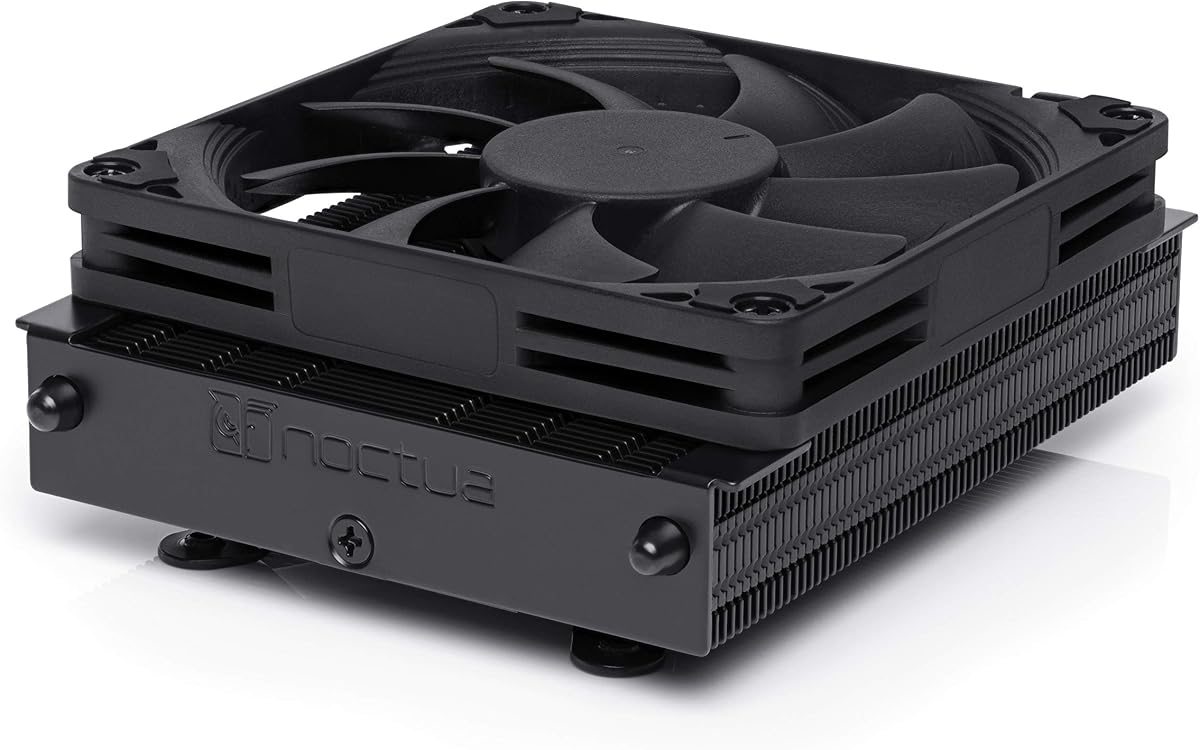


The Noctua NH-L9x65 stands out as a premier choice for builders seeking silence. It earns top marks for its ability to cool effectively without noise.
We may earn a commission when you buy through this link, at no additional cost to you.
Its NF-A9x14 fan features advanced blade geometry and PWM control for precise speed adjustments. The included NT-H1 thermal paste ensures optimal transfer right out of the box.
While expensive compared to competitors, the longevity and reliability justify the investment for many users. You may find limited color choices if you prefer non-brown aesthetics.
This model is ideal for those prioritizing acoustic comfort in home theater or office PCs. We strongly recommend it for quiet ITX builds requiring moderate cooling.
The fan is engineered to minimize noise even under load for a peaceful environment.
SecuFirm2 ensures stable contact and easy installation across modern Intel and AMD sockets.
We may earn a commission when you buy through this link, at no additional cost to you.
This chromax.Black version offers the same top-tier cooling as the standard model but with a sleek all-black look. It is perfect for builds requiring a monochrome aesthetic.
We may earn a commission when you buy through this link, at no additional cost to you.
The footprint is optimized to clear RAM slots while maintaining robust cooling performance. It includes the same high-end fan and mounting system found in other Noctua units.
While you pay extra for the design, the visual integration in dark cases is unmatched. The weight might be a minor concern for very small portable chassis.
Choose this if you value both premium silence and a coordinated color scheme. It remains a top recommendation for high-end SFF enthusiasts.
The all-black finish matches seamlessly with modern motherboards and cases for a unified look.
Despite the black coating, thermal performance remains identical to the original brown model.
We may earn a commission when you buy through this link, at no additional cost to you.
The Thermalright AXP90 X36 delivers exceptional value with its compact 36mm profile. It is an excellent choice for tight enclosures where height is a major constraint.
We may earn a commission when you buy through this link, at no additional cost to you.
AGHP technology ensures the heat pipes work effectively regardless of orientation, a common issue in SFF builds. The nickel plating adds durability against corrosion over time.
While it lacks the refinements of premium brands, it cools adequately for most mainstream CPUs. Some users note the fan is louder than top-tier alternatives under load.
This is the smart pick for budget-conscious builders needing extreme compactness. We recommend it for entry-level ITX systems where silence is secondary to size.
AGHP technology solves heat pipe orientation issues ensuring consistent performance in any build angle.
You get reliable cooling performance without the high price tag associated with premium branded coolers.
We may earn a commission when you buy through this link, at no additional cost to you.
Designed specifically for AMD AM5 sockets, this model ensures perfect fit and cooling for Ryzen 7000 series chips. It features the same reliable fan as other Noctua low profile units.
We may earn a commission when you buy through this link, at no additional cost to you.
The 37mm height allows it to fit in the slimmest cases while maintaining clearance for tall RAM modules. The mounting system is optimized for the LGA1718 socket layout.
Limited socket compatibility means it is not a universal option but excels within its niche. The price reflects the specialized engineering required for AM5 optimization.
Ideal for AM5 ITX users wanting a silent black cooler that is ready to use. It is a top choice for those building on the latest AMD platform.
The mounting hardware and base contact are specifically engineered for the AM5 socket geometry.
At only 37mm it clears even the most restrictive chassis without compromising airflow.
We may earn a commission when you buy through this link, at no additional cost to you.
The be quiet! Pure Rock Low Profile is a straightforward solution for compact systems. It supports a wide range of Intel and AMD sockets without needing extra adapters.
We may earn a commission when you buy through this link, at no additional cost to you.
Its 92mm fan is designed for low noise operation and provides steady airflow. The simple design makes it easy to install and maintain over time.
While it does not have advanced heat pipe technology like some rivals, it handles moderate TDP CPUs well. It is a safe choice for general purpose ITX builds.
We recommend this for users needing a no fuss cooler that works out of the box. It balances price and performance for everyday computing needs.
Supports both modern Intel and AMD sockets making it versatile for various upgrade paths.
The mounting kit is designed for quick and secure installation without complex tools.
We may earn a commission when you buy through this link, at no additional cost to you.
The AXP-90 X53 Black offers a middle ground between extreme height and cooling power. With 53mm it clears most RAM but still fits many ITX cases.
We may earn a commission when you buy through this link, at no additional cost to you.
Four heat pipes distribute heat efficiently and the nickel plating protects against corrosion. The PWM fan adjusts speed based on temperature for balanced performance.
It may produce more noise than premium models at high speeds but the cooling is consistent. The black finish adds a modern touch to budget builds.
This is a solid choice if you need slightly more cooling than the 36mm variant. We suggest it for budget builds with slightly larger cases.
The 53mm height allows for better thermal performance while still fitting many small form factor cases.
Black nickel plating provides both aesthetic appeal and resistance to corrosion over time.
We may earn a commission when you buy through this link, at no additional cost to you.
This model strikes a balance between height and thermal capability with its 47mm profile. It supports AGHP technology which ensures pipes work in any orientation.
We may earn a commission when you buy through this link, at no additional cost to you.
The 92mm slim fan is PWM controlled to adapt to workload. The black finish gives it a sleek appearance for modern builds.
While the mounting clips may feel less robust than premium brands the performance is solid. Users might need to manage fan curves to keep noise acceptable.
We recommend this for builders wanting a middle option between ultra thin and taller coolers. It is good for cases with 47mm limits.
AGHP technology ensures heat dissipation works effectively even in non standard mounting orientations.
The slim profile allows it to fit inside cases with limited vertical clearance.
We may earn a commission when you buy through this link, at no additional cost to you.
The IS-67-XT stands out with six heat pipes and a large 120mm fan. This combination allows for cooling higher TDP CPUs within a low profile design.
We may earn a commission when you buy through this link, at no additional cost to you.
It uses PWM control for the fan to regulate speed and noise. The black design keeps it looking modern in a variety of builds.
Because of the larger fan size you might have less clearance for tall RAM sticks. This model is best for those prioritizing thermal capacity over space.
We recommend this if you need to cool a powerful CPU in a compact case. It is a top pick for performance focused ITX builds.
The 120mm fan provides substantial airflow to help dissipate heat from more powerful processors.
Six heat pipes enhance the thermal conductivity and distribute heat across the fins.
We may earn a commission when you buy through this link, at no additional cost to you.
This version of the AXP90 X47 uses AGHP technology for reliable cooling in any case orientation. It maintains a 47mm height that fits many ITX chassis.
We may earn a commission when you buy through this link, at no additional cost to you.
The TL-9015B fan offers PWM control for adjusting noise levels. It supports both AMD and Intel sockets for broad usability.
Build quality is adequate but may not feel as substantial as higher priced brands. Users should be mindful of noise levels when the fan runs at full speed.
We suggest this for budget builds needing a compact cooler with reliable thermal performance. It is a practical choice for small systems.
The AGHP technique ensures pipes perform well regardless of how the case is positioned.
The 47mm profile is designed to fit inside many compact enclosures without interference.
We may earn a commission when you buy through this link, at no additional cost to you.
The IS-40-XT offers an affordable entry into low profile cooling with a 47mm height. It features four heat pipes for heat distribution and a PWM fan.
We may earn a commission when you buy through this link, at no additional cost to you.
Installation is straightforward with an upgraded mounting kit. The all black look is a nice touch for budget builds.
It is best suited for CPUs with moderate heat dissipation needs. Those with high TDP processors may need to look at larger coolers.
We recommend this for first time ITX builders or upgrades where budget is tight. It delivers solid basic performance for many mainstream CPUs.
This cooler provides reliable cooling at a low price point suitable for budget builds.
The upgraded mounting kit simplifies the process making it easier to install securely.
We may earn a commission when you buy through this link, at no additional cost to you.
Selecting a low profile CPU cooler requires balancing size limits with thermal needs. This guide outlines the critical factors to consider before you buy.
The most important factor is ensuring the cooler fits your case. Measure the maximum CPU height allowed by your chassis to avoid incompatibility.
Always choose a cooler with a total height slightly lower than your case limit to account for fan thickness.
Verify that the cooler supports your CPU socket. Modern boards like AM5 or LGA1851 may need specific mounting brackets not included in older models.
Check the manufacturer list for compatibility to avoid purchasing a unit that cannot be mounted.
Match the cooler TDP rating to your CPU heat output. High performance chips need more robust cooling to avoid throttling under load.
Select a cooler with a TDP rating that meets or exceeds your CPU needs for stable performance.
More heat pipes generally mean better heat transfer. Look for at least four pipes in standard coolers to ensure efficient dissipation.
Higher end models use more pipes to support intense workloads in compact enclosures.
Consider the width of the cooler and your RAM modules. Overhang can prevent high profile memory sticks from fitting on narrow boards.
Choose a narrow footprint cooler to ensure your RAM can be installed without interference.
Fan noise is a key concern in small cases. Look for PWM fans that adjust speed based on temperature to reduce idle noise.
Check decibel ratings to ensure the cooler operates quietly during normal usage.
Quality materials like nickel plated bases resist corrosion and improve transfer. Ensure the mounting system is secure for long term stability.
Invest in a model with robust construction to avoid issues with loosening screws over time.
Budget models offer solid value but may lack premium features. Premium brands often include better fans and mounting systems for extra cost.
Decide what matters most to you whether it is cost savings or top end silence.
Apply thermal paste carefully to ensure optimal heat transfer between the CPU and cooler base. A pea sized amount is usually sufficient to avoid air gaps.
Install the mounting bracket securely to ensure consistent contact. Loose mounting can cause hot spots and reduced cooling efficiency.
Clean dust from the fins and fan regularly to maintain airflow. Use compressed air to remove debris without damaging the fan blades.
A low profile CPU cooler is designed to be shorter than standard coolers. It fits in compact cases where space above the motherboard is limited.
Yes many are engineered for low noise operation. They use slower spinning fans that move air efficiently without generating excess sound.
Many modern models include AM5 support. Always check the compatibility list before buying to ensure it fits your socket.
You use one to fit cooling into small cases. It allows for compact builds without sacrificing thermal management entirely.
No they vary in size and heat capacity. Some use more heat pipes or larger fans for better cooling power.
Attach the backplate and apply thermal paste. Secure the cooler using the provided screws and connect the fan to the CPU header.
AGHP ensures heat pipes work in any orientation. This prevents gravity from affecting cooling performance in vertical or tilted cases.
Most include paste but some do not. Check the package contents to see if additional paste is required for installation.
Choosing the right cooler depends on your case size and CPU needs. We highlighted options that balance height and cooling capability for various builds.
Prioritize compatibility and thermal efficiency when making your decision. A quiet cooler ensures comfort while maintaining stable system performance.
Always check the latest stock and specifications before buying to confirm fit. Prices and availability change frequently so review current listings carefully.