
Logitech G213 Prodigy
4.2Editor score
Dedicated media controls
Five customizable lighting zones
Integrated comfortable palm rest
This comprehensive guide compares the top ten best Mac gaming keyboard options available in October 2026 to help you find the perfect match for your setup.
Finding the right Mac gaming keyboard can transform your entire setup by combining seamless macOS compatibility with responsive mechanical feedback and durable construction.
We evaluated ten top-rated models based on connectivity options switch quality layout design and overall performance to ensure they meet the demands of serious gamers.
Each pick highlights unique strengths and potential trade-offs so you can decide quickly while keeping in mind that prices and availability may change over time.
4.2Editor score
4.3Editor score
4.0Editor score
Explore our detailed side-by-side comparison of the top ten Mac gaming keyboards to see how each model stacks up in terms of features and performance.


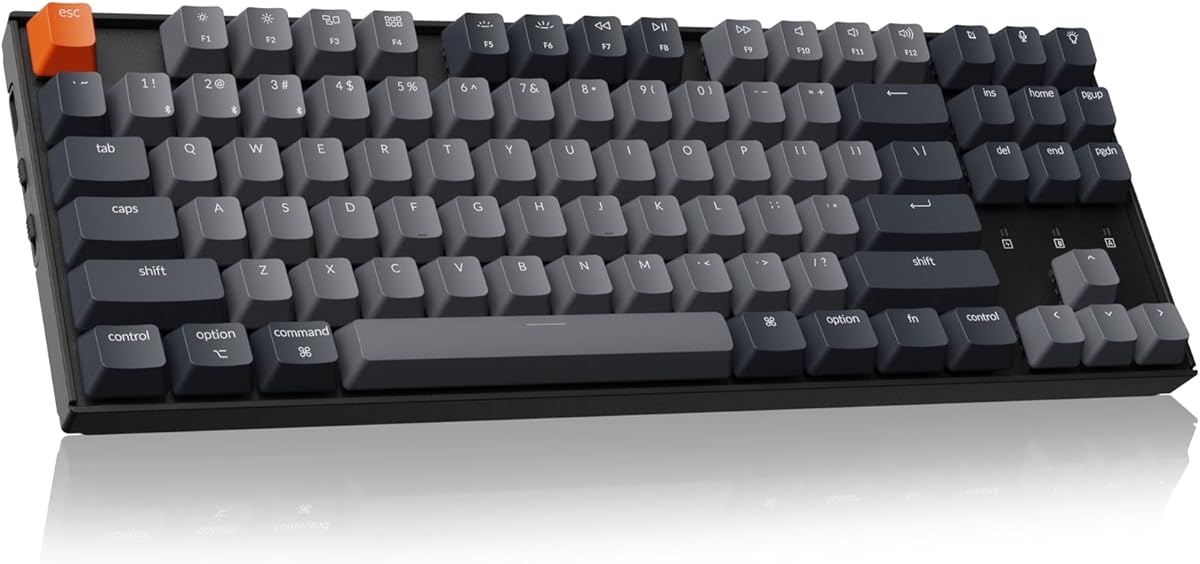
The Keychron K8 stands out as the top choice for Mac gamers seeking a versatile mechanical keyboard with seamless Bluetooth integration and robust build quality.
We may earn a commission when you buy through this link, at no additional cost to you.
Its optimized layout includes all essential macOS function keys and dedicated multimedia controls while the brown switches provide a tactile feel ideal for both typing and gaming.
While it lacks a dedicated volume knob found on some competitors the large 4000 mAh battery ensures long usage sessions without frequent charging interruptions or downtime.
Gamers who value compatibility and portability will appreciate how this keyboard switches between devices effortlessly making it perfect for hybrid setups involving Mac and Windows PCs.
The K8 includes extra keycaps and specific function mappings tailored for macOS ensuring command keys and media shortcuts work exactly as expected without remapping.
Whether you need wireless freedom via Bluetooth 5.1 or a stable wired connection via USB Type-C the K8 adapts to your environment without sacrificing performance.
We may earn a commission when you buy through this link, at no additional cost to you.
The SteelSeries Apex 3 offers an incredibly accessible entry point for Mac users looking for a reliable gaming keyboard without breaking the bank or compromising on comfort.
We may earn a commission when you buy through this link, at no additional cost to you.
Its whisper quiet switches and IP32 water resistance make it ideal for shared living spaces where noise and accidental spills are real concerns during long sessions.
Although it uses membrane rather than mechanical switches the 10 zone RGB illumination and magnetic wrist rest provide a premium feel that exceeds expectations for this price tier.
Budget conscious gamers who prioritize durability and quiet operation over tactile feedback will find this keyboard an excellent addition to their Mac gaming setup.
The whisper quiet gaming switches reduce noise significantly compared to traditional mechanical keyboards making it suitable for late night gaming without disturbing others.
With an IP32 water resistant rating the Apex 3 can withstand minor liquid spills giving you peace of mind when keeping drinks near your workspace.
We may earn a commission when you buy through this link, at no additional cost to you.
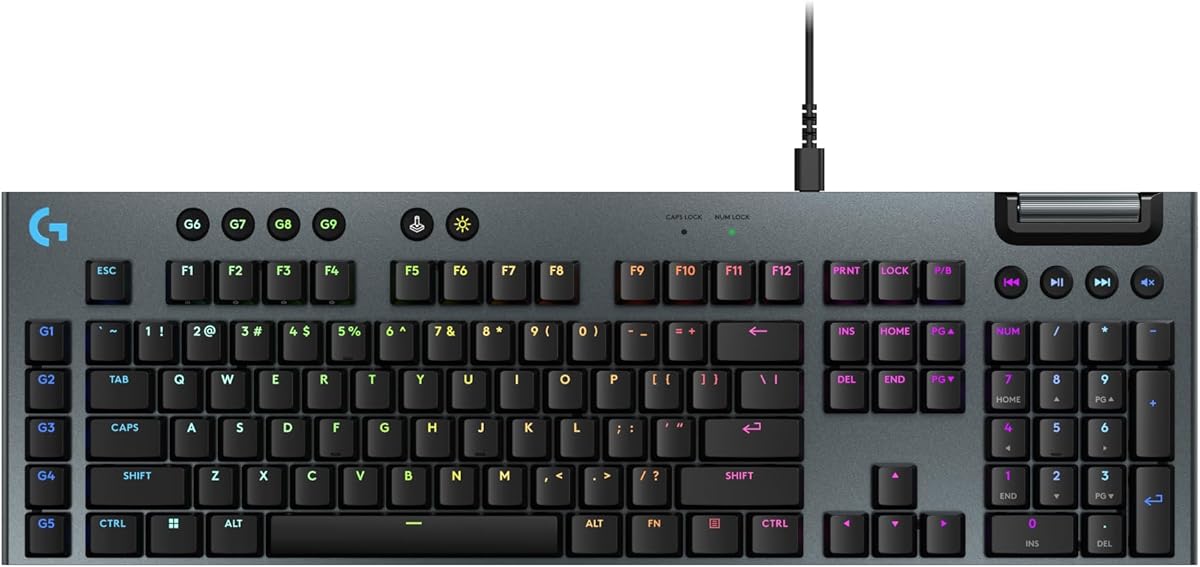
The Logitech G915 X represents the pinnacle of premium gaming keyboards with its ultra slim profile and advanced mechanical switches designed for speed and precision.
We may earn a commission when you buy through this link, at no additional cost to you.
Its low profile GL switches offer a shorter actuation point that increases actions per minute making it perfect for competitive gaming where split second reactions matter.
The brushed aluminum top plate and full size layout with a dedicated numpad deliver a luxurious feel and functionality that justifies the investment for serious enthusiasts.
While it is wired only and expensive this keyboard is ideal for Mac users who want a high-end dedicated desktop setup and value form factor alongside raw performance.
With a 1.3 mm actuation point the GL switches provide faster response times than standard mechanical switches giving you an edge in fast paced games.
The sand blasted aluminum top plate and double shot PBT keycaps ensure the keyboard remains durable and looks premium even after years of heavy use.
We may earn a commission when you buy through this link, at no additional cost to you.
The EPOMAKER X Aula F75 MAX brings a futuristic twist to Mac gaming keyboards with its built-in TFT screen and hot swappable design allowing deep customization.
We may earn a commission when you buy through this link, at no additional cost to you.
The gasket mount structure and pre-lubed switches deliver a creamy smooth typing sound that is highly satisfying and rare at this price point.
While the 75% layout saves desk space it lacks a dedicated numpad which might inconvenience users who rely on numeric input for specific games or tasks.
Tech savvy Mac users who love tinkering with their hardware will find the customization options and unique display features incredibly rewarding and fun.
The customizable TFT screen allows you to show animations or battery status adding a unique visual element that enhances your overall desk setup.
Factory lubed switches and sound dampening foam create a rich thocky sound profile that appeals to enthusiasts who prioritize audio feedback.
We may earn a commission when you buy through this link, at no additional cost to you.
The Logitech G413 TKL SE combines robust construction with reliable performance making it a strong contender for Mac users who prefer a wired mechanical experience.
We may earn a commission when you buy through this link, at no additional cost to you.
PBT keycaps resist heat and wear better than standard ABS ensuring the legends stay crisp even after extensive gaming sessions and heavy typing.
The brushed aluminum magnesium alloy top case provides stability and prevents flex which is crucial for accurate input during intense competitive matches.
If you need a straightforward durable keyboard without extra wireless features the G413 TKL SE offers excellent value and build quality for Mac setups.
PBT keycaps are more resistant to shine and wear than standard plastics ensuring your keyboard looks new longer even with daily use.
Removing the numpad frees up mouse space which is essential for low sensitivity gamers who need room to swing their mouse freely.
We may earn a commission when you buy through this link, at no additional cost to you.
The Redragon K742 offers exceptional value with QMK VIA programmability and tri mode connectivity making it a powerhouse for custom enthusiasts on a budget.
We may earn a commission when you buy through this link, at no additional cost to you.
Its gasket structure and sound absorbing paddings create a premium thocky feel that is usually reserved for much more expensive custom keyboards.
While the software setup might be daunting for beginners the flexibility to remap keys and create macros provides unmatched control for your workflow.
This keyboard is perfect for Mac users who want deep customization and modern features without paying premium brand prices for a quality mechanical experience.
Using VIA software you can remap keys and create layers on the fly allowing for complex macros and personalized layouts without physical hardware.
Switch between Bluetooth 5.0 2.4GHz and USB-C wired modes effortlessly to connect your Mac alongside multiple devices seamlessly.
We may earn a commission when you buy through this link, at no additional cost to you.
The Keychron K4 combines a compact 96% layout with full functionality including a numpad making it ideal for Mac users who need data entry capabilities.
We may earn a commission when you buy through this link, at no additional cost to you.
It supports Bluetooth 5.1 and wired USB-C connection allowing seamless switching between your Mac and other devices without cable clutter.
The white LED backlight and specific Mac layout with function keys ensure that your workflow remains efficient and visually clean without unnecessary color distractions.
Professionals who game casually will appreciate the balance between a full feature set and the space saving design that this unique layout offers.
The 96% layout keeps the number pad while reducing overall footprint ensuring you don't lose functionality when using a Mac setup.
Connect via Bluetooth 5.1 for a clean desk look or switch to wired mode for zero latency when gaming on your Mac.
We may earn a commission when you buy through this link, at no additional cost to you.
The Logitech MX Mechanical bridges the gap between office productivity and gaming with quiet tactile switches and smart illumination that reacts to your hands.
We may earn a commission when you buy through this link, at no additional cost to you.
Its low profile design and ergonomic layout reduce finger strain making it comfortable for long typing sessions as well as gaming on macOS.
The smart backlighting saves battery by turning off when not in use and the multi device pairing lets you switch between Mac and Windows instantly.
If you need a keyboard that looks professional in meetings but performs well during game nights this is the most versatile choice available.
The backlit keys light up when your hands approach and adjust to lighting conditions automatically saving battery and enhancing visibility.
Pair with up to three devices via Bluetooth or Logi Bolt and switch between them with a button press for seamless multi OS work.
We may earn a commission when you buy through this link, at no additional cost to you.
The GravaStar Mercury K1 stands out for its unique futuristic aluminum design and high quality construction that appeals to style conscious Mac gamers.
We may earn a commission when you buy through this link, at no additional cost to you.
The custom Kailh switches and gasket mounted structure provide a smooth and quiet typing experience that is both satisfying and comfortable over time.
Dual independent RGB systems allow for dynamic lighting effects that can be tailored to match your Mac setup aesthetics without feeling generic.
Gamers who value unique hardware design and build quality will find this keyboard a perfect blend of art and function for their desk.
The aluminum alloy exoskeleton with gradient black finish provides a futuristic look that sets it apart from standard plastic keyboards.
Gasket mounting and sound dampening foam absorb vibrations creating a smooth and quiet sound profile that enhances the typing experience.
We may earn a commission when you buy through this link, at no additional cost to you.
The Logitech G213 Prodigy serves as a reliable entry level gaming keyboard that balances performance and durability for Mac users starting their setup.
We may earn a commission when you buy through this link, at no additional cost to you.
Its five customizable lighting zones and integrated palm rest offer comfort and style while the spill resistant design protects against accidental accidents.
Dedicated media controls allow quick volume and playback adjustments without leaving your game making it convenient for entertainment focused setups.
New gamers or those on a strict budget will appreciate the full sized layout and robust build quality that defines this affordable Logitech model.
The integrated palm rest and customizable lighting zones ensure you stay comfortable and visually aligned with your gaming setup.
The anti ghosting gaming matrix ensures accurate key presses even when multiple keys are pressed simultaneously during intense gaming moments.
We may earn a commission when you buy through this link, at no additional cost to you.
Choosing the right Mac gaming keyboard involves balancing compatibility performance and design to ensure a seamless experience across all your activities.
Look for keyboards that include dedicated macOS function keys and media controls to avoid the frustration of having to re-map keys manually.
Ensure the keyboard supports Mac OS X and macOS specifically to guarantee that features like Command and Option keys function as intended.
Mechanical switches provide distinct tactile feedback that enhances gaming precision and typing satisfaction compared to membrane keyboards.
Consider whether you prefer tactile clicky or linear switches based on your noise tolerance and need for feedback during gameplay.
Wireless Bluetooth connections offer cleaner desk setups but wired options ensure zero latency for competitive gaming scenarios.
Dual mode keyboards allow you to switch between wireless for typing and wired for gaming providing the best of both worlds.
Full size keyboards include a numpad which is useful for productivity but consume more desk space than tenkeyless or compact layouts.
Choose a TKL or 75% layout if you prioritize mouse room and portability or a full size if you need frequent number entry.
Keyboards made with aluminum cases or metal frames resist flex and provide a more stable typing experience during intense sessions.
Check for features like spill resistance or durable keycaps such as PBT which ensure the keyboard lasts longer under heavy use.
Software that allows macro programming and RGB lighting control lets you tailor the keyboard to your specific gaming or workflow needs.
Hot swappable PCBs provide the added benefit of changing switches later without replacing the entire keyboard if your preferences change.
For wireless keyboards check the battery capacity and how long it lasts with and without backlighting to avoid frequent charging interruptions.
High capacity batteries ensure you can game for weeks without needing to plug in which maintains convenience during long usage periods.
Set a budget that aligns with your needs knowing that premium features like OLED screens or wireless charging add significant cost.
Entry level models often offer 90 percent of the performance for a fraction of the price making them smart choices for casual gamers.
Always pair your wireless keyboard via Bluetooth settings on your Mac ensuring you are in pairing mode usually by holding a specific function key.
Use the manufacturer software if available to remap keys or update firmware so the keyboard functions smoothly within macOS environments.
Clean the keycaps regularly using compressed air to remove dust and debris and wipe down the surface with a slightly damp cloth.
Yes mechanical keyboards generally provide faster response times and tactile feedback which can improve performance in competitive games compared to membrane ones. They also tend to be more durable and have a longer lifespan for heavy gaming sessions.
While not strictly necessary a Mac specific layout ensures that command and option keys are placed correctly for macOS apps. If using a PC keyboard you may need to remap keys manually to match your workflow.
Yes many modern wireless keyboards use Bluetooth 5.1 or proprietary 2.4GHz dongles that offer low latency suitable for gaming. However wired connections still provide the absolute zero latency for competitive play.
A tenkeyless or TKL layout is often preferred for gaming as it saves space and allows more room for mouse movement. However full size layouts are better if you need the number pad for data entry.
If keys are not working correctly check the Keyboard settings in System Preferences to remap modifier keys like Option and Command. Software tools like Karabiner Elements can also help fix complex mapping issues.
Yes spill resistant keyboards provide peace of mind especially if you have drinks near your desk. They can prevent minor liquid spills from damaging the internal components ensuring your keyboard survives accidental accidents.
The Keychron K8 and Logitech G915 X top our list for their perfect blend of macOS compatibility and high performance features tailored for serious users.
Prioritize features like layout and switch type based on your specific gaming habits to ensure you get the most out of your new peripheral.
Remember to check current availability and pricing on trusted platforms to make sure you get the best deal for your chosen model today.