
Canon PIXMA TR4720
3.9Editor score
Compact design for small spaces
Built-in fax and auto document feeder
Alexa smart reorder integration
This comprehensive guide compares the top 10 all in one printer with fax models for 2026, analyzing performance, features, and value to help you choose the
Finding the right all in one printer with fax can streamline your workflow by combining printing, scanning, copying, and faxing into a single device. Whether you run a small business or manage a busy home office, having a reliable multifunction printer ensures you stay connected and productive without cluttering your desk with multiple machines.
We evaluated ten top-rated models based on print quality, speed, connectivity options, and fax capabilities. Our analysis focuses on real-world performance, user feedback, and key features like automatic document feeders, duplex printing, and mobile support to help you identify the best fit for your specific needs and budget constraints.
Each selection highlights unique strengths and potential trade-offs so you can make an informed decision. While prices fluctuate over time, the core features and performance metrics remain consistent. We encourage you to verify current availability and specifications before purchasing to ensure the model meets your evolving office requirements.
3.9Editor score

3.9Editor score

4.3Editor score
The following table provides a side-by-side comparison of the ten selected models, highlighting their core specifications and unique selling points to help you quickly identify which device aligns best with your operational requirements.






The HP OfficeJet Pro 9125 stands out as a top contender for professionals needing a reliable all in one printer with fax. With a rating of 3.9 stars, users appreciate its balance of speed, quality, and smart features designed for office environments.
We may earn a commission when you buy through this link, at no additional cost to you.
Its standout qualities include print speeds up to 22 pages per minute for black documents and 18 for color. The large 2.7-inch touchscreen simplifies navigation, while HP AI optimizes print formatting to reduce wasted pages. Security is robust with HP Wolf Pro Security protecting against cyber threats.
However, it only works with original HP chips, which may limit third-party cartridge options. The Instant Ink trial ends after three months, requiring a subscription for continued savings. These trade-offs are acceptable for users prioritizing performance and convenience over absolute cost control.
This printer is ideal for small offices that need consistent output quality and strong connectivity. If you value speed and integrated security, the 9125 offers a compelling package that supports demanding workflows without sacrificing ease of use.
HP AI removes unwanted content from web pages and emails, ensuring prints are formatted precisely as intended to save paper and improve professionalism.
Built-in protections help keep your network safe from cyber threats, making it suitable for businesses handling sensitive client information.
We may earn a commission when you buy through this link, at no additional cost to you.
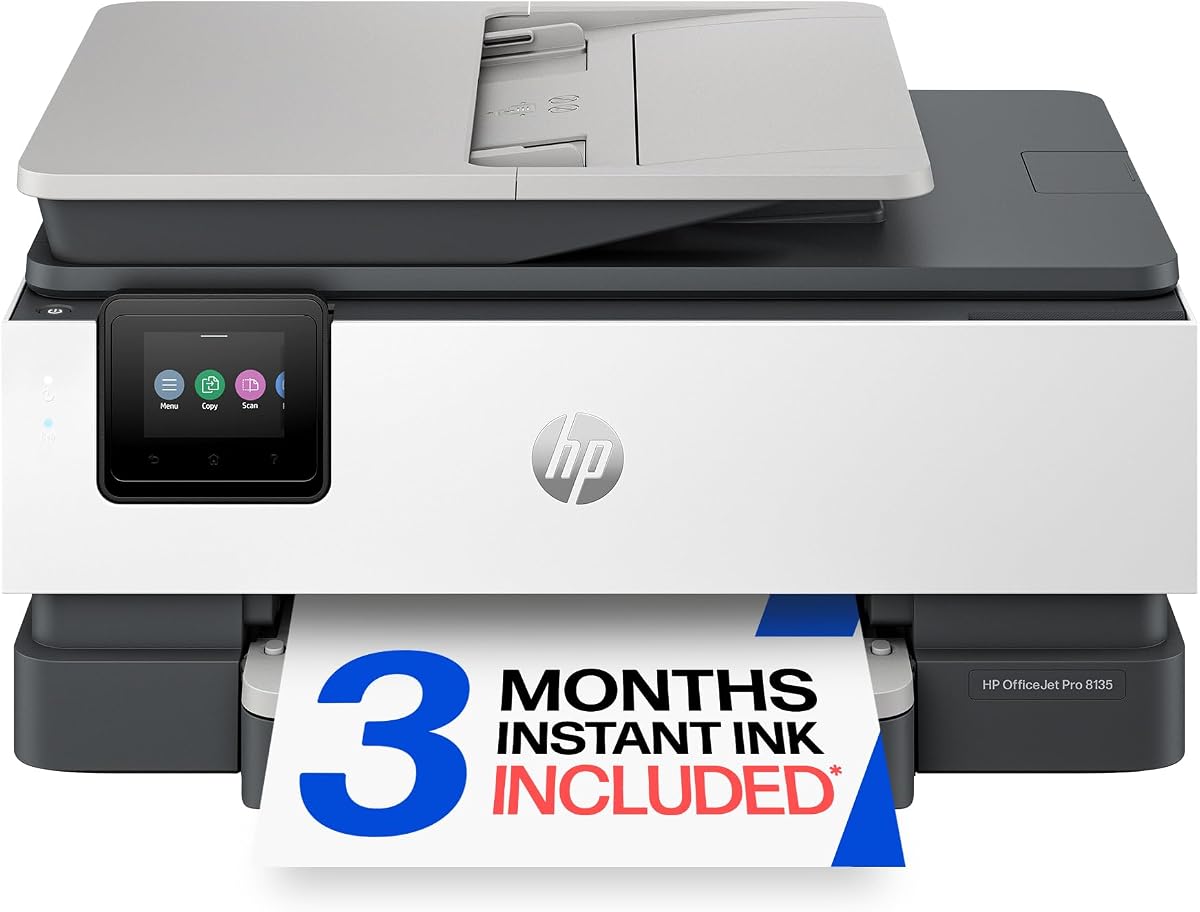
The HP OfficeJet Pro 8135 is tailored for home offices requiring professional-quality documents. It delivers reliable performance with features like auto duplex printing and a user-friendly touchscreen interface that simplifies daily tasks.
We may earn a commission when you buy through this link, at no additional cost to you.
Key strengths include print speeds of 20 ppm for black and 10 for color. The 2.7-inch touchscreen offers intuitive navigation, while HP AI ensures precise formatting. It uses dual-band Wi-Fi to maintain stable connections even in busy wireless environments.
Like other HP models, it enforces chip restrictions on cartridges, which can limit flexibility. The Instant Ink trial provides initial savings but transitions to a paid model. These factors are manageable for users who prioritize ease of use over cartridge independence.
Choose the 8135 if you need a dependable all in one printer with fax for home-based business needs. Its balance of quality and connectivity makes it a strong choice for remote workers and freelancers.
Automatic duplex printing and scanning reduce paper usage and speed up document handling for efficient daily operations.
Made with over 45% recycled plastic, this model supports sustainability goals without compromising performance or reliability.
We may earn a commission when you buy through this link, at no additional cost to you.
The Epson EcoTank ET-4800 offers a cartridge-free printing solution that appeals to high-volume users. With a 3.8 rating, it is praised for its innovative design that eliminates the need for traditional ink cartridges.
We may earn a commission when you buy through this link, at no additional cost to you.
Innovative supertank technology means you can print thousands of pages before refilling. The Micro Piezo Heat-Free Technology ensures sharp text and vibrant photos. Refilling is mess-free with EcoFit bottles designed for easy handling.
While the upfront cost is higher, long-term savings on ink offset the initial investment. Print speeds are slower than laser alternatives, which may not suit urgent tasks. For users focused on value over time, this is a minor drawback.
This model is best for households or offices with heavy printing demands. If you want to reduce waste and ongoing costs, the ET-4800 provides a sustainable and efficient all in one printer with fax alternative.
Eliminating cartridges drastically lowers the cost per page, making it economical for frequent printing needs.
Zero cartridge waste helps reduce landfill contributions, aligning with eco-friendly practices.
We may earn a commission when you buy through this link, at no additional cost to you.
The HP OfficeJet Pro 8125 is designed for home offices seeking professional output in a compact form. It delivers quality color documents with features like duplex printing and an auto document feeder for multi-page tasks.
We may earn a commission when you buy through this link, at no additional cost to you.
Print speeds reach 20 ppm for black documents, ensuring timely delivery of reports. The 2.7-inch touchscreen simplifies setup and operation, while HP AI optimizes layouts to prevent wasted pages. Dual-band Wi-Fi keeps connections stable.
Cartridge restrictions remain a limitation for budget-conscious users. The Instant Ink trial offers initial convenience but requires a subscription afterward. These aspects are acceptable given the device's overall reliability and feature set.
Ideal for small home offices, the 8125 balances performance and space efficiency. If you need a dependable all in one printer with fax that fits limited desk space, this model is a solid option.
HP AI removes unwanted content from emails and web pages, ensuring clean and professional prints every time.
Dual-band Wi-Fi automatically resolves connection issues, minimizing downtime and maximizing productivity.
We may earn a commission when you buy through this link, at no additional cost to you.
The HP Smart Tank 7603 is built for users who demand high-volume printing without frequent maintenance. It includes up to three years of ink in the box, providing exceptional value for active offices.
We may earn a commission when you buy through this link, at no additional cost to you.
With up to 8,000 color pages included, you can print confidently without worrying about running out. The mess-free refill system makes topping up ink simple and spill-proof. Touch controls and wireless connectivity enhance usability.
The larger footprint may not suit very small spaces. While the upfront cost is higher, the long-term savings on ink justify the investment for frequent users. It offers a balanced combination of capacity and convenience.
Choose the 7603 if you need a reliable all in one printer with fax that minimizes interruptions. Its high capacity and ease of use make it ideal for busy home offices and small businesses.
Up to three years of ink included means you can print up to 8,000 color pages without purchasing additional supplies.
Mess-free refilling ensures you never deal with spills or complex cartridge changes, saving time and effort.
We may earn a commission when you buy through this link, at no additional cost to you.
The HP OfficeJet Pro 9135 is engineered for larger office environments requiring speed and capacity. With a 4.0 rating, it excels in performance, offering robust features for heavy daily use.
We may earn a commission when you buy through this link, at no additional cost to you.
Print speeds reach 25 ppm for black documents and 20 for color. Two 250-sheet trays reduce the need for frequent refills. The 4.3-inch touchscreen provides a rich interface, while single-pass duplex scanning enhances efficiency.
The higher price and subscription model may not suit smaller budgets. However, for offices prioritizing throughput and reliability, these costs are justified by the performance gains. Security features add peace of mind.
Select the 9135 if you need a high-performance all in one printer with fax for demanding workflows. Its speed and capacity make it a powerhouse for professional environments.
Single-pass duplex scanning allows you to scan double-sided documents quickly, saving time on large batches.
HP Wolf Pro Security protects your network from cyber threats, ensuring safe document handling in shared spaces.
We may earn a commission when you buy through this link, at no additional cost to you.
The Canon PIXMA TR4720 offers an affordable entry point for those needing an all in one printer with fax. It balances basic functionality with smart features, making it ideal for light home office use.
We may earn a commission when you buy through this link, at no additional cost to you.
It supports wireless printing and includes an auto document feeder for convenience. The compact design fits easily on small desks, and Energy Star certification ensures low power consumption. Smart reorder integration with Alexa helps manage ink supplies.
Print speeds are slower than premium models, which may frustrate users with urgent needs. The smaller tray requires more frequent refills. These limitations are acceptable given the low cost and essential functionality.
For budget-conscious buyers, the TR4720 is a practical choice. If you need basic fax, scan, and copy capabilities without breaking the bank, this model delivers excellent value.
Alexa integration sends notifications when ink is low and can place smart orders automatically to prevent running out.
Its compact design fits comfortably in home offices, ensuring you maximize available workspace.
We may earn a commission when you buy through this link, at no additional cost to you.
The Canon PIXMA TR8620a is designed for users who want high-quality photo prints alongside office documents. It supports voice commands and SD card printing, offering versatility for creative projects.
We may earn a commission when you buy through this link, at no additional cost to you.
With 15 ipm print speed and dual feeding systems, it handles various paper types efficiently. Alexa allows hands-free control, making it accessible for quick tasks. The SD slot lets you print directly from cameras or phones.
It relies on smart reorder subscriptions, which may limit flexibility. The larger footprint requires more desk space. For those prioritizing photo quality, these are minor compromises worth accepting.
Ideal for home offices with creative needs, the TR8620a delivers excellent output. If you value photo quality and modern connectivity, this model is a strong contender.
Voice print with Alexa allows you to initiate tasks using simple commands, streamlining your workflow.
Dual feeding systems support a variety of paper types and sizes, making it adaptable to different tasks.
We may earn a commission when you buy through this link, at no additional cost to you.
The HP OfficeJet Pro 8139 provides a unique advantage with a one-year Instant Ink trial. This extended period helps users evaluate the service without immediate costs, making it a compelling choice for home offices.
We may earn a commission when you buy through this link, at no additional cost to you.
It offers professional-quality prints with speeds up to 20 ppm. The large touchscreen and HP AI optimize workflows effectively. Security features protect data while maintaining ease of use across devices.
Cartridge restrictions may limit third-party compatibility. Transitioning to a paid subscription after one year requires planning. These factors are acceptable for users who appreciate long-term ink delivery benefits.
Choose the 8139 if you value extended trial benefits and reliability. It is an excellent option for home offices needing consistent performance and support.
A one-year Instant Ink trial allows you to test the service for a full year without immediate monthly fees.
Prints professional-quality documents suitable for business needs, including reports and presentations.
We may earn a commission when you buy through this link, at no additional cost to you.
The Brother MFC-L2820DW delivers high-speed monochrome laser printing in a compact form. With a 4.3 rating, it is recognized for efficiency, reliability, and advanced connectivity for business environments.
We may earn a commission when you buy through this link, at no additional cost to you.
Print speeds reach 36 ppm, significantly faster than most inkjet alternatives. Dual-band wireless and Ethernet options ensure secure connections. The compact design saves space while offering robust features like duplex printing and cloud support.
It only prints black and white, which limits its use for color tasks. The initial cost is higher, but toner costs and speed offset this over time. For text-heavy work, this trade-off is acceptable.
Select the MFC-L2820DW if you need fast, reliable laser printing. It is ideal for offices that prioritize speed and security without requiring color output.
With speeds up to 36 pages per minute, you can process documents quickly, keeping your workflow moving.
Ethernet and dual-band wireless options ensure safe, stable connections for professional business use.
We may earn a commission when you buy through this link, at no additional cost to you.
Selecting the right multifunction printer requires evaluating several key factors to ensure it meets your specific workflow and budget needs. This guide outlines essential criteria to consider before making a purchase.
Print speed determines how quickly you can produce documents. For busy offices, higher ppm rates prevent bottlenecks. Consider your average monthly volume to match the printer duty cycle.
Prioritize faster models if you handle large batches regularly to maintain productivity.
Inkjet printers offer color flexibility but may have higher ongoing ink costs. Laser printers use toner that lasts longer and costs less per page for black text. Supertank models reduce costs significantly with refillable ink.
Evaluate long-term supply expenses to find the most economical choice for your usage.
Modern printers should support Wi-Fi, mobile apps, and Ethernet for secure office use. Dual-band Wi-Fi reduces interference in busy networks. Ensure compatibility with your operating systems and cloud services.
Choose models with versatile connections to ensure seamless integration with your devices.
Fax capabilities vary by model, with some offering advanced digital integration. Ensure the fax features meet your compliance or legacy document needs. Built-in modems are essential for traditional faxing.
Verify that the fax function supports both sending and receiving clearly.
Input tray capacity affects how often you need to reload paper. Auto document feeders streamline scanning and faxing multi-page documents. Look for duplex printing to save paper and costs.
Opt for larger trays and auto feeders to reduce manual handling time.
For businesses, printer security protects sensitive data from unauthorized access. Features like user authentication and encrypted data transmission prevent breaches. Ensure the device supports your network security protocols.
Always prioritize models with strong built-in security measures for business data.
Physical footprint matters for small offices. Compact designs save desk space without sacrificing functionality. Check dimensions before buying to ensure a proper fit in your workspace.
Select a model that balances size with the necessary features you need.
Many printers offer ink or toner subscription services that automate delivery. These can save costs and prevent running out of supplies. Review trial periods and monthly fees before committing.
Assess if a subscription aligns with your printing frequency and budget constraints.
Set up your printer on a flat, stable surface near a power outlet and network access point. Install drivers or apps for your computer and mobile devices following the included instructions. Ensure all firmware is updated to access the latest features.
Regularly clean the scanner glass and exterior with a soft, dry cloth to maintain print quality. Check and align print heads periodically to ensure sharp text. Monitor ink or toner levels to avoid unexpected interruptions.
Use the right paper type for your tasks to prevent jams and ensure consistent results. Store paper in a dry place to avoid moisture damage. Restart the printer occasionally to reset internal processes and maintain performance.
An all in one printer with fax combines printing, scanning, copying, and faxing in a single device. It allows users to send and receive documents directly without needing a separate fax machine. This integration saves space and simplifies office workflows for home or business use.
Traditional faxing typically requires a phone line connection. However, many modern printers support internet-based fax services that work over Wi-Fi. Check your model's specifications to determine if it supports VoIP faxing or analog connections.
Choosing between ink and laser depends on your needs. Inkjet printers excel at color documents and photos with flexible paper handling. Laser printers offer faster text output and lower costs per page for high-volume black printing.
Slow printing can result from low-quality settings or network issues. Ensure you are using the correct paper type and driver settings. Check your Wi-Fi signal strength or connect via Ethernet for faster speeds.
Most printers allow local printing via USB if internet is unavailable. Wireless printing generally requires network connectivity. Some models support direct Wi-Fi connections without a router, but features may be limited compared to full network setups.
Instant Ink is a subscription service that delivers ink to your door based on usage. It aims to save money and ensure you never run out. Trials are often included with new printers, but monthly fees apply afterward.
Wireless faxing uses internet protocols that should be encrypted for security. Choose models with built-in security features to protect data. Always keep firmware updated to guard against vulnerabilities and unauthorized access.
Our top picks highlight models that excel in different areas, from the HP OfficeJet Pro 9125 for office versatility to the Brother MFC-L2820DW for speed. Each device offers unique strengths tailored to specific professional or home needs.
Consider your priority factors like speed, ink costs, and connectivity before buying. Investing time in comparing specifications ensures you select a model that supports your productivity long-term without unexpected costs or interruptions.
Always check current pricing and availability since deals fluctuate often. We hope this guide helps you find the perfect multifunction solution to streamline your document management efficiently.