
CENMATE Aluminum 8 Bay Hard Drive Enclosure
3.8Editor score
Supports up to 160TB capacity
Multiple RAID modes including RAID 5
Dual cooling fans for heat management
Choosing the right storage solution is critical for professionals and enthusiasts who manage large volumes of data. An 8 Bay Hardware RAID Enclosure offers the capacity and redundancy needed to keep your projects safe while providing fast access speeds for demanding workflows.
We have evaluated ten top-rated models based on their build quality, interface speeds, RAID capabilities, and user feedback. This list covers a wide range of options from budget-friendly DAS units to high-performance Thunderbolt arrays suitable for creative studios and enterprise environments.
Each pick highlights specific strengths and potential trade-offs to help you find the best fit for your needs. Please note that product availability and pricing can change rapidly, so verify the current details before making your final purchase decision.
3.8Editor score

5.0Editor score

3.9Editor score
As an Amazon Associate we earn from qualifying purchases.
The following comparison table provides a side-by-side look at the key specifications and features of all ten products reviewed in this guide. Use this data to quickly identify which model meets your specific capacity and performance requirements.


The CENMATE Aluminum 8 Bay Hard Drive RAID Enclosure stands out as a highly accessible option for users needing substantial storage capacity without breaking the bank. With a rating of 3.8 stars, it offers a balance of features that cater to both personal and light enterprise use cases effectively.
We may earn a commission when you buy through this link, at no additional cost to you.
Its standout feature is the support for eight distinct RAID modes, including RAID 5 and RAID 50, which provides flexibility for data redundancy and performance. The enclosure supports up to 160TB total capacity using 2.5 or 3.5 inch drives, making it suitable for archiving large video projects or backing up critical business data.
However, users should be aware of the trade-offs involved. The dual cooling fans can produce noise around 40 to 50 decibels which might be noticeable in quiet environments. Additionally, the setup process requires careful attention to ensure each drive is functioning correctly before enabling RAID modes to avoid data loss.
This enclosure is best suited for users who prioritize capacity and RAID flexibility over raw transfer speed. If you need a reliable external storage system that supports hot-swappable drives and offers a robust metal chassis, this model provides excellent value for the investment.
The ability to switch between multiple RAID modes allows users to optimize for either performance or data safety depending on their specific workflow requirements.
Dual 2.9 inch fans help dissipate heat generated by eight drives running simultaneously, ensuring long-term reliability and protecting your hardware investment.
We may earn a commission when you buy through this link, at no additional cost to you.
The SanDisk Professional G-RAID Shuttle 8-Bay is a powerhouse designed for professionals who demand maximum speed and reliability. Boasting a perfect 5.0 star rating, this enclosure delivers read speeds up to 1900MB/s and write speeds up to 2000MB/s when connected via Thunderbolt 3.
We may earn a commission when you buy through this link, at no additional cost to you.
Its pre-configured RAID 5 setup offers a great balance of performance and redundancy right out of the box. The use of removable Ultrastar hard drives enhances reliability and makes it easy to swap drives for maintenance or to upgrade capacity without replacing the entire unit.
While the performance is exceptional, the high price point reflects its enterprise-grade capabilities. It also requires a Thunderbolt 3 port to achieve its maximum speeds, which might limit compatibility with older machines without adapters.
This unit is the ideal choice for video editors working with 8K footage, audio producers handling large samples, or businesses needing a transportable high-capacity solution. If your workflow depends on speed and data safety, this enclosure justifies its premium price tag.
Thunderbolt 3 connectivity provides four times the bandwidth of USB 3.0 allowing for seamless editing directly from the enclosure without lag.
Removable drives allow you to easily back up data or swap out drives on the go making it perfect for field production or on-site work.
We may earn a commission when you buy through this link, at no additional cost to you.
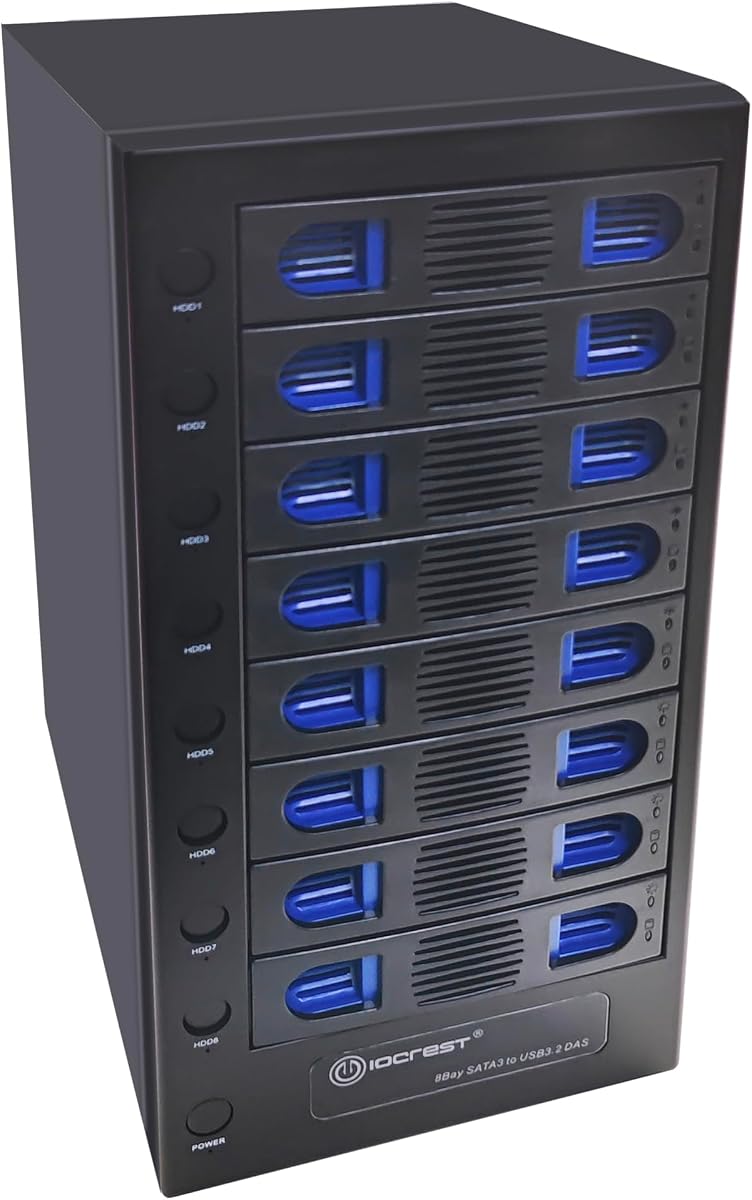
For users who prefer simplicity and direct access to their drives, this CENMATE DAS enclosure is an excellent choice. With a 4.3 star rating, it focuses on providing a reliable way to connect multiple drives without the complexity of RAID configuration or NAS setup.
We may earn a commission when you buy through this link, at no additional cost to you.
The enclosure supports hot-swappable drives, allowing you to add or remove drives without powering down the system. This feature is particularly useful for users who need to frequently exchange drives or expand storage on the fly.
One limitation is the lack of hardware RAID which means data redundancy must be managed through software. Additionally, it is capped at USB 3.0 speeds which may not be sufficient for high-bandwidth video editing tasks.
This model is perfect for home users or small businesses that need a simple way to expand storage capacity. If you prioritize ease of use and the ability to swap drives quickly, this enclosure meets those needs efficiently.
Swap drives without shutting down the host computer to maintain workflow continuity and save time during data management tasks.
The daisy chain feature allows you to connect multiple enclosures to significantly increase total storage capacity for large projects.
We may earn a commission when you buy through this link, at no additional cost to you.
The OWC ThunderBay 8 is a robust solution for users seeking high-speed external storage with the flexibility to daisy chain multiple units. With a rating of 3.9 stars, it is designed to handle demanding workflows that require rapid data access and large capacity.
We may earn a commission when you buy through this link, at no additional cost to you.
It supports both 2.5 and 3.5 inch drives giving you the freedom to choose the most cost-effective or performance-oriented drives. The dual Thunderbolt 3 ports allow you to daisy chain up to six units for a massive total storage potential.
Setup is straightforward with no drivers required for most systems. However, it relies on SoftRAID for advanced management which is an additional software purchase for Windows users. The requirement for Thunderbolt 3 ports also means it might not fit all desktop configurations.
This enclosure is ideal for creative professionals working on Mac systems who need speed and scalability. If you value speed and the ability to expand your storage network over time this is a strong investment.
Thunderbolt 3 provides four times the bandwidth of USB 3.0 enabling fast transfers of large files and video clips.
Support for both 2.5 and 3.5 inch drives allows you to use existing stock drives or choose SSDs for better performance.
We may earn a commission when you buy through this link, at no additional cost to you.
This CENMATE model upgrades the previous USB 3.0 version with a USB 3.2 Gen 2 interface that supports speeds up to 10Gbps. With a 4.1 star rating, it bridges the gap between budget DAS enclosures and high-end Thunderbolt arrays.
We may earn a commission when you buy through this link, at no additional cost to you.
The hot-swappable feature allows you to replace drives without shutting down the system which is convenient for managing large libraries of data. The aluminum chassis helps dissipate heat and the dual fans keep the drives cool under load.
While it lacks hardware RAID the speed improvement over standard USB 3.0 makes it attractive for users working with medium-sized video projects or frequent backups. However, you will still need to manage data redundancy through software.
If you need a faster external storage solution without investing in Thunderbolt technology this enclosure offers a solid middle ground. It is best suited for users who want quick access to large files and value easy drive maintenance.
USB 3.2 Gen 2 doubles the bandwidth of USB 3.0 reducing wait times when moving large video files or project archives.
Replace a drive without powering down the system to keep your workflow running smoothly during maintenance or upgrades.
We may earn a commission when you buy through this link, at no additional cost to you.
This 8 Bay enclosure distinguishes itself with a smart fan system that adjusts speed based on thermal conditions. With a 4.3 star rating, it is designed to manage heat efficiently while providing direct access to high-capacity drives.
We may earn a commission when you buy through this link, at no additional cost to you.
Each drive has its own power switch which gives you precise control over which drives are active. This is useful for saving power or isolating specific drives for maintenance. The support for drives up to 22TB each means you can potentially reach nearly 176TB of total storage.
The tool-less tray design makes installation simple and quick. However, since it does not support hardware RAID you will need to rely on software for data protection. The fan noise can vary depending on the mode selected which might be a factor in quiet workspaces.
This enclosure is ideal for users who value thermal management and individual drive control. If you work with large hard drives and need a reliable DAS solution without complex RAID configuration this model is a strong contender.
The built-in sensor adjusts fan speed to maintain optimal temperatures reducing noise when full cooling is not needed.
Switch individual drives on or off to manage power consumption and isolate drives for troubleshooting or backups.
We may earn a commission when you buy through this link, at no additional cost to you.
The OWC ThunderBay Flex 8 is more than a storage enclosure it is a versatile expansion dock that can hold up to eight drives or cards. With a 3.7 star rating, it targets professionals who need to expand their system's capabilities beyond just storage.
We may earn a commission when you buy through this link, at no additional cost to you.
Its unique PCIe x16 slot allows you to add audio cards, capture cards, or hardware RAID controllers. The front-facing USB-C and SD card readers provide quick access for photographers and videographers to offload footage directly from their cameras.
While powerful, it requires a clear understanding of PCIe slots and compatibility. The SoftRAID software included is robust but limits certain RAID levels to Mac users. The high price point also means this is a specialized tool for specific workflows.
This enclosure is best for creative professionals who need a central hub for storage and peripherals. If you want to add specialized cards to your setup while managing large amounts of data this Flex dock is unmatched.
Add audio video capture or network cards to your setup using the built-in PCIe slot for a more connected workstation.
Quick access ports and card readers on the front make it easy to transfer files without reaching behind the desk.
We may earn a commission when you buy through this link, at no additional cost to you.
The QNAP TL-D810TC4-US is designed to expand storage for existing QNAP NAS systems or for use as a standalone DAS. With a 4.0 star rating, it provides a straightforward way to add capacity using USB 3.2 Gen 2 for fast access.
We may earn a commission when you buy through this link, at no additional cost to you.
It uses JBOD configurations which you can manage through the QNAP JBOD Manager utility. This makes it easy to expand storage for media libraries or backup repositories without the complexity of a full NAS upgrade.
While it is versatile, its features are most useful if you are already in the QNAP ecosystem. Without the associated software, it acts as a simple external drive array with limited management capabilities compared to its potential.
This enclosure is perfect for QNAP users needing extra storage space. If you are building a large media archive or need a quick backup target this model integrates smoothly into existing setups.
Seamlessly works with QNAP NAS devices allowing you to expand storage capacity without replacing your main system.
Use the free QNAP JBOD Manager to monitor drive health and configure your storage efficiently.
We may earn a commission when you buy through this link, at no additional cost to you.
This 8 Bay Mini NAS case is a DIY solution for users who want to build their own custom storage server. With a 4.0 star rating, it offers the flexibility of an internal NAS design in a compact package suitable for home or small business use.
We may earn a commission when you buy through this link, at no additional cost to you.
It features dual independent air channels which separate heat from drives and the motherboard to ensure optimal cooling. The hot-swap bays allow you to add or remove drives without shutting down the entire system making maintenance much easier.
Since it is a case you will need to source a motherboard power supply and CPU separately. This adds complexity but also gives you full control over the performance and features of your storage server.
This case is ideal for tech-savvy users who want a custom NAS build. If you need a flexible and quiet enclosure that supports eight drives and allows you to choose your own components this is a great option.
Separate air ducts keep the motherboard and drives cool preventing heat interference and extending hardware life.
Choose your own motherboard and power supply to tailor the server to your specific performance and budget needs.
We may earn a commission when you buy through this link, at no additional cost to you.
The ICY DOCK MB998SK-B is an internal backplane cage designed to fit into a standard 5.25 inch drive bay. With a 5.0 star rating, it provides a secure way to manage eight 2.5 inch drives inside your computer case.
We may earn a commission when you buy through this link, at no additional cost to you.
Its locking trays ensure drives are held securely in place reducing the risk of vibration damage. The all-metal construction enhances durability and helps dissipate heat generated by multiple drives in close proximity.
This product requires an internal installation and a free 5.25 inch bay which may not be available on modern slim cases. It is intended for users who want to build a high-density storage array inside their server or desktop workstation.
This backplane is ideal for server builders or enthusiasts needing dense internal storage. If you want to maximize storage capacity inside your machine with a robust and secure solution this cage is a reliable choice.
Locking mechanisms secure your drives firmly preventing movement and damage during transport or high-vibration operation.
Metal construction provides structural integrity and heat dissipation ensuring long-term reliability for your drives.
We may earn a commission when you buy through this link, at no additional cost to you.
Choosing the right enclosure involves balancing interface speed, RAID capabilities, and physical design. This guide breaks down the key factors to help you make an informed decision.
The interface you choose determines how fast data moves between your computer and the enclosure. Thunderbolt 3 and USB 3.2 Gen 2 offer the fastest speeds ideal for video editing and large file transfers. USB 3.0 is more affordable but slower and may bottleneck fast SSDs.
Choose Thunderbolt or USB 3.2 Gen 2 if you work with large media files. For general storage or backups USB 3.0 may be sufficient and cost-effective.
RAID enclosures offer hardware-level redundancy which protects data if a drive fails. DAS units connect drives individually which is simpler but requires software for protection. Some models support multiple RAID modes while others are strictly JBOD.
Select a RAID enclosure if data redundancy is critical. If you prefer flexibility and use software backups a DAS model may be simpler and more affordable.
Check the maximum supported drive capacity and the physical sizes the enclosure supports. Most modern 8 bay models support 2.5 and 3.5 inch drives with capacities up to 20TB or 22TB per drive. Ensure the total capacity meets your current and future storage needs.
Look for support for high-capacity drives to ensure longevity. If you plan to expand storage later verify that the enclosure supports larger drive sizes.
Eight drives generate significant heat so effective cooling is essential for reliability. Enclosures with aluminum or steel chassis and active fans protect your drives from overheating. Silent fans are beneficial if the unit will be in a quiet office or home environment.
Prioritize models with strong cooling systems. Metal construction offers better durability and heat dissipation than plastic alternatives.
Hot swap support allows you to remove and replace drives without powering down the system. This feature is vital for servers or workstations that need to stay online during maintenance. Not all models support hot-swapping for every drive.
Choose hot-swap capable enclosures for business environments. This feature saves downtime and simplifies drive replacement procedures.
Daisy chaining allows you to connect multiple enclosures to one port for massive storage capacity. This is useful if your needs grow beyond eight drives. Thunderbolt and USB-C models often support this feature more robustly than older USB ports.
Look for daisy chain support if you anticipate needing more storage in the future. This flexibility allows you to expand without buying a new enclosure.
Consider the operating system compatibility and the software required to manage RAID or JBOD configurations. Some units work plug-and-play on Mac and Windows while others need additional drivers or management tools like SoftRAID.
Ensure the enclosure works with your existing OS. Plug-and-play units save time and setup headaches for most users.
Prices for 8 bay enclosures vary widely depending on features like Thunderbolt speeds RAID support, and build quality. Entry-level models start around $200 while high-performance units can exceed $1000. Determine your budget and balance it against the features you truly need.
Avoid overpaying for features you will not use. If you do not need Thunderbolt speeds a USB enclosure may provide better value.
When setting up a RAID enclosure, back up your data before enabling any RAID mode as initialization typically formats the drives. Follow the manufacturer's instructions for configuring the RAID array and ensure all drives are inserted correctly.
Maintain proper ventilation by keeping the enclosure in an open area with space for airflow. Dust filters should be cleaned regularly to prevent overheating and ensure the cooling fans operate efficiently over time.
Perform regular health checks on your drives using the included software or system utilities. Replacing failing drives promptly will help maintain data integrity and extend the life of your storage system.
Yes, enclosures with Thunderbolt 3 or USB 3.2 Gen 2 provide enough bandwidth for smooth 4K video editing. Ensure you connect to a compatible port and use high-performance SSDs for the best results.
RAID 5 offers a good balance of performance and redundancy, but it can be risky with large drives due to long rebuild times. For critical data, consider RAID 6 or RAID 10 if supported by your enclosure.
First, back up your data. Then locate the failed drive using indicator lights, remove it, and insert a new drive. Use the management software to rebuild the RAID array with the new drive.
Most modern enclosures work plug-and-play on Windows and Mac without extra drivers. However, advanced RAID management software may be required for full configuration and monitoring features.
Many enclosures with Thunderbolt or USB-C support daisy chaining. Check the product specs to confirm how many units can be connected and ensure your computer has enough ports or adapters.
Regularly check drive health and ensure proper ventilation to prevent overheating. Keep firmware updated and back up critical data frequently to avoid data loss in case of drive failure.
In this guide we reviewed the top 10 8 Bay Hardware RAID Enclosures ranging from budget-friendly DAS units to high-end Thunderbolt arrays. Each model offers unique advantages whether you need capacity speed or flexibility for your storage needs.
When choosing an enclosure prioritize interface speed and RAID capabilities that match your workflow. If you handle large media files look for Thunderbolt 3 or USB 3.2 Gen 2 support. For general storage and backups a USB 3.0 DAS may suffice.
Remember that pricing and availability change frequently so verify the current offers before purchasing. Investing in the right enclosure ensures your data remains safe and accessible for years to come.