
Redragon S101-3 PRO Gaming Keyboard and Mouse
4.5Editor score
RGB backlit programmable keys
Independent macro record keys
Value combo set with mouse
Explore the top ten keyboards for Fortnite players featuring mechanical switches, rapid trigger tech, and RGB lighting to enhance your gaming performance and
Finding the right keyboard for Fortnite can transform how you play. Competitive players need fast actuation, reliable anti-ghosting, and ergonomic layouts to execute builds and edits quickly during intense matches.
We compared ten top-rated gaming keyboards based on switch type, polling rates, layout size, and customization options. Our analysis highlights models that deliver precision and comfort for long gaming sessions.
Each pick includes detailed specs, pros, and cons to help you choose. Prices and availability change frequently, so check current listings before purchasing to ensure you get the best deal available.
4.5Editor score
4.5Editor score

4.6Editor score
This side-by-side comparison highlights key specifications across all ten models to help you quickly identify the best fit for your play style and budget.






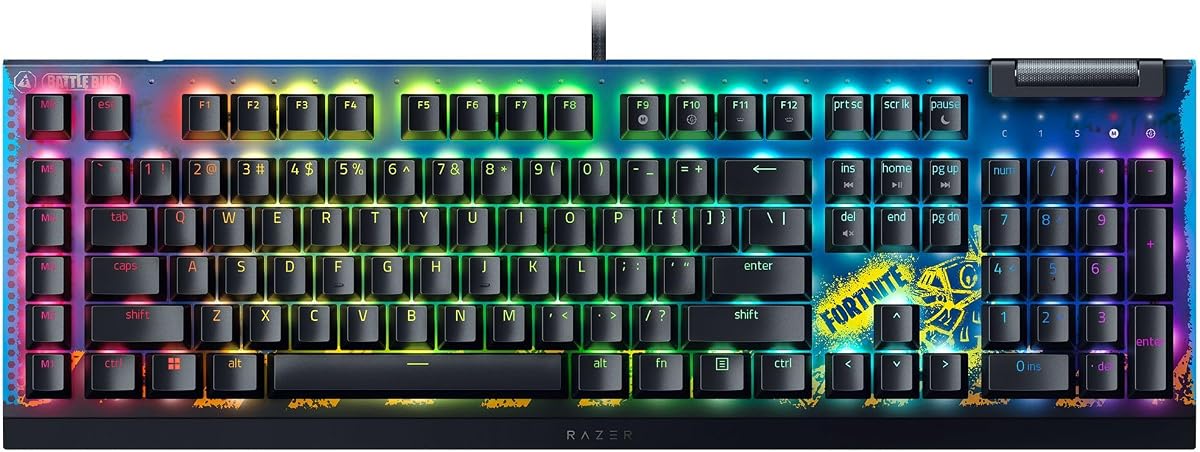
The Razer BlackWidow V4 X Fortnite Edition stands out as a top-tier choice for gamers seeking precision and speed. With a 4.5-star rating, it offers instant inputs via yellow mechanical linear switches that are quiet yet responsive.
We may earn a commission when you buy through this link, at no additional cost to you.
Its six dedicated macro keys allow you to program complex sequences like rapid builds or utility swaps. The multi-function roller and secondary media keys add convenience for controlling audio and brightness without leaving the game.
While the ABS keycaps may shine over time, the doubleshot process ensures labeling never wears off. This keyboard is a solid investment for players who value fast actuation and seamless integration with Razer Chroma ecosystems.
We recommend this model for serious Fortnite players who want a balance of performance and customization. Its rapid-fire capabilities and macro support make it ideal for competitive matches requiring split-second decisions.
Zero-distance actuation and reset points enable quick keystrokes for building and editing structures efficiently.
Program macros for potions, trap setups, or movement combos to reduce finger strain during intense sessions.
We may earn a commission when you buy through this link, at no additional cost to you.
The SteelSeries Apex 3 earns a high 4.6-star rating for its quiet operation and durable build. It is ideal for players in shared spaces who need stealthy but reliable performance during late-night Fortnite sessions.
We may earn a commission when you buy through this link, at no additional cost to you.
Whisper quiet switches ensure nearly silent use, while the IP32 water resistant coating prevents damage from spills. The magnetic wrist rest provides full palm support to reduce fatigue during long matches.
Though it uses membrane switches, the 10-zone RGB illumination still offers gorgeous color schemes and reactive effects. Dedicated multimedia controls allow you to adjust volume on the fly without disrupting your gameplay.
This keyboard is a great pick for casual gamers or streamers who prioritize quiet and comfort. Its compatibility with multiple consoles and PCs makes it a versatile addition to any gaming setup.
Whisper quiet switches allow you to game without disturbing others nearby, perfect for apartments or dorms.
IP32 water resistant coating protects against accidental spills, extending the keyboard lifespan in chaotic gaming environments.
We may earn a commission when you buy through this link, at no additional cost to you.
The Redragon S101-3 PRO offers unbeatable value as a complete combo set with a 4.5-star rating. It includes a full-size RGB backlit keyboard and a precision gaming mouse suitable for students and budget-conscious gamers.
We may earn a commission when you buy through this link, at no additional cost to you.
Six vibrant backlight modes and 10 mouse lighting effects let you customize your setup. The intuitive software enables recording complex command sequences using five dedicated macro keys for a competitive edge.
Soft-touch membrane keys provide quiet, comfortable feedback ideal for marathon sessions. Anti-ghosting ensures every key press registers instantly even during intense action sequences in Fortnite.
We recommend this set for first-time gamers or those seeking an affordable upgrade. Its plug-and-play simplicity and durable build make it a reliable choice for everyday use.
Get both keyboard and mouse in one package, saving money while getting responsive peripherals ready for action.
Program macro commands through software to automate complex in-game actions for smoother gameplay.
We may earn a commission when you buy through this link, at no additional cost to you.
The GEODMAER 65% Gaming Keyboard saves desktop space without sacrificing functionality. With a 4.3-star rating, it features separate arrow keys and a compact size perfect for gamers with limited desk area.
We may earn a commission when you buy through this link, at no additional cost to you.
Wired connection via detachable Type-C cable ensures stable, low-latency input. The 26-key no-conflict anti-ghosting system registers simultaneous key presses accurately for smooth gaming performance.
LED backlit modes include always bright and breathing effects adjustable via FN keys. The ergonomic keycap height protects your wrist during long typing or gaming sessions.
This model is ideal for gamers on the go or those who prefer minimalist setups. Its compact design and durable build make it a practical choice for both gaming and office tasks.
The 65% layout removes the numpad to free up room for wider mouse movements essential in FPS games.
Detachable Type-C cable provides a reliable connection with ultra-low latency for competitive gaming.
We may earn a commission when you buy through this link, at no additional cost to you.
The Aula WIN60 HE delivers competitive precision with Hall effect magnetic switches and an 8000Hz polling rate. Rated 4.5 stars, this keyboard is optimized for FPS titles requiring fast peeking and quick-stop shooting.
We may earn a commission when you buy through this link, at no additional cost to you.
Rapid trigger mode with 0.02mm RT step distance ensures lightning-fast responses for complex combos. The web-based driver lets you remap keys and customize RGB without bulky software downloads.
Compact 60% design saves desk space while retaining essential functionality. Dynamic RGB lighting with 16.8 million colors enhances your gaming atmosphere significantly.
We recommend this keyboard for competitive players chasing performance advantages. Its magnetic technology offers unmatched precision and reliability for high-stakes matches.
Magnetic switches eliminate physical contact wear, delivering consistent actuation and ultra-fast response times.
Effortless customization via web driver allows key remapping and macro creation across devices.
We may earn a commission when you buy through this link, at no additional cost to you.
The AULA F75 Pro offers tri-mode connectivity and hot-swap customization for a 4.6-star experience. It supports Bluetooth, 2.4GHz wireless, and USB wired connections for up to five devices.
We may earn a commission when you buy through this link, at no additional cost to you.
Pre-lubricated stabilizers and LEOBOG reaper switches provide smooth typing and pleasant mechanical sound. Side-engraved PBT keycaps are durable and prevent fading over time.
A multi-function control knob adjusts brightness or volume with ease. The 75% layout saves desktop space while retaining arrow keys essential for gaming.
This keyboard suits users wanting wireless freedom without sacrificing tactile feedback. Its large battery and customizable features make it versatile for work and gaming.
Support multiple devices with tri-mode connectivity to switch between console, PC, and mobile seamlessly.
Swap switches without soldering to customize typing feel and sound to your personal preference.
We may earn a commission when you buy through this link, at no additional cost to you.
The AULA WIN68 HE offers an industry-leading 8000Hz polling rate and ultra-low latency. With a 4.5-star rating, this keyboard is designed for professional gamers seeking precise actuation points.
We may earn a commission when you buy through this link, at no additional cost to you.
Adjustable actuation ranges from 0.02mm to 3.44mm to match keystroke habits. The web driver enables customization of functions and RGB lighting without extra downloads.
Compact 60% design saves up to 40% desktop space while keeping arrow keys. Detachable USB cable ensures stable connection and easy transport for business trips.
We suggest this model for gamers who want fast response and customization. Its magnetic switches and compact build make it ideal for competitive environments.
Personalize actuation points to match your typing habits and gaming style for better control.
Lightweight and portable design fits easily in bags for travel to tournaments or LAN events.
We may earn a commission when you buy through this link, at no additional cost to you.
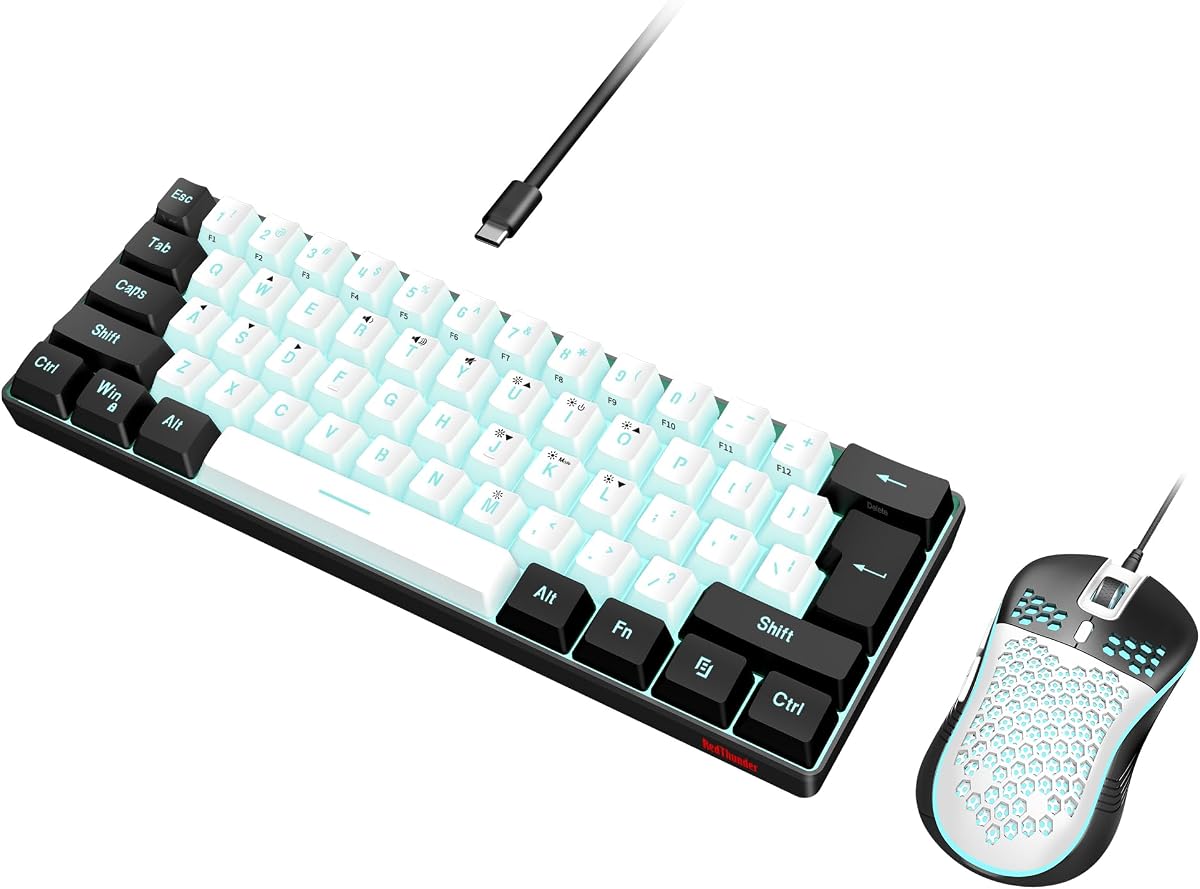
The RedThunder 60% Combo provides a neat desktop setup with an ultra-compact 61-key keyboard. Rated 4.3 stars, it includes a lightweight honeycomb mouse with 7200 DPI for precision aiming.
We may earn a commission when you buy through this link, at no additional cost to you.
All-core water-resistant design prevents liquid damage. Triple protection guarantees stable data transmission and durable performance against daily wear.
RGB backlit modes offer breathing and permanent lighting adjustable via keys. The symmetrical mouse shell accommodates both left and right-hand users comfortably.
This set is perfect for minimalists who value space efficiency. Its durable build and high-performance mouse make it suitable for gaming and office work alike.
Triple protection design guards against spills ensuring longevity in gaming environments prone to accidents.
7200 DPI optical sensor provides accurate tracking for fast-paced gaming and detailed cursor movement.
We may earn a commission when you buy through this link, at no additional cost to you.
The Logitech G PRO Mechanical TKL is built for esports athletes needing speed and precision. With a 4.6-star rating, it features GX blue click switches delivering solid tactile feedback for every keypress.
We may earn a commission when you buy through this link, at no additional cost to you.
Compact tenkeyless design frees up table space for mouse movement. LIGHTSYNC RGB highlights keys and allows static patterns via onboard memory for tournament systems.
Detachable micro USB cables feature a three-pronged design for secure transport. Rubber feet provide stability during intense gaming while angle adjustment enhances comfort.
We recommend this keyboard for competitive gamers traveling to tournaments. Its durability and precise feedback are ideal for players who demand professional-grade reliability.
Designed for competition-level performance with durable switches and compact layout for better mouse control.
Detachable cable with three-pronged design ensures safe and secure transport to LAN events.
We may earn a commission when you buy through this link, at no additional cost to you.
The ATTACK SHARK X68 HE RT features magnetic switches with a true 8000Hz polling rate. Rated 4.6 stars, this keyboard allows binding multiple functions to one key based on pressing degrees.
We may earn a commission when you buy through this link, at no additional cost to you.
Web driver enables remapping and macro setting without installation. Top-mount structure with PORON layers ensures quiet, stable keystrokes and HIFI typing sound.
Solid pure color PBT keycaps with south-facing LEDs enhance durability and shine-through. Detachable unique streamer aids efficient work and gaming workflows.
This keyboard suits gamers seeking precision and control. Its rapid trigger and customizable functions offer advantages for FPS and rhythm games.
Hall effect magnetic switches allow adjustable actuation points and rapid trigger for faster response.
Top-mounted structure with PORON layers delivers stable and quiet typing with enhanced durability.
We may earn a commission when you buy through this link, at no additional cost to you.
Choosing the right keyboard depends on your play style, budget, and preferred features.
Mechanical switches offer faster actuation and durability compared to membrane switches. Linear switches like red or yellow are preferred for gaming due to smooth travel without tactile bump.
Choose mechanical switches for faster response and longer lifespan in competitive gaming.
Compact layouts like 60% or TKL save desk space for mouse movements. Full-size keyboards provide number pads but may hinder quick mouse swipes.
Select a compact layout if you prioritize mouse movement range during gameplay.
Higher polling rates like 1000Hz or more reduce input lag. For competitive play, keyboards with 8000Hz offer faster response times.
Opt for higher polling rates to minimize delay between keystrokes and actions.
Anti-ghosting ensures all simultaneous key presses register. This is essential when building or editing quickly while moving in-game.
Always verify anti-ghosting support to avoid missed inputs during intense moments.
RGB lighting and macro keys enhance personalization and functionality. Software allows remapping and creating macros for complex commands.
Look for customizable options to tailor keyboard behavior to your preferences.
Wired connections provide stable low-latency input. Wireless options offer convenience but may introduce latency depending on technology used.
Prefer wired connections for competitive gaming to ensure consistent performance.
Ergonomic features like wrist rests and adjustable angles reduce fatigue. Long gaming sessions require comfort to maintain performance over time.
Prioritize ergonomic features to minimize wrist strain during extended play.
Keycap materials like PBT resist shine and wear. Water resistance protects against spills and accidental damage.
Choose durable materials and protections to ensure longevity and reliability.
Keep your keyboard clean by regularly wiping keycaps with a soft cloth. Use compressed air to remove dust and debris from switch areas to maintain responsiveness.
Adjust software settings to map keys and macros to your playstyle. Enable anti-ghosting and high polling rates for optimal performance during matches.
Store the keyboard in a protective case if transporting. Avoid exposing it to extreme temperatures or moisture to prolong its lifespan.
Linear mechanical switches are generally best because they offer smooth actuation without tactile bumps. This allows for rapid keystrokes essential for building and editing quickly in Fortnite.
Mechanical keyboards provide faster response and durability. While membrane options work, mechanical switches offer better performance for competitive play requiring quick reactions.
Compact layouts like TKL or 60% free up desk space for larger mouse movements. This can improve aim and comfort during fast-paced matches.
RGB lighting enhances aesthetics but doesn't impact performance. Customizable lighting can help identify keys quickly but is optional for gameplay efficiency.
Wireless keyboards work but may introduce slight latency. Wired options are preferred for competitive play to ensure minimal delay between actions and inputs.
Use compressed air to blow out debris and a soft cloth for keycaps. Avoid using liquids directly on the keyboard to prevent damage to internal components.
Anti-ghosting ensures all keys pressed simultaneously register correctly. This feature prevents missed inputs when executing complex moves or building rapidly in-game.
Macro keys allow binding complex commands to single keystrokes. They can help streamline inventory management or building sequences for faster gameplay.
These ten keyboards offer varied features for every gamer from budget-friendly to premium models. Each provides speed and reliability needed to excel in Fortnite.
Prioritize switch type and layout based on your preferences for speed and comfort. A good keyboard enhances your performance significantly during competitive matches.
Check current availability and features before buying. Select the keyboard that fits your budget and playstyle best to improve your gaming experience.