
SANSUI 24 Inch Curved 160Hz Gaming Monitor
4.4Editor score
160Hz Refresh Rate
1500R Curved Screen
110% sRGB Color
Finding the perfect curved 160Hz gaming monitor can transform your gaming experience by offering smoother motion and deeper immersion. These displays blend high refresh rates with curved screens to reduce eye strain and keep you focused on the action. Whether you play competitive shooters or immersive stories, a quality monitor matters for performance and comfort.
We analyzed ten top models based on panel quality, response time, connectivity, and ergonomic features to create this comprehensive list. Each product was evaluated for its ability to deliver crisp visuals and fluid gameplay without excessive input lag. Our goal is to help you find the right balance between performance and price for your setup.
Each pick in this guide highlights specific strengths like color accuracy, HDR support, or ultra-wide views to match different needs. You will see detailed reviews, pros and cons, and key specs to make an informed decision easily. Keep in mind that availability and deals change often so verify details before you buy.
4.4Editor score
4.5Editor score

4.6Editor score
As an Amazon Associate we earn from qualifying purchases.
This comparison table lists all ten models side by side with key specs to help you choose quickly based on your needs.






The SANSUI 24 Inch Curved 160Hz Gaming Monitor offers a compelling entry point for gamers seeking speed and immersion without breaking the bank. It carries a solid rating of 4.4 stars from users who appreciate its smooth performance and sharp visuals. The monitor is designed to deliver responsive gameplay with minimal motion blur in fast-paced titles.
We may earn a commission when you buy through this link, at no additional cost to you.
Its standout quality is the combination of a 160Hz refresh rate and a 1ms MPRT response time which ensures fluid motion during competitive gaming. The 1500R curved screen wraps around your view to enhance focus and reduce distractions from the environment. With 110% sRGB color gamut coverage you get vibrant images that make games look rich and lively.
While it lacks built-in speakers which means you will need external audio for sound the trade-off helps keep the price low and the design sleek. The tilt adjustment is limited but adequate for most desk setups and the VESA mount option allows for flexible mounting solutions. For budget-conscious buyers this model delivers excellent value per dollar.
You should buy this monitor if you want a reliable 24-inch display that handles high refresh rates well without premium costs. It suits casual gamers and entry-level esports players who prioritize smooth visuals over advanced ergonomic features. Overall it is a strong choice for those stepping up to higher refresh rates on a budget.
A 160Hz refresh rate makes animations smoother and reduces screen tearing which helps you react faster in games.
The 1500R curve brings the edges of the screen closer to your eyes creating a more natural viewing field.
We may earn a commission when you buy through this link, at no additional cost to you.
The SANSUI 27 Inch Curved 160Hz Gaming Monitor expands your visual field with a larger screen while maintaining fast response times. It holds a rating of 4.4 stars reflecting user satisfaction with its gaming features and display quality. This model is tailored for those who want more screen real estate without moving to ultrawide or 4K resolutions.
We may earn a commission when you buy through this link, at no additional cost to you.
Its key strengths include gamer-centric tools like black level adjustment and a crosshair overlay which aid precision in shooters. The 160Hz refresh rate and 1ms response time ensure that action scenes remain clear and fluid even during intense moments. The 1500R curve helps reduce eyestrain during long sessions by aligning the screen with your natural field of view.
A trade-off is the FHD resolution on a 27-inch panel which may appear less sharp than higher resolutions at close range. The stand offers tilt but lacks height adjustment so you may need a VESA mount to optimize ergonomics for your desk height. Despite these limits the included features make it a versatile option for mixed use.
Buy this monitor if you want a bigger screen for media and games and value practical tools like crosshairs and timers. It fits well in setups where screen size matters more than pixel density or premium ergonomic stands. It is a solid mid-size choice for everyday gaming and work tasks.
Features like game timers and FPS modes help tailor the display to specific genres for better visual performance.
Low blue light and anti-flicker tech reduce eye fatigue when you game or work for hours at a time.
We may earn a commission when you buy through this link, at no additional cost to you.
The SANSUI 24 Inch Curved Gaming Monitor up to 160Hz is designed for both business and gaming use with strong color performance. It earned a rating of 4.5 stars which highlights its reliability and quality in user feedback. This model stands out for its color accuracy and wide viewing angles that help in collaborative work environments.
We may earn a commission when you buy through this link, at no additional cost to you.
Its primary strengths lie in the DCI-P3 97% coverage and 110% sRGB which deliver rich colors for media and creative tasks. The 160Hz refresh rate paired with 1ms response time ensures smooth visuals for gaming while flicker-free tech reduces strain during document work. A Kensington lock provides security for public or shared spaces where theft is a concern.
You may notice it lacks HDMI 2.1 which limits next-gen console support and the stand offers only tilt without height adjustment. These factors mean it is less ideal for console gamers or those who need precise ergonomic positioning at a desk. Still the color performance and security features add value for mixed professional and entertainment setups.
Choose this monitor if you need accurate colors and a secure option that handles both work and play reliably. It is suitable for creative professionals who game casually and want a safe display for office environments. Its balance of color and speed makes it a versatile dual-purpose display.
DCI-P3 97% coverage ensures vibrant and true-to-life colors for photos and videos and modern games.
The Kensington lock slot helps protect the display in shared spaces by allowing cable locking to desks.
We may earn a commission when you buy through this link, at no additional cost to you.
The CRUA 32 4K UHD 160Hz Curved Gaming Monitor delivers breathtaking clarity with a 4K resolution on a large 32-inch panel. It holds a rating of 4.3 stars indicating solid performance and user approval for its visual fidelity. This monitor aims to combine high-resolution visuals with high refresh rates for immersive gaming and media consumption.
We may earn a commission when you buy through this link, at no additional cost to you.
Its most notable features are the 4K UHD resolution and 120% sRGB color accuracy which provide sharp and vibrant images. The 160Hz refresh rate and AMD FreeSync support reduce tearing and stuttering for smoother gameplay in supported titles. Built-in speakers add convenience by reducing cable clutter while maintaining decent audio for casual media use.
A potential downside is the higher price compared to smaller FHD options which may not fit tight budgets. The stand allows tilt but lacks height adjustment so ergonomics depend on your desk height and monitor arm needs. These factors mean it is best for users who prioritize screen size and resolution over advanced stand flexibility.
You should buy this if you want a large high-resolution screen for games and videos without needing an ultrawide layout. It suits home theater setups and creative work where detail matters more than competitive edge adjustments. It offers a premium visual experience at a competitive price for its class.
A 4K resolution provides sharp text and detailed textures that make games and videos look incredibly crisp.
Built-in speakers simplify your desk setup by removing the need for external speakers for basic audio tasks.
We may earn a commission when you buy through this link, at no additional cost to you.
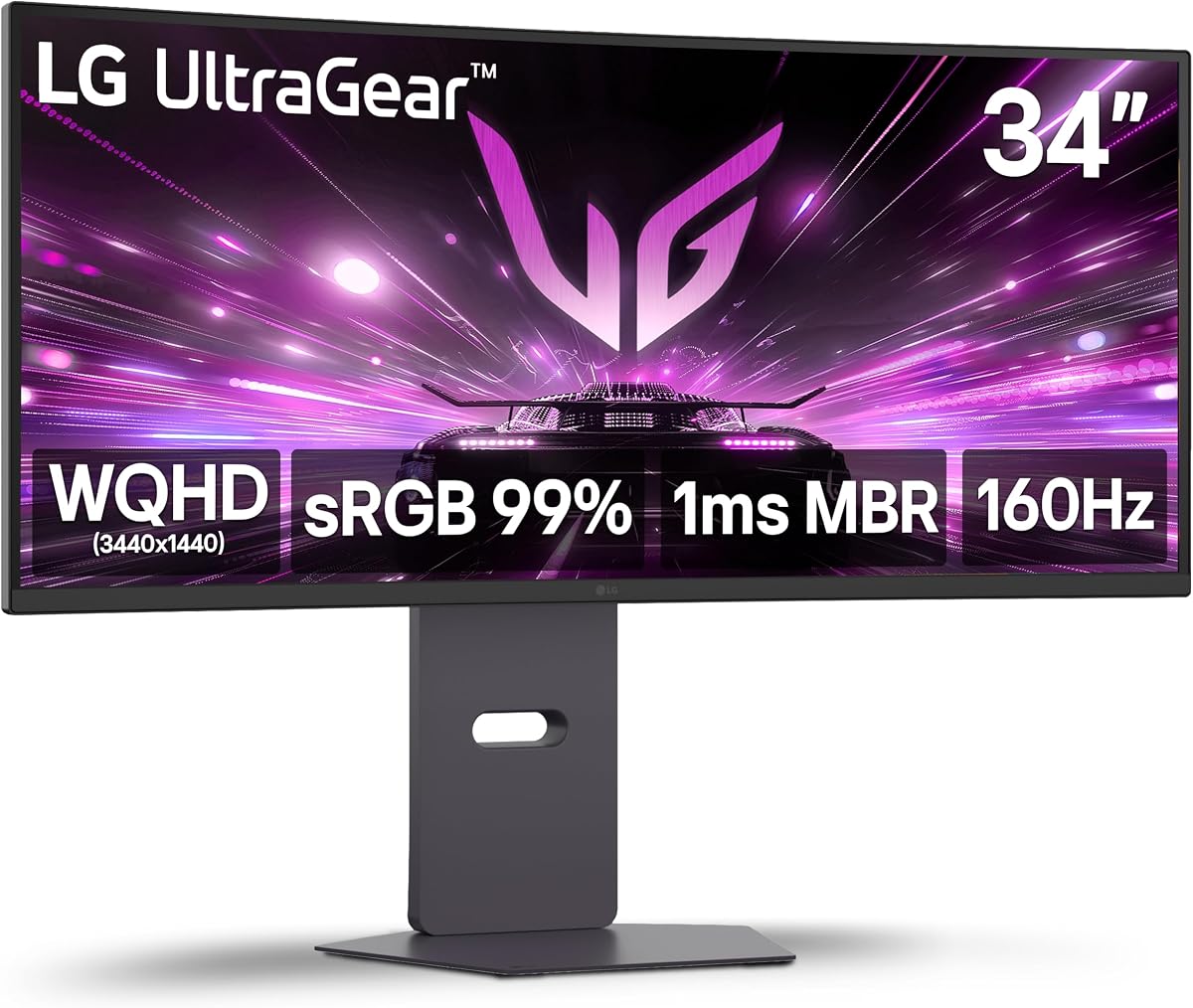
The LG 34G600A-B 34-inch Ultragear offers a premium ultrawide experience with 160Hz speed and robust features for gamers and creators. It has a rating of 4.5 stars showing high satisfaction with its performance and build quality. This monitor stands out for blending immersion with practical ergonomics and advanced connectivity options.
We may earn a commission when you buy through this link, at no additional cost to you.
Its standout qualities include a 34-inch WQHD curved display with 1800R curvature that expands your field of view significantly. The 160Hz refresh rate and 1ms Motion Blur Reduction keep fast-paced games smooth and clear while AMD FreeSync Premium handles tearing. The stand provides tilt height and swivel adjustments which help you find a comfortable viewing position easily.
You may find the price higher than budget models which reflects the premium features and panel quality it offers. The curvature while immersive may take some getting used to for productivity tasks that favor flat screens. Still the overall balance of image quality speed and ergonomics makes it a top choice for many.
Buy this monitor if you want an all-around high-performance display for gaming streaming and work with room to grow. It suits users who value smooth motion accurate colors and a stand that adapts to your desk setup. It is a strong investment for those seeking a versatile premium experience.
The ultrawide 21:9 ratio gives you more horizontal space for games multitasking and media viewing.
1ms MBR technology sharpens fast action and reduces ghosting so moving objects stay distinct and clear.
We may earn a commission when you buy through this link, at no additional cost to you.
The LG 34G600A-B Renewed brings the same powerful features as the new model at a reduced price for budget-conscious buyers. It holds a 5.0 star rating which reflects strong satisfaction with its condition and performance after refurbishment. This option is ideal for those who want premium specs without paying full retail price for a new unit.
We may earn a commission when you buy through this link, at no additional cost to you.
Its main strengths are the identical panel and ergonomics as the new version including 34-inch WQHD and 160Hz refresh rate. You still get AMD FreeSync Premium HDR10 support and a fully adjustable stand for height and swivel. The certified renewal process ensures the display meets quality checks and includes warranty protection for peace of mind.
A trade-off is that it is not brand new which means there may be minor cosmetic signs or limited availability. You should check the specific condition details and return policy before purchasing to ensure it fits your needs. For many the savings outweigh the minor drawbacks of buying a renewed product.
Choose this if you want a proven premium monitor at a better value and trust the renewal process. It fits well for gamers and creators who need top-tier performance without the highest price tag. It is a smart pick for cost-efficient high-end setups.
Certified renewed monitors go through quality testing to ensure performance matches original specifications.
The stand supports height tilt and swivel so you can align the screen with your eyes for comfort.
We may earn a commission when you buy through this link, at no additional cost to you.
The Samsung 32 inch Odyssey G55C Series QHD 1000R Curved Gaming Monitor wraps around your view with a deep curve for intense immersion. It holds a rating of 4.4 stars indicating strong user approval for its visuals and comfort. This model is tailored for gamers who want to feel fully inside the action with a wide field of view.
We may earn a commission when you buy through this link, at no additional cost to you.
Its key strengths include the 1000R curve which matches the human eye's natural focus to reduce strain and boost presence. The 165Hz refresh rate and 1ms response time ensure smooth fast gameplay while QHD resolution delivers sharp details. Eye Saver Mode and low flicker tech help keep your eyes comfortable during extended gaming sessions.
You may find the deep curve takes time to get used to especially for text work or multitasking on flat desks. The stand offers tilt but lacks height adjustment so you may need a mount to optimize viewing ergonomics. These factors make it best suited for dedicated gaming setups over hybrid work environments.
Buy this if you crave immersive gaming and prioritize screen presence over flexible ergonomic adjustments. It suits console and PC gamers who play titles that benefit from a curved panoramic view. The deep curve adds a unique sense of realism that flat screens cannot match.
A 1000R curve brings screen edges closer to your eyes for a theater-like sense of presence.
Eye Saver Mode filters blue light and reduces flicker to minimize fatigue during long use.
We may earn a commission when you buy through this link, at no additional cost to you.
The Sceptre 34-inch Curved Ultrawide WQHD Monitor offers high refresh rates and wide views for immersive gaming experiences. It holds a rating of 4.2 stars reflecting solid performance and user approval for its speed and size. This model targets gamers who want ultrawide views without sacrificing refresh rate or budget.
We may earn a commission when you buy through this link, at no additional cost to you.
Its key strengths include a 180Hz refresh rate which delivers very smooth motion in supported titles alongside a 1ms response time. The 34-inch WQHD ultrawide panel gives you extra screen space for multitasking or panoramic gaming views. Built-in speakers simplify your desk setup while 99% sRGB coverage ensures rich and vibrant colors.
A trade-off is the basic stand which lacks advanced ergonomic adjustments like height or swivel so you may need a mount. Color calibration is decent but not as refined as premium models which may require tweaking for professional creative work. Still the performance features and price make it a compelling choice for budget ultrawides.
Buy this if you want a wide screen with high refresh rates for gaming and media without breaking the bank. It fits gamers and multitaskers who prioritize speed and screen width over premium ergonomics. It is a practical step into ultrawide displays with strong value.
The 21:9 ratio provides 30% more screen space for multiple windows or wide games.
Luminous back cover LEDs add style and ambiance to your desk without extra cables or bulbs.
We may earn a commission when you buy through this link, at no additional cost to you.
The Alienware 34 Curved Gaming Monitor AW3425DWM delivers premium performance with a polished design and advanced gaming features. It holds a rating of 4.6 stars which reflects strong user approval for its build quality and visual fidelity. This model is built for enthusiasts who want top-tier speed and a distinctive look.
We may earn a commission when you buy through this link, at no additional cost to you.
Its standout qualities include an 180Hz refresh rate and 1ms response time for ultra-smooth gameplay in competitive titles. The 1500R curve and VESA DisplayHDR 400 certification ensure vibrant colors and deep contrast for cinematic scenes. Hardware-based low blue light solutions help you game longer without eye strain while keeping colors accurate.
A trade-off is the higher price which reflects its premium build and advanced features compared to standard models. It may have fewer ports than other ultrawides which could limit flexibility for multi-device setups. Still the polish and reliability make it a top pick for those seeking a flagship experience.
Buy this if you want a flagship ultrawide with reliable performance and a design that stands out. It suits dedicated gamers and streamers who value build quality and color accuracy. It is a strong investment for those seeking a long-term premium monitor.
VESA DisplayHDR 400 provides richer blacks and brighter highlights for more dynamic game visuals.
Hardware low blue light tech reduces eye strain without altering color balance for natural viewing.
We may earn a commission when you buy through this link, at no additional cost to you.
The AOC 34 Inch Curved Gaming Monitor UWQHD 200Hz offers some of the fastest refresh rates available in an ultrawide panel. It has a rating of 4.5 stars indicating high satisfaction with its speed and responsiveness for gaming. This model is for players who demand the smoothest motion possible on a wide screen.
We may earn a commission when you buy through this link, at no additional cost to you.
Its primary strengths include a 200Hz refresh rate and 0.3ms MPRT response time which minimize blur in competitive games. The 34-inch WQHD curved display delivers sharp visuals with Adaptive-Sync support for tear-free gameplay. An ergonomic stand with height tilt and swivel adjustments helps you set the screen at a comfortable angle easily.
A trade-off is that HDR performance is ready but may not match premium panels in brightness or dynamic range. VA panels can show slight ghosting in very dark scenes which may matter to critical users. Still the raw speed and ergonomics make it a strong pick for competitive ultrawide gaming.
Buy this if you want top speed in an ultrawide and need a stand that adjusts to your desk height. It fits competitive gamers and streamers who need smooth motion and flexible placement. It is a performance-focused choice for those prioritizing refresh rates.
A 200Hz refresh rate gives a measurable edge in fast-paced games by reducing motion blur and lag.
Adaptive-Sync matches the monitor to your GPU to prevent tearing and ensure consistent frame delivery.
We may earn a commission when you buy through this link, at no additional cost to you.
This guide covers the most important factors to consider when selecting a curved 160Hz gaming monitor.
Refresh rate determines how many frames per second the display can show and higher values like 160Hz reduce motion blur.
Choose a model that supports your GPU capabilities to fully benefit from the increased smoothness.
Resolution affects image sharpness while size impacts immersion so balance these based on your desk space and GPU power.
For 24 to 27 inches FHD is often enough but larger screens may benefit from WQHD or 4K resolutions.
Curvature like 1500R or 1000R wraps the screen around you to enhance immersion and reduce eye strain.
Deeper curves work well for gaming but may be less ideal for tasks requiring flat viewing accuracy.
Response time measures how quickly pixels change color and lower values like 1ms reduce ghosting and blur.
Look for MPRT or GtG response times that match the refresh rate to ensure fluid motion.
Color coverage such as sRGB or DCI-P3 affects how accurate and vibrant images appear on the screen.
High coverage like 110% sRGB is beneficial for creative work and visually rich games.
Adaptive Sync technologies like FreeSync or G-Sync match the monitor to your GPU to prevent screen tearing.
Ensure your graphics card supports the same sync standard for tear-free gaming.
Ergonomic stands with height tilt and swivel help you position the screen for comfortable long sessions.
If the stand is limited consider a VESA mount to improve posture and reduce neck strain.
Ports like HDMI 2.0 or 2.1 and DisplayPort 1.4 determine supported refresh rates and resolutions.
Check that your chosen ports support the full refresh rate and resolution of your desired setup.
Start by setting the monitor to 160Hz in your operating system display settings to ensure it runs at the intended refresh rate.
Use the OSD menu to select game modes like FPS or RTS for optimized brightness and contrast for specific genres.
Clean the screen with a microfiber cloth to avoid scratches and keep dust off the panel and stand regularly.
Yes for gamers who play fast-paced titles it offers smoother motion and better responsiveness. The curve adds immersion and reduces eye strain during long sessions.
1500R is a common sweet spot for immersion and comfort. Deeper curves like 1000R offer more presence but may affect productivity tasks.
You need a GPU that can render frames near 160Hz to fully benefit. Lower specs may still use the monitor but at lower refresh rates.
Yes many models have modes and eye comfort features suitable for text and creative work. Ultrawides help multitask with multiple windows.
Use DisplayPort 1.4 or HDMI 2.0 or higher to support 160Hz at common resolutions. Check your GPU and monitor specs for the best match.
Enable low blue light and anti-flicker modes in the monitor OSD. Adjust brightness to match room lighting and take regular breaks during use.
This guide highlighted ten models from budget picks to premium displays that deliver speed and immersion in curved panels.
Consider your main use case whether competitive gaming or creative work to decide on resolution ergonomics and refresh rate priorities.
Prices and availability can change so check current deals and specs before buying to ensure the best value for your setup.