
Coral M.2 Accelerator B+M Key
5.0Editor score
4 TOPS ML Inferencing
Debian Linux Compatible
Low Power Consumption
This guide compares the top M2 accelerator cards for AI and storage. We review performance, compatibility, and value to help you choose the right hardware
M2 accelerator cards have become essential for modern computing tasks ranging from artificial intelligence to high-speed storage expansion. These compact modules fit into tight spaces while delivering significant performance boosts for edge computing and server environments. Choosing the right one depends on your specific workload requirements and system compatibility needs.
We evaluated ten top-rated models based on their processing power, energy efficiency, and software support. Our analysis covers dedicated AI accelerators as well as versatile storage expansion cards that support NVMe SSDs. Each product was assessed for its ability to handle demanding tasks without compromising system stability or thermal performance.
Each pick in this list highlights key strengths and potential limitations for different user scenarios. You will find detailed breakdowns of specifications, pros, cons, and real-world use cases for every model. Please note that pricing and availability change frequently so check current listings before making your final purchase decision.
5.0Editor score

4.3Editor score

4.6Editor score
The following comparison table provides a side-by-side overview of all ten products. We highlight key specifications and unique features to help you quickly identify the model that best fits your technical requirements and budget constraints.


The MX3 M.2 AI Accelerator stands out as the top choice for developers needing robust edge AI capabilities. With a 4.3 rating and exceptional performance in computer vision tasks, it delivers efficiency without consuming excessive power. Its M-key form factor ensures seamless integration into modern systems.
We may earn a commission when you buy through this link, at no additional cost to you.
Performance-wise the MX3 is engineered to handle the most demanding AI computer vision workloads. It integrates easily via M.2 M-key slots and supports Linux operating systems natively. The comprehensive Software Development Kit simplifies deployment making it accessible for professionals and enthusiasts alike.
While its Linux requirement might limit Windows users the trade-off is justified by the stability and efficiency gained. Power consumption is minimized without sacrificing speed which is crucial for battery powered or edge devices. Documentation remains accessible though you may need to visit the developer site directly.
Ideal for engineers building vision systems or deploying models on embedded hardware like Raspberry Pi 5. If you need high performance with low power usage the MX3 is the recommended pick. Its SDK support ensures long-term viability for your AI projects.
The MX3 minimizes power consumption while delivering high performance ideal for energy sensitive applications.
A comprehensive SDK simplifies development and deployment reducing time to market for AI solutions.
We may earn a commission when you buy through this link, at no additional cost to you.
This accelerator card features dual Google Edge TPU ML units providing significant parallel processing power. With a 4.1 rating it is a strong contender for machine learning inference tasks. The dual setup allows for higher throughput compared to single TPU modules.
We may earn a commission when you buy through this link, at no additional cost to you.
The total peak performance reaches 8 TOPS in int8 precision offering speed for complex models. It connects via a PCIe Gen2 x1 interface per TPU and uses the M.2 2230 E-key form factor. This design ensures compatibility with various embedded systems and small form factor PCs.
While the PCIe Gen2 interface may bottleneck maximum throughput the efficiency per watt remains impressive. At 2 TOPS per watt it offers a balanced performance to power ratio for continuous operation. The specific E-key requirement means checking your motherboard or carrier board first.
Recommended for projects requiring multiple vision models simultaneously such as security analytics or robotics. The dual TPU architecture makes it versatile for scaling your inference workloads. Ensure your system supports E-key slots before purchasing this specific module.
Dual Edge TPUs enable simultaneous model execution boosting overall inference speeds significantly.
Delivering 2 TOPS per watt ensures sustainable operation for always-on edge devices.
We may earn a commission when you buy through this link, at no additional cost to you.
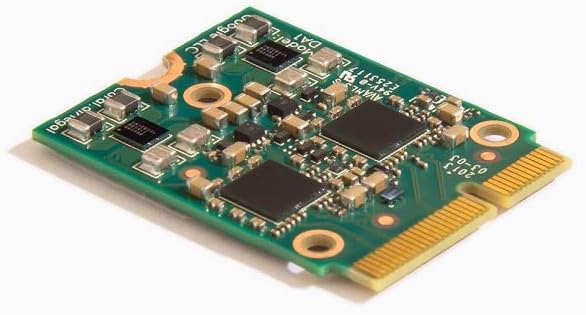
The Coral M.2 Accelerator boasts a perfect 5.0 rating making it a favorite among developers. It performs high-speed ML inferencing with an on-board Edge TPU coprocessor. Its ability to execute MobileNet v2 at 400 FPS demonstrates impressive efficiency in real-world tasks.
We may earn a commission when you buy through this link, at no additional cost to you.
Designed to work seamlessly with Debian-based Linux systems it integrates well with existing infrastructures. TensorFlow Lite models can be compiled directly for the Edge TPU avoiding the need for ground-up builds. AutoML Vision Edge support simplifies creating custom image classification models quickly.
While its compatibility is focused on Debian Linux the performance per watt is excellent at 2 TOPS per watt. Power consumption is minimal which suits battery powered or thermally constrained environments. The perfect rating suggests high reliability and customer satisfaction over time.
Ideal for hobbyists and businesses needing reliable object detection on a budget. Its support for standard ML frameworks like TensorFlow Lite makes it versatile for various applications. Choose this for robust performance without needing expensive hardware upgrades.
Capable of running MobileNet v2 at 400 FPS for rapid real-time inference.
Supports TensorFlow Lite and AutoML Vision Edge for easy model deployment.
We may earn a commission when you buy through this link, at no additional cost to you.
This expansion card transforms storage capabilities with two PCIe Gen3 NVMe SSD slots. It features a 4.4 rating and includes a 10GbE port for ultra-fast networking. It allows QNAP NAS systems to achieve faster data transfer and caching options.
We may earn a commission when you buy through this link, at no additional cost to you.
The Marvell AQtion Ethernet Controller enables high-speed connections up to 10 Gigabits per second. Compatible with QNAP QTS QuTS hero Windows and Linux OS it offers flexibility for diverse environments. It supports PCIe Gen 3 x8 ensuring bandwidth for demanding workloads.
While it requires a QNAP NAS the performance gains in storage and networking are substantial. The low profile bracket is pre-installed saving setup time for small chassis installations. This card is ideal for users needing enterprise-level storage speeds in compact form factors.
Recommended for network administrators requiring fast storage caching and high-speed connectivity. If you use a QNAP device this card significantly enhances system throughput. Ensure your NAS supports PCIe expansion before purchasing this component.
10GbE ports allow connecting to high speed networking devices seamlessly.
Works with QTS QuTS hero Windows and Linux for versatile integration.
We may earn a commission when you buy through this link, at no additional cost to you.
The Rocket 1604L supports four M.2 NVMe devices with PCIe 5.0 bandwidth. Each port has dedicated x4 lanes ensuring full performance for all connected drives. This design targets high-performance storage expansion in workstations and servers needing raw speed.
We may earn a commission when you buy through this link, at no additional cost to you.
With support for mainstream operating systems and both x86 Intel AMD and ARM platforms it offers broad compatibility. The PCIe 5.0 x16 interface provides unprecedented throughput for modern storage needs. It supports various M.2 form factors including 2242 2260 and 2280.
While specific benchmarks are not fully available the interface guarantees future-proof performance. The dedicated lanes prevent bottlenecks common in split lane designs. Ensure your motherboard supports PCIe 5.0 before installing to unlock its full potential.
Ideal for professionals needing massive storage pools with maximum speed. This card is perfect for video editing or data science workloads. It offers a scalable solution for growing storage requirements without compromising performance.
Dedicated x4 lanes per port ensure maximum speed for every connected drive.
Supports x86 and ARM platforms with native OS integration.
We may earn a commission when you buy through this link, at no additional cost to you.
This adapter transforms your system into a dual-TPU workstation for faster object detection. It allows you to run two Coral M.2 Accelerator Cards in a single PCIe slot. The design includes a heatsink to maintain thermal stability during heavy workloads.
We may earn a commission when you buy through this link, at no additional cost to you.
Engineered for today's AI demands it is perfect for TensorFlow Lite models and computer vision. It splits a PCIe Gen3 x4 into four Gen2 x1 lanes to feed both accelerators efficiently. This maximizes your hardware investment without buying a whole new system.
While it is limited to Coral TPUs the expansion capability is significant. The heatsink ensures reliable operation even under continuous inference loads. Space efficiency is a major plus for compact workstations needing multiple AI engines.
Recommended for developers scaling AI workloads across multiple models. It offers a cost-effective way to double your inference performance. Ensure your PCIe slot has sufficient power and bandwidth before installing this adapter.
Maximize existing hardware investment instead of buying a whole new system.
Heatsink included ensures thermal stability during continuous AI processing.
We may earn a commission when you buy through this link, at no additional cost to you.
The ASUS Hyper M.2 x16 Gen5 Card supports four NVMe M.2 devices with up to 512 Gbps. It adapts server-grade PCBs for smooth data transfers across platforms. An active fan and large heatsink prevent throttling during intense data operations.
We may earn a commission when you buy through this link, at no additional cost to you.
A 6-pin PCIe Power connector supports up to 14-watt output for latest NVMe drives. It supports RAID functions across different platforms to create a bootable RAID array. This makes it ideal for high-performance workstations needing redundancy and speed.
While it requires PCIe power and Gen5 motherboard support the reliability is strong. Active cooling ensures unthrottled transfer speeds which is crucial for sustained throughput. The wide support for drive sizes adds flexibility for mixed storage configurations.
Ideal for enterprise users needing robust storage arrays with high-speed capabilities. If you want RAID functionality combined with Gen5 speeds this is the top pick. Ensure adequate power supply before installing this high-performance card.
Large heatsink and active fan reduce SSD temperatures for unthrottled speeds.
Create bootable RAID arrays across different platforms for redundancy.
We may earn a commission when you buy through this link, at no additional cost to you.
The waveshare Hailo-8 module delivers 26 TOPS of processing power with low latency. It is compatible with Raspberry Pi 5 and supports Linux and Windows systems. Typical power consumption is just 2.5W making it efficient for edge AI deployments.
We may earn a commission when you buy through this link, at no additional cost to you.
This module enables simultaneous processing of multi-streams and multi-models for complex tasks. It supports popular frameworks like TensorFlow Lite ONNX Keras and Pytorch. Official Wiki resources make it accessible for developers needing quick integration into projects.
While the price point is higher the performance per watt is excellent for industrial use. Operating temperature ranges from -40°C to 85°C ensuring durability in harsh environments. This scalability makes it ideal for expanding edge AI workloads over time.
Recommended for advanced projects needing massive AI throughput in a compact module. Choose this for high-end computer vision or industrial inspection systems. Its cross-platform support simplifies development across diverse operating environments.
26 TOPS processing enables real-time low latency high-efficiency AI inferencing.
Supports Linux and Windows with wide temperature range for reliability.
We may earn a commission when you buy through this link, at no additional cost to you.
This accelerator integrates Edge TPU delivering 4 TOPS peak performance for ML tasks. It features a 4.2 rating and strong compatibility with M.2 A+E key interfaces. The design provides 2 TOPS per watt ideal for energy-efficient applications.
We may earn a commission when you buy through this link, at no additional cost to you.
Compatible with Debian Ubuntu and Windows 10 64-bit it offers broad system support. Operating temperature ranges from -20°C to +85°C suitable for harsh environments. This makes it a reliable choice for industrial embedded systems needing stability.
While its A+E key requirement limits some systems the reliability is high. Power efficiency suits embedded environments where heat dissipation is limited. Its industrial-grade build ensures consistent performance under stress over long periods.
Ideal for professionals deploying vision models in challenging industrial conditions. If you need a reliable Edge TPU module with wide OS support this is the choice. Ensure your system supports A+E keys before installation.
Provides 2 TOPS per watt ideal for embedded and energy-efficient applications.
Wide OS support including Linux and Windows for versatile deployment.
We may earn a commission when you buy through this link, at no additional cost to you.
This adapter maximizes AI inference performance for Coral M.2 Accelerator with Dual Edge TPU. It fits standard M.2 2280 B or M-key slots for PCIe protocol use. A stainless steel mounting screw ensures vibration-resistant PCB fixation for reliability.
We may earn a commission when you buy through this link, at no additional cost to you.
It features bidirectional Gen2 bandwidth with upstream and downstream capabilities. Explicitly incompatible with Raspberry Pi CM4 enclosures preventing common buyer errors. The design ensures maximum efficiency for dual TPU setups in limited space.
While it limits to PCIe protocol the specialization improves system stability. The mounting screw adds physical security crucial for mobile applications. Check your slot type carefully before purchasing to ensure compatibility.
Recommended for users needing specific physical adapter for their Coral TPU. It offers a reliable way to integrate these modules into PCIe slots. Ensure you check explicit incompatibility notes to avoid return hassles.
Includes stainless steel mounting screw for vibration-resistant PCB fixation.
Bidirectional Gen2 bandwidth ensures fast PCIe protocol only transfers.
We may earn a commission when you buy through this link, at no additional cost to you.
Selecting the right M2 accelerator card requires understanding your specific hardware needs and system constraints. We break down the key factors to consider before making your investment decision.
Processing power is measured in Tera Operations Per Second (TOPS). Higher TOPS values allow for faster inference of complex models. Look for accelerators that meet or exceed the demands of your intended AI workloads.
Choose a card with sufficient TOPS to handle your models efficiently without overheating.
Not all accelerators work on every OS. Some support Linux while others offer Windows support. Ensure your card matches your system environment to avoid driver or software conflicts.
Verify compatibility with your existing OS before purchasing to ensure seamless integration.
M2 slots vary by key type (A E B M) and size (2230 2242 2280). Confirm your motherboard or carrier board supports the required form factor. PCIe Gen2 vs Gen3 bandwidth also impacts overall speed.
Match the card's physical specifications to your available slot to ensure physical fit.
Edge devices often have strict power budgets. High-performance cards may require external power connectors. Lower wattage cards are ideal for battery-powered or passive-cooled environments.
Consider your system's power capacity and cooling capabilities when choosing a card.
Robust SDKs and documentation simplify development. Some cards support specific frameworks like TensorFlow Lite or ONNX natively. Check for active community support and regular updates to keep your projects viable.
Look for comprehensive SDKs that match your preferred development frameworks.
If your workload grows you may need multiple accelerators. Adapters allowing dual TPU setups offer better scalability. Ensure your system can handle the added bandwidth and thermal load.
Prioritize designs that allow for future expansion without replacing the entire system.
AI tasks generate significant heat during inference. Cards with active cooling or large heatsinks prevent throttling. Thermal solutions are critical for sustained performance in high-throughput scenarios.
Ensure the card includes adequate cooling solutions for your specific environment.
The initial price is not the only cost. Consider the need for adapters or extra slots. Reliable hardware may cost more upfront but offers better longevity and support.
Evaluate the complete cost including accessories and potential system upgrades.
Install the card in a compatible M2 or PCIe slot on your motherboard. Follow static safety guidelines to prevent damage to components.
Install required drivers and SDKs from the official developer website. Ensure your OS recognizes the device before running tests.
Monitor thermal performance during heavy workloads. Use monitoring tools to ensure the card stays within safe temperature limits.
An accelerator card focuses on processing data locally for tasks like AI inference whereas a standard SSD stores data. Accelerators use specialized hardware to speed up computation reducing reliance on the main CPU.
Yes most cards require specific drivers and SDKs provided by the manufacturer. These tools enable your operating system to communicate with the accelerator efficiently.
Most require specific M2 slots which many laptops lack. Check your device's hardware manual to confirm slot type and power availability before attempting installation.
With proper thermal management these cards typically last several years. Longevity depends on usage intensity and environmental conditions like dust or temperature.
Many open-source frameworks optimize better for Linux environments. However many vendors now provide support for Windows to broaden their user base.
Check your motherboard documentation or use a slot identification tool. Key types vary by physical notches and compatibility standards like PCIe or SATA.
The MX3 Coral and waveshare options lead the list due to their performance and reliability. Each offers distinct strengths for different needs from budget to enterprise usage.
Prioritize power efficiency and software support when making your selection. These factors often determine long-term project success more than raw speed alone.
Always verify current specifications and pricing before buying. Technology moves quickly so ensure your purchase aligns with your current system needs.