
Macally Compact Wireless Keyboard
4.4Editor score
2.4G wireless USB dongle
No number pad design
78-key compact layout
Compare the best compact editing keyboard options for creators. This guide reviews top models for portability features compatibility, and performance.
Finding the right compact editing keyboard can transform your workflow significantly. Whether you edit videos or design graphics, a streamlined layout saves desk space without sacrificing functionality. These devices offer specialized keys and ergonomics tailored for creative professionals on the move.
We compared ten top-rated models based on portability, connectivity, and customization features. Each product was evaluated for its ability to integrate seamlessly into diverse creative setups. Our analysis focuses on real-world usability for editors, designers, and content creators seeking efficiency.
Each pick highlights specific strengths like wireless range, battery life, and key customization. You will find detailed pros and cons to help match a model to your needs. Please note that prices fluctuate frequently, so check current listings before purchasing.
4.4Editor score

4.7Editor score

4.4Editor score
This side-by-side comparison outlines the core specifications and unique selling points of each selected model. Use this table to quickly identify which device aligns with your specific editing environment and connectivity requirements.



This keyboard stands out as the premier choice for serious video editors using DaVinci Resolve. It combines a compact form factor with dedicated playback controls and a built-in search dial. With a rating of 4.7, users praise its precision and workflow acceleration capabilities for professional grading.
We may earn a commission when you buy through this link, at no additional cost to you.
The standout feature is the specialized key layout that mirrors editing functions directly. You can trim, mark, and search timelines without touching the mouse. The included Studio activation card adds significant value, making it a complete solution for high-end post-production workflows.
However, its utility is heavily tied to the DaVinci ecosystem. If you primarily use Premiere Pro or Final Cut, this device offers limited value outside of general typing. The higher cost is justified for professionals but might be steep for casual hobbyists.
Buy this if you are a dedicated DaVinci Resolve user seeking maximum control. It transforms your editing suite by reducing mouse dependency. For anyone looking to streamline complex color grading or timeline editing tasks, this remains the industry standard hardware companion.
Keys map directly to common timeline tools for instant access without looking.
Switch between Bluetooth and USB-C connections to fit any editing station setup.
We may earn a commission when you buy through this link, at no additional cost to you.
The ProtoArc XK04 is ideal for travelers who need a physical keyboard on mobile devices. Its foldable design allows it to slip easily into a backpack. Rated 4.5 stars, it offers a reliable typing experience for tablets and phones where touch screens fall short.
We may earn a commission when you buy through this link, at no additional cost to you.
It features a slim layout optimized for smaller screens. The included PU leather cover protects the keys and adds a premium look. Connectivity is seamless with Bluetooth 5.1, allowing you to switch between up to three devices without manual re-pairing.
While excellent for portability, the key travel is shallow and keycaps are small. Users with larger fingers might find this fatiguing during long sessions. Additionally, the lack of backlighting limits usability in dimly lit environments like airplanes or cafes.
Choose this for mobile productivity on the go. It excels at quick emails or notes while traveling. If your workflow prioritizes saving space in your bag and typing on a tablet, this model delivers strong value without the bulk.
Ultra-compact foldable structure ensures it fits anywhere in your carry-on luggage.
Connect to three devices simultaneously and switch with dedicated keys easily.
We may earn a commission when you buy through this link, at no additional cost to you.
This Macally keyboard offers an incredibly affordable entry point for users needing a small wireless solution. It uses a standard USB dongle for reliable connection without Bluetooth pairing hassles. With a 4.4 rating, users appreciate its simplicity and ease of setup.
We may earn a commission when you buy through this link, at no additional cost to you.
The design focuses on saving desk space. It removes the number pad to bring the mouse closer, improving ergonomics for many. The plug-and-play nature means it works instantly with Windows and Chromebooks right out of the box.
Limitations include the single device connection limitation compared to Bluetooth multipoint keyboards. You cannot switch between a tablet and PC effortlessly. Also, the lack of backlighting restricts use in low-light conditions.
Buy this for basic home or office tasks where budget is a priority. It serves well as a spare keyboard for small desks. If you need something simple and cheap for typing on a desktop or laptop, this is a solid pick.
Plug in the USB dongle and start typing immediately without installing any software.
The slim design removes unnecessary keys to free up valuable desk surface area.
We may earn a commission when you buy through this link, at no additional cost to you.
The MX Keys Mini delivers a high-end typing experience in a sleek form factor. Its smart illumination lights up when your hands approach, adapting to ambient light automatically. Rated 4.4, it is praised for its ergonomic key shape and fluid connectivity options.
We may earn a commission when you buy through this link, at no additional cost to you.
This keyboard excels at switching between three devices via Bluetooth Low Energy. The rechargeable battery lasts months, reducing waste from disposable cells. Keycaps are optimized for finger comfort, making long editing sessions less fatiguing than flat membranes.
The price point is higher than basic models, reflecting its premium features. Users needing a number pad must look elsewhere. Despite this, the overall build quality and integration with other MX devices make it a worthy investment for professionals.
Choose this for a balanced blend of style and performance. It fits well in modern setups and supports Mac or Windows seamlessly. If you value typing comfort and smart features, this model provides a top-tier experience without the bulk.
Adjustable backlight senses hand proximity and lights up only when you need it.
Pair with MX Master mice to seamlessly switch between computers while typing.
We may earn a commission when you buy through this link, at no additional cost to you.
This device acts as a specialized remote control rather than a full keyboard. It features a dial for zooming or adjusting brush size alongside shortcut keys. Rated 4.3, artists and editors value its ability to streamline repetitive commands in creative software.
We may earn a commission when you buy through this link, at no additional cost to you.
You can program up to forty shortcuts across four sets using the included driver. The dial provides precise tactile feedback, ideal for navigating large canvases or timelines. Its compact size allows it to sit on the edge of your desk.
However, full functionality requires downloading specific software, which can be tedious initially. If you skip the setup, it functions only as a basic controller. Also, iOS users need a separate app to configure settings effectively.
Buy this if you need dedicated macro control for design or video work. It reduces mouse dependency for frequent actions like zooming or brush adjustments. For artists looking to speed up their creative process, this tool is highly effective.
Rotate to scroll timelines or adjust opacity with clear click feedback per step.
Press multiple keys simultaneously without lag, ensuring smooth complex command entry.
We may earn a commission when you buy through this link, at no additional cost to you.
Microsoft designed this keyboard to save space while maintaining a high-end look. The matte finish and clean lines complement any modern workspace. Rated 4.3, users note its comfort and quick switching capabilities between Windows and Mac devices.
We may earn a commission when you buy through this link, at no additional cost to you.
An expressive input key offers quick access to emojis and symbols, enhancing communication. The layout is optimized for close mouse usage, reducing strain during long typing sessions. Bluetooth connectivity ensures a tidy desk without visible cables.
While aesthetically pleasing, it relies on standard AAA batteries which may need replacement. The color palette is limited compared to competitors. Despite this, the build quality and integration with Microsoft apps make it a strong choice for office environments.
Choose this for a stylish, reliable Bluetooth option. It fits well in shared workspaces or home offices. If you prioritize design and seamless connectivity over advanced customization, this model delivers consistent performance and comfort.
Access emojis and symbols with one key press to speed up messaging tasks.
Optimized spacing and travel ensure fast input with minimal finger movement.
We may earn a commission when you buy through this link, at no additional cost to you.
This model brings eco-conscious design to portable computing with recycled plastic parts. Its slim profile makes it easy to slip into a laptop bag. Rated 4.3, users appreciate the quiet keys and long battery life that supports worry-free usage.
We may earn a commission when you buy through this link, at no additional cost to you.
Easy-Switch buttons let you jump between three devices instantly. The keyboard supports Windows, macOS, and Android, making it versatile for mixed ecosystems. Scooped keys provide a comfortable laptop-like typing feel without the bulk.
The rounded keys might feel different from flat surfaces, requiring slight adjustment. Lack of backlighting limits use in dark rooms. Despite this, the balance of sustainability, design, and performance makes it a strong contender for daily use.
Buy this for everyday tasks on a go. It suits students and professionals valuing sustainability. If you need a reliable, quiet keyboard that fits anywhere, this model offers excellent value and consistent performance.
Constructed with certified post-consumer recycled plastic to reduce environmental impact.
Seamlessly switch between Windows Mac and Chrome OS devices with one click.
We may earn a commission when you buy through this link, at no additional cost to you.
The K250 provides a rare mix of compact design and a full number pad. This makes it perfect for accounting or data entry tasks. Rated 4.2, users highlight its durability and spill resistance as key selling points for daily office use.
We may earn a commission when you buy through this link, at no additional cost to you.
It connects via Bluetooth without needing a dongle, saving USB ports. The battery lasts up to a year, reducing maintenance. Deep-profile keys offer a comfortable typing experience compared to flatter modern membranes.
Customization is limited compared to newer models. The lack of backlighting restricts usage in dark settings. While not as sleek as premium options, its utility and robust build make it a practical workhorse.
Choose this for functional work environments needing a numpad. It suits accountants or office workers prioritizing utility over style. If you need a reliable wireless option for data entry without sacrificing desk space, this is a solid choice.
Built with a sealed design to protect internal components from accidental liquid spills.
Enjoy up to twelve months of power on standard batteries without frequent changes.
We may earn a commission when you buy through this link, at no additional cost to you.
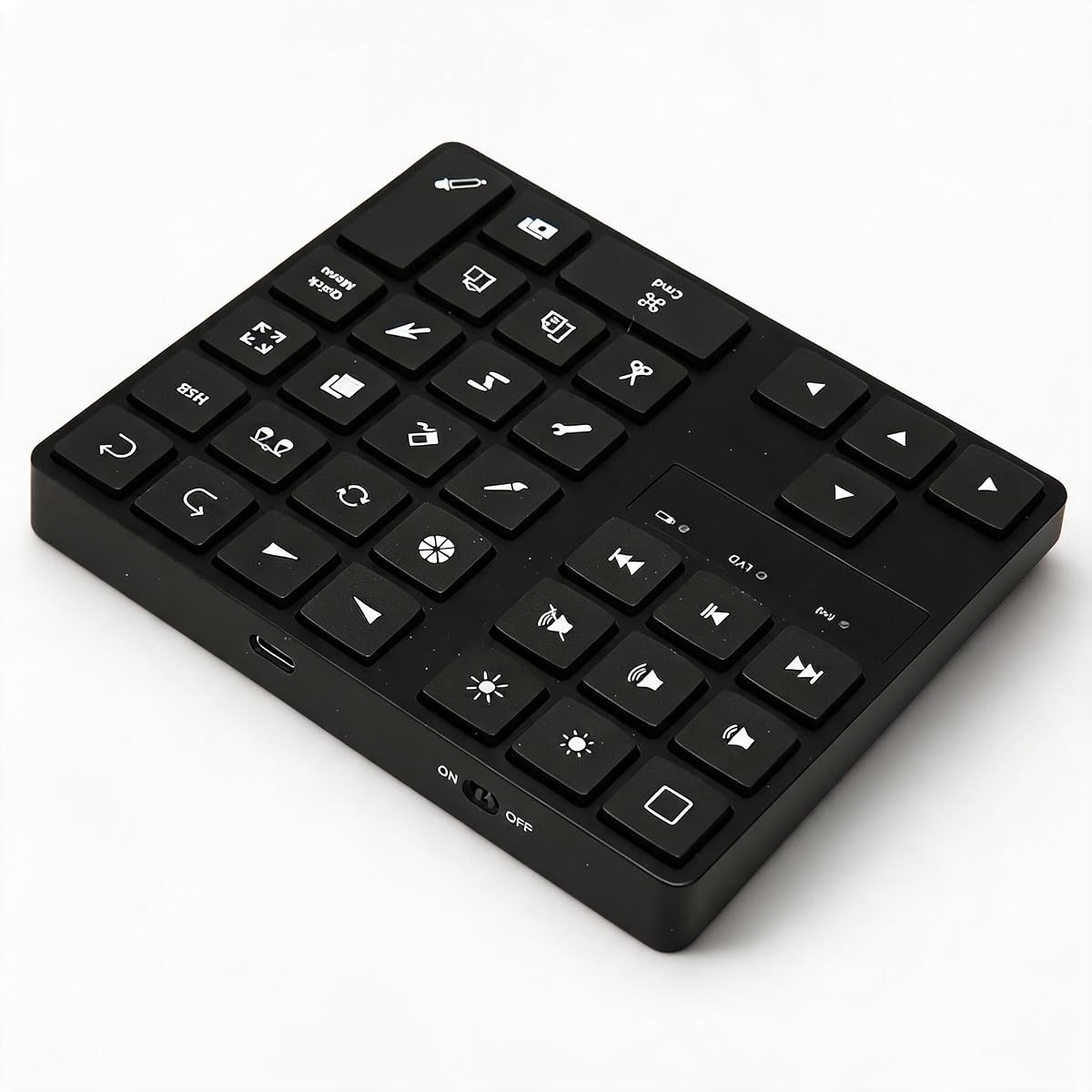
This ergonomic device allows creative work using one hand to free up the other. It features thirty-five shortcuts that can be programmed for specific drawing or editing functions. Rated 4.0, it is favored for relieving wrist strain during long sessions.
We may earn a commission when you buy through this link, at no additional cost to you.
The wired connection ensures zero latency, critical for precise digital work. You can assign macros to open files or trigger tools instantly. Its small size leaves room on the desk for a mouse or stylus.
However, being one-handed means you must retrain typing habits for text input. The wired USB limit restricts mobility. It is designed as a supplement to a main keyboard rather than a replacement.
Buy this if you suffer from wrist fatigue during design. It pairs well with a full keyboard for comfort. If you need specific shortcuts for creative work, this tool adds significant workflow value and ergonomic relief.
Sculpted key well promotes neutral wrist posture to prevent repetitive strain.
Wired connection guarantees instant response for precise timing in creative apps.
We may earn a commission when you buy through this link, at no additional cost to you.
This model offers a simple reliable solution for fixed workspaces. It uses a compact TKL layout without a numpad to save desk space. Rated 4.3, users praise its whisper-quiet switches which are ideal for quiet environments.
We may earn a commission when you buy through this link, at no additional cost to you.
The scissor technology ensures precise key presses without excessive noise. High contrast lettering remains legible even after years of use. The metal plate adds stability preventing the keyboard from sliding on the desk.
Being wired means it lacks the mobility of wireless options. It is not suitable for traveling or multi-device switching. However, for a dedicated workstation, this reliability ensures you never face battery drain issues.
Choose this for a stable noise-free office setup. It works well in shared rooms or libraries. If you prefer a wired connection for consistent performance without charging hassles, this keyboard is a robust choice.
Scissor technology reduces noise to a minimum for quiet typing environments.
Metal plate and abrasion-resistant lettering ensure long-lasting stability and look.
We may earn a commission when you buy through this link, at no additional cost to you.
Selecting the right compact editing keyboard depends on your specific workflow needs and device ecosystem. This guide outlines the essential factors to consider before making your purchase.
Decide between Bluetooth and USB dongles based on your system compatibility. Bluetooth allows wireless freedom but requires pairing, while dongles ensure instant connections for older machines.
Prioritize Bluetooth if you switch between devices frequently. Use dongles if stability is critical on desktops without native Bluetooth support.
If you travel often, look for foldable or slim profiles that fit into laptop bags. Weight and dimensions determine how easy it is to carry without adding bulk.
Foldable designs are best for mobile use. Fixed compact keyboards suit temporary setups like coffee shops.
Programmable keys and dials are vital for editors using complex software like Premiere Pro or DaVinci Resolve. Custom macros can drastically reduce mouse usage.
Check if the software supports your specific OS and applications. More complex features require more robust software support.
Rechargeable batteries reduce long-term costs but add charging steps. Standard AAA batteries offer easy swaps but create waste. Aim for models lasting weeks on a single charge.
Consider USB-C rechargeable models for sustainability and convenience. Check auto-sleep features to maximize power usage.
Key travel height and curvature impact comfort during long editing sessions. Shallow keys are portable but can cause fatigue if used excessively.
Prioritize keyboards with a slight tilt or split design for better wrist posture. Ensure the layout allows comfortable mouse positioning.
Ensure the keyboard supports your primary OS. Some models have dedicated keys for Mac or Windows. Compatibility ensures all shortcuts function correctly.
Verify if software drivers are available for your specific OS. Some customization tools only work on specific platforms.
Materials like aluminum or high-quality plastic affect durability. A sturdy frame prevents key wobble and extends lifespan. Check for spill resistance if working near food.
Look for reputable brands known for longevity. A robust build justifies higher costs over time.
If you work in varying lighting conditions, backlighting is essential. Adjustable brightness helps visibility without straining your eyes in dark rooms.
Smart backlighting that responds to touch adds convenience. Ensure the lighting does not drain the battery quickly.
Start by pairing the keyboard with your device via Bluetooth or inserting the USB dongle. Ensure the device is powered on and in pairing mode. Follow the manufacturer app on-screen instructions for a seamless connection.
Customize shortcuts using the provided software if available. Assign frequent commands to easy-to-reach keys to boost efficiency. Save multiple profiles if you switch between different software applications regularly.
Clean the keyboard regularly with a soft brush or compressed air to remove debris. Wipe the surface with a slightly damp cloth to remove oils. Store it in a protective case when not in use to prevent scratches.
Most compact keyboards are compatible with both Mac and Windows systems. However, ensure the model includes function keys for your specific OS. Some software drivers may have different capabilities on different platforms.
Yes, compact keyboards work well for daily typing tasks. However, the absence of a number pad might slow down data entry. If you do heavy data entry, consider a model with a numpad.
Enable Bluetooth on your computer and turn on the keyboard. Put the keyboard in pairing mode by holding the designated button. Select the device name from your computer's list to complete the connection.
Some models use rechargeable batteries while others use disposable ones. Rechargeable units save money and reduce waste. Check the product specifications to see the power source before buying.
Many modern compact keyboards support multi-device connection. This allows switching between a tablet, laptop, and phone seamlessly. Look for models with Easy-Switch buttons for quick toggling.
Many compact keyboards use low-profile switches that are quieter than standard ones. Scissor switches are particularly known for low noise levels. If noise is a concern, check for quiet-rated options.
We have reviewed ten distinct models ranging from budget-friendly wireless options to specialized video editing controllers. Each device offers unique benefits tailored to specific workflows. The Blackmagic Speed Editor excels for video professionals while the Macally offers great value for basic tasks.
Prioritize connectivity and customization features that align with your primary software. Portability matters if you travel, but battery life is equally important for uninterrupted work. Consider the keyboard size to ensure it fits comfortably alongside your mouse.
Prices for these products fluctuate based on demand and promotions. Always verify the latest pricing and availability on the retailer's site before buying. With the right choice, your productivity and comfort will see immediate improvement.