
CENMATE Aluminum 4 Bay
4.3Editor score
Affordable 4-bay design
USB A and C ports
Built-in cooling fan
Direct attached storage solutions provide a powerful way to expand your computer's capacity without network complexity. These external enclosures support multiple drives, delivering high speeds and reliability for professionals who need instant access to large datasets and media files.
We evaluated ten leading DAS enclosures based on transfer speeds, drive compatibility, cooling efficiency, and ease of use. Our analysis focuses on hardware features like USB 3.2 Gen 2 ports, tool-free drive bays, and hot-swap capabilities to ensure you get the best performance for your needs.
Each product selection highlights specific strengths such as hybrid storage options, hardware RAID support, or compact designs. While we do not list current prices as they change frequently, you can find the latest deals by visiting the product links provided in our detailed reviews below.
4.3Editor score

4.2Editor score

3.5Editor score
As an Amazon Associate we earn from qualifying purchases.
The following table compares the technical specifications and key features of all ten Direct Attached Storage enclosures reviewed in this guide to help you make an informed decision.


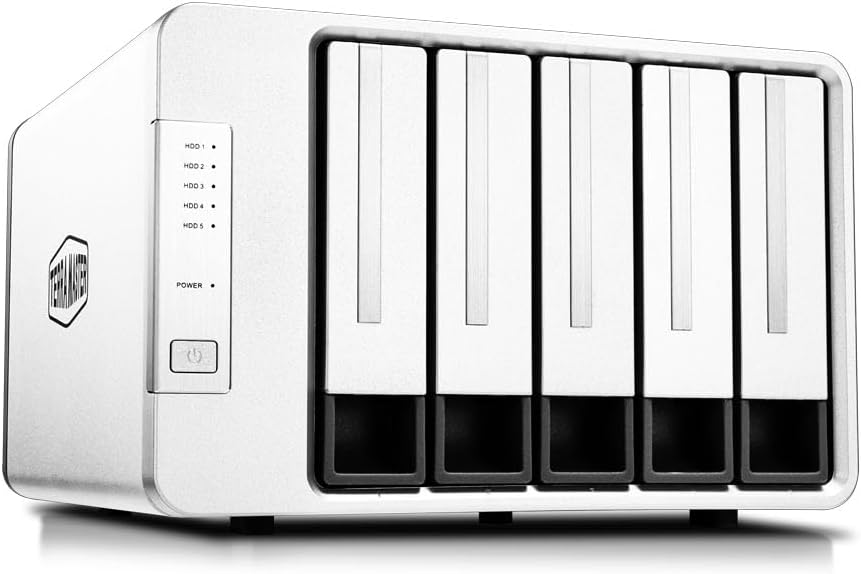


The TERRAMASTER D4-320 stands out as a reliable DAS solution for professionals needing high-speed access to large files. With a rating of 4.2 stars, users appreciate its robust build and consistent performance in real-world tasks.
We may earn a commission when you buy through this link, at no additional cost to you.
This enclosure delivers up to 10Gbps transfer speeds via USB 3.2 Gen 2, ensuring quick data transfers for video editing and large backups. Its tool-free design and hot-swap support make drive management simple and efficient.
While it lacks hardware RAID capabilities which some enterprise users might expect, the individual drive mode offers flexibility for those who prefer manual redundancy or software-based solutions.
If you need a versatile and fast storage expansion solution for your workstation, this model is highly recommended. It balances performance with ease of use effectively.
USB 3.2 Gen 2 ensures up to 10Gbps speeds for quick file transfers.
Intelligent temperature-controlled fan keeps drives cool during heavy use.
We may earn a commission when you buy through this link, at no additional cost to you.
The QNAP TR-004 is ideal for users already invested in the QNAP ecosystem who want to expand their storage capacity. With hardware RAID support, it provides an extra layer of data security.
We may earn a commission when you buy through this link, at no additional cost to you.
Its USB Type-C connection allows for fast data transfer and compatibility with modern computers. The ability to expand an existing NAS makes it a smart choice for growing data needs.
However, the reliance on QNAP software and specific compatibility requirements might limit its appeal for standalone users seeking a plug-and-play experience.
If you value data redundancy and ecosystem integration, this enclosure is a solid choice. It offers robust features for power users who need reliability.
Supports multiple RAID configurations to safeguard your critical data.
Designed to work smoothly with QNAP network storage systems.
We may earn a commission when you buy through this link, at no additional cost to you.
The TERRAMASTER D8 Hybrid offers a unique solution by supporting both HDD and NVMe SSDs in one enclosure. This hybrid approach caters to workflows requiring speed for active files and capacity for archives.
We may earn a commission when you buy through this link, at no additional cost to you.
With up to 152TB of storage space, users can handle large projects without worrying about running out of space. The tool-free design ensures quick changes when needed.
While the hybrid setup requires some planning to manage data efficiently across drive types, the performance benefits are significant for power users.
If you need both speed and capacity in a single unit, this model delivers. It is perfect for creative professionals with demanding storage needs.
Supports both HDD and NVMe drives for optimized workflows.
Expand your storage up to 152TB for all your data.
We may earn a commission when you buy through this link, at no additional cost to you.
The CENMATE Aluminum 4 Bay is a fantastic budget-friendly choice for users who need reliable storage without breaking the bank. Its sturdy aluminum construction ensures durability even in busy environments.
We may earn a commission when you buy through this link, at no additional cost to you.
With support for up to 80TB of total capacity and plug-and-play functionality, it is perfect for home or small office use. The tool-free design simplifies drive swaps significantly.
While the USB 3.0 speed is slower than newer Gen 2 interfaces, it still provides adequate performance for general file transfers and backups.
If you are looking for a cost-effective solution for expanding your desktop storage, this model is highly recommended. It delivers great value for the price.
Constructed with high-quality aluminum for heat dissipation and durability.
Tool-free installation makes adding drives quick and simple.
We may earn a commission when you buy through this link, at no additional cost to you.
The SABRENT DS-SC5B provides five drive bays for those needing significant storage expansion without network infrastructure. Its independent drive controller ensures each drive remains stable during heavy operations.
We may earn a commission when you buy through this link, at no additional cost to you.
With USB-C 10Gbps speeds, you can transfer large files quickly. The daisy-chain feature allows you to connect multiple docks for even more capacity.
However, the larger size might not fit every workspace, and the lack of RAID support means you need to manage data redundancy manually.
If you need maximum capacity and speed for a single workstation, this dock is excellent. It is ideal for editors and archivists with huge media libraries.
Expand your storage with up to five hard drives in one enclosure.
Connect multiple docks via rear USB-C for expanded storage.
We may earn a commission when you buy through this link, at no additional cost to you.
The TERRAMASTER D8 Hybrid 2 improves on the original model with better power management tools for improved efficiency. With a perfect user rating, it is a top choice for power-conscious users.
We may earn a commission when you buy through this link, at no additional cost to you.
Its hybrid support for HDD and NVMe drives allows flexible storage setups. The TPM technology optimizes power usage without sacrificing performance.
While it shares some limitations with the original regarding software, the hardware improvements make it a strong competitor in the hybrid category.
If you want energy efficiency alongside high capacity, this model stands out. It is well-suited for long-term storage needs.
Switch between power modes to optimize energy use and speed.
Accommodates both SATA and NVMe drives for flexible setups.
We may earn a commission when you buy through this link, at no additional cost to you.
The TERRAMASTER D5-310 simplifies RAID configuration with a physical knob on the back, allowing quick changes without software. This hardware control is a unique advantage for many users.
We may earn a commission when you buy through this link, at no additional cost to you.
Supporting up to 120TB of storage, it offers ample room for extensive data needs. The hot-swap bays ensure convenience during maintenance tasks.
While the USB 3.1 interface is slower than modern Gen 2 options, the hardware RAID reliability compensates for users prioritizing data safety.
If you prefer physical controls for RAID setup, this is an ideal choice. It suits those who need a robust and straightforward storage solution.
Physically switch RAID modes easily using the rear dial.
Expand your storage up to 120TB for all needs.
We may earn a commission when you buy through this link, at no additional cost to you.
The WAVLINK 4-Bay is an excellent all-in-one docking solution with a 4K HDMI port for video output. It transforms your storage enclosure into a multimedia hub.
We may earn a commission when you buy through this link, at no additional cost to you.
Supporting up to 88TB capacity and USB 3.2 speeds, it handles large media files efficiently. The aluminum shell ensures durability and better heat management.
While the HDMI feature is powerful, it requires a compatible host port which may not be available on all computers.
If you want a docking station that doubles as a display adapter, this model is unique. It suits creators needing display and storage integration.
Connect displays directly for multimedia and presentation tasks.
High-quality aluminum construction provides heat dissipation and strength.
We may earn a commission when you buy through this link, at no additional cost to you.
The ORICO 5 Bay is known for its magnetic cover design that allows tool-free installation of drives. This convenience makes it a user-friendly option for frequent drive swaps.
We may earn a commission when you buy through this link, at no additional cost to you.
With support for 110TB total capacity and USB 3.1 speeds, it handles a wide range of storage tasks effectively. The compact design saves desk space.
However, the cooling fan might be noticeable during heavy operations, which could be an issue for quiet work environments.
If you need a simple and efficient storage solution without complex tools, this is a good pick. It works well for general home or office use.
Tool-free installation with magnetic covers simplifies drive management.
Expand up to 110TB to store all your important data.
We may earn a commission when you buy through this link, at no additional cost to you.
The QNAP TR-002 offers a compact solution for expanding storage with two drive bays. Its USB Type-C interface ensures modern connectivity and fast data transfers.
We may earn a commission when you buy through this link, at no additional cost to you.
Ideal for QNAP NAS owners, it integrates seamlessly into existing setups. The hardware RAID support adds data protection for smaller configurations.
While the capacity is limited compared to 4 or 5-bay models, its size makes it perfect for desktop use.
If you need a small and reliable DAS for a workspace, this model is recommended. It balances size and functionality effectively.
Small dual-bay design fits easily on any desk.
Designed to expand QNAP NAS systems effortlessly.
We may earn a commission when you buy through this link, at no additional cost to you.
Selecting the right DAS requires evaluating several factors to match your specific performance and capacity needs.
Consider how many drives you need and the total storage capacity required for your files. Some models support up to five bays for massive expansion.
Choose an enclosure that meets your current needs and allows room for future growth.
USB 3.2 Gen 2 provides faster speeds up to 10Gbps which is essential for large media transfers. Older USB 3.0 interfaces are slower but cheaper.
Prioritize newer interfaces if you work with high-resolution video or large datasets.
Effective cooling systems prevent overheating during continuous operations. Look for intelligent fans or aluminum designs that dissipate heat well.
Ensure the enclosure maintains safe temperatures to protect your data and drive life.
Tool-free drive trays simplify installation and swaps which is crucial for frequent changes. Plug-and-play functionality avoids driver hassles.
Opt for models with easy access to bays for smooth daily workflow.
Aluminum enclosures offer durability and better heat dissipation than plastic. A sturdy build protects drives from physical damage.
Select high-quality materials to ensure longevity and reliability for your investment.
Ensure the DAS supports your OS such as Windows, macOS, or Linux without extra drivers. Cross-platform compatibility increases flexibility.
Check specifications to confirm broad system support before purchasing.
Some enclosures use external power adapters for stability while others draw power from USB. Proper power management protects drives from surges.
Choose a power setup that matches your port capabilities and stability needs.
Always connect the DAS to a powered USB port or use the included power adapter to ensure stable operation during data transfers.
Avoid moving the enclosure while drives are spinning to prevent physical damage and data corruption.
Regularly update firmware and backup your important data to ensure continued reliability and data safety.
Direct Attached Storage connects directly to one computer via USB or Thunderbolt, while NAS connects over a network to multiple users. DAS offers simpler setup and faster single-user speeds.
Most DAS enclosures are sold diskless meaning you must purchase and install your own hard drives or SSDs. This allows you to choose the exact capacity and type you need.
Yes, you can plug the DAS into any compatible computer with the necessary USB ports. However, only one computer can access the drives at a time unless you switch physical connections.
Multiple hard drives generate significant heat which can shorten their lifespan or cause data loss. Proper cooling fans or aluminum chassis help maintain safe operating temperatures.
Check the enclosure specifications for supported drive sizes like 2.5 or 3.5 inches. Ensure your selected hard drives match these physical dimensions to fit securely inside.
Hot-swapping allows you to replace drives without powering off the enclosure. It is very useful for quickly adding more storage or replacing a failing drive without interruption.
Some models include hardware RAID for data redundancy while others offer just individual drive access. Check product features to confirm RAID support if data protection is a priority.
Regular backups to another device or cloud storage are essential since no hardware is completely failproof. Avoid moving the unit during operation to reduce physical risks.
The ten models reviewed above offer a variety of options for different storage needs from budget-friendly solutions to advanced hybrid systems.
Prioritize transfer speeds and cooling when selecting a model to ensure reliable performance under heavy workloads.
Always verify current specifications and pricing on the product pages as features can vary by region and time.