
msi Gaming GeForce GT 1030 4GB DDR4
4.5Editor score
Affordable entry level pricing
Compact single fan design
Basic gaming support
This guide compares the top 10 GPUs for Optiplex systems to help you choose the best graphics card for gaming, work, or compact desktop upgrades.
Finding the right GPU for Optiplex systems can be challenging due to space and power constraints. This guide helps you identify graphics cards that fit seamlessly into small form factor cases while delivering strong performance for your needs.
We evaluated ten real products based on their compatibility, architecture, memory, and professional certifications. Our analysis focuses on cards that balance efficiency with power, ensuring they work well with Dell Optiplex desktops without requiring major modifications.
Each pick highlights specific strengths like low-profile designs, professional ISV certifications, or gaming capabilities. Prices and availability change frequently, so always verify current details before purchasing to ensure you get the best value for your setup.
4.5Editor score

4.7Editor score

4.3Editor score
This table provides a side-by-side comparison of all ten selected graphics cards. It highlights key specifications like memory size, clock speeds, and output ports to help you quickly identify which model aligns with your Optiplex upgrade goals.
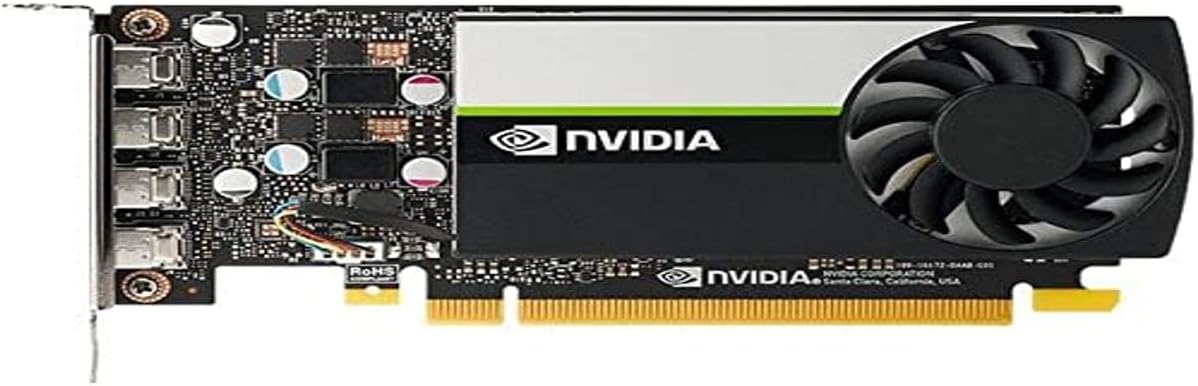


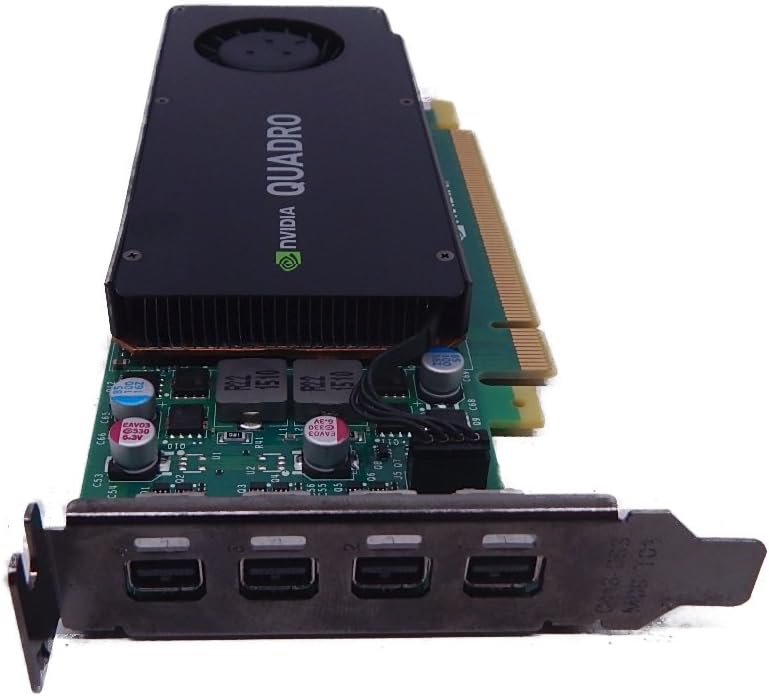
The PNY Nvidia RTX A400 stands out as a top choice for Optiplex users needing professional reliability. With its low profile design and efficient 50W power draw, it fits easily into tight office desktops without demanding extra power cables.
We may earn a commission when you buy through this link, at no additional cost to you.
Its Ampere architecture delivers strong compute power for AI and 3D modeling tasks. The four Mini DisplayPort outputs allow you to connect multiple monitors, making it perfect for trading desks or multi-monitor coding setups.
While it is not built for heavy gaming, its stability and ISV certifications ensure smooth operation with CAD software. The trade-off is fewer consumer-focused features, but this card excels in business environments.
If you need a reliable card for business apps in an Optiplex, this is a top recommendation. It balances performance and size effectively, ensuring your workstation remains stable and productive.
The single slot profile ensures it fits into even the narrowest Optiplex chassis, keeping airflow optimal.
ISV certifications guarantee compatibility with industry software, reducing crashes during critical design work.
We may earn a commission when you buy through this link, at no additional cost to you.
The msi Gaming GT 1030 offers the most affordable way to add dedicated graphics to an Optiplex. Its low profile design allows it to slide into small desktops, providing better visual performance than integrated graphics.
We may earn a commission when you buy through this link, at no additional cost to you.
It runs cool and quiet thanks to its single fan design, which is important in office environments. The HDMI and DisplayPort outputs make connecting monitors straightforward, whether for work or light entertainment.
While it cannot handle heavy gaming, it is perfect for media playback and basic tasks. The lower price makes it accessible for users on a tight budget who still want a dedicated card.
For simple upgrades, this card is a solid starting point. It proves you do not need to spend much to get a noticeable improvement in display quality on your Optiplex.
This card delivers entry-level dedicated graphics without breaking the bank, making it ideal for budget-conscious upgrades.
The single fan ensures low noise levels, which is crucial for quiet office spaces or home setups.
We may earn a commission when you buy through this link, at no additional cost to you.
The maxsun RTX 3050 brings high-end gaming features into a compact chassis. With 6GB of GDDR6 memory and AI support, it delivers smooth visuals for modern titles without needing a full-sized tower.
We may earn a commission when you buy through this link, at no additional cost to you.
Its slim design ensures it fits in mini PCs, while the HDMI 2.1 port allows for high refresh rates on compatible monitors. This makes it a great choice for gaming on a budget desktop.
While it may strain slightly in heavy AAA titles, DLSS helps maintain performance. The card is a strong contender for users wanting a mix of work and play on one machine.
If you need gaming capability in an Optiplex, this card is a top pick. It balances size, power, and features better than most competitors in the small form factor market.
DLSS technology boosts frame rates, allowing for smoother gameplay in demanding games on this compact card.
Its compact dimensions make it perfect for mini ITX cases, keeping your setup sleek and powerful.
We may earn a commission when you buy through this link, at no additional cost to you.
The PNY T600 is designed for users who prioritize stability over gaming. Its Turing architecture handles 3D workloads efficiently, making it ideal for design professionals using CAD software.
We may earn a commission when you buy through this link, at no additional cost to you.
With support for up to four displays, it offers a flexible workspace for multitasking. The dedicated video engines ensure smooth playback of high-resolution content without impacting system performance.
While it lacks the ray tracing features of newer gaming cards, its reliability is unmatched for professional use. The ISV certification ensures it works seamlessly with industry-standard applications.
For businesses needing reliable graphics for design, this card is a smart investment. It provides the stability required for professional workloads in a compact package.
ISV certifications reduce the risk of crashes during critical design work, ensuring productivity remains high.
The ability to drive multiple displays allows for efficient workflows in trading or data analysis setups.
We may earn a commission when you buy through this link, at no additional cost to you.
The ASUS Dual RTX 3050 is built for performance in a compact frame. Its dual fan design ensures effective cooling, which is essential when installing a card in a small Optiplex chassis.
We may earn a commission when you buy through this link, at no additional cost to you.
With a boost clock that supports higher performance, it handles gaming well. The IP5X dust resistance protects internal components from buildup, extending the card's lifespan.
While it uses two slots, it is still compact enough for many cases. It balances power and durability better than some single-fan alternatives.
If you want a reliable gaming experience, this card is a great choice. Its build quality ensures it lasts, providing consistent performance for your Optiplex.
The dual fans keep the card running cool under load, which is critical for stability in small cases.
Dust resistance and a stainless steel bracket make it robust against the wear and tear of daily use.
We may earn a commission when you buy through this link, at no additional cost to you.
The msi GT 1030 is an ideal starting point for upgrading an older Optiplex. It fits into tight spaces and offers a significant boost over integrated graphics for basic tasks.
We may earn a commission when you buy through this link, at no additional cost to you.
Its simple design ensures easy installation without the need for extra power connectors. This makes it a hassle-free upgrade for users who need reliable display output.
While it is not powerful enough for demanding applications, it is great for media and light tasks. The price makes it accessible for anyone on a tight budget.
For those needing a reliable budget card, this is a solid choice. It provides the basic performance needed for modern computing without complexity.
No extra power cables are needed, making the physical setup straightforward for non-technical users.
This card offers a cost-effective way to improve display performance for everyday work and browsing.
We may earn a commission when you buy through this link, at no additional cost to you.
The GIGABYTE RTX 3050 features a dual fan design that ensures efficient cooling. This is important for maintaining performance in a small Optiplex where airflow is limited.
We may earn a commission when you buy through this link, at no additional cost to you.
Its 6GB of GDDR6 memory handles modern gaming needs well. The card supports advanced features like DLSS, giving you better visuals in demanding titles.
While it requires a bit of space, it fits many compact cases. It is a strong option for users who want a balance of power and size.
If you need reliable gaming performance, this card is a great pick. It combines quality cooling with modern features to deliver a solid experience.
Two fans work together to keep temperatures low, ensuring stable performance even during long gaming sessions.
Support for DLSS and ray tracing allows for better visual quality in modern games on a small form factor PC.
We may earn a commission when you buy through this link, at no additional cost to you.
The msi RTX 3050 LP is designed specifically for small form factor cases. Its low profile design ensures it fits in the narrowest Optiplex chassis without any issues.
We may earn a commission when you buy through this link, at no additional cost to you.
With dual HDMI 2.1 outputs, it supports high refresh rates and modern displays. The card delivers impressive gaming performance for its compact size.
It is a good choice for users who want gaming in a small office PC. The combination of size and power is hard to beat in this category.
If you need a low profile gaming card, this is a top recommendation. It offers the flexibility of modern gaming in a tiny package.
The low profile bracket ensures compatibility with almost all mini desktops, giving you flexibility in case choice.
Multiple HDMI 2.1 ports allow for high refresh rates and support for modern monitors without adapters.
We may earn a commission when you buy through this link, at no additional cost to you.
The PNY Quadro K1200 is a great option for older Optiplex models. Its support for PCIe 2.0 means it works in systems that might not support newer cards.
We may earn a commission when you buy through this link, at no additional cost to you.
As a professional card, it is stable and reliable for CAD work. The low profile design ensures it fits into smaller business desktops without issues.
It is not built for gaming, but it handles workloads well. The multiple displays outputs allow for a flexible workspace setup.
If you need a reliable card for an older machine, this is a solid choice. It bridges the gap between legacy hardware and modern display needs.
Supporting PCIe 2.0 ensures this card works with older desktops, extending their usable life with better graphics.
ISV certifications mean it will handle professional software without crashing, ensuring reliability for your work.
We may earn a commission when you buy through this link, at no additional cost to you.
The NVIDIA Quadro P1000 provides professional performance in a compact form. Its Pascal architecture handles demanding design tasks efficiently, making it ideal for workstations.
We may earn a commission when you buy through this link, at no additional cost to you.
It supports 4K displays, giving you a high-quality workspace. The ISV certification ensures it works seamlessly with industry-standard software.
While it may not be the newest technology, it offers reliable performance for business users. The low profile design ensures it fits in most Optiplex cases.
If you need professional power, this card is a strong pick. It delivers the stability required for design tasks in a small package.
Designed for business use, this card ensures your workflow remains uninterrupted during critical design tasks.
Support for high resolution displays allows you to work with detail and precision on your projects.
We may earn a commission when you buy through this link, at no additional cost to you.
Choosing the right graphics card for an Optiplex involves understanding your specific needs and system constraints. This guide outlines key factors to consider to ensure a successful upgrade.
The Optiplex comes in various sizes, from towers to mini desktops. Always check the case dimensions and bracket height to ensure the card fits physically.
Measure the available space before buying to avoid compatibility issues with larger cards.
Many Optiplex models have limited power supplies. Look for cards that draw power solely from the PCIe slot to avoid needing extra cables.
Verify your system wattage before purchasing higher performance cards to ensure stability.
Decide if you need gaming or professional performance. Gaming cards offer higher raw power, while professional cards provide stability and ISV certifications.
Choose a card that matches your daily tasks to avoid overspending or underpowering.
Check the ports on your card against your monitors. Ensure it has the right connectors like HDMI or DisplayPort for your setup.
Adapters can work but native support is more reliable for multi-monitor setups.
Memory affects how many apps or textures you can load. 4GB is often enough for basic tasks, while 6GB supports heavier workloads.
More memory future-proofs your card against growing software requirements.
Prices vary significantly between entry-level and high-end cards. Set a budget that balances your needs with what you can afford.
Consider the long-term value of a slightly more expensive card that lasts longer.
Small cases have limited airflow, so efficient cooling is crucial. Look for cards with good fan designs or passive options if your case is tight.
A hot card can throttle performance, so cooling matters for stable operation.
A good warranty protects your investment. Check the length and terms of the warranty before buying to ensure you have support if issues arise.
Manufacturers like PNY and ASUS often offer solid protection for their cards.
First, always shut down your computer and unplug it before opening the case. This prevents electrical damage and ensures your safety while handling components.
Second, align the card with the PCIe slot and press firmly until it clicks. Secure the bracket to the case back so the card stays stable.
Third, update your drivers regularly from the manufacturer's website. This ensures you get the latest performance improvements and bug fixes for your Optiplex.
Most of these cards draw power directly from the PCIe slot, so no extra cables are needed. However, higher performance models might require a connection. Check the card specs before installing to ensure your power supply matches the requirements.
Low profile cards like the PNY A400 and MSI 3050 LP are designed for Mini Optiplex cases. Always measure your case dimensions to be sure. Taller cards might not fit without modifying the bracket or case.
Yes, cards with more memory like the RTX 3050 are good for video editing. Professional cards like the PNY T600 offer stability for professional apps. For heavy editing, ensure the card has at least 4GB of memory.
For entry-level cards, the default power supply is usually enough. High-end gaming cards might require a more robust power unit. Check your system's wattage before upgrading to ensure safe operation.
Yes, updating drivers ensures your system uses the card's features correctly. Manufacturers release updates for better performance and compatibility. Check the official website for the latest drivers after installation.
Cards like the RTX 3050 are great for gaming on a budget. Lower-end cards like the GT 1030 work for casual gaming. Avoid using professional cards like the T600 for heavy gaming as they lack gaming features.
Older Optiplex models may only support PCIe 2.0 or 3.0. Check your motherboard specs to confirm compatibility. Most cards work down to PCIe 2.0 but may not reach full speed.
The MSI GT 1030 is the most affordable option for basic improvements. It offers better performance than integrated graphics at a low price. For slightly more power, consider the PNY A400 if you need professional stability.
The top picks offer a range of options for every need. The PNY A400 is perfect for professionals, while the MSI 1030 suits budget users. The maxsun RTX 3050 brings gaming to small desks.
Prioritize your specific needs when making a choice. If you need stability for work, choose a professional card. If you want gaming, go for an RTX model that fits your case.
Prices change frequently, so always check current deals before buying. This ensures you get the best value for your money. A good card can extend your Optiplex's life for years.