
NexiGo N60
4.3Editor score
Full HD 1080p video
Built-in noise cancelling mic
Includes privacy protection cover
External webcams for Mac have become essential tools for remote workers and content creators who need reliable video quality. Unlike built-in cameras these devices offer superior optics and better performance in challenging lighting conditions.
We compared ten leading models based on resolution image quality microphone clarity and ease of use with macOS. Each product was evaluated for compatibility with popular conferencing apps and overall build quality.
Every pick highlights key features and performance strengths to help you find the right camera for your setup. Please note that product prices and availability can change frequently on online marketplaces.
4.3Editor score

4.6Editor score

4.6Editor score
As an Amazon Associate we earn from qualifying purchases.
The following table provides a side-by-side comparison of all ten selected webcams highlighting their resolution sensor type field of view and connectivity options for quick reference.




The Acer 4K Webcam stands out as the top choice for Mac users seeking professional video quality. It holds an impressive rating and delivers crisp visuals thanks to its large Sony sensor.
We may earn a commission when you buy through this link, at no additional cost to you.
Its Phase Detection Autofocus ensures sharp focus even during movement while the dual microphones capture clear audio from a distance. The all-metal unibody design adds durability and efficient heat dissipation for long sessions.
While it costs more than budget options the investment is justified by the superior optics and build. The need for a USB-C adapter on older Macs is a minor inconvenience for the performance gains.
This camera is ideal for streamers presenters and professionals who demand the best. Its seamless compatibility with macOS and major conferencing apps makes it a reliable daily driver.
The Sony 1/2 sensor captures detailed true-to-life images that excel in low-light conditions without grain.
PDAF technology locks focus quickly while dual high-sensitivity mics filter out ambient noise effectively.
We may earn a commission when you buy through this link, at no additional cost to you.
The Anker PowerConf C200 offers a balanced mix of features at a competitive price point. Its 2K resolution provides noticeable clarity over standard HD options for daily meetings.
We may earn a commission when you buy through this link, at no additional cost to you.
AI noise cancellation ensures your voice comes through clearly even in noisy environments. The ability to customize viewing angles via software allows you to frame your shot precisely.
The slide privacy cover offers convenience though some users might prefer a magnetic option. While it lacks 4K resolution it remains a strong contender for those prioritizing value.
This webcam suits remote workers who need reliable performance without breaking the bank. Its broad compatibility ensures it works smoothly with macOS and popular conferencing platforms.
Dual mics with AI noise cancellation filter out background sounds for crystal clear communication.
Customizable viewing angles let you adjust your frame for professional presentations.
We may earn a commission when you buy through this link, at no additional cost to you.
The EMEET C960 delivers true 4K resolution that brings unmatched clarity to video calls. It features PDAF autofocus technology that ensures stable focus during interactions.
We may earn a commission when you buy through this link, at no additional cost to you.
Auto light correction adjusts exposure dynamically so you remain visible in various lighting environments. The included privacy cover adds security while the tripod thread enables versatile mounting options.
Users must switch to 4K manually which adds a small step but ensures optimal performance when needed. The dual omnidirectional mics capture audio from multiple directions effectively.
This model is great for educators and professionals who need detailed visuals. Its flexibility with mounting and software adjustments makes it adaptable to different setups.
True 4K sensors provide ultra-clear visuals ideal for sharing detailed documents or whiteboards.
A standard 1/4-inch thread allows secure attachment to tripods for stable recording.
We may earn a commission when you buy through this link, at no additional cost to you.
The NexiGo N60 is an excellent entry-level choice for budget-conscious Mac users. It delivers sharp 1080p video with a glass lens optimized for close to medium distances.
We may earn a commission when you buy through this link, at no additional cost to you.
Its built-in noise cancelling microphone reduces ambient sounds effectively for clearer calls. The privacy cover blocks the lens when not in use providing peace of mind.
While it lacks autofocus the fixed focus works well for standard desk setups. The lack of extra drivers makes it instantly ready to use with macOS.
This webcam is perfect for students or casual users needing reliable video. Its low cost and solid performance make it a top pick for basic needs.
Plug-and-play design means no drivers are needed to get started immediately.
A built-in cover lets you block the lens easily for better security.
We may earn a commission when you buy through this link, at no additional cost to you.
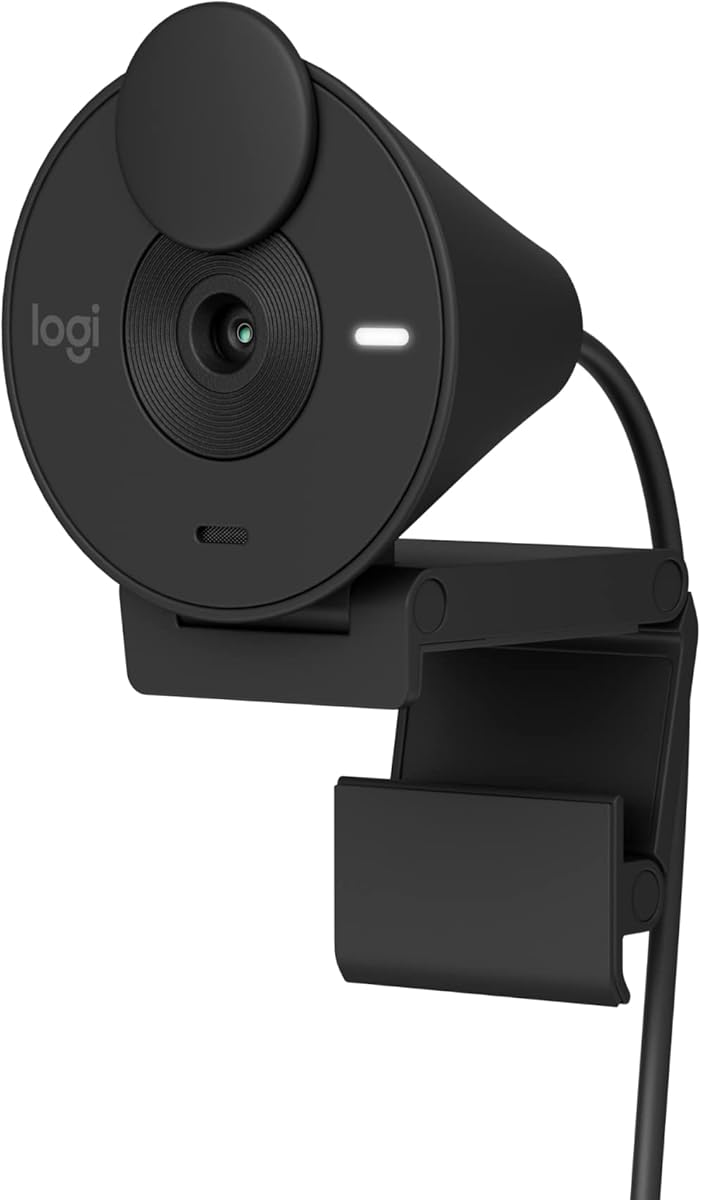
The Logitech Brio 100 brings trusted reliability to Mac setups at a reasonable price. RightLight technology boosts brightness to reduce shadows so you look natural.
We may earn a commission when you buy through this link, at no additional cost to you.
The integrated slide cover offers convenient privacy control without extra accessories. Made with recycled plastic it aligns with environmental values while maintaining durability.
It works seamlessly with major conferencing apps like Teams and Zoom out of the box. The white color matches many modern Mac setups aesthetically.
Ideal for office environments this webcam delivers consistent performance. Its simplicity and build quality make it a solid everyday choice for professionals.
RightLight tech adjusts brightness to ensure you look clear in dim rooms.
Made with minimum 34 percent post-consumer plastic for a greener product.
We may earn a commission when you buy through this link, at no additional cost to you.
The Logitech Brio 301 is certified for Zoom and Teams ensuring seamless integration in business environments. RightLight 2 automatically adjusts lighting so you remain visible clearly.
We may earn a commission when you buy through this link, at no additional cost to you.
Its spin shutter design is quick to operate for privacy. Logi Tune software allows you to adjust color and image settings to your preference.
While the microphone is mono it suppresses background noise effectively. The black finish fits standard office setups discreetly.
This webcam is tailored for professionals who need reliability. Its certification and software support make it a dependable tool for daily meetings.
Certified for Zoom and Teams guarantees seamless operation in enterprise environments.
Logi Tune software lets you fine-tune video settings for personal preferences.
We may earn a commission when you buy through this link, at no additional cost to you.
The Logitech C920e is designed for business security with TAA compliance and privacy features. It includes an attachable privacy screen that flips to cover the lens when needed.
We may earn a commission when you buy through this link, at no additional cost to you.
Built-in HD autofocus keeps your image sharp and automatic light correction handles varied lighting. Dual omnidirectional microphones capture audio clearly from up to one meter.
Its sturdy clip fits monitors and laptops easily with tripod threads for versatility. The 78 degree field of view frames individuals well for meetings.
This webcam is best for enterprises prioritizing compliance and security. Its robust build and privacy features ensure safe reliable communication.
An attachable privacy screen lets you control lens exposure easily.
Omnidirectional mics capture natural sound from multiple directions effectively.
We may earn a commission when you buy through this link, at no additional cost to you.
The Logitech C922x is a premium choice for streamers who need high performance and flexibility. It delivers crisp 1080p video with advanced lighting adjustments for better visuals.
We may earn a commission when you buy through this link, at no additional cost to you.
Stereo audio via dual mics captures natural sound during calls. Background removal software included helps streamline professional presentations without a green screen.
Its autofocus and high frame rate support smooth motion during activities. The build is solid though it lacks a privacy shutter which users must source separately.
This webcam is ideal for creators and advanced users. Its advanced software and audio features justify the cost for those needing professional tools.
Designed for content creators with background removal tools included.
Dual mics provide rich audio quality that enhances communication experiences.
We may earn a commission when you buy through this link, at no additional cost to you.
The Logitech C920S is a trusted standard for many Mac users seeking reliable video quality. It includes a snug privacy shutter that fits well over the lens.
We may earn a commission when you buy through this link, at no additional cost to you.
Full HD video ensures you look like a pro with HD autofocus maintaining focus. Stereo audio with dual mics captures natural sound for recorded videos.
Its glass lens provides crisp images with vibrant colors. It lacks some advanced streaming features but performs excellently for general conferencing.
This webcam is best for users wanting reliability. Its privacy shutter and consistent performance make it a solid long-term investment.
A snug privacy shutter provides peace of mind when not in use.
Stereo audio with dual mics ensures natural sound on all calls.
We may earn a commission when you buy through this link, at no additional cost to you.
The Acer 4K Webcam offers premium performance with a robust aluminum unibody design. Its large Sony sensor delivers true-to-life visuals with excellent low-light capabilities.
We may earn a commission when you buy through this link, at no additional cost to you.
Phase Detection Autofocus ensures crisp clear video without blurriness. The magnetic privacy cover snaps securely over the lens for reliable protection during breaks.
Its compact and lightweight design makes it portable for mobile workers. The fast cooling system supports reliable 24/7 video performance without overheating.
This webcam is ideal for professionals and gamers alike. Its durable build and high resolution justify the price for those needing top-tier quality.
Aerospace-grade aluminum ensures durability and fast heat dissipation.
Ultra-portable form factor lets you take video anywhere easily.
We may earn a commission when you buy through this link, at no additional cost to you.
Selecting the right external webcam for Mac depends on your specific needs and usage environment. Understanding key factors will help you find a model that balances quality and value.
Resolution determines the clarity of your video during calls. 4K resolution offers the sharpest detail which is ideal for professional presentations or streaming. 1080p remains the standard for general use and balances quality with bandwidth requirements.
Prioritize higher resolution if you need to show fine details. Otherwise standard HD is sufficient for most meetings.
Field of view dictates how much of your background the camera captures. A wider angle includes more people and is suitable for group settings. A narrower angle focuses on you which is better for one-on-one calls.
Check the degree specifications to ensure the frame fits your setup. Adjusting distance can help optimize the framing.
Built-in microphones vary in clarity and noise reduction capabilities. Dual mics with noise cancellation ensure your voice stands out in noisy environments. Some models offer stereo audio which enhances recording quality.
If you work in a quiet space a standard mic may suffice. For busy rooms look for advanced noise filtering features.
Autofocus keeps your image sharp even when you move. Phase Detection autofocus is faster than standard options. Auto light correction helps maintain visibility in dim rooms or varying lighting conditions.
Ensure the camera adapts to your typical lighting environment. This reduces the need for external lights.
The construction affects longevity and stability. Metal bodies dissipate heat better and feel more premium than plastic. Lightweight designs are portable but must be stable enough to stay in place.
Consider materials if you plan to use the camera daily. Heat dissipation ensures reliability during long sessions.
Privacy covers protect you from unwanted viewing when the camera is idle. Slide shutters are convenient while magnetic covers offer a secure fit. Some models include attachable screens for extra control.
Look for integrated covers to avoid losing accessories. This ensures you always have privacy when needed.
macOS compatibility is critical for seamless setup. Most modern webcams work plug-and-play but software may be needed for advanced features. Ensure the model supports your conferencing apps like Zoom or Teams.
Check for driver support on your macOS version. Software customization adds flexibility for personal needs.
USB connections determine ease of setup. USB-C offers faster speeds and direct compatibility with newer Macs. USB-A is common but may require adapters on modern devices.
Verify the port type matches your Mac to avoid extra hardware. Reliable connection ensures stable video streaming.
Connect the webcam to your Mac using the appropriate cable or adapter. Ensure it is plugged into a USB port that supports data transfer for the video stream.
Open your conferencing app and navigate to the video settings to select the external camera. Adjust focus and exposure settings within the app to optimize the image.
Clean the lens with a soft microfiber cloth to remove smudges or dust. Store the privacy cover in a safe place when not in use to prevent loss.
Most modern webcams are plug-and-play and do not require additional drivers for macOS. However some advanced features may need specific software. Check the product page for compatibility details before purchasing.
4K webcams provide significantly higher resolution with more detail than 1080p models. They require more bandwidth and storage. 1080p is usually sufficient for standard video calls and streaming.
Yes most webcams support older Macs via USB-A ports. Newer models might need an adapter for USB-C. Verify the specific compatibility requirements listed by the manufacturer.
Many webcams come with built-in privacy covers or shutters. Others may require purchasing one separately. Check the product specifications to confirm if it is included in the box.
Check that autofocus is enabled in your settings and clean the lens. Ensure the lighting is adequate as dim light can reduce clarity. Replug the device if connection issues persist.
Models with 4K resolution and advanced software features suit streaming well. Look for options that support background removal and high frame rates. Professional features help create engaging content.
We have reviewed ten excellent options ranging from budget-friendly models to premium 4K choices. The Acer 4K Webcam leads our top picks for its superior image quality and robust build.
Prioritize features like resolution and autofocus based on your daily needs. Whether you need simple video calls or advanced streaming tools there is a model for every use case.
Always check current prices and compatibility details before purchasing to ensure you get the best deal. These webcams will enhance your video communication experience on Mac significantly.