
10Gb/s SFP+ Fiber Port Ethernet Adapter
4.3Editor score
Intel 82599ES Controller
10Gbps SFP+ Port
Wide OS Compatibility
This guide compares the top Fiber Optic Network Interface Card options for servers and desktops, evaluating speed, compatibility, and reliability for 2026.
Fiber optic network interface cards enable high-speed data transmission essential for modern servers and workstations. Choosing the right card ensures reliable connectivity and efficient data handling across your network infrastructure.
We evaluated ten leading models based on chipset performance, port types, and system compatibility. This list covers options ranging from single port gigabit cards to dual port ten gigabit adapters for diverse needs.
Each pick highlights specific strengths like thermal design or virtualization support to help you decide. Note that availability and pricing fluctuate regularly, so verify current stock before purchasing your next network upgrade.
4.3Editor score

5.0Editor score

4.9Editor score
The following table provides a side-by-side overview of the ten selected fiber optic network interface cards. Compare key specifications like chipset, port count, and interface speed to find the right match for your hardware.


This StarTech network card stands out for its reliable Intel I350 chipset and dual open SFP slots. It delivers consistent gigabit performance ideal for servers requiring fiber connectivity without proprietary locks.
We may earn a commission when you buy through this link, at no additional cost to you.
The unlocked SFP slots allow you to use any MSA-compliant transceiver or direct attach copper cables. This flexibility reduces long-term costs and avoids vendor lock-in issues common with branded adapters.
While it offers robust thermal design with a built-in heatsink, it is limited to gigabit speeds. For many server environments this is sufficient but high throughput needs require faster options.
Ideal for system administrators managing Windows Server or Linux systems needing stable fiber links. Its broad compatibility and managed features make it a top choice for professional upgrades.
Open SFP slots mean you can choose transceivers from any brand compatible with your switch. This freedom simplifies procurement and lowers costs over time.
The Intel I350 chipset provides proven stability and virtualization features. It supports SR-IOV and VMDq for efficient VM networking in virtual environments.
We may earn a commission when you buy through this link, at no additional cost to you.
This adapter delivers genuine 10Gbps performance using the Intel 82599ES controller at a competitive price point. It is excellent for NAS builds needing fast local transfer speeds.
We may earn a commission when you buy through this link, at no additional cost to you.
The Intel chipset ensures compatibility with virtualization stacks and advanced features like SR-IOV. It supports both SFP+ fiber and DAC cables for flexible connectivity options.
Note that Windows clients may need manual driver installation unlike server OS versions. Also ensure your case has airflow since the card relies on passive cooling for thermal management.
Best for gamers and NAS users upgrading from gigabit networks. The balance of performance and cost makes it a popular entry level 10G option.
Move large files ten times faster than standard gigabit adapters. This speed is crucial for video editing and backup workflows.
Supports both fiber optic and direct attach copper cables. Choose based on distance needs and switch port availability.
We may earn a commission when you buy through this link, at no additional cost to you.
Asus brings a premium touch to the 10G network card market with this sleek design and robust aluminum heatsink. It offers reliable 10Gbps connectivity through a standard SFP+ port.
We may earn a commission when you buy through this link, at no additional cost to you.
The built-in cooling solution helps maintain stable performance during heavy loads. Its SFP+ cage supports both fiber and DAC connections making it versatile for various setups.
While it offers automatic QoS prioritization for gaming or streaming, the price is higher than generic alternatives. You pay extra for the brand reputation and thermal engineering.
Recommended for workstation builds where aesthetics and thermal performance matter. It balances high-speed networking with a refined physical design suitable for open cases.
The aluminum heatsink dissipates heat effectively without active fans. This keeps the system quiet during high throughput transfers.
Built-in QoS technology boosts bandwidth to priority applications. This ensures smooth gaming or video streaming while downloading large files.
We may earn a commission when you buy through this link, at no additional cost to you.
This 10Gtek card delivers reliable 10Gbps performance using the well-known Intel 82599EN controller. It is widely recognized for stability in server and NAS environments.
We may earn a commission when you buy through this link, at no additional cost to you.
The single SFP+ port is sufficient for many desktop and workgroup server needs. It includes both low profile and full height brackets for flexible case installation options.
While the one port design limits uplink redundancy, it keeps costs low and power usage manageable. It requires proper driver configuration on newer Windows versions to function correctly.
Best suited for users who need a simple one-to-one 10G link. Its compatibility with major hypervisors makes it a solid choice for virtualization homelabs.
The Intel 82599EN ensures consistent throughput with minimal packet loss. This stability is key for database and file server apps.
Includes a three year warranty and lifetime technical support. This backing adds peace of mind for enterprise or personal deployments.
We may earn a commission when you buy through this link, at no additional cost to you.
This card utilizes the Realtek RTL8127 controller to offer 10Gbps speeds on a modern PCIe Gen4 x1 interface. It represents a newer design aimed at recent PC architectures.
We may earn a commission when you buy through this link, at no additional cost to you.
It includes practical features like wake on LAN and PXE boot support for efficient system management. The QR code driver download simplifies setup for users unfamiliar with manual downloads.
Linux support is extensive but capped at kernel version 6.15 according to manufacturer notes. This may require careful OS version selection for advanced Linux users.
Ideal for modern desktops needing 10G connectivity without full PCIe lane bandwidth. The Gen4 x1 lane ensures it works in standard slots without sacrificing overall system bandwidth.
PCIe Gen4 support allows for faster signal integrity and compatibility with newer motherboards. It ensures the card performs optimally on recent hardware.
Scan the QR code on the card to access drivers quickly. This reduces setup time and avoids searching for correct software online.
We may earn a commission when you buy through this link, at no additional cost to you.
This Intel-compatible card is designed to work without vendor lock-in on SFP+ modules. It allows you to use third-party optics or cables freely without warnings.
We may earn a commission when you buy through this link, at no additional cost to you.
It detects automatically on Proxmox TrueNAS and Unraid without driver installation. This convenience makes it highly appealing for home lab and storage builds.
The passive heatsink runs warm which means case airflow is essential for longevity. You may need to position a case fan near it during prolonged high usage.
Perfect for users who want a true drop-in alternative to branded Intel cards. It simplifies NAS networking by removing complex driver steps.
Third-party transceivers work seamlessly without rejection errors. This saves money on optics and cables over the life of the card.
TrueNAS and Unraid detect the card immediately upon boot. It is ready to assign IP addresses without extra configuration.
We may earn a commission when you buy through this link, at no additional cost to you.
This dual port 25Gbps card offers enterprise grade performance with RDMA capabilities. It is ideal for clusters needing minimal latency and high throughput for data processing.
We may earn a commission when you buy through this link, at no additional cost to you.
The Mellanox ConnectX-4 Lx controller supports offloads like VXLAN and overlay networks. These features are essential for cloud and software-defined networking environments.
To utilize 25G speeds you need matching switch ports and cabling. This requirement increases the total system cost compared to standard 10G setups.
Best for professionals building high-end storage or compute clusters. The dual ports allow for link aggregation or failover redundancy easily.
Remote Direct Memory Access allows low latency data transfer. This reduces CPU usage during storage transfers in virtualized environments.
25G Ethernet is becoming standard for high density data centers. Investing in this speed future proofs your infrastructure for longer.
We may earn a commission when you buy through this link, at no additional cost to you.
This card provides immediate value by including a multimode optical module in the package. It saves you the effort of sourcing a compatible transceiver separately.
We may earn a commission when you buy through this link, at no additional cost to you.
Gold plated fingers on the PCIe connector ensure reliable contact and resistance to oxidation. This design choice extends the physical lifespan of the interface pins.
While it supports both half and full duplex modes ensure your switch is configured correctly. The included module restricts initial use to multimode links unless you replace it.
Best for users who want a quick out of box solution. It simplifies the procurement process for single fiber optic network interface card interface setup.
The included module makes this card ready to plug in immediately. You avoid waiting for transceiver shipments after ordering the card.
Gold plated connectors prevent corrosion over time. This ensures reliable physical connection even after years of use.
We may earn a commission when you buy through this link, at no additional cost to you.
This TP-Link card uses 10GBase-T technology to connect via standard RJ45 ports. It is unique because it does not require special fiber or SFP+ switch ports.
We may earn a commission when you buy through this link, at no additional cost to you.
It comes with a CAT6A cable rated for 10G speeds so you can start using it right away. This makes it simple for users with existing copper wiring infrastructure.
While convenient copper 10GBase-T uses more power and generates more heat than fiber. Ensure your case has good airflow to handle the thermal load during long transfers.
Ideal for users connecting to 10GBase-T switches or routers directly. Its backward compatibility allows it to work with older gigabit networks seamlessly.
You can use regular ethernet cables for high speed. No special fiber transceivers are needed for this card.
Automatically negotiates speed with older switches. It downgrades to 1G or 2.5G if needed without manual changes.
We may earn a commission when you buy through this link, at no additional cost to you.
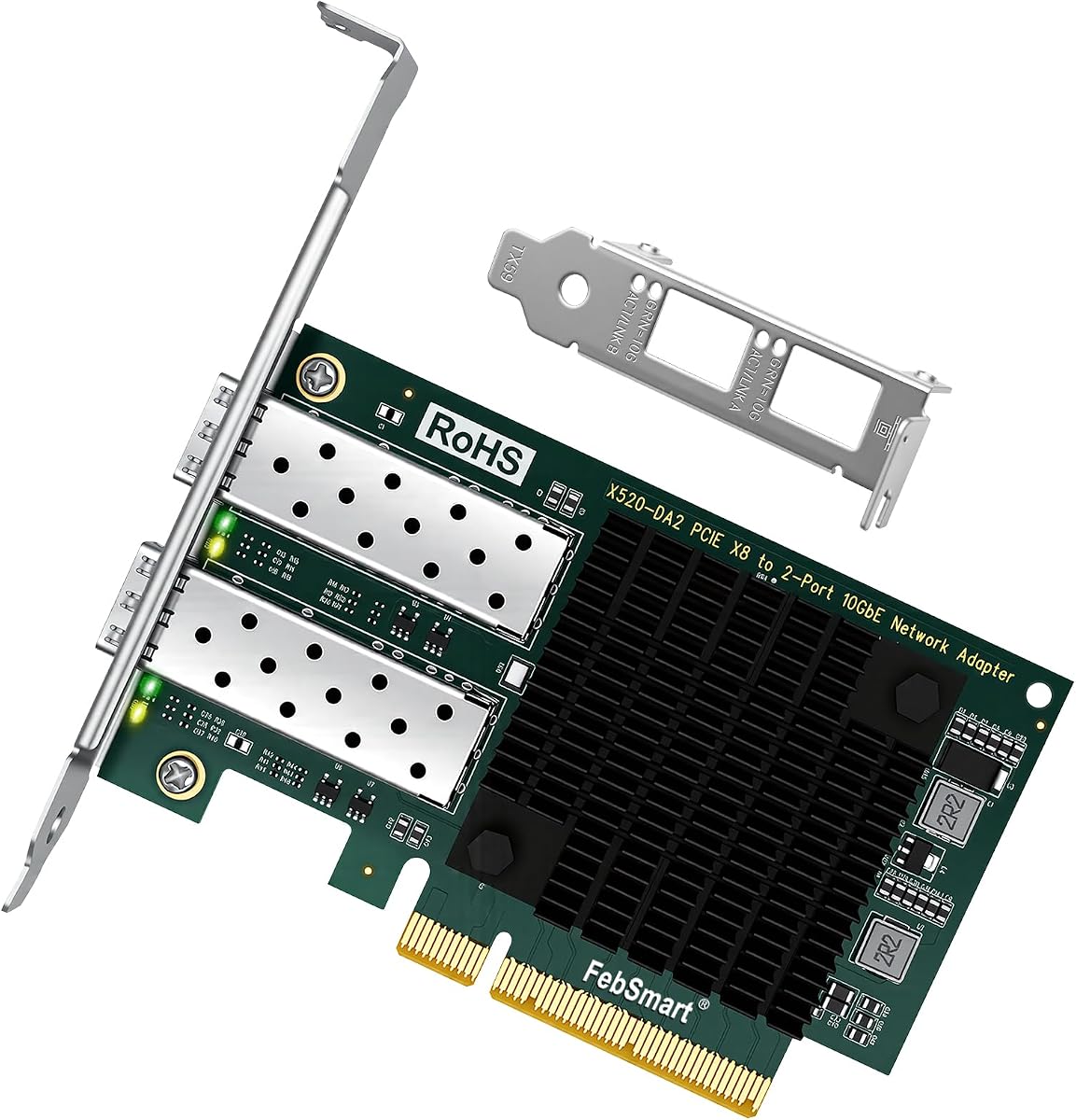
This card offers two independent 10Gbps ports controlled by a single Intel chipset. It allows for link aggregation to double bandwidth or redundancy for critical systems.
We may earn a commission when you buy through this link, at no additional cost to you.
The PCIe x8 interface ensures full bandwidth availability for both ports without bottlenecks. It includes virtualization features like SR-IOV for efficient multi-VM networking.
You need a physical PCIe x8 or x16 slot for installation which may not fit smaller systems. Also remember to budget for two transceivers and cables for full utilization.
Best for workstations needing high throughput to multiple destinations. The dual ports provide flexibility for network segmentation or dedicated storage links.
Combine both ports to achieve 20Gbps throughput. This is ideal for high speed data backups or rendering tasks.
Use separate ports for storage and general traffic. This isolates traffic types for better performance and security.
We may earn a commission when you buy through this link, at no additional cost to you.
Selecting the right fiber optic network interface card requires understanding your specific network needs and hardware limitations. Consider speed, interface type, and compatibility before buying.
Determine if you need Gigabit, 10Gbps, or 25Gbps speeds. Higher speeds like 25Gbps are better for modern storage but require compatible switches and cables.
Match the card speed to your switch port to avoid bottlenecks. Buying a faster card than your switch supports wastes money and performance.
Choose between SFP+ and SFP28 connectors based on your fiber or DAC requirements. Ensure the card accepts the modules you plan to purchase.
Check if the card supports direct attach cables or needs separate transceivers. Direct attach cables are cheaper but have limited distance ranges.
Verify that your motherboard has the correct PCIe slot size and version. Some cards need x4 or x8 lanes while others work in x1 slots.
Modern PCIe Gen4 offers better signal integrity for high speeds. Older PCIe Gen2 slots may limit performance on some newer cards.
Ensure the card has drivers for your specific OS version like Windows 11 or Linux kernel version. Some older cards lack support for newer systems.
Server OS versions often have built-in drivers while desktop versions may need downloads. Check the manufacturer support page before buying.
Consider if the card has active or passive cooling. Passive cards rely on case airflow and may heat up during long transfers.
If you have limited airflow look for cards with larger heatsinks or active cooling fans. Heat can cause throttling or instability under load.
Look for SR-IOV and VMDq support if you run virtual machines. These features improve network performance for VMs by reducing CPU usage.
Virtualization support helps offload network tasks from the CPU. This leads to smoother performance when running multiple applications simultaneously.
Check if the card includes low profile brackets for small cases. Full height cards may not fit in mini tower enclosures without modification.
Most modern cards come with both bracket sizes for flexibility. Ensure the package includes the right size for your chassis.
Compare the total cost including necessary transceivers and cables. Some cards come with modules while others require separate purchases.
Budget cards often lack premium features like RDMA support. Decide if those features justify the extra cost for your use case.
First open the box and install the card into a matching PCIe slot on your motherboard. Secure it with a screw and ensure the bracket aligns with your case opening.
Next install any necessary drivers from the manufacturer website. For most server OS versions this step may be skipped due to built-in support.
Finally connect your fiber or direct attach cables to the SFP+ ports. Verify link lights indicate a successful connection and test speed with file transfers.
Standard fiber cards use SFP+ ports which require transceivers or DAC cables not standard RJ45 ethernet cables. You need special adapters to use copper cables unless you buy a specific 10GBase-T model.
Yes you need a switch with matching SFP+ or SFP28 ports capable of 10G speeds. Regular gigabit switches will limit the speed to 1Gbps or fail to connect.
SFP+ supports up to 10Gbps speeds while SFP28 supports 25Gbps. They are physically similar but SFP28 is designed for higher bandwidth data centers.
Check your switch ports match the card type and speed. If your switch has gigabit ports you will not get 10G speed unless you upgrade the switch too.
Most Linux distributions have built-in drivers for common chipsets like Intel 82599. However newer Realtek models may require specific kernel modules for full support.
Observe the temperature after installation. If the card gets hot to the touch during transfers consider adding a small fan directed at the heatsink.
Yes direct attach copper cables work with SFP+ ports for shorter distances. They are often cheaper and easier to install than separate fiber transceivers.
Extra ports allow for future upgrades or link aggregation. They do not hurt performance but consume more PCIe lanes and power.
We reviewed ten top models ranging from budget friendly 10G cards to premium 25G enterprise adapters. Each offers unique benefits depending on your specific networking goals.
Prioritize compatibility with your existing switch and operating system before choosing speed. A card that works reliably is better than a faster one that causes issues.
Remember to check current availability and shipping options before finalizing your order. Network technology evolves quickly so verify the product matches your latest needs.