
USB to HDMI Adapter for Monitor Windows 11/10 / 8
3.8Editor score
Supports 1920×1080 resolution
Compatible with Windows and Mac
Includes 36 months warranty
This guide compares the top flash drive to HDMI adapter models for 2026, evaluating compatibility, video quality, and ease of setup for various users.
Connecting your digital content to a larger display is essential for presentations and entertainment. A flash drive to HDMI adapter bridges the gap between portable storage and high-definition screens seamlessly.
We evaluated ten top-rated adapters based on resolution support, driver requirements, and system compatibility. Our analysis focuses on reliability, ease of use, and performance across different operating systems.
Each pick highlights specific strengths and limitations to help you choose the right device for your needs. Prices and availability may change, so verify details before purchasing to ensure satisfaction.
3.8Editor score

4.5Editor score

4.4Editor score
The following table provides a side-by-side comparison of all ten adapters reviewed in this guide to help you quickly identify the best fit for your setup.




The StarTech USB-A 3.0 to HDMI Converter stands out as a top choice for users seeking reliable video output. It delivers crisp 1080p video at 60Hz, making it suitable for both work and entertainment needs.
We may earn a commission when you buy through this link, at no additional cost to you.
This adapter features a compact design that fits easily into travel bags or pockets. It is bus-powered, meaning you do not need an additional power supply. The 6cm cable length ensures a neat connection to your display.
While it offers excellent performance, it requires driver installation on Windows systems. Additionally, it does not support macOS or Linux, limiting its compatibility for some users.
We recommend this adapter for Windows users who prioritize quality and reliability. It is an ideal solution for extending your desktop or connecting to a projector for presentations.
The adapter delivers 1080p video at 60Hz, ensuring smooth and clear visuals for various applications.
Its lightweight and compact design makes it easy to carry and use on the go.
We may earn a commission when you buy through this link, at no additional cost to you.
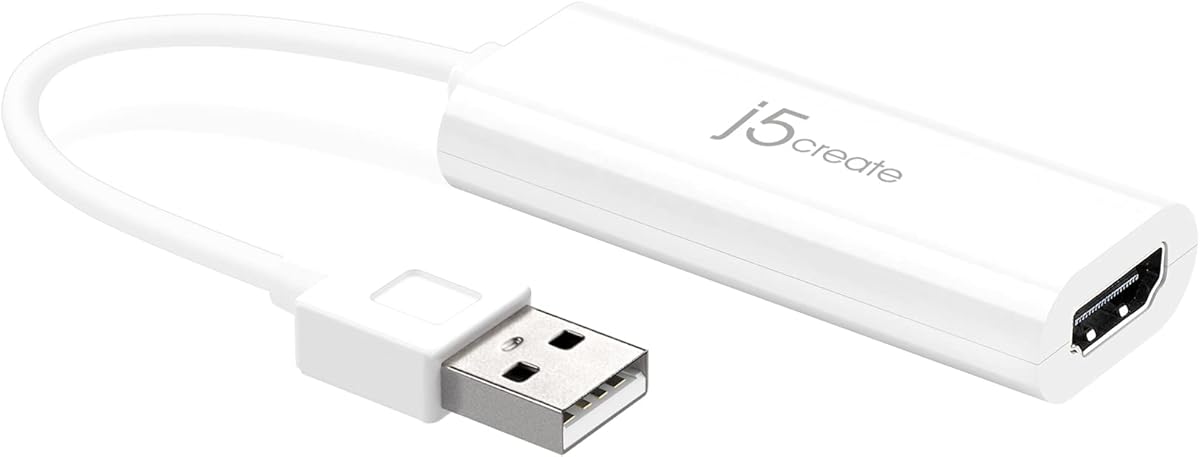
This USB to HDMI adapter offers an affordable solution for connecting your devices to external displays. It supports 1920×1080 resolution and works with both Windows and Mac systems, providing flexibility for various users.
We may earn a commission when you buy through this link, at no additional cost to you.
The adapter supports hot-plugging, allowing you to connect or disconnect without restarting your computer. It also comes with a 36-month warranty, adding value to your purchase and peace of mind.
However, user reviews are mixed, with some reporting challenges during driver installation. It is important to follow the setup instructions carefully to ensure proper functionality.
This adapter is a good option for those on a budget who need basic video output. It is suitable for casual use or occasional presentations where high-end performance is not critical.
This adapter provides a cost-effective way to connect your devices to external displays without breaking the bank.
The ability to connect or disconnect the adapter without restarting your computer adds convenience to your workflow.
We may earn a commission when you buy through this link, at no additional cost to you.
The WAVLINK USB 3.0/USB C to HDMI Universal Video Adapter is designed for users who need to connect multiple monitors. It supports up to 6 monitors, making it ideal for complex workstations and multitasking environments.
We may earn a commission when you buy through this link, at no additional cost to you.
This adapter is compatible with both Windows and macOS, including newer Apple Silicon Macs. It features a built-in USB 3.0 GPU and supports high resolutions up to 2560×1440 at 50Hz.
Despite its advanced features, it requires the installation of the DisplayLink driver. Additionally, the higher price point may be a consideration for budget-conscious buyers.
We recommend this adapter for professionals who need to extend their workspace across multiple screens. Its compatibility and performance make it a top choice for demanding users.
The adapter supports up to 6 monitors, allowing for an expansive workspace and enhanced productivity.
It works with both Windows and macOS, including Apple Silicon Macs, providing flexibility for different users.
We may earn a commission when you buy through this link, at no additional cost to you.
The Reborn USB to HDMI adapter is a powerful device that facilitates connections to HDMI displays. It delivers 1080p video at 60Hz, making it suitable for both work and entertainment needs.
We may earn a commission when you buy through this link, at no additional cost to you.
This adapter is compatible with multiple operating systems, including Windows and macOS. It also supports mirror and extended modes, which can enhance work efficiency and provide more screen real estate.
However, it cannot be used in BIOS mode, and driver installation is required. If other drivers are installed, they may need to be uninstalled first to avoid conflicts.
We recommend this adapter for users who need a reliable solution for connecting to external displays. Its compact design and compatibility make it a convenient choice for various setups.
The adapter supports mirror and extended modes, enhancing work efficiency and providing more screen real estate.
Its compact and sturdy design ensures convenient carrying and instant connection for various needs.
We may earn a commission when you buy through this link, at no additional cost to you.
This USB to Dual HDMI monitor adapter lets you extend your desktop by adding up to two HDMI monitors to your laptop or desktop computer. It is ideal for workstation setups in the office or working from home.
We may earn a commission when you buy through this link, at no additional cost to you.
The adapter supports 4K at 30Hz and 1080p at 60Hz, providing high-quality video output. It is designed for IT professionals and is backed by a 3-year warranty, including free lifetime technical assistance.
It requires administrator rights to install drivers and is only compatible with Windows. This limitation may not suit users who rely on macOS or Linux systems for their work.
We recommend this adapter for IT professionals and power users who need to connect multiple monitors. Its performance and support make it a top choice for demanding environments.
The adapter allows you to connect up to two HDMI monitors, providing a versatile solution for extending your workspace.
Designed for IT professionals, the adapter is built with high-quality materials and comes with a long warranty period.
We may earn a commission when you buy through this link, at no additional cost to you.
This USB to HDMI adapter dongle is DisplayLink certified, ensuring compatibility with any USB-A laptop, Ultrabook, PC desktop, or small form factor system. It delivers 1080p video and supports up to 5.1ch audio through HDMI.
We may earn a commission when you buy through this link, at no additional cost to you.
The adapter features automatic driver installation with Windows and Chrome OS, making setup quick and easy. It is USB bus-powered, requiring no extra power supply, and has a compact design for portability.
While it offers reliable performance, it is limited to 1080p resolution and only works with Windows and Chrome OS. This may not suit users who need higher resolution or cross-platform compatibility.
We recommend this adapter for users who need a reliable and easy-to-use solution for connecting to external displays. Its DisplayLink certification and automatic driver installation make it a top choice for many.
The adapter is DisplayLink certified, ensuring ensured compatibility with a wide range of devices.
The automatic driver installation with Windows and Chrome OS makes setup quick and easy for users.
We may earn a commission when you buy through this link, at no additional cost to you.
The Kinhaly USB C to HDMI for TV adapter helps iPhone 15/16 and iPad users expand their HDMI 4K@60Hz port and a charging port. It allows for crystal-clear audio and high-definition video experience, making it ideal for sharing content with family and friends.
We may earn a commission when you buy through this link, at no additional cost to you.
This adapter features a plug and play design, meaning you do not need to install any driver or app. It is compatible with a wide range of devices, including iPhone 15/16 series, MacBook Pro/Air, and Samsung Galaxy devices.
However, it does not work with apps that have HDMI video copyright protection, such as Netflix and Prime Video. This limitation may not suit users who want to stream content from these services.
We recommend this adapter for iPhone and Mac users who need a reliable and easy-to-use solution for connecting to external displays. Its plug and play setup and sturdy design make it a top choice for many.
The adapter features a plug and play design, meaning you do not need to install any driver or app for quick and easy setup.
It is compatible with a wide range of devices, including iPhone 15/16 series, MacBook Pro/Air, and Samsung Galaxy devices.
We may earn a commission when you buy through this link, at no additional cost to you.
Transform your USB-A port into a high-definition HDMI output with this USB 3.0 to HDMI adapter for monitor. It delivers crystal-clear 1080P@60Hz resolution and ensures lag-free video/audio sync for movies, gaming, and presentations.
We may earn a commission when you buy through this link, at no additional cost to you.
This adapter supports dual display modes, allowing you to switch between extended desktop or mirrored display modes effortlessly. It is widely compatible with Windows 11/10/7 and macOS 10.15+, making it suitable for various users.
Driver installation is required, but the step-by-step guide ensures quick setup. It is worth noting that the driver runs locally for privacy, with no internet or data access needed.
We recommend this adapter for users who need a reliable solution for connecting to external displays. Its dual display modes and wide compatibility make it a top choice for many users.
The adapter supports dual display modes, allowing you to switch between extended desktop or mirrored display modes effortlessly for enhanced productivity.
It is widely compatible with Windows 11/10/7 and macOS 10.15+, making it suitable for various users and systems.
We may earn a commission when you buy through this link, at no additional cost to you.
This compact-designed portable BENFEI USB-C to HDMI adapter connects a computer, desktop, laptop, or other devices with USB-C port to a monitor, projector, HDTV, or other devices with HDMI port. It is designed to tuck into your bag or pocket for business presentations.
We may earn a commission when you buy through this link, at no additional cost to you.
The adapter supports resolutions up to 3840*2160@60Hz and requires the USB-C device to support the USB Type-C DP Alt mode. It features a plated USB-C connector that resists corrosion and abrasion, improving signal transmission performance.
It is compatible with a wide range of devices, including iPhone 15 Pro/Max, MacBook Pro/Air, and Google Chromebook Pixel. However, it may not work with all USB-C devices if they do not support DP Alt mode.
We recommend this adapter for users who need a compact and reliable solution for connecting to external displays. Its wide compatibility and excellent build quality make it a top choice for many users.
The adapter supports resolutions up to 3840*2160@60Hz, delivering high-quality video for various needs.
It is compatible with a wide range of devices, including iPhone 15 Pro/Max, MacBook Pro/Air, and Google Chromebook Pixel.
We may earn a commission when you buy through this link, at no additional cost to you.
Add an additional monitor without adding an expensive, internal video card. Simply install the driver for the USB to HDMI Display Adapter and then connect your monitors using HDMI cables. It features hot-swappable USB, allowing you to add or remove monitors without rebooting your system.
We may earn a commission when you buy through this link, at no additional cost to you.
This adapter is great for multitasking in a wide variety of fields, including phone centers, stock markets, hospitals, graphic design, editing, and accounting. It allows you to move and view your large spreadsheets across two screens without overlapping windows.
It requires driver installation, which may be a hurdle for some users. Additionally, it may not be compatible with all operating systems, limiting its versatility for some setups.
We recommend this adapter for professionals who need to connect multiple monitors and multitask efficiently. Its hot-swappable USB and high-quality construction make it a top choice for many users.
The adapter features hot-swappable USB, allowing you to add or remove monitors without rebooting your system for convenience.
It is great for multitasking in a wide variety of fields, allowing you to view large spreadsheets across two screens without overlapping windows.
We may earn a commission when you buy through this link, at no additional cost to you.
Choosing the right adapter involves considering several key factors to ensure compatibility and performance. This guide helps you evaluate the most important aspects for your setup.
Resolution determines the clarity and detail of the video output, while refresh rate affects how smooth the video appears. Look for adapters that support at least 1080p at 60Hz for high-quality visuals. Higher resolutions like 4K are ideal for detailed work or entertainment.
Prioritize adapters that support your display's maximum resolution and refresh rate for the best experience.
Ensure the adapter works with your specific operating system. Some adapters are designed for Windows only, while others support macOS, Linux, or Chrome OS. Check the product description for system requirements before purchasing.
Verify that the adapter is compatible with your OS to avoid functionality issues.
Some adapters require manual driver installation, while others are plug-and-play. Driver-based adapters may offer more features but can be less convenient. Plug-and-play options are easier to set up but may have limited functionality.
Choose an adapter with driver requirements that match your technical comfort level.
Check if the adapter supports your device's ports. USB-C adapters often require DP Alt Mode, while USB-A adapters may need USB 3.0 for higher resolutions. Ensure your device has the necessary port to use the adapter effectively.
Confirm port compatibility to ensure the adapter can connect properly to your device.
The cable length and design affect how easily you can position the adapter and display. Short cables are more portable, while longer cables offer more flexibility. Consider the design for durability and ease of use.
Select an adapter with a cable length and design that suits your workspace needs.
Some adapters offer additional features like audio output, multiple monitor support, or charging ports. These features can enhance your experience but may come at a higher cost. Determine which features are essential for your use case.
Look for additional features that add value to your specific needs.
Price varies significantly based on features and quality. While budget options may save money, they might lack reliability or features. Higher-priced adapters often offer better performance and support. Balance cost with the features you need.
Choose an adapter that offers the best value for your budget and requirements.
To use the adapter, connect one end to your device and the other to your display. Ensure your device and display are powered off before connecting to avoid potential issues. Then, power on your devices to establish the connection.
If the adapter requires drivers, install them as instructed in the product manual. Follow the step-by-step guide carefully to ensure proper functionality. Avoid installing conflicting drivers to prevent issues.
To care for your adapter, store it in a cool, dry place when not in use. Avoid bending or twisting the cable excessively, and handle it with care to maintain its durability. Regularly check for updates to drivers and firmware.
Not all USB to HDMI adapters work with Mac. Some are designed for Windows only, while others support both Windows and macOS. Check the product description for system requirements to ensure compatibility. macOS systems may also require specific drivers for functionality.
Your adapter may not display video if the driver is not installed or if your system is not configured correctly. Ensure the driver is properly installed and your display settings are set to extend or mirror your screen. Check that your device's port supports video output.
You can use a USB to HDMI adapter for gaming, but performance may vary. Adapters with higher refresh rates like 60Hz offer smoother visuals. However, for demanding games, a dedicated graphics card may provide better performance and lower latency.
Yes, you may need a specific USB port for the adapter. USB 3.0 ports are often required for higher resolutions like 1080p or 4K. Check your device's specifications to ensure it has the necessary port for the adapter to function correctly.
Connecting multiple monitors with one adapter depends on the adapter's capabilities. Some adapters support multiple monitors, while others are designed for a single display. Check the product description to see if it supports multiple monitor setups.
To install the driver, connect the adapter to your device and follow the installation instructions in the product manual. Some adapters may require you to download the driver from a website. Ensure you have administrator rights to install the driver successfully.
Choosing the best flash drive to HDMI adapter depends on your specific needs and setup. The top picks offer reliable performance, high-quality visuals, and compatibility with various devices. Consider the key factors discussed to make an informed decision.
Prioritize resolution, compatibility, and ease of use when selecting an adapter. Whether you need a budget-friendly option or a premium solution, there is an adapter that fits your requirements. Evaluate each option carefully to ensure it meets your expectations.
Remember to check current prices and availability before purchasing. Prices may fluctuate, and some models may have limited stock. Ensure you are getting the best value for your investment by verifying details before finalizing your purchase.