
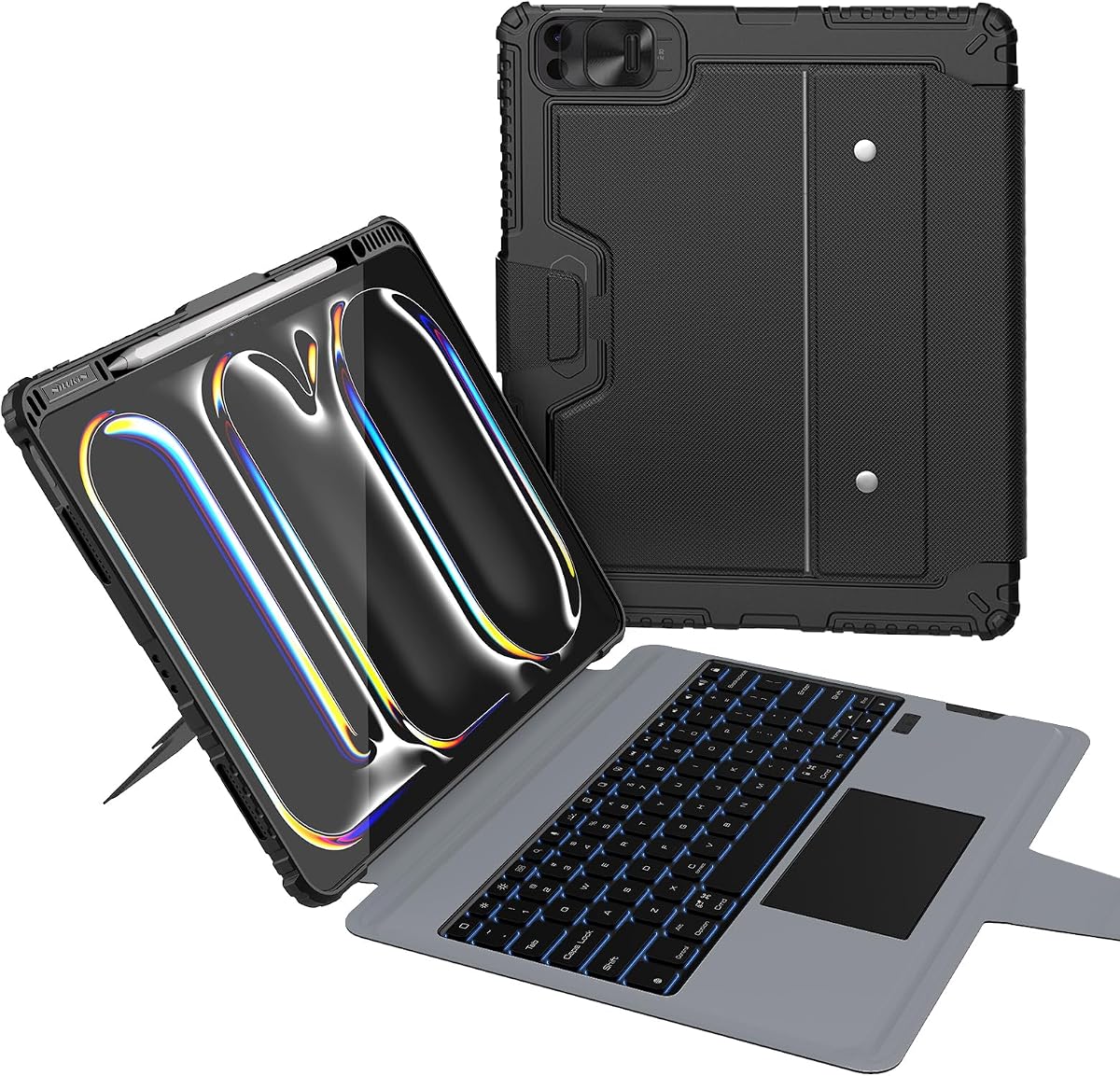
Harvopu for iPad Pro 13 Inch
4.4Editor score
Seven color backlight options available
Detachable magnetic keyboard design
Three stable viewing angles included
Finding the right keyboard case for your iPad Pro 13 M4 can transform it into a powerful productivity machine. A good case offers comfortable typing, precise trackpad navigation, and robust protection for your device while maintaining portability for everyday use.
We have compared ten top-rated keyboard cases specifically designed for the iPad Pro 13 inch M4 and M5 models. Our analysis covers compatibility, build quality, trackpad responsiveness, backlight options, and overall value to help you make an informed decision.
Each pick highlights key strengths and potential trade-offs so you can find the perfect match for your workflow. Please note that product availability and pricing can change frequently, so verify details before finalizing your purchase online today.
4.4Editor score

4.3Editor score

3.7Editor score
As an Amazon Associate we earn from qualifying purchases.
This side-by-side comparison reviews ten distinct keyboard cases tailored for the iPad Pro 13 inch M4 model. We evaluate each option on compatibility, trackpad size, backlight features, and protective qualities to highlight their unique advantages.



The Apple iPad Magic Keyboard Case stands out as the top choice for users seeking a premium typing experience with their iPad Pro 13 M4. Rated highly for its build quality and integration, it transforms the tablet into a laptop-like device seamlessly.
We may earn a commission when you buy through this link, at no additional cost to you.
Its standout features include a glass trackpad with haptic feedback that supports multi-touch gestures, making navigation intuitive. The two-cantilever hinge allows smooth adjustment of viewing angles, while the function row provides quick access to essential shortcuts without needing screen touches.
While the price is higher than many third-party options, the durability and seamless compatibility justify the investment for many professionals. The case folds to protect both the front and back of the iPad, ensuring safety during travel.
If you prioritize typing comfort and reliable trackpad performance, this is the ideal solution. It eliminates the need for separate charging cables for the keyboard, as it draws power directly from the iPad via USB-C pass-through.
The scissor mechanism keys provide a satisfying keystroke that reduces fatigue during long work sessions.
The built-in glass trackpad enables precise cursor movement and gesture support for efficient multitasking.
We may earn a commission when you buy through this link, at no additional cost to you.
The ESR for iPad Pro 13 Inch Case offers a compelling mix of functionality and affordability. It is designed specifically for the M4 and M5 models, ensuring a precise fit that maximizes usability without extra bulk.
We may earn a commission when you buy through this link, at no additional cost to you.
Its quick-set magnetic stand lets you transition between typing and viewing modes effortlessly. The extended multi-touch trackpad provides sufficient surface area for smooth navigation, while the detachable case design allows full access to the screen when needed.
This case is ideal for users who want versatility without breaking the bank. The multiple view modes include portrait orientation for FaceTime, making it suitable for communication tasks as well as productivity work.
While it lacks the premium feel of glass trackpads, the performance is solid for everyday tasks. The protection it offers is comprehensive, shielding the device from drops and scratches while maintaining a sleek profile.
The magnetic stand design enables rapid adjustments to suit different work environments or seating positions.
Removing the keyboard back allows for instant hands-on interaction with the tablet screen.
We may earn a commission when you buy through this link, at no additional cost to you.
This ESR model focuses on flexibility with its magnetic detachable design and larger trackpad. The 65 percent larger trackpad surface provides more room for gestures, enhancing navigation efficiency during complex workflows.
We may earn a commission when you buy through this link, at no additional cost to you.
The adjustable landscape stand adapts to viewing angles between 20 and 75 degrees, offering ergonomic comfort for various tasks. You can detach the keyboard entirely to use the case as a standalone protective cover for lighter activities.
Ideal for users who switch between work and creative tasks, the built-in stylus holder keeps your Apple Pencil secure. This feature prevents the pencil from falling or getting scratched during transport.
While the added size might make it less pocketable than slim cases, the versatility it offers is unmatched in its price range. It balances protection with functionality effectively for daily use.
The expanded trackpad area allows for precise scrolling and app switching without reaching the screen.
Detaching the keyboard transforms the device into a lightweight tablet perfect for digital art or gaming.
We may earn a commission when you buy through this link, at no additional cost to you.
The typecase Edge Magic-Style Keyboard Case brings a vibrant touch with its eleven backlight color options. This feature allows users to personalize their typing environment, adding a stylish element to productivity sessions.
We may earn a commission when you buy through this link, at no additional cost to you.
Its floating cantilever design ensures stable viewing angles while remaining slim. The trackpad covers the full area below the keys, providing consistent responsiveness for navigation and cursor control.
Perfect for those who work in varying light conditions, the adjustable brightness levels ensure keys remain visible without glare. The smart wake and sleep feature conserves battery life when the case is closed.
Although it does not offer the largest trackpad, the overall usability is strong. The pencil slot is a thoughtful addition that keeps your stylus accessible and protected alongside your device.
Choose from multiple colors to match your mood or workspace aesthetic for a unique setup.
Automatic wake and sleep functions help extend the iPad battery life during idle periods.
We may earn a commission when you buy through this link, at no additional cost to you.
The Logitech Combo Touch is a premium option known for its durability and comprehensive feature set. It offers a large multi-touch trackpad that feels intuitive and supports all standard iPadOS gestures effectively.
We may earn a commission when you buy through this link, at no additional cost to you.
Its detachable keyboard allows you to switch modes instantly, making it suitable for both typing and creative work. The Smart Connector ensures seamless connectivity without the need for Bluetooth pairing or separate charging.
Designed with form-fit protection, the case safeguards the iPad from scratches and bumps during travel. The wireless backlit keys provide a pleasant typing experience even in dimly lit environments.
While it comes at a higher cost, the build quality and versatility justify it for professionals. If you value reliability and a laptop-like feel, this case is a top contender in the market.
The Smart Connector provides instant secure connection without draining battery or requiring setup steps.
The flexible kickstand allows for multiple angles to reduce strain during long work sessions.
We may earn a commission when you buy through this link, at no additional cost to you.
For those seeking affordability without sacrificing core features, the Harvopu case delivers strong value. It includes a detachable magnetic keyboard with customizable backlight options to suit your visual preferences.
We may earn a commission when you buy through this link, at no additional cost to you.
The trackpad is high-sensitivity and supports multi-touch gestures, making navigation smooth for everyday tasks. A built-in rechargeable battery ensures you can use the keyboard for weeks before needing a charge.
Its PU material is resistant to stains and easy to clean, which is ideal for frequent use. The honeycomb mesh design inside helps dissipate heat, protecting the device during extended sessions.
While it is a budget choice, it covers essential needs like protection and typing capability. The Bluetooth pairing is straightforward, and the included accessories make it a complete solution for most users.
Get essential keyboard and trackpad functionality at a fraction of the cost of premium brands.
The PU surface resists dirt and spills, keeping the case looking new longer.
We may earn a commission when you buy through this link, at no additional cost to you.
The typecase Edge+ offers distinct versatility by supporting both portrait and tablet modes seamlessly. Its detachable back case allows you to adapt the setup based on whether you are typing or reading.
We may earn a commission when you buy through this link, at no additional cost to you.
The hinge design is wider and more stable than many competitors, ensuring the iPad stays put during use. A larger trackpad size improves precision, making it easier to navigate documents or web pages.
Its lightweight design makes it easy to carry around, ideal for students or travelers. The strong magnets ensure the keyboard stays attached securely when needed but removes easily for drawing.
While it may not be the most rugged option, its usability and support for vertical workflows stand out. The backlight options add a nice touch for those who value customization in their setup.
Optimized for portrait mode to enhance productivity when reading long documents or emails.
The reinforced hinge prevents the iPad from tipping over during intense typing sessions.
We may earn a commission when you buy through this link, at no additional cost to you.
This case stands out with its 360-degree rotating kickstand, allowing for smooth angle adjustments in any direction. Whether typing, presenting, or drawing, you can find the perfect angle instantly.
We may earn a commission when you buy through this link, at no additional cost to you.
The transparent design lets the original color of your iPad shine through while protecting it. It includes a wireless keyboard with precise trackpad navigation, making it a functional workstation on the go.
The backlight options add a layer of style and practicality for dark environments. Full port access ensures you can charge or connect peripherals without removing the case.
Ideal for users who like to show off their device design while staying protected, it balances aesthetics with utility. The rotation mechanism is smooth and locks securely in place for stability.
Switch effortlessly between landscape and portrait or any angle in between without removing the device.
Keep the sleek look of your iPad visible while getting full protection from scratches and drops.
We may earn a commission when you buy through this link, at no additional cost to you.
For users who need maximum durability, the Nillkin Rugged case is engineered to withstand drops and harsh environments. It features military-grade protection with reinforced corners and a sturdy TPU frame.
We may earn a commission when you buy through this link, at no additional cost to you.
The zero to 180-degree kickstand offers extreme flexibility for any activity. Its laptop-class typing experience uses scissor switches that feel responsive and comfortable for extended writing sessions.
Battery life is a highlight, lasting weeks on a single charge due to efficient power management. The included pencil slot keeps your stylus secure and accessible when needed for creative tasks.
While bulkier than slim cases, the protection it offers is unmatched for fieldwork or travel. The leather material wipes clean easily, maintaining a professional look despite heavy daily use.
Rugged construction protects the iPad from falls and impacts in demanding work environments.
Extended battery life reduces the need to carry extra chargers during trips.
We may earn a commission when you buy through this link, at no additional cost to you.
The TSQQST Clear Wireless Keyboard Case blends protection with a modern, futuristic aesthetic. Its crystal-clear body showcases your iPad while the acrylic design adds a unique tech-inspired look to your setup.
We may earn a commission when you buy through this link, at no additional cost to you.
The 360-degree rotating stand supports ergonomic comfort for various tasks. The glowing keyboard adds a touch of sophistication, making it perfect for creative professionals who value style alongside function.
Despite its stylish appearance, it provides reliable protection against drops and scratches. The precision trackpad ensures smooth navigation, keeping productivity high even when the focus is on design.
Ideal for those who want their device to stand out visually, this case balances form and function. The glow keyboard creates a distinct ambiance for night work or presentations.
Combines transparent aesthetics with rugged protection to make a statement without sacrificing utility.
The acrylic design and glow keyboard create a striking visual presence for any workspace.
We may earn a commission when you buy through this link, at no additional cost to you.
Selecting the right keyboard case involves balancing protection, typing comfort, and specific features that match your workflow. This section breaks down the key factors to consider before making a purchase.
Ensure the case is specifically designed for the iPad Pro 13 inch M4 or M5 models. Model numbers like A2925 or A3360 are critical to verify for a perfect fit.
Check the product description for specific compatibility notes to avoid ordering a case that does not align with your tablet's dimensions or port layout.
Trackpads vary from standard touch surfaces to glass with haptic feedback. Glass trackpads often offer smoother navigation and gesture support similar to a laptop.
If you rely heavily on cursor control, prioritize models with larger or glass trackpads for a more refined experience.
Many cases offer adjustable brightness and color options for the backlight. This feature is useful for typing in low-light conditions without straining your eyes.
Consider whether color customization matters to you or if simple brightness adjustment suffices for your work environment.
The hinge and stand design determine how well the iPad is held at different angles. Look for cantilever or rotating stands that allow smooth transitions.
A stable stand is essential to prevent wobbling while typing and to ensure comfort during long viewing sessions.
Cases provide varying degrees of protection from full shell coverage to slim wraps. Rugged cases offer drop protection, while sleek ones focus on scratch resistance.
Choose based on where you use the iPad most often, such as travel or stationary desk work.
Some keyboards require Bluetooth pairing and charging, while others use the Smart Connector for instant power. Smart Connector options save battery life on the iPad itself.
Decide whether you prefer the convenience of no charging cables or the flexibility of wireless Bluetooth.
A keyboard case adds weight to the iPad. Lighter cases are better for travel, while heavier ones may offer more stability.
Weigh the trade-off between protection features and how much you want to carry daily.
If you use an Apple Pencil, a built-in holder prevents it from getting lost or damaged during transit.
Check if the case includes a dedicated slot for your stylus to keep your accessories organized.
Start by confirming compatibility before attaching the case to your iPad. Align the magnetic or Smart Connector ports carefully to avoid misalignment during installation.
Clean the case regularly with a soft, dry cloth to maintain the surface. Avoid harsh chemicals that might damage the coating or scratch the screen.
If your keyboard is battery-powered, charge it periodically to maintain performance. Store the case in a cool, dry place when not in use to prevent warping or dust accumulation.
Some models use Bluetooth and require separate charging via USB-C. Others like the Apple Magic Keyboard or Logitech Combo Touch draw power directly from the iPad and need no charging.
Yes, most of these cases include a dedicated stylus slot or allow you to attach the Pencil magnetically to the side of the iPad without removing the keyboard.
Most modern models support multi-touch gestures similar to macOS. However, premium options with glass trackpads generally offer smoother and more accurate tracking.
The listed products are designed for both M4 and M5 models, as the physical dimensions remain similar. Always double-check compatibility before purchase.
Many cases feature detachable keyboards or folding designs that allow you to remove the typing portion and use the tablet freely for creative work.
Most cases offer adjustable brightness levels to suit different lighting environments. Some also include multiple color options for personalization.
Protection varies by model. Rugged cases offer drop resistance, while standard cases focus on scratch prevention. All listed options provide front and back coverage.
Yes, the trackpads are designed to support standard iPadOS gestures for navigation and app switching without needing to touch the screen.
Choosing the right keyboard case can significantly enhance your productivity and creative workflow. Whether you prefer a premium Apple Magic Keyboard or a budget-friendly option, there is a fit for every need.
Prioritize features like trackpad quality, backlight visibility, and compatibility to ensure the case meets your daily demands. The options listed here offer a balanced range of value and performance.
Always check current availability and compatibility details before buying. Prices and stock levels can change, so verify the latest information to make the best decision for your device.