
ASRock D1800M
4.0Editor score
Dual Core J1800 CPU
DDR3 Memory Support
Compact Micro ATX Form
This guide compares the top ten low power motherboards for energy efficiency and performance, helping you select the ideal board for NAS, home servers, or
Finding a low power motherboard is essential for building energy-efficient systems like NAS servers, home labs, or compact desktops. These boards minimize electricity costs while maintaining reliable performance for 24/7 operation and specialized tasks.
We evaluated ten real products based on processor efficiency, connectivity options, form factor, and user ratings. Each entry includes detailed specifications and practical insights to help you match hardware needs with power constraints.
Every pick highlights key strengths, trade-offs, and ideal use cases. Prices fluctuate frequently so verify current listings before buying. This guide ensures you choose a board that balances performance with minimal energy consumption.
4.0Editor score

4.4Editor score

5.0Editor score
This side-by-side comparison reviews ten low power motherboards ranging from budget industrial boards to high-performance AMD platforms. Each entry lists critical specs like CPU support, memory type, storage options, and network capabilities to simplify your decision.




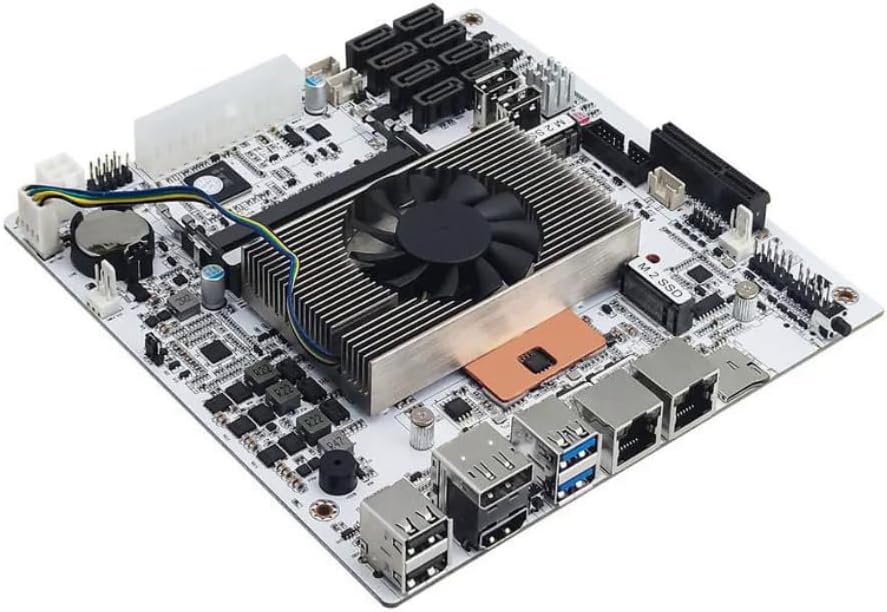
This industrial NAS motherboard features an Intel Celeron N5105 processor delivering low power efficiency with four cores and threads. It holds a 4.5 rating from users who praise its networking speed and reliability for server tasks.
We may earn a commission when you buy through this link, at no additional cost to you.
The standout feature is the four i226 2.5GbE network ports providing secure fast connections ideal for firewalls or media servers. It supports dual 4K displays via HDMI and DP and offers extensive storage with six SATA ports and two M.2 slots.
Trade-offs include the requirement for both 24PIN and 4PIN power connections which may limit case compatibility. Initial boot takes time to read memory information requiring patience but ensures stable operation for 24/7 NAS systems.
Ideal for home lab builders and network admins needing compact reliable low power systems. Its robust build and versatile connectivity make it a top choice for professional or enthusiast storage solutions.
Four 2.5GbE ports enable seamless data transfer and network segmentation without needing external switches.
Ultrafast moisture-proof circuit board design ensures durability in continuous operation environments like server rooms.
We may earn a commission when you buy through this link, at no additional cost to you.
The ASRock D1800M is an economical micro ATX board featuring an included Intel J1800 dual-core processor. It holds a 4.0 rating from users seeking budget-friendly solutions for basic tasks like light NAS or media playback.
We may earn a commission when you buy through this link, at no additional cost to you.
Its key strength is ultra-low power usage combined with an accessible price. The board supports up to 16GB of DDR3 memory and offers essential connectivity including HDMI DVI and VGA for flexible display options.
Limitations include reliance on older DDR3 memory which may be harder to source and limited PCIe expansion. These trade-offs are acceptable for users prioritizing cost savings over high performance or modern features.
Best suited for simple home servers or kiosks where minimal power draw matters. This board delivers reliable entry-level performance without breaking the budget.
Inexpensive build with decent output speeds for budget conscious system builders needing low power efficiency.
Offers video outputs like VGA for older monitors ensuring broad display support for legacy applications.
We may earn a commission when you buy through this link, at no additional cost to you.
This micro ATX motherboard supports AMD Ryzen 5000 and earlier series processors with a digital VRM design. It holds a 4.4 rating for its balanced performance and cooling features making it suitable for efficient home builds.
We may earn a commission when you buy through this link, at no additional cost to you.
Key strengths include PCIe 4.0 support and two M.2 slots enabling fast storage. Enhanced power phases and chipset heatsinks ensure steady power delivery and better heat dissipation during extended use.
Missing integrated WiFi and using a basic audio codec are trade-offs for the price. These are acceptable for users who prioritize core performance and connectivity over extra wireless or audio features.
Recommended for builders wanting modern AMD platform capabilities at a reasonable cost. Its efficiency and upgrade path make it a smart choice for compact low power systems.
Handles Ryzen 5000 CPUs and PCIe 4.0 for future-proofing without excessive power draw.
Chipset heatsinks improve heat dissipation ensuring stable performance during heavy compute tasks.
We may earn a commission when you buy through this link, at no additional cost to you.
The MSI PRO B550M-P features an AM4 socket with Core Boost technology for stable performance. It holds a 4.4 rating for its AI cooling system and robust PCIe 4.0 support ideal for efficient graphics card usage.
We may earn a commission when you buy through this link, at no additional cost to you.
Frozr AI cooling adjusts fans based on temperatures while a passive chipset heatsink reduces noise. Dual M.2 slots enable Gen4 and Gen3 SSDs offering fast storage options without high power consumption.
Limited rear USB 3.2 Gen2 ports and a basic I/O shield are trade-offs for the price. These are acceptable for builders focused on internal performance rather than extensive external connectivity.
Ideal for mid-range builds needing modern AMD features and efficient cooling. Its design balances performance with energy savings for long-term reliability.
Frozr AI cooling optimizes fan speeds to maintain temperatures without constant high-speed operation.
Dual M.2 slots with Gen4 support provide fast storage while keeping power draw low.
We may earn a commission when you buy through this link, at no additional cost to you.
This board features an Intel J4125 quad-core processor delivering low power quad-core performance. It holds a 3.4 rating with users noting good value for basic NAS or home server tasks requiring minimal electricity.
We may earn a commission when you buy through this link, at no additional cost to you.
Key strengths include DDR4 memory support and an M.2 Key E slot for WiFi cards. The compact layout and low power TDP make it suitable for silent and efficient compact builds.
Limitations include PCIe 2.0 slots which limit modern graphics expansion and mixed user feedback. These trade-offs are acceptable for users prioritizing basic efficiency over expandability.
Recommended for budget home labs or media centers. Its simplicity and low power draw make it a solid entry point for energy-conscious builders.
J4125 provides four cores for multitasking while maintaining low energy consumption for continuous use.
Space-saving layout supports small cases ideal for silent home server deployments.
We may earn a commission when you buy through this link, at no additional cost to you.
This micro ATX board supports Ryzen 5000 series with DDR4 memory speeds up to 4733MHz. It holds a 4.5 rating for its stable power delivery and broad monitor compatibility via HDMI DVI and VGA.
We may earn a commission when you buy through this link, at no additional cost to you.
Key strengths include PCIe 4.0 readiness and a Hyper M.2 slot for fast NVMe storage. Six USB 3.2 ports and 6-phase power ensure reliable daily performance without excessive power use.
Legacy VGA support and micro ATX case constraints are trade-offs for price. These are acceptable for office or home systems prioritizing compatibility and value over premium chassis.
Ideal for cost-conscious builders needing Ryzen platform flexibility. Its balance of performance and connectivity makes it a reliable choice for efficient desktops.
HDMI DVI and VGA outputs ensure compatibility with both modern and legacy monitors.
Supports high-speed DDR4 memory improving system responsiveness without major power increases.
We may earn a commission when you buy through this link, at no additional cost to you.
This mini ITX board supports AMD Ryzen processors with integrated Intel WiFi and Bluetooth. It holds a 4.4 rating for its compact design and digital PWM delivering stable power in small chassis.
We may earn a commission when you buy through this link, at no additional cost to you.
Key strengths include dual channel DDR4 support and optimized VRM heatsinks for cooling. Three display outputs and a PCIe 3.0 M.2 slot ensure flexibility for compact home theaters or desktops.
Limited RAM slots and lack of PCIe 4.0 are trade-offs for size. These are acceptable for users prioritizing compact form factors and built-in wireless over maximum performance.
Ideal for small form factor builds needing modern connectivity. Its efficient design and robust power make it a premium option for space-conscious systems.
Mini ITX design fits small cases while maintaining robust power delivery for reliable operation.
Intel Dual Band AC WiFi and Bluetooth eliminate extra cards for cleaner setups.
We may earn a commission when you buy through this link, at no additional cost to you.
This micro ATX board supports Ryzen 3000 to 5000 series with Wi-Fi 6E. It holds a perfect 5.0 rating for its premium audio and high-speed memory support offering excellent efficiency.
We may earn a commission when you buy through this link, at no additional cost to you.
Key strengths include 4 DDR4 slots supporting up to 128GB and 8 USB 3.2 ports for connectivity. Premium audio codec and 8-phase power ensure stable and immersive performance.
Premium price and reliance on USB or LAN for Ethernet are trade-offs. These are acceptable for users prioritizing wireless performance and audio fidelity over minimal cost.
Ideal for users needing top-tier connectivity and performance. Its balanced features make it a standout choice for high-efficiency desktops.
802.11axe support delivers low-latency gaming and fast transfers in crowded networks.
Realtek ALC1220 codec with Nahimic provides immersive sound for entertainment builds.
We may earn a commission when you buy through this link, at no additional cost to you.
This industrial mini ITX board uses an 8th-gen U-series low power CPU with 8 threads. It holds a 4.1 rating for its robust networking and storage options tailored for home server tasks.
We may earn a commission when you buy through this link, at no additional cost to you.
Key strengths include dual 2.5GbE LAN ports and 8 SATA ports supporting extensive storage. DDR4 memory support and dual 4K displays make it versatile for NAS and multimedia use.
Known sleep mode bug and boot delays are trade-offs for functionality. These are acceptable for users prioritizing continuous 24/7 operation over power saving modes.
Ideal for firewall NAS and virtualization projects. Its compact industrial design ensures reliable performance in energy-efficient setups.
Dual 2.5GbE RJ45 ports provide stable high-speed connections for file servers.
8 SATA ports plus M.2 slots offer flexible expansion for large NAS arrays.
We may earn a commission when you buy through this link, at no additional cost to you.
This mini ITX board features a Core i5 8265U processor ideal for energy-efficient NAS. It holds an N/A rating due to its ES version but supports virtualization and continuous operation.
We may earn a commission when you buy through this link, at no additional cost to you.
Key strengths include 8 SATA ports plus NVMe slots for massive storage. Dual 2.5GbE LAN and support for TrueNAS or PVE make it versatile for advanced users.
Lack of sleep mode and ES version limitations are trade-offs. These are acceptable for users prioritizing 24/7 uptime over power saving features.
Ideal for home servers and VMs needing robust storage. Its design balances performance with continuous operation efficiency.
Eight SATA ports plus NVMe slots support large drive arrays for media servers.
VT-x VT-d support ensures smooth VM performance for complex setups.
We may earn a commission when you buy through this link, at no additional cost to you.
Selecting a low power motherboard requires balancing efficiency with features like CPU socket, memory type, and connectivity options.
Choose a socket matching your CPU and check Thermal Design Power ratings. Lower TDP means less electricity use and quieter cooling requirements.
Focus on Intel Celeron or AMD Ryzen low power models for efficiency.
Mini-ITX boards save space but limit expansion while Micro ATX offers balance. Ensure your case supports the size before purchasing.
Smaller boards suit compact NAS systems.
DDR4 supports newer CPUs and is more efficient than DDR3. Check max RAM capacity for your workload needs.
Prioritize DDR4 for long-term support.
Multiple Gigabit or 2.5G ports improve transfer speeds. Essential for NAS or firewall builds.
Look for dual LAN options.
M.2 slots add NVMe SSDs for speed. SATA count matters for multi-drive NAS setups.
Ensure enough ports for your drives.
HDMI and DP support ensure monitor compatibility. Useful for headless servers needing occasional display.
Check resolution support like 4K.
PCIe slots allow adding WiFi or network cards. More slots mean better future flexibility.
Prioritize PCIe 4.0 for speed.
Standard 24PIN plus 4PIN ensures stable power. Some boards need extra connectors for stability.
Verify PSU compatibility first.
Install the board in a ventilated case to prevent overheating. Connect all power and data cables carefully according to the manual.
Keep BIOS updated for performance and security fixes. Use energy saving settings in Windows or Linux to maximize efficiency.
Clean dust from heatsinks regularly with compressed air. Ensure adequate airflow around the board for long-term reliability.
Low power motherboards use processors with low TDP and efficient VRMs. They draw less electricity during idle and load, reducing heat and energy bills.
Mini ITX boards often have fewer components and lower power draw. They suit compact builds but may limit storage and PCIe expansion options.
Some budget boards support DDR3 but it is older and less efficient. DDR4 is recommended for newer models and better performance.
Intel Celeron or low TDP i3/i5 are ideal for NAS. They offer enough cores for virtualization while keeping power low.
Most low power boards use passive heatsinks. Ensure your case airflow is good to prevent throttling during heavy use.
Gigabit LAN is standard but 2.5GbE ports improve transfer speeds. Essential for multi-drive NAS needing fast data access.
Many boards support dual HDMI or DP outputs. Check for 4K support if using modern monitors for media playback.
It offers faster speeds for NVMe and GPUs but may cost more. For basic NAS, PCIe 3.0 is sufficient and efficient.
These ten boards offer options from budget industrial to premium AMD platforms. Each balances energy efficiency with essential features for home or pro use.
Prioritize TDP memory type and network ports for your needs. Match the form factor to your case to avoid installation issues.
Always check current listings for latest BIOS and pricing. Selecting the right board ensures long-term efficiency and performance.