
Thrustmaster T-Flight Hotas X USB Flight Sim Stick & Throttle – PC
4.5Editor score
Comfortable ergonomic hotas design
Fully programmable flight controls
Detachable throttle for flexible setup
This guide compares the top ten Mac game flight controllers for realistic simulation, helping you choose the perfect hardware for your virtual cockpit setup.
Finding the right flight controller for your Mac can transform your simulation experience from basic to professional. These devices offer precise inputs and immersive feedback that standard keyboards cannot match.
We evaluated ten top-rated flight controllers based on compatibility, build quality, and programmable features. Each product was selected for its ability to deliver an authentic aviation or space simulation experience on Mac systems.
Each pick highlights key strengths, potential trade-offs, and ideal user profiles to help you decide quickly. Please note that product prices and availability change frequently, so verify current details before purchasing.
4.5Editor score

4.3Editor score

4.4Editor score
This side-by-side comparison highlights the key specifications and unique features of each flight controller to help you find the perfect match for your Mac gaming setup.





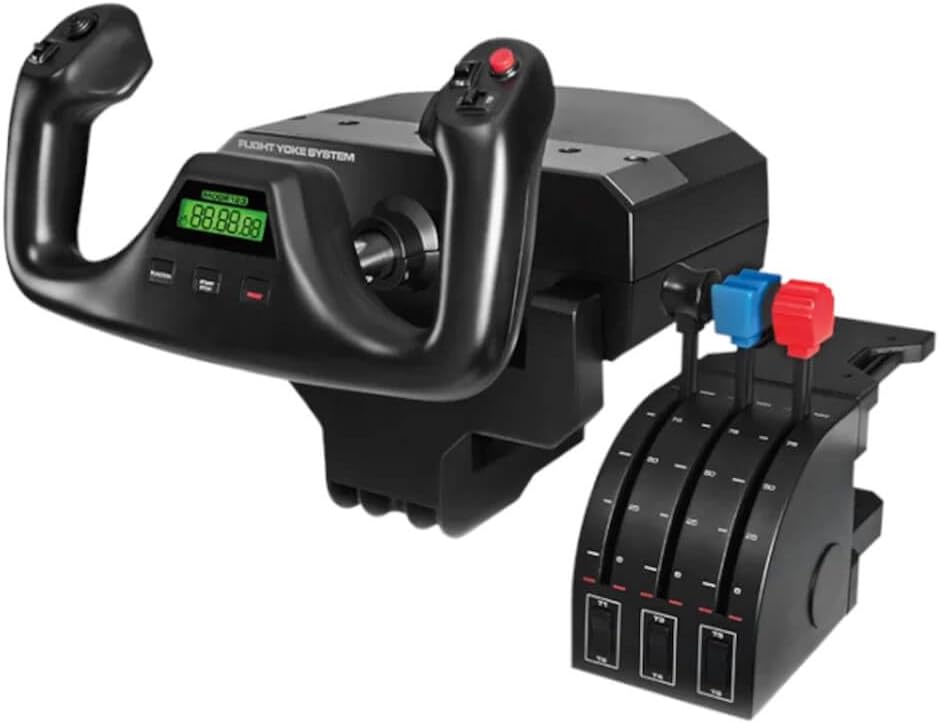

The Logitech G PRO Flight Yoke System offers a realistic cockpit feel that appeals to both new and experienced flight simulation enthusiasts on Mac. With a rating of 4.3 stars, this controller provides the muscle memory training needed for serious aviation simulation sessions.
We may earn a commission when you buy through this link, at no additional cost to you.
Its stainless steel yoke shaft ensures smooth and accurate pitch and roll control inputs, which are essential for precise flying. The inclusion of a flight throttle quadrant with separate cables allows for a full cockpit configuration that mimics real aircraft setups.
While the setup requires software downloads for full functionality with simulators like Microsoft Flight Simulator, the effort is worthwhile for the depth of control. Some users might find the cable management slightly cumbersome when arranging a dedicated desk space for the hardware.
This system is ideal for pilots who want to build professional-grade skills or hobbyists seeking high fidelity immersion. If you value realistic handling and extensive programmable options, this remains a top choice for Mac-based flight simulation setups.
The yoke design supports muscle memory development for both new pilots and experienced aviators seeking realism.
A two-position desk clamp provides robust security ensuring controls stay fixed during intense simulation maneuvers.
We may earn a commission when you buy through this link, at no additional cost to you.
The Thrustmaster T-Flight Hotas X delivers a highly comfortable and ergonomic experience that is perfect for extended flight simulation sessions. With a strong 4.5-star rating, it offers excellent value for users seeking a compact yet powerful control setup for their Mac.
We may earn a commission when you buy through this link, at no additional cost to you.
Its detachable throttle allows you to configure the control stick according to your desk space and personal preference. The precision joystick features adjustable resistance, letting you fine-tune the tension to match your preferred feel during flight maneuvers.
While it is designed with PC and Windows in mind, it works effectively with Mac systems through standard USB protocols. The main limitation is that advanced customization may require Windows software, which could be a hurdle for pure Mac users.
This controller is best suited for casual pilots or those starting their flight simulation journey on a budget. If you prioritize comfort and ease of use over deep programmable features, this HOTAS setup is a compelling and affordable choice.
The wide hand rest and natural throttle shape reduce fatigue during hours of immersive simulation.
The throttle can be connected or detached to suit your available desk space and play style.
We may earn a commission when you buy through this link, at no additional cost to you.
The Honeycomb Alpha Flight Controls Yoke stands out as the most advanced and realistic simulation system available for serious flight simulation enthusiasts on Mac. With a 4.4-star rating, it provides a genuine cockpit experience that pilots and students alike will appreciate highly.
We may earn a commission when you buy through this link, at no additional cost to you.
Its full 180-degree rotation and solid steel shaft with dual linear ball bearings ensure incredibly smooth and accurate control inputs. The included switch panel adds essential aviation functionality with master alternator and avionics switches that mimic real aircraft panels.
The dual mounting solution allows for flexible installation whether you prefer clamps or a clamp-free suction pad option. While the price is higher, the build quality and engineering by aerospace professionals justify the investment for those seeking top-tier immersion.
This controller is perfect for users who want an authentic feel and are willing to invest in high-end hardware. If realism and precise mechanical feedback are your priorities, the Honeycomb Alpha Yoke delivers an unparalleled simulation experience.
The self-centering mechanism with minimal dead zone offers true-to-life pitch and roll control.
The switch panel provides essential avionics controls that enhance the fidelity of your cockpit setup.
We may earn a commission when you buy through this link, at no additional cost to you.
The Logitech G X56 H.O.T.A.S offers a high-precision military-grade experience that is ideal for combat simulation enthusiasts on Mac. With a 4.0-star rating, it provides a massive number of programmable controls that allow for deep customization of your virtual cockpit.
We may earn a commission when you buy through this link, at no additional cost to you.
The twin throttles with friction adjusters and hall-effect sensors ensure accurate and responsive inputs for complex maneuvers. Mini analog stick control surfaces add additional layers of control for pitch, roll, and yaw without removing your hands from the stick.
Although the system requirements list Windows, the hardware works via USB with Mac systems if paired with compatible software. The RGB lighting adds visual immersion but may require specific setup to function correctly across different operating systems.
This controller is best suited for users who demand advanced features and extensive button mappings for complex sims. If you want a comprehensive control surface with high build quality and customization, the X56 is a strong contender.
With over 189 programmable controls, you can map every function of your aircraft to the controller.
The accurate 16-bit axes provide smooth inputs without contact wear over time.
We may earn a commission when you buy through this link, at no additional cost to you.
The Turtle Beach VelocityOne Flightstick introduces an OLED display that provides real-time flight data and performance tuning right on the stick. With a 4.2-star rating, it offers a modern approach to flight simulation control that integrates visual feedback directly into your hands.
We may earn a commission when you buy through this link, at no additional cost to you.
The integrated touchpad navigation sensor allows for full cursor control which can be useful for menu navigation during flight. The 27 programmable buttons and 8 axes give you ample control over most flight functions without needing additional hardware.
While designed for Xbox and PC, it connects to Mac via standard USB and works well with compatible flight simulators. The ambidextrous design ensures comfort for both left and right-handed pilots during extended sessions at the controls.
This controller is ideal for pilots who want compact control with added visual information. If you value convenience and integrated displays over a full cockpit setup, the VelocityOne Flightstick offers a unique and practical solution.
The OLED screen shows real-time flight data to enhance your situational awareness during simulation.
A built-in touchpad allows for intuitive cursor control without needing a separate mouse.
We may earn a commission when you buy through this link, at no additional cost to you.
The Logitech G Saitek X52 Pro is a classic flight control system known for its LCD multi-function display that provides gameplay information at a glance. With a 3.9-star rating, it remains a reliable choice for those who value proven design and straightforward control.
We may earn a commission when you buy through this link, at no additional cost to you.
The progressive throttle with resistance adjustment and detents allows for precise engine control during flight phases. The 5-position handle adjustment system ensures that pilots of various hand sizes can find a comfortable grip for extended sessions.
While it is designed primarily for Windows environments, Mac users can often access basic functionality through drivers or alternative software. The LCD display adds value but may require specific configurations to function correctly on non-Windows platforms.
This controller is suitable for users seeking a dependable and familiar interface for flight simulation. If you prioritize a balanced feature set and proven reliability over the latest tech, the X52 Pro is a solid option.
The illuminated multi-function display provides intuitive access to critical game information during play.
Resistance adjustments and detents let you simulate realistic throttle settings with precision.
We may earn a commission when you buy through this link, at no additional cost to you.
The Logitech G Pro Flight Bundle combines a realistic yoke system with professional rudder pedals to create a comprehensive cockpit experience. With a high 4.6-star rating, this setup offers the most complete control solution for serious flight simulation enthusiasts on Mac.
We may earn a commission when you buy through this link, at no additional cost to you.
The smooth and accurate self-centering rudder pedals add another layer of realistic control essential for proper aircraft handling. The differential toe brakes allow for precise runway control and are adjustable to accommodate a wide range of foot sizes comfortably.
While it is designed to deliver a full simulation experience, it requires careful cable management to connect the yoke and pedals together. Mac users may need to ensure compatibility with the software required to optimize both devices simultaneously.
This bundle is perfect for users who want to upgrade from basic controllers to a professional-grade setup. If you seek a complete and immersive flight simulation experience with high user satisfaction, this bundle is an excellent investment.
The rudder pedals provide the full control needed for realistic aircraft maneuvering on the ground.
Differential brakes allow for precise runway control without needing separate brake hardware.
We may earn a commission when you buy through this link, at no additional cost to you.
The Turtle Beach VelocityOne H.O.T.A.S. features high-resolution Hall-Effect sensors that provide precise control inputs for advanced flight simulation. With a 2.6-star rating, it offers high-end hardware features but has faced some criticism regarding software stability on certain platforms.
We may earn a commission when you buy through this link, at no additional cost to you.
The swappable dual throttle detents deliver tactile thrust reference points that enhance the realism of your throttle management. The full-color display provides real-time flight data and quick performance tuning options that are accessible directly from the controller.
While the hardware is robust, the software ecosystem may require updates and troubleshooting to function fully on Mac systems. Users should be prepared to spend time configuring the VelocityOne Hangar app to get the best experience possible.
This controller is best suited for users who prioritize high-resolution sensors and advanced input options. If you are willing to work through software setup to unlock its full potential, it offers a premium control surface.
The 16-bit Hall-Effect sensors ensure high precision control without mechanical contact wear.
The app enables full customization and personalized settings for your specific flight simulation needs.
We may earn a commission when you buy through this link, at no additional cost to you.
The Logitech G PRO Flight Yoke System offers 75 programmable controls and configurable throttle knobs that provide flexibility for various flight simulation scenarios. With a 4.4-star rating, it delivers a solid professional simulation experience with robust hardware design.
We may earn a commission when you buy through this link, at no additional cost to you.
Its stainless steel yoke shaft ensures smooth pitch and roll control that mimics real aircraft mechanics accurately. The integrated 1-USB 2.0 Port Hub simplifies connection management by allowing you to connect additional peripherals easily.
While it is marketed primarily for PC, it supports multiple operating systems and may require specific drivers for Mac compatibility. The 3-position mode switch and POV hat offer extensive control mapping that adapts to different simulator requirements.
This controller is suitable for pilots who want a robust and configurable setup with high programmable control count. If you value flexibility and a professional feel, this yoke system is a strong choice for your Mac.
The throttle knobs can be configured to match your specific aircraft preferences and simulation needs.
The integrated USB hub helps streamline cable connections for other peripherals in your setup.
We may earn a commission when you buy through this link, at no additional cost to you.
The Logitech G Saitek PRO USB Flight Yoke System (Renewed) offers a cost-effective way to access professional-grade flight simulation controls on Mac. With a 4.2-star rating, this renewed unit provides a reliable simulation experience without the cost of a new device.
We may earn a commission when you buy through this link, at no additional cost to you.
Its integrated digital chronograph is perfect for brushing up on IFR and cross-country procedures, adding educational value to your flights. The stainless steel shaft with ultra-precise bearings ensures exceptionally smooth pitch and roll control inputs over time.
While it is an older model, it remains compatible with Mac OS and offers sufficient programmability for most users. The renewed certification ensures the unit has been tested and refurbished to meet quality standards before shipping to you.
This controller is ideal for budget-conscious users who want a proven design without paying full retail price. If you prioritize value and proven compatibility over the latest features, this renewed system is a practical choice.
The built-in chronograph helps you practice real-world navigation procedures during your simulation flights.
The renewed status ensures the device meets quality standards at a reduced price point for buyers.
We may earn a commission when you buy through this link, at no additional cost to you.
Selecting the right flight controller involves balancing budget, comfort, and simulation fidelity. Consider these factors to find a device that enhances your experience without compromising on quality.
Ensure the controller supports macOS or offers cross-platform drivers. Many controllers are designed for Windows so verify software availability for your operating system before purchasing.
Look for products with active developer support and community forums to assist with configuration on Mac systems.
Decide between a yoke for civilian aircraft or a joystick for fighter jets. Yokes offer realistic handling while joysticks provide faster response for combat simulation.
Higher immersion often requires additional pedals and throttle quadrants so plan your budget accordingly for full setups.
Check for durable materials like stainless steel shafts and metal bearings. These components ensure smooth movement and long-term durability under heavy use.
Robust construction prevents wear over time and maintains precise control inputs throughout the lifespan of the product.
The more programmable buttons and axes available the more intuitive your cockpit experience becomes. Look for controllers that allow easy customization of functions and macros.
A higher count of programmable inputs ensures you can map critical flight functions directly to your controller without constant menu navigation.
Flight sessions can last hours so ergonomic grips and comfortable hand rests are essential. Poor ergonomics can lead to fatigue and discomfort during extended use.
Adjustable handles and padded surfaces help maintain a natural hand position which improves precision and reduces strain on your wrists.
Consider your desk space and mounting options like clamps or suction pads. A stable mounting system ensures the controller does not shift during intense flight maneuvers.
Ensure your desk is strong enough to support heavy controllers and plan cable management to keep your workspace organized and safe.
Flight controllers range from affordable entry-level units to expensive professional-grade systems. Determine how much you are willing to invest based on your simulation goals and frequency of use.
Balance cost with features to ensure you get the best value. Sometimes mid-range options provide enough features without the premium price tag of high-end kits.
Look for controllers with hall-effect sensors or force feedback for enhanced realism. These technologies provide tactile cues that improve immersion and control accuracy.
Durability features like self-centering mechanisms and robust connectors ensure the controller remains reliable over time despite frequent adjustments.
Start by connecting the controller to your Mac via USB and installing any required drivers or configuration software. Verify that the device is recognized by your operating system and that all buttons are responding correctly before launching a game.
Regularly clean the surfaces of your controller with a soft cloth to remove dust and grime. Avoid using harsh chemicals that could damage the plastic or rubber components and ensure ports remain clear of debris.
Store the controller in a dry environment when not in use to prevent moisture damage. Periodically check cables for wear and tear to avoid connection issues that could interrupt your simulation sessions.
Many flight controllers work with Mac via USB but require specific drivers or software. Always check the product description for macOS compatibility and be prepared to use community tools if official support is limited.
A yoke mimics aircraft steering wheels for civil aviation while a joystick resembles a fighter jet stick for combat. Yokes offer realistic handling whereas joysticks prioritize speed and agility in simulation.
Yes several models offer affordable prices while maintaining solid functionality. Look for older models or bundles that include essential features without premium add-ons to save money on your setup.
Most controllers require software to map buttons and adjust settings. Some support cross-platform tools but native software is often better for full functionality so check compatibility before purchase.
Use a soft dry cloth to wipe down surfaces and avoid liquids near electronic parts. Do not use harsh chemicals and ensure the device is unplugged during cleaning to prevent damage or electrical hazards.
Most controllers support popular flight simulators through standard USB HID protocols. Some may require configuration files for specific games but generally they are flexible across different simulation software.
We reviewed ten top Mac game flight controllers ranging from budget options to high-end premium models. Each product offers unique strengths whether you prioritize realistic yokes programmable buttons or ergonomic comfort.
Consider your budget and simulation needs when making your final decision. Focus on compatibility and build quality to ensure a setup that delivers years of immersive flight experience on your Mac.
Remember to verify current prices and availability before purchasing as these details change regularly. Use this guide to narrow down your choices and enjoy a professional-grade cockpit experience at home.